
Imagine unlocking your smartphone without typing a password.
You simply place your finger on a sensor or look at the camera.
Within seconds, your device recognizes you and unlocks.
How does the device know that you are the authorized user?
Does it store your fingerprint as a photograph? Can someone copy your face and bypass the security system?
The technology behind this process is called Biometric Authentication.
Biometric authentication uses measurable biological or behavioral characteristics to help verify a person’s identity.
Common examples include fingerprint recognition, facial recognition, iris scanning and voice recognition.
Modern biometric systems are used in smartphones, enterprise security, banking, healthcare, physical access control and identity management.
However, biometric authentication is not automatically more secure than every other authentication method.
Its effectiveness depends on the sensor, matching algorithm, anti-spoofing controls, credential protection and overall authentication design.
In this article, you will learn:
- What biometric authentication is and how it works
- Difference between biometric verification and identification
- Physical and behavioral biometric methods
- How biometric enrollment and matching work
- What false matches and false non-matches mean
- How biometric spoofing and presentation attacks happen
- How biometrics work with MFA and passkeys
- Biometric privacy and secure data storage
- How to understand matching thresholds through a practical Python lab
- Security best practices for biometric authentication systems
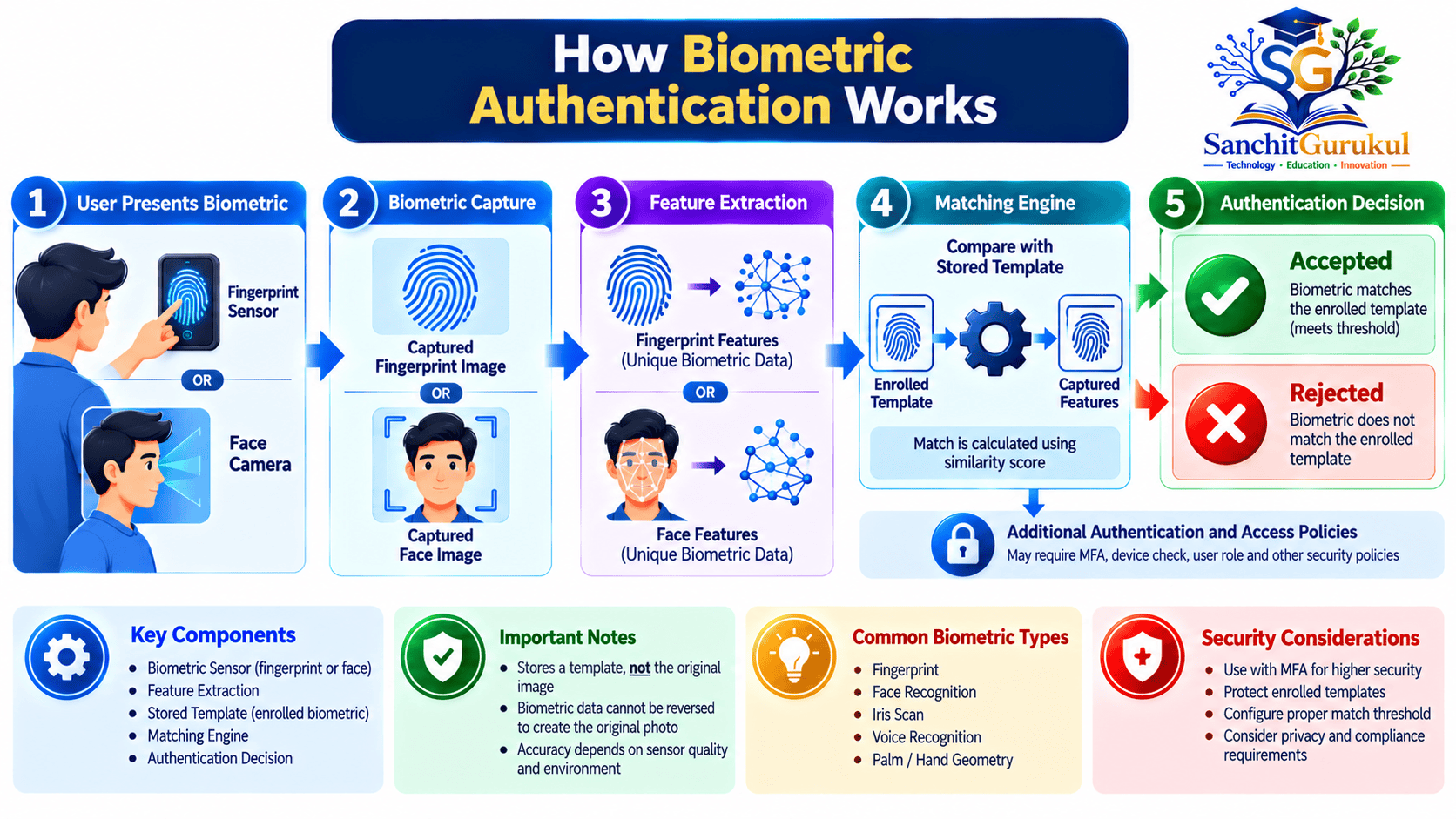
What Is Biometric Authentication and How Does It Work?
Biometric authentication is a security process that uses biological or behavioral characteristics to help verify the identity of a person.
The term biometric refers to measurable human characteristics.
Examples include:
- Fingerprint patterns
- Facial features
- Iris patterns
- Voice characteristics
- Typing rhythm
- Walking patterns
Biometric systems convert captured characteristics into mathematical representations that can be compared.
These representations are commonly called biometric templates.
Biometric Enrollment and Authentication
A typical biometric system has two major operations.
Enrollment
The system registers a person’s biometric characteristics for future comparison.
Verification
The system captures a new sample and compares it with the enrolled reference.
Step 1 — Biometric Enrollment
The user presents a biometric characteristic to a sensor.
For example, a fingerprint reader captures information about the finger’s ridge patterns.
The system analyzes the captured sample and extracts relevant features.
It creates a biometric template or another reference representation.
Depending on the design, the reference may be stored locally or in a protected central system.
Step 2 — Biometric Capture
When authentication is requested, the user presents the biometric characteristic again.
The sensor captures a new sample.
Step 3 — Feature Extraction
The system processes the sample to generate a representation suitable for matching.
For fingerprint recognition, this may involve fingerprint minutiae or other distinctive features.
For facial recognition, it may involve a mathematical representation produced by a facial recognition model.
Step 4 — Biometric Matching
The matching engine compares the new sample against the enrolled reference.
Biometric measurements are rarely identical every time.
For example, a finger may be slightly rotated, or the lighting may change during facial capture.
For this reason, biometric matching typically uses a similarity or distance score rather than requiring an exact digital match.
Step 5 — Authentication Decision
The matching result is evaluated against a configured threshold.
The system may accept or reject the biometric match.
A secure design also considers:
- Sensor integrity
- Anti-spoofing checks
- Failed-attempt limits
- Authenticator possession
- User intent
- Recovery and fallback policies
Biometric Verification vs Identification
This distinction is important.
| Feature | Verification (1:1) | Identification (1:N) |
|---|---|---|
| Main Question | Is this the claimed person? | Who might this person be? |
| Comparison | Against a specific enrolled identity | Against multiple enrolled identities |
| Example | Unlocking an enrolled phone | Searching an authorized identity database |
| Typical Purpose | Authentication | Identification or identity matching |
| Main Concern | Incorrect acceptance or rejection | Incorrect candidate matches and search accuracy |
Verification compares against a claimed identity.
Identification searches across a collection of enrolled identities.
These operations have different accuracy, privacy and operational considerations.
Types of Biometric Authentication — Physical and Behavioral
Biometric technologies are commonly divided into physical and behavioral categories.
Physical biometrics measure biological characteristics.
Behavioral biometrics analyze patterns in how a person acts or interacts with a system.
Physical Biometrics
| Biometric Method | What It Measures | Common Application |
|---|---|---|
| Fingerprint | Finger ridge patterns | Smartphone unlocking |
| Facial Recognition | Facial characteristics | Device verification |
| Iris Recognition | Iris texture and patterns | Identity verification |
| Retina Recognition | Retinal blood vessel patterns | Specialized applications |
| Palm Vein Recognition | Vein patterns within the hand | Physical access control |
| Hand Geometry | Hand shape and dimensions | Selected access systems |
1. Fingerprint Recognition
Fingerprint recognition examines the patterns present on a person’s finger.
These patterns contain features such as ridge endings and bifurcations.
Fingerprint systems are commonly used for:
- Smartphone unlocking
- Laptop authentication
- Physical access control
- Employee identity verification
Advantages
- Fast and convenient
- Widely supported
- Suitable for many local authentication systems
Limitations
- Dirty, injured or wet fingers may affect capture.
- Latent fingerprints can be collected from touched surfaces.
- Some sensors may be vulnerable to presentation attacks.
- Accessibility alternatives may be necessary.
2. Facial Recognition
Facial recognition uses a camera and a matching algorithm to analyze facial features.
Many modern devices use facial recognition as a convenient way to unlock a protected local authenticator.
Security depends on the implementation.
A system using an ordinary camera and weak verification software may provide different protection from a system using specialized depth sensing and hardware-backed biometric processing.
Common applications
- Smartphone unlocking
- Access control
- Identity verification
- Selected airport and travel processes
Limitations
- Lighting and camera positioning can affect capture.
- Appearance changes may affect matching.
- Some algorithms exhibit demographic performance differences.
- Photographs, masks and manipulated video can create presentation-attack risks.
3. Iris Recognition
Iris recognition analyzes patterns in the colored region surrounding the pupil.
Iris patterns contain detailed features that can support reliable biometric matching.
This technology is used in selected identity systems and controlled-access environments.
Specialized capture equipment and image quality requirements may affect its suitability.
4. Retina Recognition
Retina recognition examines patterns associated with blood vessels at the back of the eye.
It is different from iris recognition.
Retina scanning requires more specialized acquisition conditions and is considerably less common in everyday consumer authentication.
5. Palm Vein Recognition
Palm vein systems use suitable sensing technologies to analyze vein patterns within the hand.
These systems are used in selected physical-access and identity-verification applications.
Their security depends on the sensor, matching algorithm and protection against spoofing or captured-data injection.
Behavioral Biometrics
Behavioral biometrics measure patterns associated with human activity.
Examples include:
Keystroke Dynamics
Analyzes typing intervals, rhythm and other typing characteristics.
Gait Recognition
Analyzes patterns in how a person walks.
Signature Dynamics
Measures how a person signs, potentially including timing, movement and pressure.
Mouse or Touchscreen Behavior
Analyzes interaction patterns such as movement speed, gestures and screen pressure.
Voice Recognition
Analyzes characteristics of speech to help distinguish speakers.
Voice recognition is vulnerable to environmental variation, voice imitation and synthetic speech attacks.
Importantly, NIST SP 800-63B-4 does not permit biometric comparison based on voice for authentication systems operating under its requirements.
Voice analysis may still appear in other identification or fraud-detection applications, but that should not be confused with NIST-conformant biometric authentication.

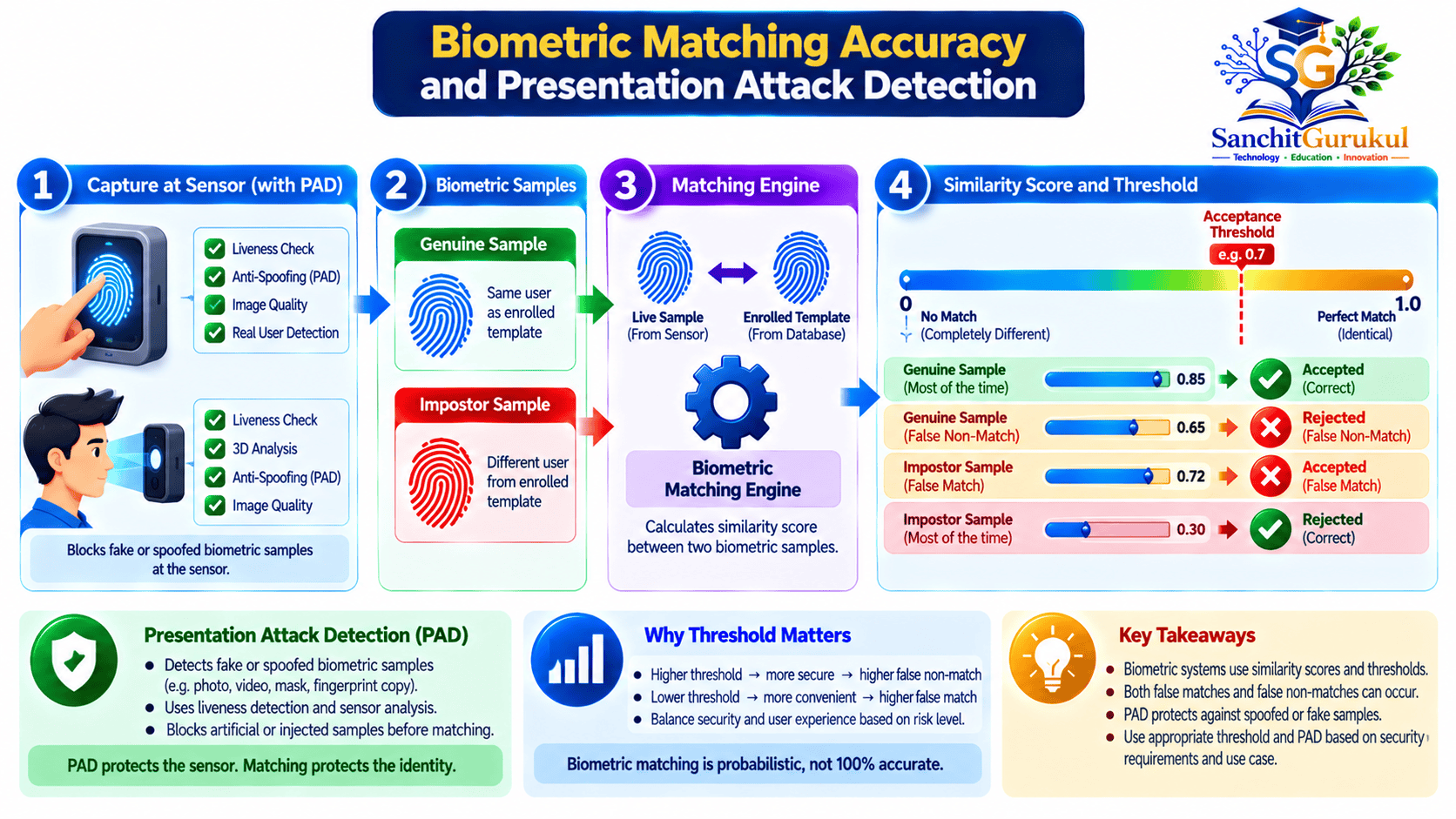
Biometric Accuracy, Matching Thresholds and Security Risks
Biometric authentication is based on measurements.
Even a legitimate user’s newly captured sample will not always be identical to the enrolled reference.
This means biometric systems must balance security and usability.
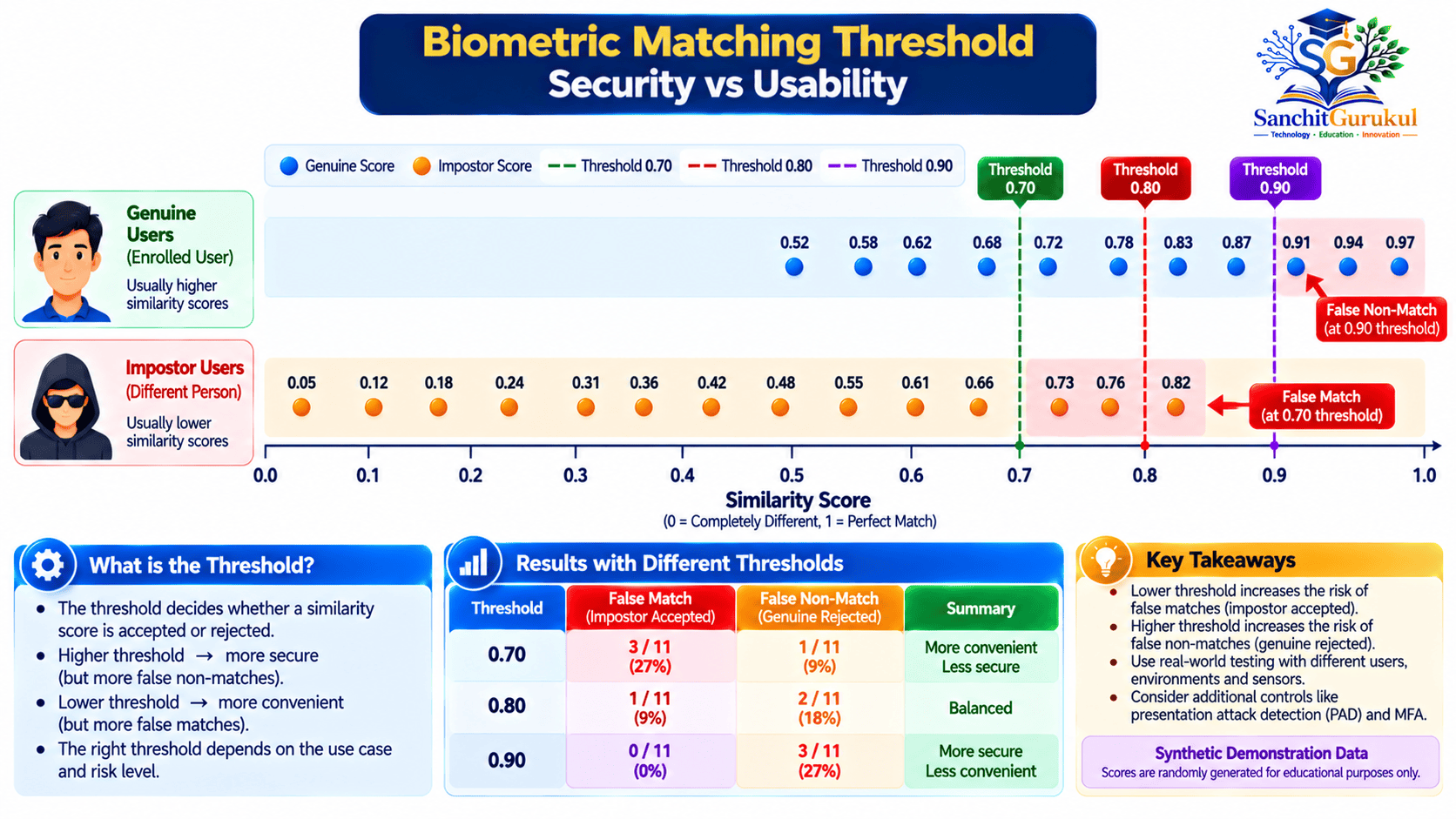
What Is a Matching Threshold?
A matching threshold is a configured value used to decide whether a new biometric sample is sufficiently similar to an enrolled reference.
For systems using similarity scores, a higher threshold generally requires a closer match.
A lower threshold may make matching easier but can also increase the risk of accepting the wrong person.
False Match and False Non-Match
Two important biometric accuracy measurements are:
| Metric | Meaning | Example |
|---|---|---|
| False Match Rate (FMR) | Rate at which different individuals’ biometric comparisons incorrectly match | An unrelated fingerprint matches an enrolled template |
| False Non-Match Rate (FNMR) | Rate at which genuine comparisons incorrectly fail to match | An enrolled user is rejected |
| Failure to Acquire | The system cannot obtain a usable sample | Sensor fails to capture a fingerprint |
| Presentation Attack | An attempt to deceive the sensor using an artifact or manipulated presentation | Presenting an imitation biometric sample |
False match and false non-match rates describe matching performance under defined evaluation conditions.
They do not by themselves measure resistance to deliberate spoofing attacks.
How Does the Threshold Affect Accuracy?
Consider a hypothetical biometric system using scores between 0 and 1.
A score closer to 1 indicates greater similarity.
At a lower threshold, more comparisons may be accepted.
At a higher threshold, fewer comparisons may be accepted.
This can reduce false matches while increasing false non-matches.
The ideal threshold depends on the application and tested system performance.
Current NIST Biometric Accuracy Guidance
NIST SP 800-63B-4 provides specific requirements for biometric authentication within its scope.
These include:
- A false match rate of no worse than 1 in 10,000 for each relevant demographic group.
- A recommended false non-match rate below 5%.
- Evaluation against appropriate biometric performance standards.
- Protection against excessive failed authentication attempts.
- Appropriate presentation attack detection.
These are requirements and recommendations for covered systems, not guaranteed performance figures for every commercial biometric product.
What Is Biometric Spoofing?
Biometric spoofing is an attempt to deceive a biometric recognition system.
Depending on the modality, attacks may involve:
- Reproduced fingerprint patterns
- Printed or displayed facial images
- Three-dimensional masks
- Synthetic or replayed speech
- Manipulated sensor input
Not every technique works against every sensor.
The success of an attack depends on the implementation and its defenses.
What Is Presentation Attack Detection (PAD)?
Presentation Attack Detection is a security mechanism intended to identify suspicious biometric presentations at the capture stage.
It is sometimes described as liveness detection, although PAD is the more precise technical term.
PAD techniques may inspect properties such as:
- Depth
- Motion
- Texture
- Reflection
- Sensor response
- Other characteristics relevant to the modality
ISO/IEC 30107-3:2023 specifies principles for testing and reporting PAD performance.
NIST SP 800-63B-4 requires PAD for facial recognition within its scope and recommends it for fingerprint and iris recognition.
PAD reduces certain attack risks but does not guarantee that all presentation attacks will be detected.
Presentation Attacks vs Injection Attacks
A presentation attack targets the biometric capture process.
An injection attack attempts to substitute or manipulate data inside the capture or processing path.
For example, an attacker may attempt to make software process a fabricated image as though it came from a trusted sensor.
Secure systems must protect both the sensor and the integrity of the data path.
Biometrics with MFA, Passkeys and Secure Data Storage
Modern biometric authentication often works together with a protected device or cryptographic authenticator.
This is particularly important in FIDO2 and passkey-based authentication.
Are Biometrics Automatically Multi-Factor Authentication?
No.
A fingerprint or face measurement alone represents biometric evidence.
Simply performing two biometric checks does not automatically create two independent authentication factors.
Under NIST SP 800-63B-4, biometric authentication must be combined with a physical authenticator.
The standard also requires an available non-biometric authentication option.
How Biometrics Work with Passkeys
A passkey is a cryptographic credential used for authentication.
It uses a public-private key pair.
- The private key is protected by the authenticator or passkey provider.
- The public key is registered with the application.
- The user may unlock the authenticator using a fingerprint, face or PIN.
The biometric check normally occurs locally.
The website verifies a cryptographic response rather than receiving the user’s fingerprint or facial template.
Example — Signing In with a Passkey
Is the Biometric Template Always Stored Locally?
No.
Biometric storage depends on the system design.
Local Biometric Verification
A device stores biometric reference data within its own protected environment.
Some modern devices use hardware-backed security components to protect biometric processing and related credentials.
Centralized Biometric Verification
A server or centralized service maintains biometric templates for matching.
This introduces additional privacy and security responsibilities because the organization collects and manages sensitive biometric information.
Local vs Centralized Biometric Storage
| Feature | Local Verification | Centralized Verification |
|---|---|---|
| Reference Location | User device or authenticator | Central system |
| Network Transmission | Biometric data may remain local | Protected biometric data may need transmission |
| Database Breach Exposure | Generally avoids a central biometric template database | Central templates require strong protection |
| Privacy Considerations | Device security and local processing | Collection, retention and access controls |
| Typical Use | Device unlocking and passkeys | Some enterprise or identity systems |
Apple’s documented Face ID architecture, for example, protects facial representations through the Secure Enclave and keeps Face ID data on the device.
Other biometric products may use different architectures.

Biometric Authentication Use Cases and Security Best Practices
Biometric technology is used across several industries.
However, the appropriate method depends on the application, privacy requirements and reliability of the biometric system.
Common Use Cases
| Use Case | Biometric Technology | Purpose |
|---|---|---|
| Smartphones | Fingerprint or face | Unlocking and local user verification |
| Enterprise Workstations | Fingerprint or face | Authenticator activation |
| Financial Applications | Device biometrics | Supporting secure login and transaction approval |
| Physical Access Control | Fingerprint, face or palm vein | Controlling entry to facilities |
| Identity Verification | Face or iris | Comparing identity evidence |
| Healthcare | Selected biometric systems | Identity or authorized access workflows |
| Airport and Travel Services | Face or iris | Identity verification under applicable programs |
| Behavioral Security | Typing or interaction patterns | Supplemental risk assessment |
Biometric identification used by government or law-enforcement systems has additional accuracy, privacy and oversight considerations.
It should not be treated as identical to smartphone unlocking.
Benefits of Biometric Authentication
Convenience
Users can verify themselves without repeatedly entering long passwords.
Fast Local Verification
Supported devices can complete biometric checks quickly.
Integration with Cryptographic Authentication
Biometrics can unlock protected security keys or passkeys.
Reduced Password Dependence
Some systems allow passwordless authentication with appropriate cryptographic authenticators.
Useful Additional Security Signals
Behavioral and physical characteristics can support carefully designed authentication and risk-assessment systems.
Limitations of Biometric Authentication
False Matches and False Non-Matches
Biometric comparisons are probabilistic.
Presentation Attacks
Attackers may attempt to imitate or reproduce biometric characteristics.
Privacy Risks
Biometric data can reveal sensitive personal information.
Accessibility
Some users cannot reliably provide particular biometric samples.
Environmental Conditions
Lighting, sensor contamination, injuries and other conditions may reduce reliability.
Infrastructure Cost
Specialized scanners, secure processing and centralized systems can increase deployment costs.
Biometric Security Best Practices
1. Prefer Local Verification Where Appropriate
Avoid collecting biometric templates centrally when a protected local authenticator can satisfy the authentication requirement.
2. Protect Stored Biometric Data
Apply strong access controls and appropriate encryption.
Use protected hardware or secure execution environments where supported.
3. Implement PAD
Use evaluated presentation attack detection appropriate to the biometric modality and deployment risk.
4. Protect the Capture Path
Verify sensor integrity and protect against unauthorized replacement, replay or data injection.
5. Provide Non-Biometric Alternatives
Allow approved PINs, passwords, physical authenticators or other suitable recovery mechanisms.
6. Apply Failed-Attempt Controls
Use appropriate attempt limits, delays and fallback requirements.
7. Respect Privacy
Collect only the information necessary for the stated purpose.
Define access, retention and deletion policies.
Follow applicable privacy laws, consent requirements and organizational policies.
8. Evaluate Accuracy and Fairness
Test the system across relevant user populations and operating environments.
NIST’s face recognition evaluations have identified performance differences among algorithms and demographic groups.
These differences should be considered during selection and deployment.
9. Protect Account Recovery
A secure biometric login can be undermined by weak enrollment or recovery procedures.
Ensure that adding a new biometric reference, changing authenticators or recovering an account requires suitable authorization.
10. Avoid Unnecessary Re-Enrollment
Biometric templates may be updated or re-enrolled when genuinely required by device changes, quality problems or security policy.
Routine re-enrollment should not be treated as an automatic security improvement.
Practical Python Lab — Understand Biometric Matching Thresholds
This lab demonstrates the difference between false matches and false non-matches.
You will use Python to evaluate synthetic biometric similarity scores against three different thresholds.
The exercise does not collect or process actual fingerprints, facial images or voice samples.
Lab Objective
Understand how changing a matching threshold affects authentication decisions.
Requirements
- Python 3
- Windows, macOS or Linux
- Terminal access
- Basic understanding of Python execution
No external Python packages are required.
Step 1 — Verify Python
Open a terminal.
On Ubuntu or macOS, execute:
python3 --versionIllustrative output:
Python 3.x.xOn Windows, the installed Python launcher may use py or python instead.
Step 2 — Create the Lab Script
Create a new file named:
sg_biometric_threshold_lab.py
On Ubuntu:
nano sg_biometric_threshold_lab.pyAdd the following code.
# SanchitGurukul biometric threshold demonstration
# Synthetic values only — no real biometric data.

# Scores for genuine-user comparisons.
genuine_scores = [0.96, 0.91, 0.87, 0.78, 0.72]

# Scores for comparisons involving impostors.
impostor_scores = [0.31, 0.44, 0.61, 0.75, 0.83]

print("Threshold  False non-matches  False matches")

for threshold in (0.70, 0.80, 0.90):

    false_nonmatches = sum(
        score = threshold
        for score in impostor_scores
    )

    print(
        f"{threshold:.2f}       "
        f"{false_nonmatches}/5                "
        f"{false_matches}/5"
    )
Save the file.
Step 3 — Run the Script
Execute:
python3 sg_biometric_threshold_lab.pyExpected output:
Threshold  False non-matches  False matches
0.70       0/5                2/5
0.80       2/5                1/5
0.90       3/5                0/5
Step 4 — Understand the Results
Threshold 0.70
All five genuine comparisons are accepted.
However, two impostor comparisons are also accepted.
Threshold 0.80
Two genuine comparisons are rejected.
One impostor comparison is accepted.
Threshold 0.90
Three genuine comparisons are rejected.
None of the five impostor comparisons are accepted.
What Does This Demonstrate?
Increasing the acceptance threshold makes the matching decision stricter.
In this synthetic example, a higher threshold reduces false matches but increases false non-matches.
The exact trade-off varies by biometric algorithm, sensor quality and population.
These five synthetic scores per category are only teaching examples.
They are not real-world false match rates, false non-match rates or evidence of compliance with any biometric standard.
Lab Verification Summary
| Threshold | Genuine Comparisons Rejected | Impostor Comparisons Accepted |
|---|---|---|
| 0.70 | 0 of 5 | 2 of 5 |
| 0.80 | 2 of 5 | 1 of 5 |
| 0.90 | 3 of 5 | 0 of 5 |
Key Takeaways
Core Biometric Concepts
- Biometrics use measurable physical or behavioral characteristics.
- Enrollment creates a reference for later comparison.
- Verification is a 1:1 comparison.
- Identification is a 1:N search.
- Biometric matching is probabilistic.
Types and Accuracy
- Fingerprints, facial features and iris patterns are physical biometrics.
- Typing rhythm, gait and voice are examples of behavioral biometrics.
- False matches and false non-matches measure different errors.
- Matching thresholds affect security and usability.
- Sensor quality and demographic performance matter.
Security and Privacy
- Biometric characteristics are not secrets.
- Presentation Attack Detection helps resist selected spoofing attacks.
- Biometric data requires strong privacy protection.
- Local processing can reduce central storage risks.
- Secure enrollment, fallback and recovery are essential.
Modern Authentication
- Biometrics alone do not automatically constitute MFA.
- Passkeys use cryptographic authentication.
- Biometrics can unlock local passkey authenticators.
- In FIDO authentication, biometric templates remain local.
- Strong authentication also depends on the integrity of the device and session.
Biometric authentication is an important technology in modern identity security.
It enables convenient identity verification through fingerprints, facial features, iris patterns and other measurable characteristics.
However, biometrics should not be treated as secret, impossible to copy or completely resistant to attacks.
Reliable biometric systems require accurate matching, protected sensors, secure data handling and appropriate recovery procedures.
Modern solutions increasingly combine local biometric verification with cryptographic authenticators such as FIDO2 security keys and passkeys.
Understanding these differences helps users, developers and security professionals make better authentication decisions.
Next in This Series: Multi-Factor Authentication (MFA) Explained — OTP, TOTP, Push Notifications, Security Keys and Passkeys.
Useful Links and References
SanchitGurukul Static Resources
Official External References
Your feedback matters
Was this post helpful?
Discussion
0 approved comments
No approved comments yet. You can start the discussion below.
Leave a Comment
No login is required. Name and email are used for moderation/security. Your email is never displayed publicly. All comments require administrator approval.
Discover more from SanchitGurukul
Subscribe to get the latest posts sent to your email.