
Proxies are often described simply as systems that sit between clients and servers.
In real enterprise networks, however, traffic can be handled very differently depending on whether a device is working primarily with:
- IP packets at Layer 3
- TCP or UDP connections at Layer 4
- Application protocols at Layer 7
These distinctions affect what the device can see, what decisions it can make, whether connections are terminated, and which security controls can be applied.
There is also an important terminology distinction:
> Routing, NAT, packet forwarding and proxying are not the same thing.
Layer 3 devices generally forward or translate IP traffic.
Layer 4 and Layer 7 systems may operate as actual connection proxies.
Understanding these differences is important when designing:
- Firewalls
- Load balancers
- ADCs
- Reverse proxies
- WAF architectures
- API gateways
- Cloud application delivery

OSI Layers 3, 4 and 7 in Context
The OSI model separates network communication into seven conceptual layers.
For proxy and traffic-management discussions, Layers 3, 4 and 7 are especially important.
| OSI Layer | Name | Examples | Typical Information Available |
|---|---|---|---|
| Layer 7 | Application | HTTP, DNS, SMTP | URLs, methods, headers and protocol data |
| Layer 6 | Presentation | Encoding, encryption concepts | Data representation |
| Layer 5 | Session | Session concepts | Dialog/session management |
| Layer 4 | Transport | TCP, UDP | Ports and TCP connection information |
| Layer 3 | Network | IPv4, IPv6, ICMP | Source/destination IP and IP protocol |
| Layer 2 | Data Link | Ethernet | MAC addresses and frames |
| Layer 1 | Physical | Ethernet PHY, fiber, radio | Physical transmission |
Layer 3: Packet Forwarding, Routing and NAT
Is There Really a Layer 3 Proxy?
The term Layer 3 proxy is sometimes used informally, but it can be misleading.
At Layer 3, systems normally perform functions such as:
- IP routing
- Packet forwarding
- Policy-based routing
- Address translation
- Network segmentation
- IP-based filtering
- Traffic redirection
A router, for example, receives an IP packet, examines its destination address, selects a next hop, updates required IP-header information and forwards the packet.
It does not normally become a new application endpoint.
Information Available at Layer 3
A Layer 3 forwarding device can evaluate information such as:
- Source IP address
- Destination IP address
- IP version
- IP protocol
- Routing information
- DSCP/ECN
- Hop Limit or TTL
- Other IP-header information
A purely Layer 3 decision does not require understanding an HTTP URL, cookie or JSON payload.
NAT Is Not Automatically a Proxy
Consider destination NAT:
Stateful Firewalls Add Another Dimension
The original assumption that Layer 3 forwarding means “no TCP session tracking” is not universally correct.
A stateful firewall can:
- Route packets
- Perform NAT
- Inspect TCP flags
- Maintain connection state
- Apply Layer 4 policy
without necessarily becoming a TCP proxy.
Typical Uses
Layer 3 forwarding is appropriate for:
- IP routing
- Network segmentation
- NAT
- Policy-based routing
- Basic network filtering
- Traffic steering
Layer 4: TCP and UDP Proxying
Layer 4 operates around transport protocols such as TCP and UDP.
A Layer 4 load balancer or proxy can make decisions without understanding HTTP application semantics.
Information Available at Layer 4
Depending on implementation, a Layer 4 service can use information such as:
- Source IP
- Destination IP
- Source port
- Destination port
- TCP or UDP
- TCP connection state
- Connection health
However, Layer 4 load balancing can be implemented in more than one way.
Layer 4 Passthrough
A passthrough design forwards traffic toward a selected backend without creating a traditional independent TCP connection on each side.
Layer 4 TCP Proxy
A TCP proxy can instead terminate the client TCP connection and establish another connection toward the backend.
This creates two TCP connections:
Frontend connection
Client and proxy
Backend connection
Proxy and server
The proxy can maintain independent:
- Sequence spaces
- Receive windows
- Retransmission state
- Congestion-control state
- MSS
- TCP options
- Connection timers

Layer 4 Does Not Mean Half Proxy
The terms should not be treated as synonyms.
Layer 4 describes the transport-layer context.
Half Proxy is vendor-specific terminology and is not a universal standards-defined architecture.
A product can operate as a Layer 4 Full TCP Proxy.
Can Layer 4 Terminate TLS?
Yes, depending on the product.
This is another reason the statement “Layer 4 cannot decrypt TLS” is too absolute.
Some Layer 4 load-balancing services support TLS listeners and TLS termination while still making load-balancing decisions primarily at the transport/connection level.
Typical Layer 4 Uses
Layer 4 services are commonly used for:
- Generic TCP applications
- Database connections
- SMTP
- SSH
- Custom TCP protocols
- UDP applications
- High-throughput services
- Long-lived connections
Layer 7: Application-Aware Proxying
A Layer 7 proxy understands a supported application protocol rather than making decisions solely from IP addresses and ports.
For web traffic, this commonly means understanding HTTP.
What an HTTP Proxy Can See
After it has access to the HTTP request, a Layer 7 proxy can potentially evaluate:
- Hostname
- URI
- HTTP method
- Headers
- Cookies
- Query parameters
- Request body
- Content type
- Application-specific information
This enables much more granular traffic management.
Example: HTTP Reverse Proxy
Consider:
This type of routing is not possible from IP address and TCP port information alone.
HTTPS and TLS
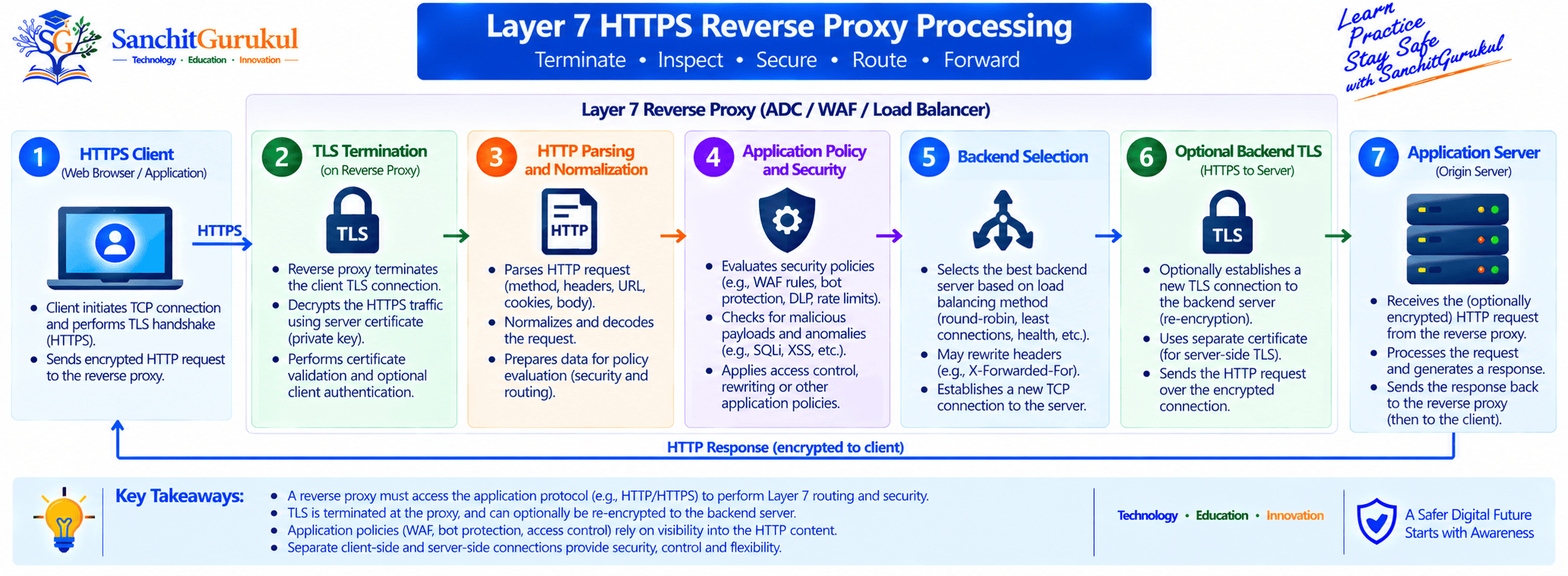
For a proxy to inspect the HTTP content inside HTTPS, the encrypted application data must become available at a trusted TLS termination point.
A common architecture is:
- Client establishes HTTPS toward the proxy.
- TLS terminates at the proxy.
- The proxy parses HTTP.
- Application policy is evaluated.
- The request is forwarded to the selected backend.
- Backend traffic may use plaintext or another TLS connection.
Layer 7 Capabilities
Depending on the product, a Layer 7 proxy can provide:
- Host-based routing
- Path-based routing
- Header-based routing
- Cookie persistence
- Header insertion or removal
- Authentication integration
- WAF integration
- API policy
- Caching
- Compression
- Content modification
- Rate limiting
These capabilities are product and configuration dependent.
Layer 7 Does Not Automatically Mean WAF
A reverse proxy can understand HTTP without providing WAF functionality.
Similarly:
- WAF may be an integrated module.
- Bot management may be separate.
- API security may require another component.
- TLS termination may occur elsewhere.
Do not assume every Layer 7 proxy provides every application-security feature.
Comparing Layer 3, Layer 4 and Layer 7
The differences are easier to understand when we separate forwarding, transport proxying, and application proxying.
| Capability | L3 Forwarding | L4 Processing / Proxy | L7 Proxy |
|---|---|---|---|
| IP awareness | Yes | Yes | Yes |
| Port awareness | Not required for pure L3 | Yes | Yes |
| TCP state awareness | Not required | Usually available for TCP | Usually available underneath application processing |
| Can terminate TCP | No for normal routing | Yes in TCP-proxy designs | Commonly |
| HTTP awareness | No | No in generic L4 mode | Yes for HTTP proxies |
| URL/path routing | No | No | Yes |
| Header/cookie routing | No | No | Yes |
| TLS termination | No for pure L3 forwarding | Possible | Common |
| WAF integration | No | Not through generic L4 payload handling | Possible |
| NAT | Possible | Possible | Possible depending on architecture |
| Application modification | No | No in generic TCP mode | Possible |
| Typical decision input | IP/network information | IP, port, transport/connection information | Application protocol information |
Choosing the Right Architecture
Choose Layer 3 Forwarding When
Use network-layer forwarding when you primarily need:
- Routing
- NAT
- Network segmentation
- IP-based policy
- Traffic redirection
Choose Layer 4 Processing When
Layer 4 is useful when you need:
- TCP or UDP load balancing
- Generic protocol support
- Connection-level decisions
- High throughput
- Long-lived connections
- Transport-level proxying without application parsing
Choose Layer 7 Proxying When
Layer 7 becomes useful when decisions require application context such as:
- HTTP host
- URL path
- Headers
- Cookies
- HTTP methods
- Application requests
Typical examples include:
- Web applications
- APIs
- Reverse proxies
- Application gateways
- HTTP load balancing
- WAF-integrated application delivery
Modern Platforms Often Use Multiple Layers
Real platforms rarely operate at only one layer.
For example, an application-delivery path might perform:
- IP routing at Layer 3
- TCP connection handling at Layer 4
- TLS processing
- HTTP routing at Layer 7
- WAF inspection
- Backend load balancing
The OSI layer therefore describes what information is being processed, rather than necessarily identifying one physical device.

Key Takeaways and Summary
Key Takeaways
- Layer 3 forwarding is normally routing, NAT or packet forwarding rather than traditional proxying.
- Layer 4 processing works with TCP, UDP, ports and connection information.
- Layer 4 can use either passthrough or proxy-based architectures.
- A Layer 4 TCP proxy can terminate TCP and create an independent backend connection.
- Layer 4 does not automatically mean Half Proxy.
- Some Layer 4 services can terminate TLS.
- Layer 7 proxies understand supported application protocols such as HTTP.
- Layer 7 enables application-aware decisions such as host, path, header and cookie routing.
- A Layer 7 proxy does not automatically provide WAF, bot management or API security.
- Modern application-delivery platforms frequently combine processing across several layers.
Summary
The difference between Layer 3, Layer 4 and Layer 7 is fundamentally about how much protocol information a system understands and uses when processing traffic.
Layer 3 primarily deals with IP packets, routing and network addressing.
Layer 4 introduces TCP/UDP ports and transport or connection-level processing.
Layer 7 understands supported application protocols and can make decisions based on application information.
The most important distinction is:
> OSI layer and proxy architecture are related concepts, but they are not interchangeable terms.
A Layer 4 service can be a passthrough load balancer or a TCP proxy, while a Layer 7 proxy can provide application-aware routing without necessarily providing every advanced security capability.
Choose the architecture according to the application’s actual requirements rather than assuming that a higher OSI layer is automatically better.
Useful Links and References
SanchitGurukul Static Resources
Official External References
Your feedback matters
Was this post helpful?
Discussion
0 approved comments
No approved comments yet. You can start the discussion below.
Leave a Comment
No login is required. Name and email are used for moderation/security. Your email is never displayed publicly. All comments require administrator approval.
Discover more from SanchitGurukul
Subscribe to get the latest posts sent to your email.


