
Imagine you log in to an online shopping application.
You enter your username and password, and the application verifies your identity.
After logging in, you browse products, view your orders and update your profile.
But does the application need your password every time you open a page or request information?
No.
Many modern applications use tokens or session credentials to maintain access after authentication.
A token is a value issued or accepted by a trusted system that represents particular security information, such as an authenticated session or permission to access an API.
The application can present the token on subsequent requests instead of repeatedly submitting the original password.
This approach is widely used in web applications, mobile applications, APIs, cloud platforms and distributed systems.
However, a token is not automatically secure.
Its security depends on how it is issued, validated, stored, transmitted, refreshed and revoked.
In this article, you will learn:
- What token-based authentication is
- How token issuance and verification work
- Difference between access, refresh, ID and session tokens
- How JSON Web Tokens (JWTs) work
- Difference between signed and encrypted tokens
- How OAuth 2.0 and OpenID Connect use tokens
- How applications securely store and validate tokens
- Common token attacks and security controls
- How to create and verify JWTs using Python
- Best practices for protecting APIs and user sessions
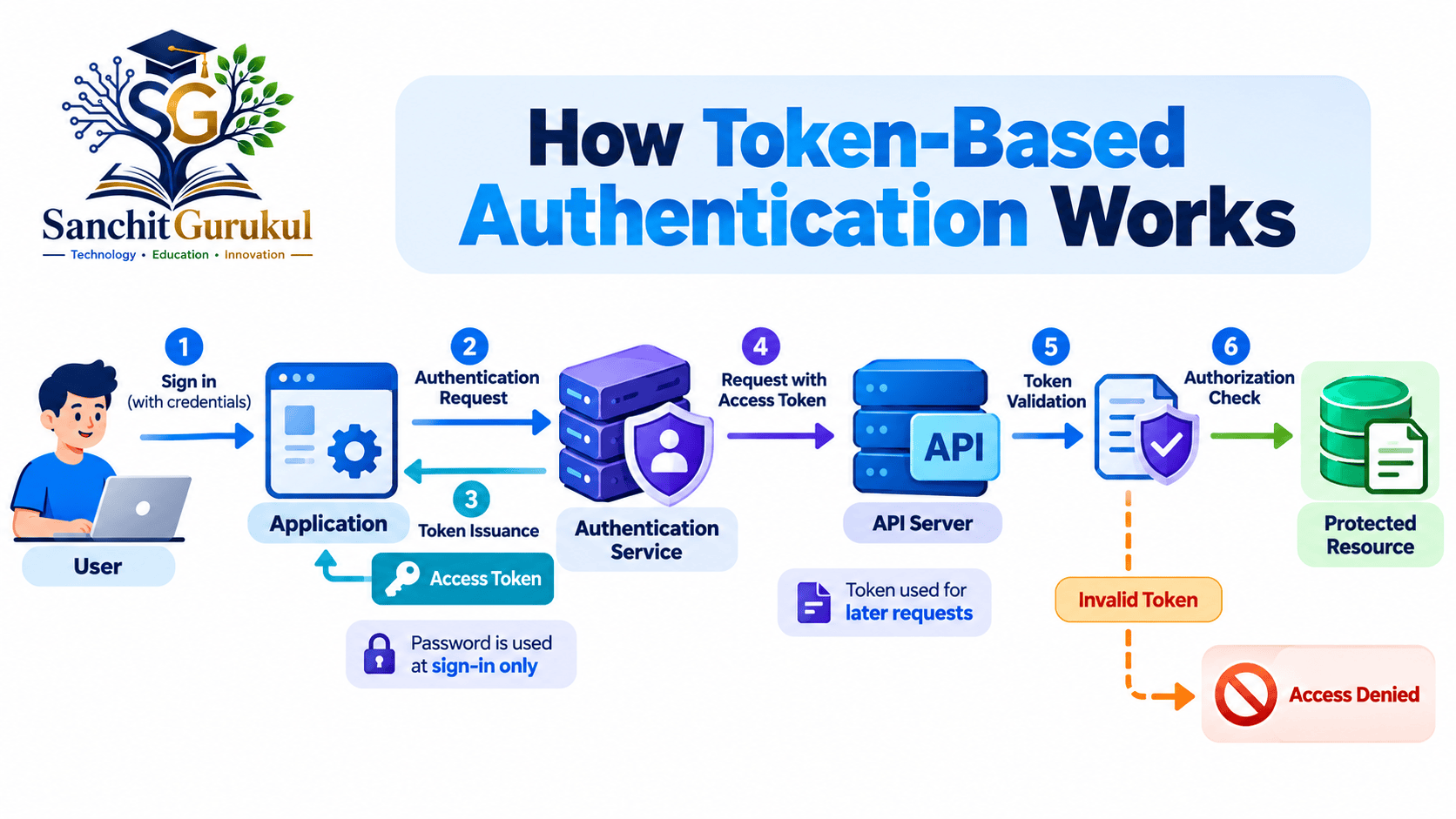
What Is Token-Based Authentication and How Does It Work?
Token-based authentication refers to systems where a token helps establish or maintain an authenticated security context.
In practice, tokens can have several different purposes.
For example:
- A session token identifies an authenticated browser session.
- An ID token communicates authentication information to an application.
- An access token authorizes access to a protected API.
- A refresh token allows a client to obtain replacement access tokens.
These token types serve different functions.
Authentication vs Authorization
Before understanding tokens, it is important to distinguish two security concepts.
| Concept | Meaning | Example |
|---|---|---|
| Authentication | Verifies an identity | Signing in with a passkey |
| Authorization | Determines permitted access | Allowing a user to read their orders |
| Session Management | Maintains login state | Browser session cookie |
| Token Validation | Checks whether a token can be accepted | Verifying signature, issuer and audience |
A valid token may help establish a security context.
However, applications must still check whether the requested action is permitted.
How a Typical Token-Based API Flow Works
Step 1 — User Authentication
The user authenticates through a trusted identity system.
Authentication may involve a password, MFA, passkey or another approved method.
Step 2 — Token Issuance
After successful authentication and any applicable authorization process, the system issues the required token.
Step 3 — Token Storage
The client or backend stores the token according to its security architecture.
The storage method depends on whether the client is a browser, mobile application or server-side service.
Step 4 — Resource Request
The client requests a protected resource.
For OAuth bearer access tokens, the token is commonly placed in the HTTP Authorization header.
Step 5 — Token Validation
The resource server validates the token or obtains its status from an appropriate authorization service.
Step 6 — Authorization Decision
The server checks whether the token permits the requested operation.
Step 7 — Response
The API returns the resource if the request is authorized.
Otherwise, the API returns an appropriate error.
Example — API Request with a Bearer Token
An access token is commonly presented using this HTTP header structure:
Authorization: Bearer YOUR_ACCESS_TOKENYOUR_ACCESS_TOKEN is a placeholder, not a real credential.
The word Bearer identifies the token presentation scheme.
A bearer token can generally be used by whoever possesses it, subject to the token’s validity and other access controls.
This makes protecting the token essential.
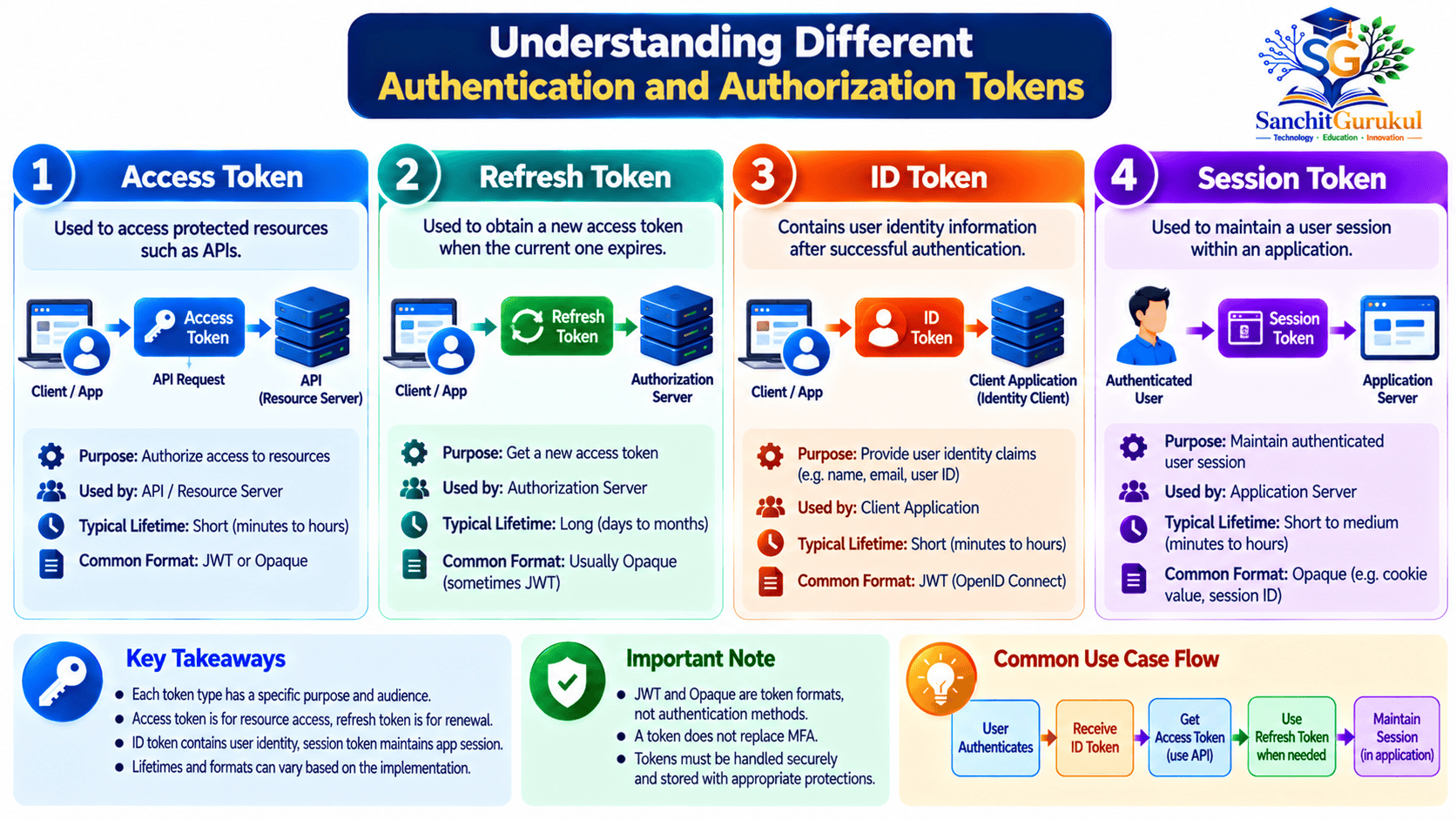
Types of Tokens — Access, Refresh, ID, Session and JWT
The term token is broad.
Some tokens are random opaque strings.
Others contain structured information.
Some are used for authentication, while others represent authorization.
Common Token Types
| Token Type | Main Purpose | Typical Consumer |
|---|---|---|
| Access Token | Access protected resources | API or resource server |
| Refresh Token | Request replacement access tokens | Authorization server |
| ID Token | Communicate authentication information | OpenID Connect client |
| Session Token | Identify an application session | Application backend |
| JWT | Structured token format | Depends on application protocol |
| SAML Assertion | Convey federated identity statements | SAML service provider |
A JWT is a format.
Access, refresh, ID and session tokens describe purposes or roles.
An access token can be a JWT, but it does not have to be one.
1. Access Token
An access token allows a client to request access to protected resources.
Depending on the system, it may contain or reference information such as:
- Subject identity
- Issuing service
- Intended recipient
- Authorized scopes
- Expiration
- Other relevant security claims
An API must accept only tokens issued by appropriate authorities and intended for that API.
2. Refresh Token
A refresh token is used to obtain replacement access tokens.
This allows a user session to continue without repeating interactive authentication for every access-token expiration.
Refresh tokens typically require stronger protection because they may be used to obtain new credentials.
They should be:
- Protected from unauthorized disclosure
- Bound to the appropriate client or sender where supported
- Subject to expiration and revocation policies
- Rotated or sender-constrained where required
Not every application receives a refresh token.
Not every expired access token can be refreshed.
3. ID Token
An ID token is part of OpenID Connect (OIDC).
It communicates information about an authentication event and the authenticated user to the intended client application.
An ID token typically contains claims such as:
iss— Issuersub— Subjectaud— Audienceiat— Issued-at timeexp— Expiration time
An ID token is not a general-purpose access token.
APIs should not treat an ID token as authorization to access protected resources.
4. Session Token
A session token identifies an established application session.
For browser applications, it is frequently stored in a protected cookie.
The server may maintain corresponding session information.
For example, the session may identify:
- Authenticated account
- Session expiration
- Security context
- Active login state
The application can invalidate the session server-side when required.
5. Opaque Tokens
An opaque token is a token whose content is not directly interpreted by the client.
It often consists of a random-looking string.
The resource server may validate it using a trusted authorization service or a server-side token store.
Opaque tokens can support centralized revocation and policy updates.
However, verification may require a network or database lookup.
6. SAML Assertions
SAML uses XML-based security assertions to communicate identity and authorization-related statements between trusted parties.
SAML is widely used in enterprise Single Sign-On.
Although SAML assertions can act as security credentials, they are not the same as OAuth bearer access tokens or JWTs.
How JSON Web Tokens (JWTs) Work
JWT stands for JSON Web Token.
It is a compact representation of JSON-based claims that can be cryptographically protected.
JWT is standardized in RFC 7519.
The most familiar JWT form is a signed token.
However, JWTs can also be encrypted or use nested protection structures.
Structure of a Signed JWT
A compact signed JWT normally contains three dot-separated parts.
The three segments use Base64URL encoding.
Base64URL is an encoding format, not encryption.
Common JWT Claims
| Claim | Meaning |
|---|---|
iss |
Issuer |
sub |
Subject |
aud |
Intended audience |
exp |
Expiration time |
iat |
Issued-at time |
nbf |
Not valid before |
jti |
Unique token identifier |
scope |
Application-defined or profile-defined access scope |
Some claims are optional in the general JWT format but may be mandatory under a particular token profile or application security policy.
Example JWT Payload
{
  "iss": "https://auth.example.test",
  "sub": "student-01",
  "aud": "sg-demo-api",
  "scope": "profile:read",
  "iat": 1792000000,
  "exp": 1792000300
}
This is an illustrative payload.
The timestamps are example values and are not intended to represent a currently valid token.
Are JWTs Encrypted?
Not necessarily.
A signed JWT using JSON Web Signature (JWS) protects integrity and authenticity under the relevant signing trust model.
The payload can normally be decoded without possessing the signing key.
A JWT protected through JSON Web Encryption (JWE) provides confidentiality.
Compact JWE typically uses five dot-separated segments rather than three.
| Token Protection | Main Property |
|---|---|
| Signed JWT (JWS) | Integrity and signer verification |
| Encrypted JWT (JWE) | Confidentiality |
| Nested JWT | Can combine signing and encryption |
How a Server Validates a JWT
A secure resource server should verify the relevant properties before accepting the token.
Important checks include:
- Signature: Is the token protected by an accepted key?
- Algorithm: Is the cryptographic algorithm explicitly permitted?
- Issuer: Was the token issued by the expected authority?
- Audience: Is this API an intended recipient?
- Expiration: Is the token still within its validity period?
- Not Before: Has the token become valid?
- Token Purpose: Is this the correct type of token?
- Authorization: Are the requested actions permitted?
- Revocation and Account State: Are additional current-state checks required?
The receiving service must not trust an algorithm merely because the JWT header requests it.
It must enforce an explicitly configured set of acceptable algorithms.

OAuth 2.0, OpenID Connect and Secure Browser Authentication
OAuth 2.0 and OpenID Connect are widely used in modern application architectures.
Understanding their different responsibilities helps prevent common identity security mistakes.
OAuth 2.0 vs OpenID Connect
| Technology | Primary Purpose |
|---|---|
| OAuth 2.0 | Delegated authorization |
| OpenID Connect | Authentication and identity information |
| JWT | Structured token format |
| SAML 2.0 | Federated identity assertions and SSO |
OAuth 2.0 allows a client application to obtain appropriately authorized access to protected resources.
OpenID Connect builds an identity layer on OAuth 2.0 and supports standardized user authentication.
For example, a website offering a federated sign-in option commonly uses OpenID Connect rather than treating an ordinary OAuth access token as proof of user identity.
Authorization Code Flow with PKCE
Modern browser-based OAuth clients should use the Authorization Code flow with Proof Key for Code Exchange (PKCE).
PKCE protects the authorization code exchange against particular interception and injection attacks.
The simplified process is:
- The client starts an authorization request with PKCE parameters.
- The user interacts with the trusted authorization service.
- The authorization service returns an authorization code through the registered redirect URI.
- The client exchanges the code along with its PKCE verifier.
- The authorization server validates the request.
- Appropriate tokens are returned to the client.
The actual flow must also protect redirect URIs, request integrity and applicable cross-site request forgery risks.
Updated Browser Security Guidance — RFC 10017
RFC 10017, published in August 2026, defines security best practices for OAuth 2.0 in browser-based applications.
It describes three common architecture patterns:
| Architecture | Token Handling |
|---|---|
| Backend for Frontend (BFF) | Backend manages OAuth tokens and API calls |
| Token-Mediating Backend | Backend handles OAuth responsibilities but browser may call APIs with access tokens |
| Browser-Based OAuth Client | Browser handles OAuth responsibilities directly |
A Backend for Frontend is a strong choice when an application can use a trusted backend.
Under this architecture:
- The backend handles OAuth token exchange.
- Access and refresh tokens remain on the server.
- The browser uses a protected application session.
- The backend forwards authorized API requests.
This reduces direct exposure of OAuth tokens to browser JavaScript.
Are Browser Cookies Secure?
Cookies can protect session credentials when configured properly.
Important attributes include:
SecureHttpOnlySameSite
However, cookies are not automatically safe.
Applications must also protect against cross-site request forgery, cross-site scripting and session management attacks.
HttpOnly prevents ordinary browser JavaScript from directly reading the cookie value, but an XSS vulnerability may still allow malicious code to perform actions through the user’s authenticated browser session.
Why Not Store Tokens in localStorage?
Browser localStorage and sessionStorage are accessible to JavaScript operating within the relevant origin.
If an attacker exploits an XSS vulnerability, malicious scripts may be able to read stored bearer tokens.
For browser applications, prefer architectures that minimize the exposure of high-value tokens to JavaScript.
Do not assume that moving a token from localStorage to sessionStorage eliminates XSS-based token theft.

Token Security Risks, Revocation and Best Practices
Tokens make many authentication and authorization workflows easier.
However, poor token handling can expose applications to serious security risks.
Common Token Security Risks
| Risk | Description | Recommended Protection |
|---|---|---|
| Token Theft | Attacker obtains a bearer token | Secure storage, TLS and monitoring |
| Token Replay | Stolen token is reused | Sender constraints where practical |
| Expired Token Acceptance | Server accepts an expired token | Validate expiration |
| Wrong Audience | Token is accepted by an unintended API | Validate audience |
| Algorithm Confusion | Unsafe signature validation | Pin permitted algorithms |
| Token Substitution | Wrong token type is accepted | Validate token purpose |
| Refresh Token Theft | Attacker obtains ongoing access | Rotation or sender constraints |
| XSS | Malicious JavaScript accesses credentials or sessions | XSS defenses and safer architecture |
| Weak Revocation | Compromised token remains usable | Revocation mechanisms and short lifetimes |
1. Always Use HTTPS
Protect tokens while they travel over networks.
Use HTTPS with appropriate TLS verification.
Do not place bearer tokens in URLs because URLs can leak through logs, browser history and other systems.
2. Use Short-Lived Access Tokens
Access tokens should have lifetimes appropriate to their risk.
Shorter lifetimes reduce the period during which a stolen token may remain valid.
However, token expiration alone does not stop misuse before the token expires.
3. Protect Refresh Tokens
Refresh tokens may provide continuing access.
OAuth security best practices require appropriate protections, including refresh-token rotation or sender-constraining for public clients.
Use expiration policies and detect abnormal refresh-token reuse.
4. Validate JWT Claims Correctly
Do not validate a JWT only by decoding its payload.
Use a maintained cryptographic library.
Configure the accepted signing algorithms explicitly.
Verify the issuer, audience, expiration and appropriate token profile.
5. Consider Sender-Constrained Tokens
Ordinary bearer tokens may be replayed by an attacker who steals them.
Sender-constrained tokens require additional proof that the presenter possesses the appropriate key or credential.
Examples include:
- Mutual TLS (mTLS)
- Demonstrating Proof of Possession (DPoP)
DPoP is standardized in RFC 9449.
These approaches can reduce certain token replay risks but do not eliminate every threat, especially when an attacker compromises the client and its key material.
6. Implement Revocation and Logout
JWTs do not automatically support immediate revocation simply because they contain an expiration time.
Possible strategies include:
- Short access-token lifetimes
- Revocation lists or deny lists
- Server-maintained token status
- Token introspection
- Refresh-token invalidation
- Session termination
RFC 7009 specifies an OAuth token revocation mechanism.
RFC 7662 defines token introspection for supported deployments.
7. Minimize Token Claims and Permissions
Use least privilege.
Issue tokens only for the resources and operations that the client requires.
Avoid unnecessarily large or sensitive JWT payloads.
For access tokens, restrict the intended audience and supported scopes.
8. Protect Signing Keys
Signing-key compromise can allow attackers to forge trusted tokens.
Use:
- Strong cryptographic key generation
- Protected secret storage
- Appropriate key rotation
- Restricted administrative access
- Key identifiers and controlled key selection
- Monitoring for suspicious token issuance
9. Keep Authorization Current
A signed token may include permission information that becomes outdated.
For sensitive operations, applications may need to consult current account status, policy or resource ownership rather than relying only on old token claims.
10. Monitor Without Exposing Credentials
Log relevant authentication and authorization events.
Avoid recording complete bearer tokens, refresh tokens, signing secrets or private credentials in ordinary logs.
Practical Python Lab — Create, Verify and Reject JWTs
This lab demonstrates how a signed JWT is created and validated.
You will verify:
- A valid signed token
- A token checked with the wrong signing key
- An expired token
- A token presented to the wrong audience
The lab uses the maintained PyJWT library rather than implementing JWT cryptography from scratch.
Lab Requirements
- Python 3
- Ubuntu, Windows or macOS
- Terminal access
- Internet access for the initial package installation
- Basic Python knowledge
The following commands use Ubuntu or another compatible Linux environment.
Step 1 — Verify Python
Open a terminal.
Execute:
python3 --versionIllustrative output:
Python 3.x.xStep 2 — Create a Python Virtual Environment
Create an isolated environment.
python3 -m venv sg-jwt-venvActivate it.
source sg-jwt-venv/bin/activateIf Ubuntu reports that virtual-environment support is missing, install the applicable python3-venv package through your operating system’s package manager.
Step 3 — Install PyJWT
With the virtual environment active, execute:
python -m pip install PyJWTThis installs the JWT library into the virtual environment.
For this demonstration, the HS256 algorithm does not require optional RSA or elliptic-curve dependencies.
Step 4 — Create the JWT Lab Script
Create a new file.
nano sg_jwt_lab.pyAdd the following code.
from datetime import datetime, timedelta, timezone
import secrets
import jwt

from jwt.exceptions import (
    ExpiredSignatureError,
    InvalidAudienceError,
    InvalidSignatureError,
)

# Disposable key for this local lab only.
signing_key = secrets.token_bytes(32)

issuer = "https://auth.example.test"
audience = "sg-demo-api"

now = datetime.now(timezone.utc)

claims = {
    "iss": issuer,
    "sub": "student-01",
    "aud": audience,
    "iat": now,
    "nbf": now,
    "exp": now + timedelta(minutes=5),
    "scope": "profile:read",
}

# Create a signed JWT.
access_token = jwt.encode(
    claims,
    signing_key,
    algorithm="HS256",
)

# Require important claims during verification.
requirements = {
    "require": [
        "iss", "sub", "aud",
        "iat", "nbf", "exp"
    ]
}

def verify(
    token,
    key=signing_key,
    intended_audience=audience,
):
    return jwt.decode(
        token,
        key,
        algorithms=["HS256"],
        issuer=issuer,
        audience=intended_audience,
        options=requirements,
    )

# Test 1: Correctly signed and valid token.
result = verify(access_token)

print(
    "Signed JWT segments:",
    len(access_token.split("."))
)
print("Valid token subject:", result["sub"])
print("Valid token scope:", result["scope"])

# Test 2: Wrong signing key.
try:
    verify(
        access_token,
        key=secrets.token_bytes(32),
    )
except InvalidSignatureError:
    print("Wrong signing key: rejected")

# Test 3: Expired token.
expired_claims = {
    **claims,
    "iat": now - timedelta(minutes=10),
    "nbf": now - timedelta(minutes=10),
    "exp": now - timedelta(seconds=5),
}

expired_token = jwt.encode(
    expired_claims,
    signing_key,
    algorithm="HS256",
)

try:
    verify(expired_token)
except ExpiredSignatureError:
    print("Expired token: rejected")

# Test 4: Wrong audience.
try:
    verify(
        access_token,
        intended_audience="another-api",
    )
except InvalidAudienceError:
    print("Wrong audience: rejected")
Save the file.
Step 5 — Execute the Script
Run:
python sg_jwt_lab.pyVerified output:
Signed JWT segments: 3
Valid token subject: student-01
Valid token scope: profile:read
Wrong signing key: rejected
Expired token: rejected
Wrong audience: rejected
This output was verified by executing the script with PyJWT.
The generated signing key and JWT are different on each execution.
Step 6 — Understand the Verification Tests
Test 1 — Valid Token
The token has a valid signature and satisfies the required issuer, audience and time checks.
Test 2 — Wrong Signing Key
The signature cannot be verified using an unrelated key.
The token is rejected.
Test 3 — Expired Token
The token’s expiration time has passed.
The token is rejected.
Test 4 — Wrong Audience
The receiving application expects a different audience.
The token is rejected even though its signature is valid.
Step 7 — Understand the Limitations
This lab intentionally focuses on JWT verification.
It does not implement:
- User authentication
- OAuth authorization flows
- Secure token distribution
- Refresh-token handling
- Session management
- Logout and token revocation
- Account-level authorization
- Production key management
The script uses a temporary symmetric signing key created for the demonstration.
It should not be copied directly into a production authentication system.
Production applications should use appropriately configured identity platforms and maintained libraries, with protected keys and complete authorization checks.
Lab Verification Summary
| Test | Expected Result |
|---|---|
| JWT Creation | Successful |
| Signed JWT Structure | Three segments |
| Correct Signing Key | Accepted |
| Wrong Signing Key | Rejected |
| Expired Token | Rejected |
| Wrong Audience | Rejected |
| Issuer Validation | Enabled |
| Required Claims | Enforced |

Key Takeaways
Core Token Concepts
- Tokens are credentials used in authentication, sessions and authorization.
- Access tokens authorize requests to protected resources.
- Refresh tokens help obtain replacement access tokens.
- ID tokens communicate authentication information to OIDC clients.
- JWT is a structured token format, not an authentication protocol.
How JWT Security Works
- Signed JWTs typically contain three segments.
- Base64URL encoding does not provide encryption.
- A signature must be verified before trusting token claims.
- Issuer, audience and expiration checks are essential.
- A valid token does not automatically authorize every action.
Modern Application Security
- OAuth 2.0 provides delegated authorization.
- OpenID Connect supports user authentication.
- Authorization Code with PKCE is appropriate for modern browser OAuth flows.
- BFF architectures reduce browser exposure to OAuth tokens.
- Refresh tokens require strong protection.
Security and Operations
- Protect bearer tokens against theft and replay.
- Use HTTPS and secure token storage.
- Avoid storing high-value tokens in browser web storage.
- Apply short token lifetimes and suitable revocation mechanisms.
- Prefer sender-constrained tokens where appropriate.
- Protect signing keys and monitor suspicious activity.
Token-based authentication and authorization are important parts of modern application security.
They allow applications to maintain sessions and access protected APIs without repeatedly submitting original login credentials.
JWTs provide a standardized format for representing security claims, while OAuth 2.0 and OpenID Connect support authorization and authentication workflows.
However, tokens introduce risks involving theft, replay, incorrect validation, insecure storage and delayed revocation.
Understanding these risks helps developers, administrators and security engineers design more reliable authentication and API protection systems.
Next in This Series: JSON Web Tokens (JWT) Explained — Header, Payload, Signature, Validation and Common Security Vulnerabilities.
Useful Links and References
SanchitGurukul Static Resources
Official External References
Your feedback matters
Was this post helpful?
Discussion
0 approved comments
No approved comments yet. You can start the discussion below.
Leave a Comment
No login is required. Name and email are used for moderation/security. Your email is never displayed publicly. All comments require administrator approval.
Discover more from SanchitGurukul
Subscribe to get the latest posts sent to your email.