
Access Control Lists (ACLs) are one of the fundamental mechanisms used to control network traffic.
An ACL defines rules that determine whether traffic should be:
- Permitted
- Denied
- Classified
- Logged
- Processed by another networking function
In Cisco networking, two of the most important IPv4 ACL categories are:
- Standard ACL
- Extended ACL
The fundamental difference is the amount of information each ACL can use when matching traffic.
Standard ACL
Primarily identifies traffic using the source IPv4 address.
Extended ACL
Can identify traffic using source address, destination address, protocol, and supported Layer 4 information such as TCP or UDP ports.
This makes Extended ACLs much more granular.
Understanding Standard and Extended ACLs
Consider the following network:
- Employee Network:
192.168.10.0/24 - Guest Network:
192.168.20.0/24 - Server Network:
10.10.10.0/24 - Web Server:
10.10.10.10 - SSH Server:
10.10.10.20

Standard ACL
A Cisco Standard IPv4 ACL primarily matches traffic according to the source IPv4 address.
Think of it as asking:
WHO is sending the traffic?
For example:
192.168.10.25 → 10.10.10.10
A Standard ACL can identify:
Source = 192.168.10.25
But it cannot provide the same filtering granularity based on:
- Destination address
- TCP destination port
- UDP destination port
- Specific IP protocol
as an Extended ACL.
A simple Standard ACL could say:
Permit traffic originating from 192.168.10.0/24.
However, it cannot express the complete policy:
Permit 192.168.10.0/24 only to 10.10.10.10 using HTTPS.
That requires additional matching information.
Extended ACL
A Cisco Extended IPv4 ACL provides much more granular traffic identification.
Think of it as asking:
WHO is communicating with WHOM using WHAT protocol or service?
An Extended ACL can evaluate information such as:
Source + Destination + Protocol + Port
For example:
192.168.10.25 → 10.10.10.10 → TCP/443
An Extended ACL can identify all of these elements.
This means you can create a policy such as:
Permit employees to access the Web Server using HTTPS but deny SSH access to that server.
Easy Way to Remember
Standard ACL
Think:
SOURCE
Extended ACL
Think:
SOURCE → DESTINATION → PROTOCOL → PORT
Side-by-Side Comparison
| Capability | Standard ACL | Extended ACL |
|---|---|---|
| Source IPv4 address | Yes | Yes |
| Destination IPv4 address | No | Yes |
| IP protocol | No | Yes |
| TCP port | No | Yes |
| UDP port | No | Yes |
| ICMP-specific matching | No | Supported |
| Granularity | Low | High |
| Simple source filtering | Excellent | Possible |
| Application/service-oriented filtering | No | Yes |
| Traditional placement guideline | Near destination | Near source |
Cisco Standard ACL — Detailed Example
Suppose the requirement is:
Allow Employee Network 192.168.10.0/24 to reach a protected server network while preventing other source networks from using that path.
The decision is based only on the source network.
A Standard ACL can handle this requirement.
Create the Standard ACL
access-list 10 permit 192.168.10.0 0.0.0.255
access-list 10 deny any
The first statement:
access-list 10 permit 192.168.10.0 0.0.0.255
means:
Permit packets whose source IPv4 address belongs to 192.168.10.0/24.
The wildcard mask:
0.0.0.255
matches the /24 network.
The second statement:
access-list 10 deny any
denies other source addresses.
Apply the Standard ACL
Assume GigabitEthernet0/2 leads toward the protected server network.
interface GigabitEthernet0/2
 ip access-group 10 out
Conceptually:
Employee Network → Router → Standard ACL → Server Network
What Happens to the Traffic?
| Source | Destination | Service | Result |
|---|---|---|---|
| 192.168.10.25 | 10.10.10.10 | HTTP | Permit |
| 192.168.10.25 | 10.10.10.10 | HTTPS | Permit |
| 192.168.10.25 | 10.10.10.10 | SSH | Permit |
| 192.168.10.25 | 10.10.10.20 | SSH | Permit |
| 192.168.20.25 | 10.10.10.10 | HTTPS | Deny |
Notice the important limitation.
The Standard ACL knows:
192.168.10.25 is an allowed source.
It does not know that we might want the employee to use HTTPS but not SSH.
Why Standard ACL Cannot Solve a More Specific Requirement
Suppose the actual security requirement changes to:
Employees may access 10.10.10.10 using HTTPS only.
Now we need to identify:
Source: 192.168.10.0/24
Destination: 10.10.10.10
Protocol: TCP
Destination Port: 443
A Standard ACL cannot express all of these criteria.
We need an Extended ACL.
Cisco Extended ACL — Detailed Example
Now consider this more realistic security requirement.
Employees from:
192.168.10.0/24
should be allowed to access:
10.10.10.10
using:
- HTTP — TCP/80
- HTTPS — TCP/443
Employees should not be allowed to SSH to that Web Server.
The Guest Network:
192.168.20.0/24
should not be allowed to access the protected Web Server.
This requires granular matching.
Create a Named Extended ACL
ip access-list extended WEB_SERVER_ACCESSPermit HTTP
permit tcp 192.168.10.0 0.0.0.255 host 10.10.10.10 eq 80This means:
Action: Permit
Protocol: TCP
Source: 192.168.10.0/24
Destination: 10.10.10.10
Destination Port: 80
Permit HTTPS
permit tcp 192.168.10.0 0.0.0.255 host 10.10.10.10 eq 443This permits HTTPS access from employees to the Web Server.
Deny Other Traffic to the Web Server
deny ip any host 10.10.10.10The complete ACL becomes:
ip access-list extended WEB_SERVER_ACCESS
 permit tcp 192.168.10.0 0.0.0.255 host 10.10.10.10 eq 80
 permit tcp 192.168.10.0 0.0.0.255 host 10.10.10.10 eq 443
 deny ip any host 10.10.10.10
Apply the Extended ACL
Because Extended ACLs can precisely identify unwanted traffic, they are traditionally placed relatively close to the source.
For example:
interface GigabitEthernet0/0
 ip access-group WEB_SERVER_ACCESS in
Traffic Results
| Source | Destination | Service | Result |
|---|---|---|---|
| 192.168.10.25 | 10.10.10.10 | HTTP / TCP 80 | Permit |
| 192.168.10.25 | 10.10.10.10 | HTTPS / TCP 443 | Permit |
| 192.168.10.25 | 10.10.10.10 | SSH / TCP 22 | Deny |
| 192.168.10.25 | 10.10.10.10 | Telnet / TCP 23 | Deny |
| 192.168.20.25 | 10.10.10.10 | HTTPS / TCP 443 | Deny |
This is the major advantage of an Extended ACL.
Instead of simply saying:
“Trust this source network.”
you can say:
“Allow this source network to communicate with this specific destination using only these specific services.”

What About the Implicit Deny?
Cisco ACLs have an implicit deny at the end.
Conceptually:
deny ip any any
Therefore, anything not explicitly permitted before reaching the end of the ACL is denied.
How Other Vendors Handle Similar Filtering
This is where terminology becomes important.
Cisco Standard ACL and Extended ACL should not be treated as universal networking terminology.
Other vendors often provide equivalent or more advanced filtering capabilities using different policy models.
Cisco
Cisco provides explicit Standard and Extended IPv4 ACL categories.
A simplified comparison is:
Standard
Source → Action
Extended
Source → Destination → Protocol → Port → Action
Cisco IOS/IOS XE also supports additional ACL capabilities depending on platform and software.
Juniper Networks
Juniper Junos commonly uses firewall filters for stateless packet filtering.
A Junos firewall filter can use match conditions involving information such as:
- Source address
- Destination address
- Protocol
- Source port
- Destination port
Conceptually, this is closer to the flexibility associated with a Cisco Extended ACL.
A simplified Junos-style example could look like:
firewall {
    family inet {
        filter WEB_SERVER_ACCESS {
            term ALLOW_HTTPS {
                from {
                    source-address {
                        192.168.10.0/24;
                    }
                    destination-address {
                        10.10.10.10/32;
                    }
                    protocol tcp;
                    destination-port 443;
                }
                then accept;
            }
            term DEFAULT_DENY {
                then discard;
            }
        }
    }
}
The policy concept is:
Source: 192.168.10.0/24
Destination: 10.10.10.10
Protocol: TCP
Destination Port: 443
Action: Accept
Fortinet FortiGate
FortiGate normally controls routed traffic using firewall policies, rather than asking the administrator to choose between a Cisco-style Standard or Extended ACL.
A FortiGate policy commonly considers criteria such as:
- Incoming interface
- Outgoing interface
- Source
- Destination
- Schedule
- Service
- Action
For our example, the conceptual policy would be:
Source: Employee Network
Destination: Web Server
Service: HTTPS
Action: ACCEPT
A simplified configuration concept could be:
config firewall policy
    edit 10
        set name "Employee-to-Web-HTTPS"
        set srcintf "LAN"
        set dstintf "SERVER"
        set srcaddr "Employee_Network"
        set dstaddr "Web_Server"
        set action accept
        set schedule "always"
        set service "HTTPS"
    next
end
Conceptually, this provides the granular policy behavior that someone familiar with Cisco might associate with an Extended ACL.
However, FortiGate firewall policies are part of a stateful firewall architecture and should not simply be renamed “Extended ACLs.”
Palo Alto Networks
Palo Alto Networks uses Security policy rules.
Security rules can evaluate information such as:
- Source zone
- Destination zone
- Source address
- Destination address
- User
- Application
- Service
Therefore, Palo Alto Networks policy goes significantly beyond the simple Standard-vs-Extended ACL model.
For our web-server requirement, the conceptual rule could be:
Source Zone: USERS
Source Address: 192.168.10.0/24
Destination Zone: SERVERS
Destination Address: 10.10.10.10
Application: web-browsing / ssl as appropriate to the policy design
Service: Application-default or specifically required service
Action: Allow
Multi-Vendor Comparison
| Platform | Common Policy Mechanism | Source | Destination | Protocol / Service | Application Awareness |
|---|---|---|---|---|---|
| Cisco Standard IPv4 ACL | Standard ACL | Yes | No | No | No |
| Cisco Extended IPv4 ACL | Extended ACL | Yes | Yes | Yes | Limited compared with NGFW policy |
| Juniper Junos | Firewall Filter | Yes | Yes | Yes | Depends on feature/platform |
| Fortinet FortiGate | Firewall Policy | Yes | Yes | Yes | Yes with security/application features |
| Palo Alto Networks | Security Policy | Yes | Yes | Yes | Strong application awareness |
Practical Comparison and Troubleshooting
Consider the requirement:
Employees should access Web Server 10.10.10.10 using HTTPS only.
Cisco Standard ACL Approach
A Standard ACL can identify:
192.168.10.0/24
but cannot independently specify all of:
10.10.10.10 + TCP + 443
Therefore, it is not the appropriate tool for implementing this precise requirement by itself.
Cisco Extended ACL Approach
An Extended ACL can express:
permit tcp 192.168.10.0 0.0.0.255 host 10.10.10.10 eq 443This is a precise match.
Juniper Approach
Conceptually:
Source 192.168.10.0/24 + Destination 10.10.10.10 + TCP + Destination Port 443 → Accept
FortiGate Approach
Conceptually:
Employee Network + Web Server + HTTPS → ACCEPT
Palo Alto Networks Approach
Conceptually:
User Zone + Server Zone + Employee Source + Web Server Destination + Approved Application/Service → ALLOW
The security objective is similar.
The implementation model is different.

Rule Order Matters
Cisco ACLs are processed sequentially.
The first matching ACE determines the result.
For example:
deny ip any any
permit tcp 192.168.10.0 0.0.0.255 host 10.10.10.10 eq 443
This does not permit HTTPS.
The first rule already matches IP traffic and denies it.
Correct the order:
permit tcp 192.168.10.0 0.0.0.255 host 10.10.10.10 eq 443
deny ip any anyVerify Cisco ACLs
Display ACLs:
show access-listsDisplay IPv4 ACLs:
show ip access-listsCheck interface ACL assignment:
show ip interface GigabitEthernet0/0Common Mistakes
| Problem | Possible Cause |
|---|---|
| All traffic blocked | Implicit deny reached |
| Correct rule does not work | Earlier ACE matches first |
| Wrong network matched | Incorrect wildcard mask |
| ACL has no effect | Wrong interface |
| ACL filters opposite traffic | Wrong direction |
| HTTPS blocked | TCP 443 missing |
| DNS partially works | Required UDP/TCP behavior not accounted for |
| Too much traffic permitted | Standard ACL used where granular Extended ACL was required |
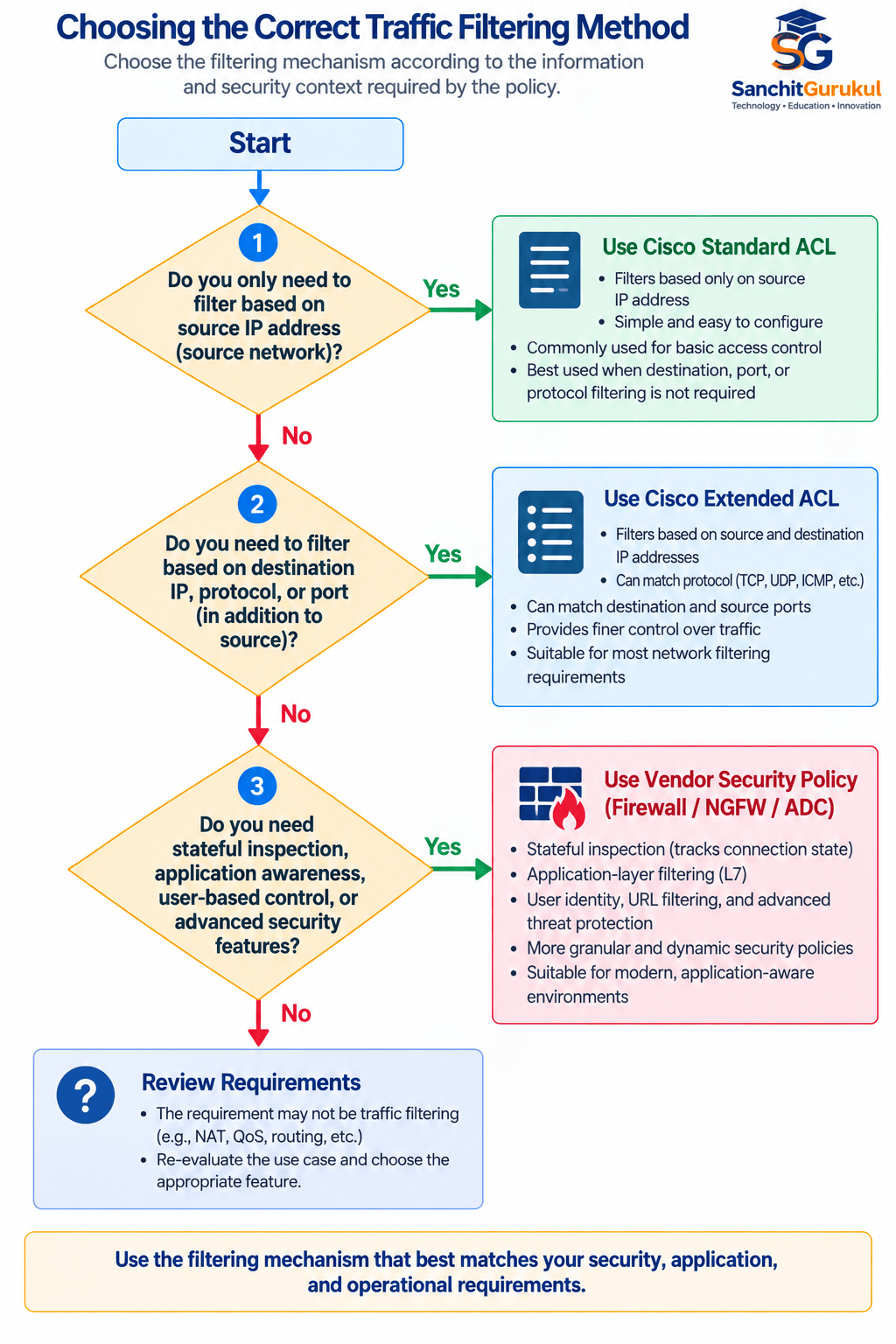
Choosing the Correct ACL or Policy Type
The decision becomes easier when you start with the security requirement.
Use a Cisco Standard ACL When
The decision primarily depends on:
Source IPv4 address
Examples:
- Permit one management subnet
- Deny one source network
- Identify a source network for a supported feature
- Implement simple source-based filtering
Use a Cisco Extended ACL When
The decision depends on combinations such as:
- Source
- Destination
- Protocol
- TCP port
- UDP port
- ICMP information
Examples:
Allow HTTPS but deny SSH
Allow DNS to a particular DNS server
Allow one subnet to communicate with a specific server
Block a protocol between two networks
Use Vendor Security Policy When
On modern NGFW platforms, use the vendor’s native policy architecture.
For example:
FortiGate → Firewall Policy
Palo Alto Networks → Security Policy
Juniper SRX → Security Policy for stateful firewall security use cases
Junos Firewall Filter → Stateless packet filtering/classification use cases
Summary
The fundamental difference between Cisco Standard and Extended ACLs is traffic-matching granularity.
Standard ACL
Think:
SOURCE
A Cisco Standard IPv4 ACL primarily identifies traffic using the source IPv4 address.
It is useful for relatively simple source-based filtering.
Extended ACL
Think:
SOURCE → DESTINATION → PROTOCOL → PORT
An Extended ACL provides much more granular traffic control.
For example:
permit tcp 192.168.10.0 0.0.0.255 host 10.10.10.10 eq 443This expresses a specific security relationship:
Employee Network → Web Server → TCP → HTTPS → Permit
Final Comparison
| Feature | Cisco Standard ACL | Cisco Extended ACL |
|---|---|---|
| Source IP | Yes | Yes |
| Destination IP | No | Yes |
| Protocol | No | Yes |
| TCP/UDP port | No | Yes |
| Granularity | Basic | High |
| Simple source filtering | Excellent | Supported |
| Service-specific filtering | No | Yes |
| Traditional placement | Near destination | Near source |
| Configuration complexity | Lower | Higher |
| Typical security precision | Lower | Higher |
Useful Links and References
SanchitGurukul Static Resources
Official External References
Your feedback matters
Was this post helpful?
Discussion
0 approved comments
No approved comments yet. You can start the discussion below.
Leave a Comment
No login is required. Name and email are used for moderation/security. Your email is never displayed publicly. All comments require administrator approval.
Discover more from SanchitGurukul
Subscribe to get the latest posts sent to your email.