
Prerequisites: Basic Networking, TCP/IP, Firewall Rules and NAT
When you send a request to a website, the network packet may pass through several devices before reaching the web server.
If a Check Point firewall is in the communication path, how does it decide whether to allow or block that packet?
Does every packet pass through all the security inspection engines?
And why can some connections be processed faster than others?
The answers are related to Check Point Firewall Packet Flow.
Packet flow describes how network traffic is received, examined, processed and forwarded through the firewall.
Check Point uses several technologies to perform these operations efficiently, including:
- Firewall Kernel: Enforces security rules and maintains connection information.
- SecureXL: Accelerates eligible network traffic.
- CoreXL: Distributes firewall inspection work across multiple CPU cores.
- Security Software Blades: Perform additional security checks when required.
Understanding how these components work together helps administrators troubleshoot connectivity problems and investigate firewall performance.
In this article, you will learn:
- How packets travel through a Check Point firewall
- How SecureXL and CoreXL work
- What Firewall Path, Accelerated Path and Medium Path mean
- How content inspection affects packet processing
- How to check packet acceleration using CLI commands
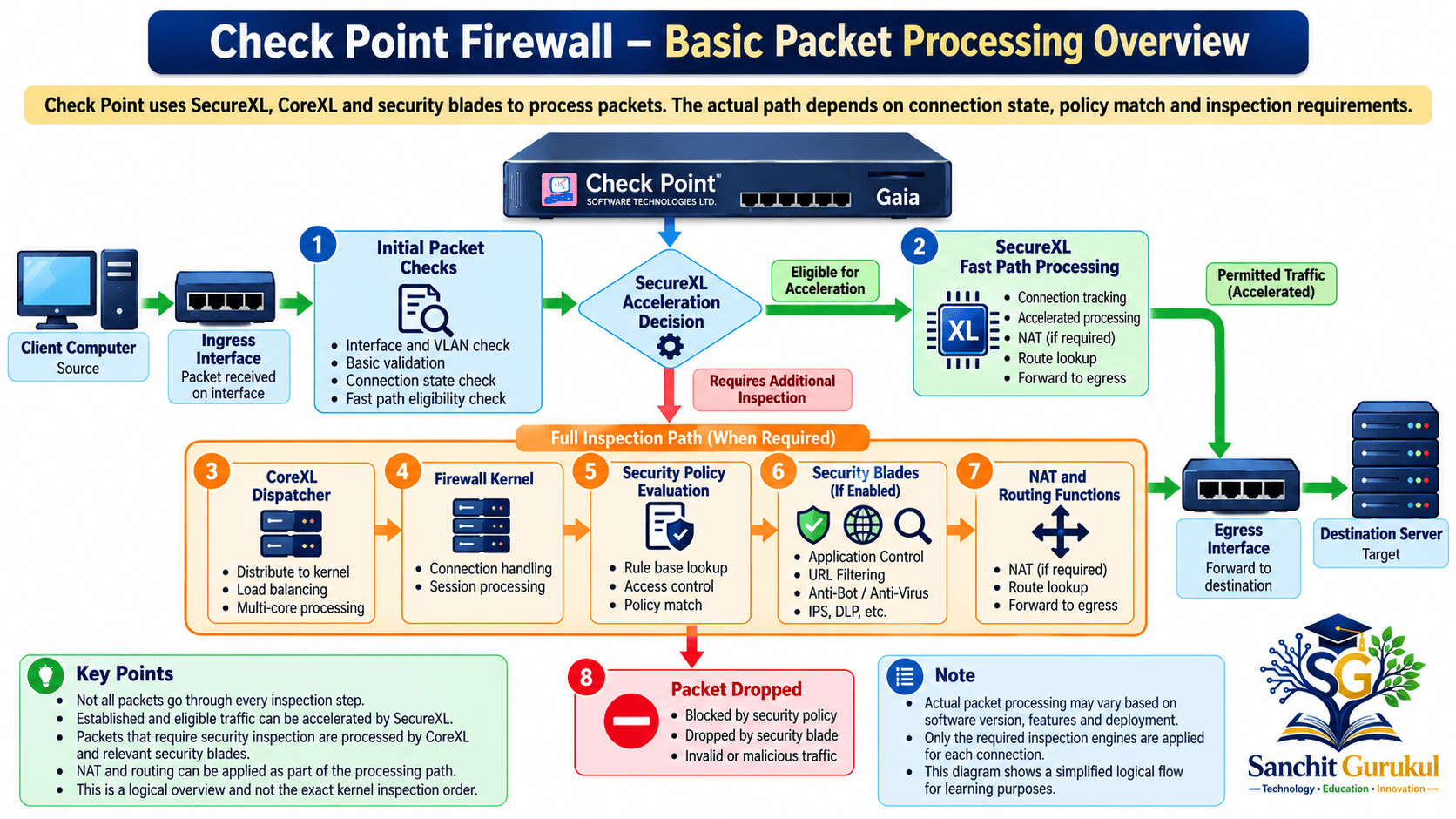
1. How Packets Move Through a Check Point Firewall
Before examining the different processing paths, let’s understand what happens when traffic enters the firewall.
Step 1 — Packet Arrives at the Ingress Interface
A packet enters through a network interface.
For example, a computer on an internal network sends an HTTPS request to a web server.
| Component | Example |
|---|---|
| Client IP | 192.168.1.100 |
| Destination IP | 203.0.113.20 |
| Protocol | TCP |
| Destination Port | 443 |
| Ingress Interface | eth1 |
| Intended Egress Interface | eth2 |
The destination IP address belongs to the documentation address range and represents an illustrative server.
The firewall receives the packet and begins the applicable processing.
Step 2 — Initial Packet and Connection Checks
The firewall examines relevant packet and connection information.
Depending on the configuration, this can include:
- Packet validity and supported protocol checks
- Interface and source-address checks
- Anti-spoofing enforcement
- Existing connection state
- SecureXL connection-table matching
An existing permitted connection may already have the information required for accelerated processing.
A new connection or a packet requiring additional checks may need Firewall Kernel processing.
Step 3 — SecureXL Processing Decision
SecureXL determines whether the packet can be handled through an accelerated processing path.
If suitable connection information is already available, SecureXL may process the packet without sending it through the complete Firewall Kernel inspection chain.
If SecureXL cannot complete the required processing, it forwards the packet for additional inspection.
Importantly, SecureXL can also perform supported security and packet-processing functions, including certain NAT, forwarding and connection checks.
Step 4 — Firewall Security Policy Evaluation
Packets requiring Firewall Kernel processing are examined according to the installed Security Policy and connection state.
For a new connection, the firewall evaluates the applicable rules and required conditions.
For example:
| Source | Destination | Service | Action |
|---|---|---|---|
| Internal_Network | Web_Server | HTTPS | Accept |
| Internal_Network | Restricted_Server | Any | Drop |
If the packet matches the first rule and satisfies the other applicable checks, communication may be permitted.
If the packet matches a blocking rule, it is dropped.
Established connections are handled using their state information rather than necessarily repeating a complete new-connection rule lookup for every packet.
Step 5 — Additional Security Inspection
If the policy requires inspection by additional Security Blades, traffic may undergo further analysis.
For example, IPS may examine suspicious network activity, while Application Control may identify an application.
Not every connection requires every Security Blade.
The actual inspection depends on the enabled blades, policy, protocol and traffic characteristics.
Step 6 — NAT and Routing
Network Address Translation (NAT) may modify source or destination address information when the configured NAT policy requires it.
Routing and forwarding logic determine how permitted traffic reaches its next destination.
For example, a source NAT policy might translate:
192.168.1.100 → 198.51.100.10
The internal address is replaced with the configured translated address for the applicable traffic.
These are conceptual operations, not a guaranteed final pair of processing stages. In the actual packet path, NAT, route decisions and other functions can occur at different hooks or be performed through acceleration.
Step 7 — Packet Leaves Through the Egress Interface
If processing permits the traffic and forwarding succeeds, the packet leaves through the applicable outgoing interface.
The return traffic is also subject to connection-state checks, routing, applicable NAT handling and security processing.
2. Understanding SecureXL and CoreXL
SecureXL and CoreXL are both important Check Point performance technologies.
However, they solve different problems.
What Is SecureXL?
SecureXL accelerates eligible network traffic to reduce repeated processing through the complete Firewall Kernel inspection path.
Consider an HTTPS connection that has already been permitted.
The firewall may not need to repeat all the original inspection operations for every subsequent packet.
SecureXL can process eligible packets using maintained connection information and supported acceleration functions.
This helps improve throughput and reduce CPU processing requirements.
SecureXL can use different implementation modes, including kernel-mode processing. Hardware acceleration capabilities also depend on the appliance model and software version.
What Is CoreXL?
CoreXL allows multiple Firewall Kernel instances to work across multiple CPU cores.
Without parallel firewall inspection instances, one processing core can become a performance bottleneck.
CoreXL helps distribute firewall inspection workloads across available processing resources.
A Firewall Kernel instance, commonly called an FWK instance, performs firewall processing using the installed Security Policy.
CoreXL uses a component called the Secure Network Distributor (SND) to receive traffic and direct packets requiring firewall processing to the appropriate FWK instance.
For example, on a supported multicore system, different connections may be handled by different FWK instances.
SecureXL vs CoreXL
| Feature | SecureXL | CoreXL |
|---|---|---|
| Main purpose | Accelerate eligible traffic | Parallelize firewall inspection |
| Primary function | Efficient packet and connection processing | Distribute inspection work |
| Main components | SecureXL processing and connection information | SND and FWK instances |
| Performance benefit | Reduces repeated full inspection processing | Uses multiple CPU cores |
| Security enforcement | Maintains applicable security processing | Enforces policy through FWK instances |
Both technologies work together.
SecureXL determines whether traffic can be processed efficiently through acceleration. CoreXL distributes traffic requiring Firewall Kernel processing across available inspection instances.
3. Three Main Check Point Packet-Processing Paths
Check Point documentation commonly explains packet processing using three main paths:
- Firewall Path
- Accelerated Path
- Medium Path
These describe different ways packets are processed through the Security Gateway.
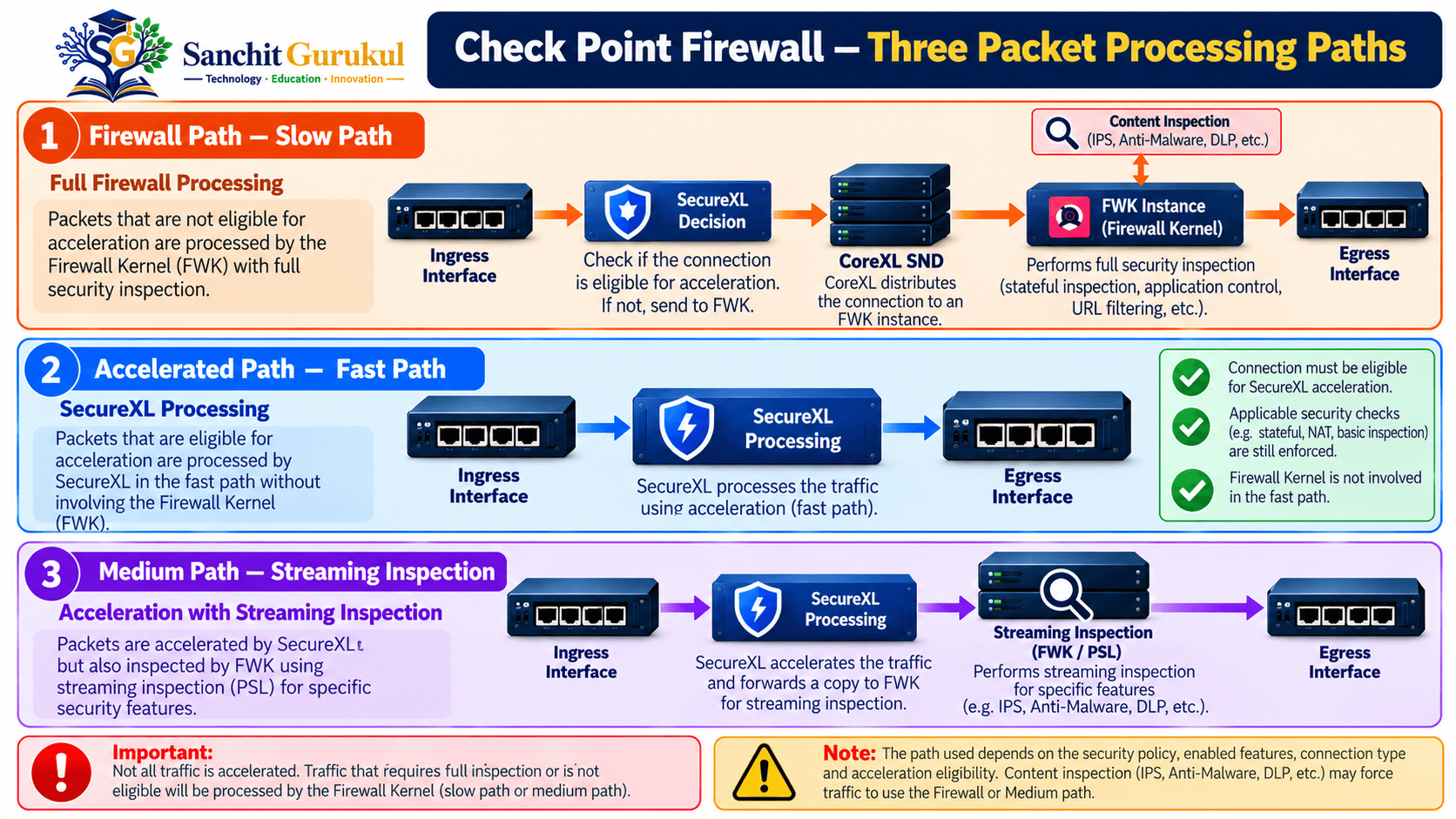
1. Firewall Path — Slow Path
The Firewall Path is also known as the Slow Path.
This path is used when SecureXL cannot perform the required packet processing.
The packet is directed to a Firewall Kernel instance for further inspection.
Typical processing may include:
- Security Policy evaluation
- Stateful connection handling
- Additional protocol checks
- Applicable Security Blade inspections
- NAT and forwarding functions
For example, a new connection may require a full security policy evaluation because the necessary acceleration information is not yet available.
Some traffic may continue using the Firewall Path because its required processing cannot be offloaded.
F2F, or Firewall-to-Firewall-path forwarding in the SecureXL context, identifies packets forwarded by SecureXL to Firewall Kernel processing. Check Point uses F2F counters to measure this traffic.
2. Accelerated Path — Fast Path
The Accelerated Path is commonly called the Fast Path.
In this path, SecureXL processes eligible packets without sending them through the complete Firewall Kernel inspection chain.
For example:
- A connection is authorized according to the applicable security requirements.
- SecureXL obtains the information necessary to accelerate the connection.
- Subsequent eligible packets can be processed through SecureXL.
- The packets are forwarded without repeating all the original Firewall Kernel processing.
This can significantly reduce repeated inspection work.
Some new connections may also benefit from supported acceleration mechanisms, depending on the policy and SecureXL implementation.
An acceleration template can help eligible connections, but a connection does not always need to match a template to become accelerated.
Also, template support and behavior have changed across Check Point releases.
3. Medium Path — Streaming Inspection
The Medium Path combines SecureXL acceleration with additional processing for traffic that requires stream or content inspection.
It is especially relevant when a TCP connection requires analysis of application data.
This processing can involve the Passive Streaming Library (PSL).
PSL reconstructs TCP data streams so security functions can inspect information that may be distributed across multiple packets.
For example, an application request might span several TCP packets.
A security inspection engine may need to understand the complete data stream rather than examining each packet independently.
The Medium Path allows SecureXL and the required streaming inspection functions to cooperate.
How Medium Path Works
In the classic template-assisted Medium Path example described by Check Point:
- A client starts a TCP connection.
- SecureXL can accelerate the TCP handshake when the required conditions are met.
- The connection becomes established.
- Application data begins to flow.
- Data-bearing packets requiring streaming inspection are directed through the appropriate FWK and streaming infrastructure.
- PSL reconstructs the TCP data stream.
- Applicable security inspections examine the reconstructed content.
- Permitted traffic continues toward its destination.
Packets that do not require data-stream inspection may remain accelerated.
The exact treatment of handshake, acknowledgment and connection-closing packets depends on the processing conditions and product version.
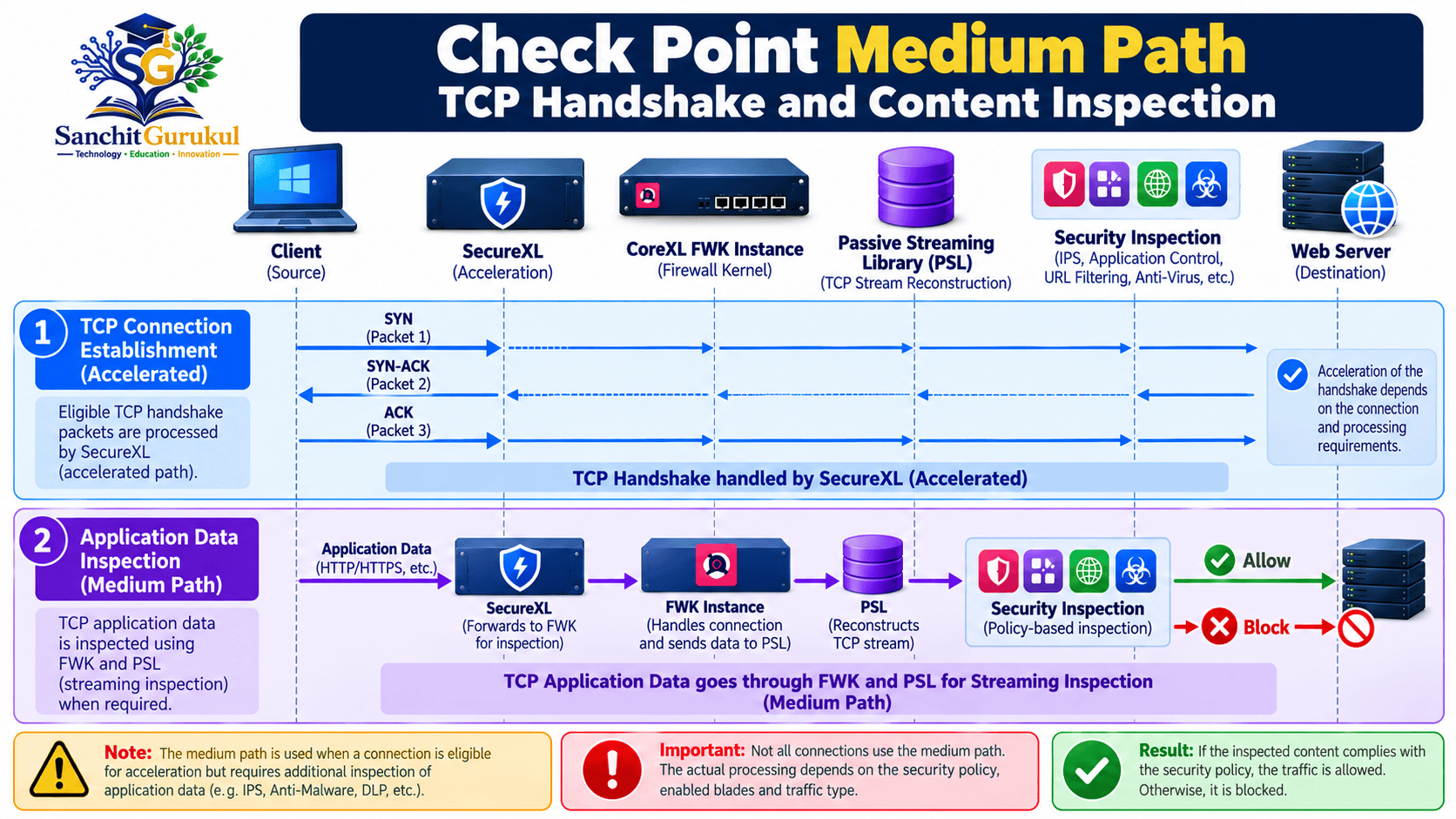
Comparison of the Three Paths
| Feature | Firewall Path | Accelerated Path | Medium Path |
|---|---|---|---|
| Common name | Slow Path | Fast Path | Streaming Path |
| Main processing | FWK | SecureXL | SecureXL with streaming inspection |
| Full FWK processing | Required | Not for eligible accelerated packets | Selective processing |
| Content inspection | When required | No additional full inspection on the accelerated packet | Important part of the path |
| Processing overhead | Generally higher | Generally lower | Depends on inspection |
| Typical use | Traffic requiring Firewall Kernel processing | Eligible accelerated traffic | Traffic needing streaming analysis |
4. Content Inspection and Packet-Flow Troubleshooting
How Content Inspection Works
Check Point Security Blades provide additional protection beyond basic network access-control decisions.
For example:
| Security Blade | Main Function |
|---|---|
| IPS | Detects and prevents selected network attacks |
| Application Control | Identifies applications and enforces application policies |
| URL Filtering | Applies policy to web destinations and URL categories |
| Anti-Virus | Detects supported malicious content |
| Anti-Bot | Detects and blocks supported bot-related activity |
| HTTPS Inspection | Enables applicable inspection of encrypted HTTPS traffic |
| Content Awareness | Enforces policies based on supported content characteristics |
When these capabilities are enabled and required by policy, additional processing may be necessary.
However, the firewall does not automatically run every Security Blade against every packet.
The applicable checks depend on the installed policy, traffic type, application and inspection capabilities.
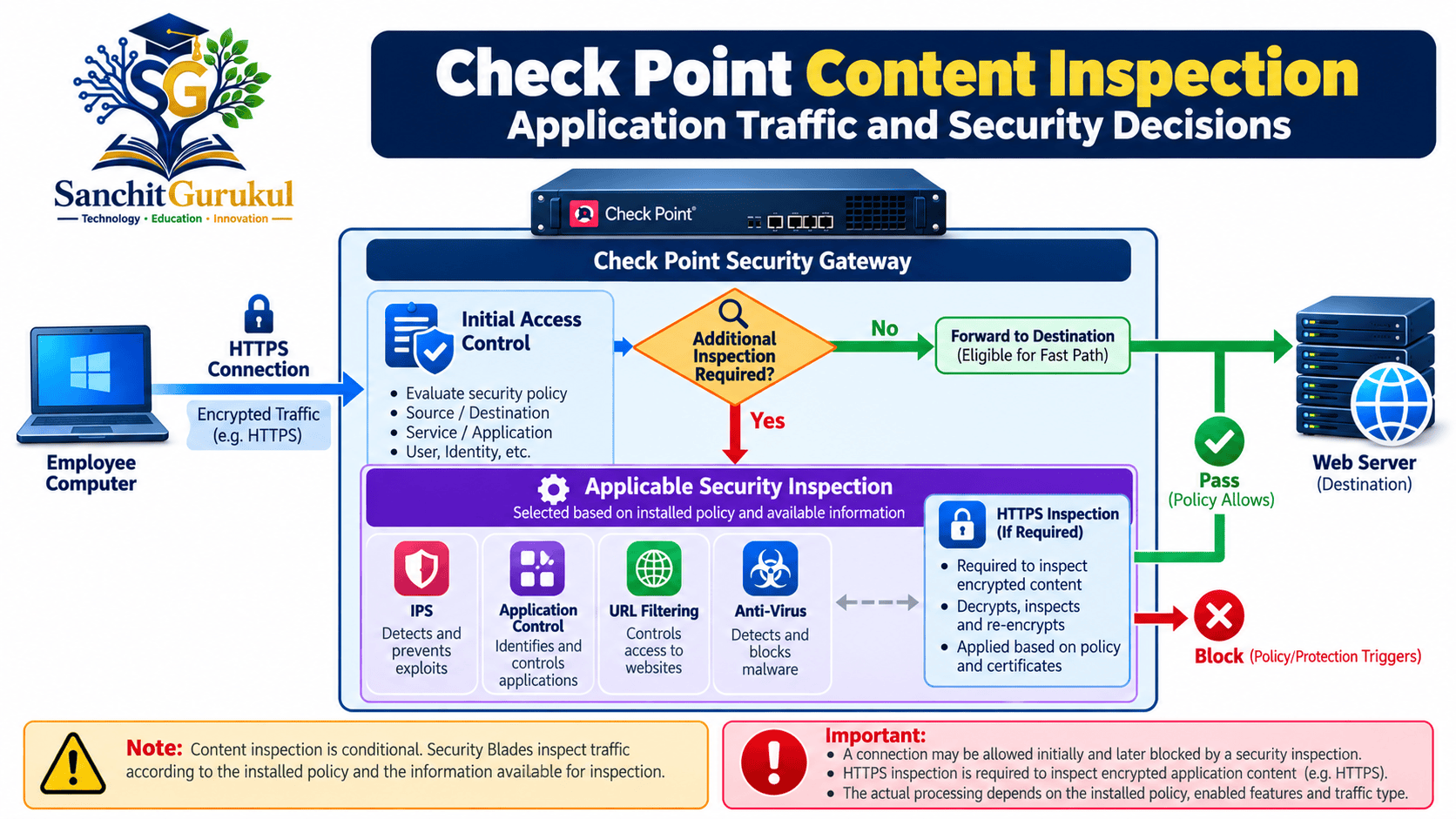
Example — User Accessing a Website
Suppose an employee opens a website through the Check Point firewall.
The client sends an HTTPS connection request toward the web server.
The firewall performs the required connection and access checks.
If the Security Policy permits the connection, additional inspection may still be necessary.
For example:
- Application Control may identify the application.
- URL Filtering may enforce a web-access policy.
- IPS may inspect applicable protocol or attack patterns.
- HTTPS Inspection may make encrypted content available for supported inspection when properly enabled and configured.
If the traffic is permitted, the firewall forwards it according to the applicable processing path.
If the traffic violates a configured protection, the relevant security function may block it.
Useful Commands for Checking Packet Processing
Administrators can examine SecureXL and CoreXL information using supported diagnostic commands.
The following examples are based on Check Point’s documented CLI commands.
Run them from Expert mode on an authorized Check Point Security Gateway.
1. Check SecureXL Status
fwaccel statThis command displays SecureXL status, operating mode, accelerated interfaces and supported features.
Check whether SecureXL is enabled and which interfaces are eligible for acceleration.
2. Check Acceleration Statistics
fwaccel stats -sThis command displays summary information about packet processing and acceleration.
Depending on the release, the output can contain information about:
- Accelerated connections and packets
- Firewall Path packets
- Medium or streaming processing counters
- Other supported processing categories
3. Check Detailed SecureXL Statistics
fwaccel statsThe detailed output includes counters for different packet-processing functions.
Useful counter groups include:
| Counter | Meaning |
|---|---|
accel packets |
Packets handled by the accelerated path |
F2F packets |
Packets forwarded to the Firewall Kernel Slow Path |
PSLXL packets |
Packets handled by the PSLXL streaming path, where reported |
CPASXL packets |
Packets handled by CPASXL processing, where reported |
dropped packets |
Packets dropped by SecureXL |
Counter availability and formatting depend on the software version.
4. Check CoreXL Firewall Instances
fw ctl multik statThis command displays information about configured Firewall Kernel instances.
An illustrative output is:
ID | Active | CPU | Connections | Peak
---------------------------------------
0  | Yes    | 7   | 120         | 250
1  | Yes    | 6   | 95          | 210
2  | Yes    | 5   | 110         | 240
3  | Yes    | 4   | 105         | 225
This example demonstrates the output structure and is not a measured result from a live gateway.
The CPU column identifies the associated processing CPU.
The Connections column shows the concurrent connections handled by each Firewall Kernel instance.
How to Interpret the Results
Suppose you observe that a large proportion of packets are processed through the Firewall Path.
Does that automatically indicate a problem?
No.
Some traffic may legitimately require additional inspection or may not be eligible for SecureXL acceleration.
Similarly, high acceleration percentages do not automatically prove that the security policy is correct or that traffic is safe.
Packet-path statistics should be interpreted together with the enabled Security Blades, connection types, traffic profile, gateway load and observed application behavior.
Key Takeaways
Basic Packet Flow
- A packet enters through an ingress interface.
- Check Point performs applicable connection, packet and security checks.
- SecureXL may accelerate eligible traffic.
- Other traffic may require Firewall Kernel processing.
- NAT and routing are applied according to the configuration and processing path.
- Permitted traffic is forwarded through the appropriate egress interface.
SecureXL and CoreXL
- SecureXL accelerates supported traffic.
- CoreXL distributes firewall processing across CPU cores.
- An FWK instance is a Firewall Kernel inspection instance.
- The CoreXL SND directs non-accelerated traffic to the appropriate FWK instance.
- SecureXL and CoreXL work together to improve gateway performance.
Three Processing Paths
- Firewall Path: Traffic requires Firewall Kernel processing.
- Accelerated Path: Eligible packets are processed through SecureXL.
- Medium Path: Acceleration is combined with additional streaming inspection.
Content Inspection
- Security Blades inspect traffic according to policy requirements.
- PSL helps reconstruct TCP data streams for inspection.
- Not every packet requires every Security Blade.
- Encrypted HTTPS content requires appropriate visibility mechanisms for inspection.
- Packet-processing paths can differ between packets of the same connection.
Understanding Check Point Firewall Packet Flow is important for both network security and troubleshooting.
The key is to understand that SecureXL, CoreXL and the Security Blades have different responsibilities.
SecureXL helps accelerate eligible connections, while CoreXL distributes Firewall Kernel processing across CPU cores.
When deeper traffic analysis is required, the firewall uses additional inspection components and streaming capabilities.
By understanding Firewall Path, Accelerated Path and Medium Path, administrators can interpret packet-processing behavior more accurately and make better troubleshooting decisions.
Next in This Series: Check Point SecureXL and CoreXL Troubleshooting — Understanding Acceleration Counters, SND, FWK Instances and Performance Bottlenecks.
Useful Links and References
SanchitGurukul Static Resources
Official External References
Your feedback matters
Was this post helpful?
Discussion
1 approved comment
Leave a Comment
No login is required. Name and email are used for moderation/security. Your email is never displayed publicly. All comments require administrator approval.
Discover more from SanchitGurukul
Subscribe to get the latest posts sent to your email.
