
Prerequisites: Basic Networking and Firewall Fundamentals
Imagine an organization with several offices, hundreds of computers, internal servers and applications running in the cloud.
Employees need access to these resources from different locations.
However, the organization must also protect its systems from unauthorized access, malware and other cyber threats.
How can the security team manage these protections across different environments?
One approach is to use an integrated cybersecurity platform.
Check Point Software Technologies provides security solutions for networks, cloud environments, applications and endpoints.
Its network security platform combines firewall protection, threat prevention, VPN connectivity and centralized security management.
In this article, you will learn:
- What the Check Point security platform is
- How Security Gateways and management systems work
- What its major security features do
- How VPN and Identity Awareness protect access
- How logging, High Availability and cloud security work
- Why organizations use integrated security management
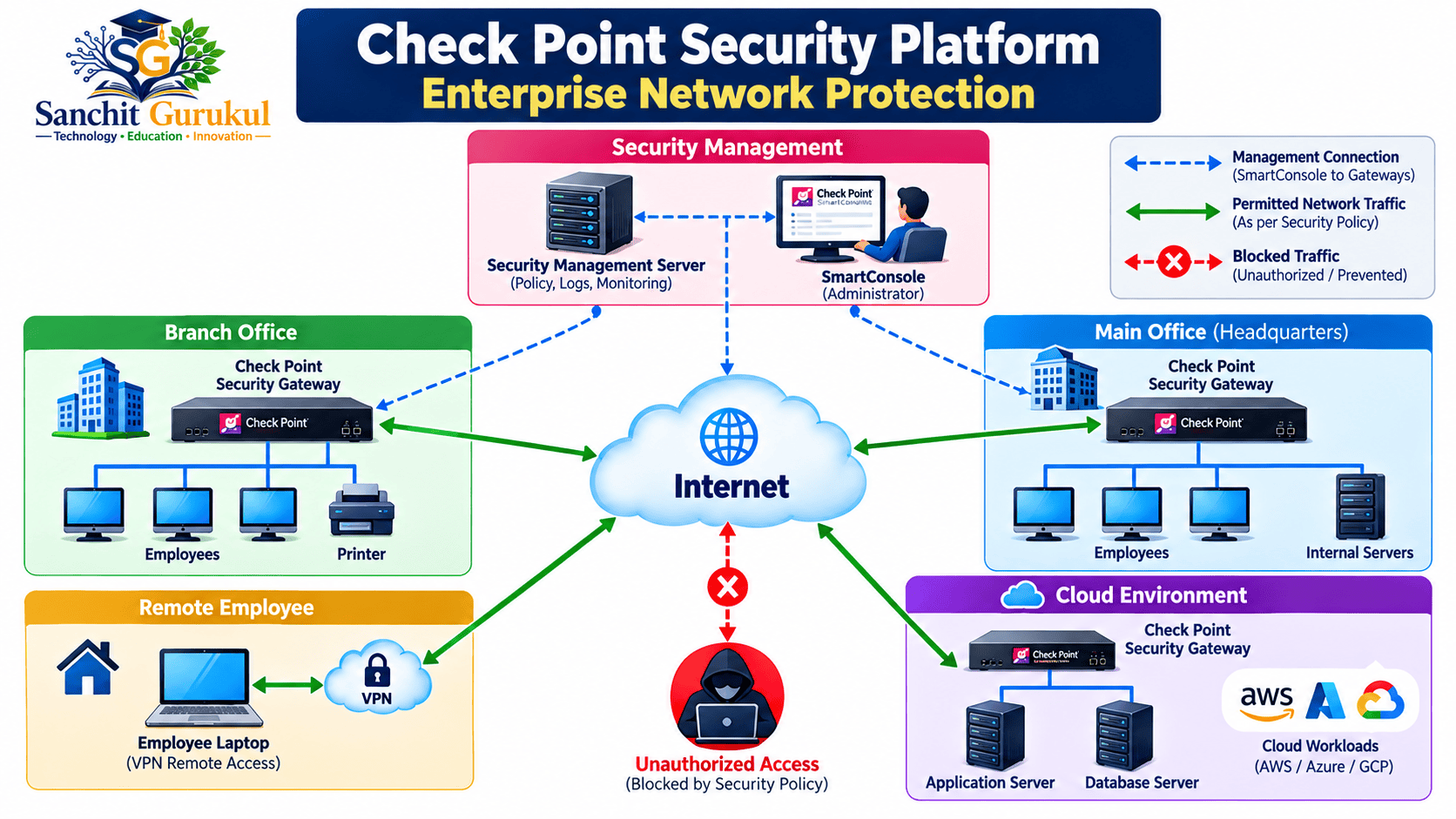
What Is the Check Point Security Platform?
Check Point provides cybersecurity technologies designed to protect different parts of an organization’s IT environment.
Its network security solutions are built around two important functions:
1. Security Gateway — Traffic Protection
The Security Gateway is responsible for inspecting network traffic and enforcing configured security policies.
Depending on the enabled features, it can:
- Permit or block network connections
- Track active connections
- Perform Network Address Translation (NAT)
- Identify supported applications
- Detect selected network threats
- Establish VPN connections
- Generate security logs
The Security Gateway is where network security policies are enforced.
2. Security Management Server — Central Administration
The Security Management Server manages security policies and connected gateways.
Administrators commonly access it through SmartConsole, a graphical management application.
With SmartConsole, administrators can create firewall rules, manage network objects, configure supported security features and review logs.
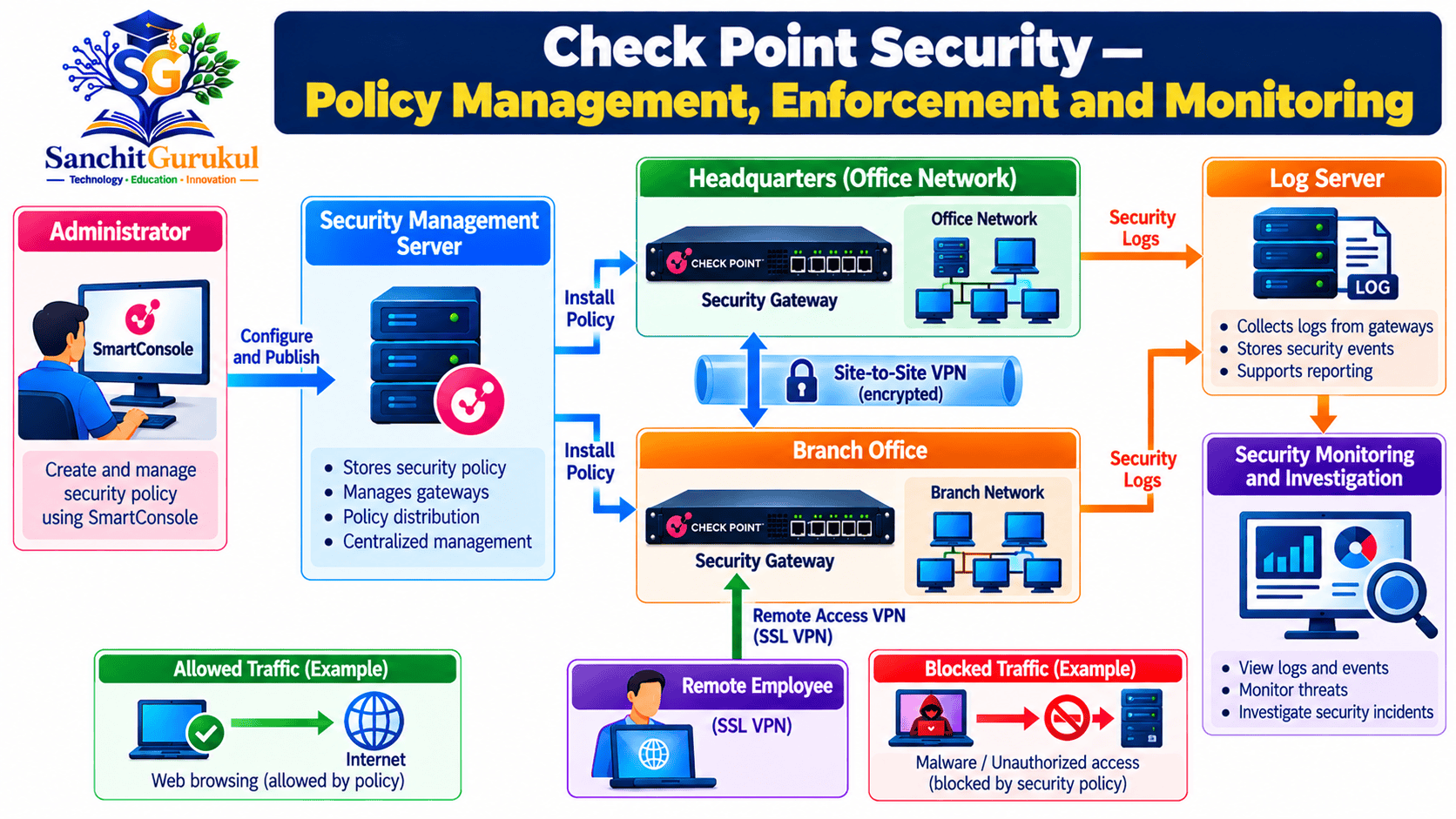
How Policy Management Works
- The administrator opens SmartConsole.
- SmartConsole connects to the Security Management Server.
- The administrator creates or modifies a security policy.
- The changes are published.
- The applicable policy is installed on selected Security Gateways.
- The gateways enforce the installed policy.
Platform Architecture at a Glance
| Component | Primary Role | Simple Explanation |
|---|---|---|
| SmartConsole | Administration | Graphical interface used to configure policies and review security information |
| Security Management Server | Central Management | Stores and manages policies, objects and gateway configurations |
| Security Gateway | Security Enforcement | Inspects traffic and applies installed security rules |
| Log Server | Log Collection | Receives and stores security logs from supported gateways |
| SmartEvent | Security Analytics | Correlates security events and supports investigations |
| ClusterXL | High Availability | Provides supported gateway redundancy and load-sharing capabilities |
| Cloud Security Gateway | Cloud Protection | Enforces supported security policies for cloud workloads |
These are functional components and capabilities. They do not all require separate physical appliances.
The exact architecture depends on the deployment size, product, licensing and management design.
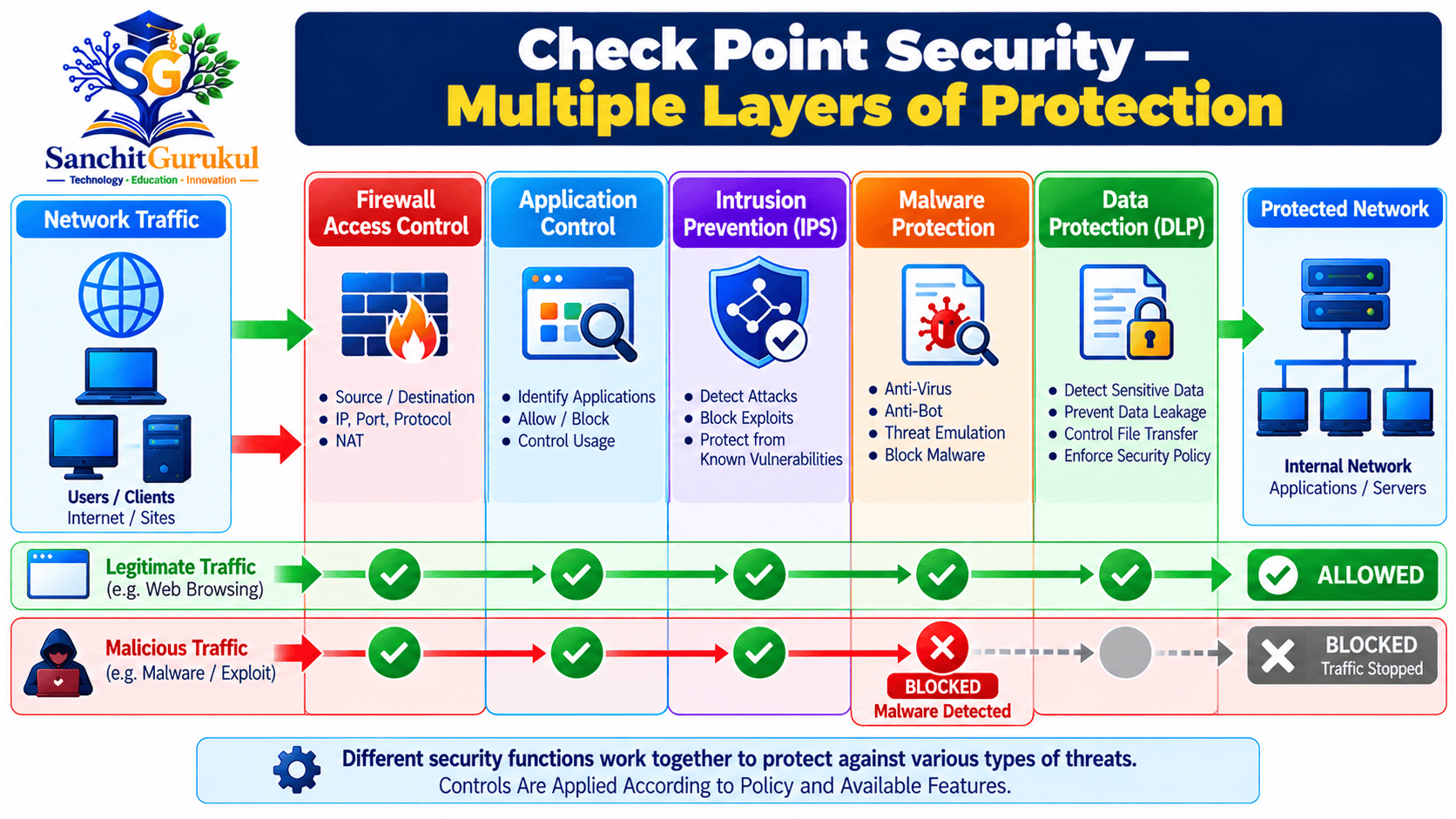
Important Check Point Security Features
Check Point uses a modular approach called Software Blades.
A Software Blade provides a particular security capability.
Different blades can work together, depending on the gateway, software, licensing and configuration.
1. Firewall and Application Control
The Firewall blade controls permitted network communication.
Application Control adds the ability to identify and control supported applications.
For example, an organization may allow employees to access approved business applications while restricting selected unauthorized applications.
2. Intrusion Prevention System (IPS)
IPS stands for Intrusion Prevention System.
It examines relevant network traffic to detect and prevent supported attack techniques.
For example, IPS may block traffic matching an enabled protection for a known software vulnerability.
3. Anti-Virus and Anti-Bot
Anti-Virus helps detect malicious files and related threats.
Anti-Bot helps detect and prevent communication associated with infected systems and malicious command-and-control infrastructure.
The effectiveness of these features depends on enabled protections and available security information.
4. Threat Emulation and Threat Extraction
Threat Emulation analyzes supported suspicious files in a controlled environment, often called a sandbox.
Threat Extraction removes potentially dangerous content from supported documents or converts them into a safer format.
These functions have different purposes.
Threat Emulation investigates suspicious file behavior, while Threat Extraction focuses on delivering cleaned content.
5. URL Filtering and Data Protection
URL Filtering controls access to supported websites or website categories.
For example, a company may restrict access to known phishing websites.
Data Loss Prevention (DLP) helps prevent unauthorized transmission of sensitive information.
DLP is different from ordinary firewall filtering because it focuses on protecting the data itself.
Security Features Summary
| Feature | Main Purpose |
|---|---|
| Firewall | Control network connections |
| IPS | Detect and prevent selected attacks |
| Application Control | Control supported applications |
| URL Filtering | Restrict selected websites |
| Anti-Virus | Detect supported malware |
| Anti-Bot | Detect malicious bot communication |
| Threat Emulation | Analyze suspicious files |
| Threat Extraction | Remove potentially harmful file content |
| DLP | Protect sensitive information |
VPN, Identity Awareness and Network Availability
1. Site-to-Site VPN
A Site-to-Site VPN creates a protected connection between separate networks.
For example, a company may connect its headquarters and branch office using an IPsec VPN.
IPsec provides authentication, encryption and integrity protection for supported VPN traffic.
2. Remote Access VPN
A Remote Access VPN allows authorized employees to connect to company resources while working from another location.
Depending on the client and configuration, Check Point supports IPsec-based remote access and other supported access methods.
Mobile Access can provide browser-based access to selected applications using HTTPS.
3. Identity Awareness
Identity Awareness helps the firewall recognize relevant user and computer identities.
Instead of relying only on IP addresses, security policies can use identified users or groups.
Example:
The Finance department may be permitted to access an internal financial application, while other users are restricted.
Identity Awareness can integrate with supported identity sources, including Active Directory.
Administrator role permissions are a separate management feature and should not be confused with user-based traffic policies.
4. High Availability — ClusterXL
High Availability helps reduce network disruption if a security gateway fails.
Check Point provides ClusterXL for supported clustering configurations.
Two important modes are:
| Mode | Simple Explanation |
|---|---|
| High Availability | An active member handles traffic while standby members are ready to take over |
| Load Sharing | Supported active members process traffic concurrently |
Load Sharing is sometimes described as Active/Active.
However, the available modes and limitations depend on the platform and software release.
ClusterXL and VRRP are separate redundancy technologies with different requirements.
Centralized Monitoring, Cloud Security and Practical Example
1. Logging and Monitoring
Check Point provides tools to record and investigate network and security events.
In modern centrally managed environments, administrators commonly use:
- SmartConsole — Logs & Events: Search and investigate security logs.
- SmartView: Access supported log views and reports through a web browser.
- SmartEvent: Correlate supported log events and help investigate security incidents.
Logs may be stored on management infrastructure or dedicated logging servers.
Monitoring capabilities depend on the deployed components and licensing.
2. Multi-Domain Security Management
Large organizations may manage several business units or customer environments.
Multi-Domain Security Management (MDSM) allows separate management domains.
Each domain can maintain its own policies, gateways, administrative permissions and relevant configuration.
For example, a Managed Security Service Provider may use different domains for separate customers.
3. Cloud and Hybrid Security
Check Point also provides cloud network security solutions.
Supported environments include:
- Amazon Web Services (AWS)
- Microsoft Azure
- Google Cloud
- Private and hybrid-cloud environments
These solutions can help protect cloud workloads and apply security controls across supported deployments.
However, cloud network firewall protection, application security and cloud posture management are different functions.
Deploying a cloud firewall does not automatically make a cloud environment compliant with every security standard.
Practical Example — Protecting a Business Network
Key Takeaways
Check Point Security Fundamentals
- Check Point provides security solutions for networks, cloud environments and other IT resources.
- Security Gateways enforce installed security policies.
- Security Management Servers provide centralized administration.
- SmartConsole is used to configure and monitor supported environments.
Important Security Features
- Firewall controls network communication.
- IPS helps detect and prevent selected attacks.
- Anti-Virus and Anti-Bot provide malware-related protection.
- Threat Emulation analyzes suspicious files.
- Threat Extraction removes potentially dangerous content from supported files.
- Identity Awareness supports user- and device-based access rules.
Operations and Availability
- VPNs protect communication between supported networks and remote users.
- ClusterXL provides supported redundancy and load-sharing options.
- SmartConsole, SmartView and SmartEvent support different monitoring functions.
- Multi-Domain Management helps separate administrative environments.
- Cloud Firewall provides network protection for supported cloud deployments.
Check Point provides a broad security platform that helps organizations protect networks, applications and cloud environments.
Its network security architecture combines traffic enforcement, centralized management and optional advanced security functions.
Features such as IPS, Application Control, VPN, Identity Awareness, ClusterXL and logging support different operational and security requirements.
However, effective protection depends on appropriate design, licensing, configuration and continuous monitoring.
Understanding these components provides a foundation for learning Check Point firewall administration and security operations.
Next Article: Check Point Software Blades Explained — Firewall, IPS, Anti-Bot, Anti-Virus and Advanced Threat Prevention.
Useful Links and References
SanchitGurukul Resources
Official External References
Your feedback matters
Was this post helpful?
Discussion
0 approved comments
No approved comments yet. You can start the discussion below.
Leave a Comment
No login is required. Name and email are used for moderation/security. Your email is never displayed publicly. All comments require administrator approval.
Discover more from SanchitGurukul
Subscribe to get the latest posts sent to your email.
