
Imagine an office with 50 computers connected to the internet.
Employees use websites, email and business applications every day.
But how can the organization control which network connections are allowed and which should be blocked?
This is where a network firewall helps.
A firewall acts like a security checkpoint between networks. It examines network traffic and applies rules to decide what communication is permitted.
One well-known firewall technology is the Cisco Adaptive Security Appliance (ASA).
In this article, you will learn:
- What Cisco ASA is
- Why organizations use it
- Its important security features
- How it fits into a network
- How it differs from newer firewall technologies

What Is Cisco ASA Firewall?
Cisco ASA stands for Cisco Adaptive Security Appliance.
It is a network security platform that provides firewall protection, network access control and VPN connectivity.
A Cisco ASA firewall can examine network packets and apply configured policies to control communication between networks.
A packet is a small unit of information transmitted across a network.
What Is a Stateful Firewall?
Cisco ASA uses stateful firewall technology.
A stateful firewall remembers information about active network connections.
For example:
- An office computer requests a website.
- The ASA checks whether the connection is permitted.
- If allowed, the ASA tracks the connection.
- Return traffic belonging to that permitted connection can pass according to its connection state and applicable inspection rules.
This is different from simply examining every packet without considering its connection.
Physical and Virtual Deployment
Cisco ASA software has been deployed on supported physical security appliances and as a virtual firewall called ASAv.
A virtual firewall runs as software in a supported virtualized environment instead of requiring a dedicated physical firewall appliance.
Supported hardware, software versions and deployment options depend on Cisco’s product documentation.
Important Features of Cisco ASA
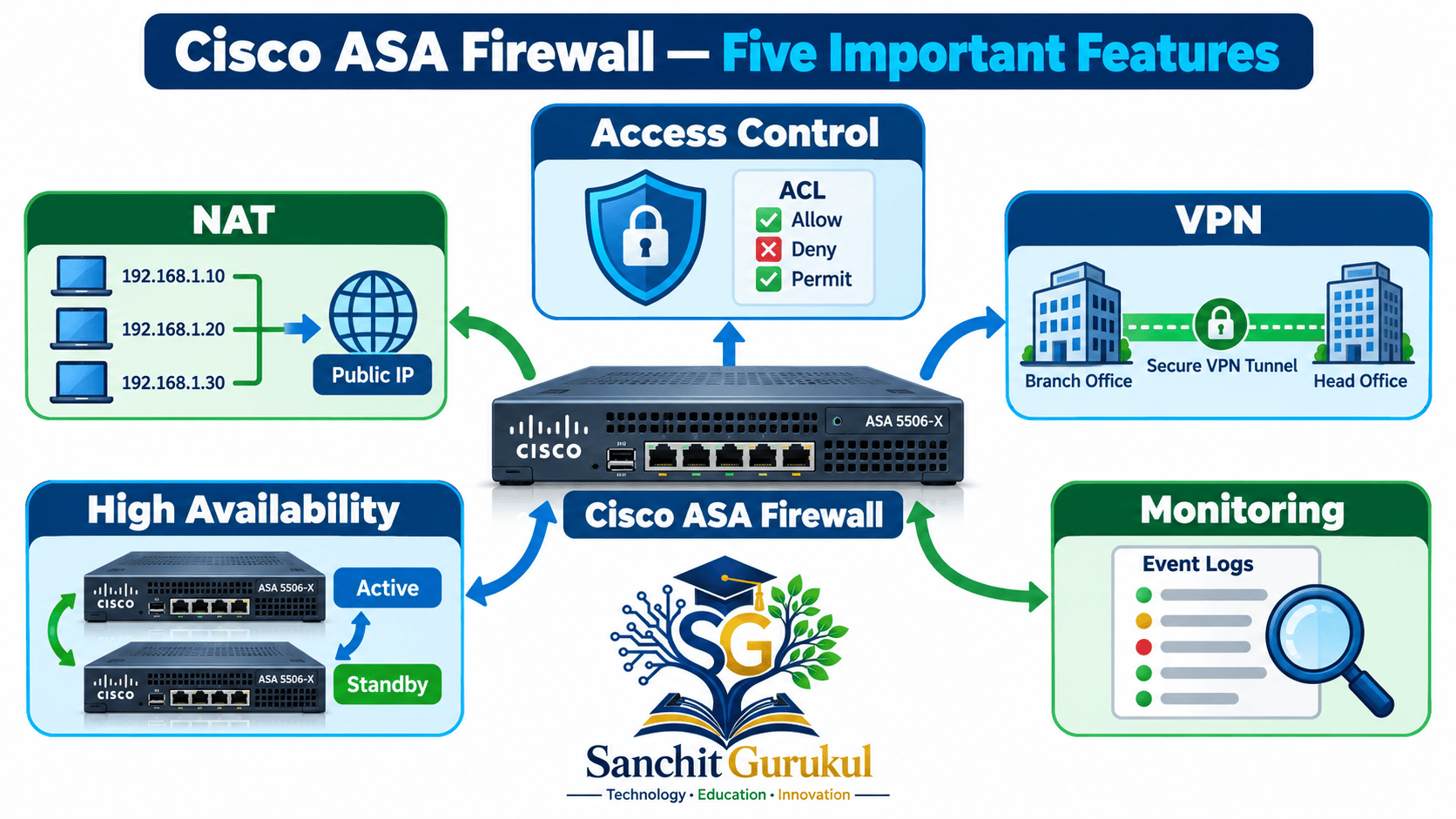
1. Access Control Lists (ACLs)
An ACL is a collection of rules that controls which network traffic is allowed or denied.
For example, a company may allow employees to access a web server while blocking access to an internal management service from the internet.
2. Network Address Translation (NAT)
NAT changes IP address information as traffic passes through a network device.
It is commonly used to connect devices with private IP addresses to external networks.
Cisco ASA supports several translation methods, including:
- Static NAT
- Dynamic NAT
- Port Address Translation (PAT)
NAT is an addressing function and should not be treated as a replacement for firewall security rules.
3. Virtual Private Network (VPN)
A VPN creates a protected connection over another network, such as the internet.
Cisco ASA supports VPN technologies used for:
- Connecting branch offices
- Providing remote employee access
- Protecting communication between supported network locations
Cisco AnyConnect is the former product name associated with what is now called Cisco Secure Client.
4. High Availability
Cisco ASA supports high-availability configurations on supported platforms.
These allow redundant firewalls to help maintain services if a firewall fails.
Common deployment designs include Active/Standby failover.
Active/Active failover is supported in specific multiple-security-context configurations rather than every ASA deployment.
5. Monitoring and Troubleshooting
Administrators can monitor and troubleshoot Cisco ASA using supported tools such as:
- Command-Line Interface (CLI)
- Adaptive Security Device Manager (ASDM)
- Syslog
- SNMP
- Packet-tracer diagnostic commands
Capabilities depend on the software version and platform.
Cisco ASA in a Real Network
Cisco ASA vs Next-Generation Firewalls
Traditional ASA functionality focuses on stateful firewalling, access control, NAT and VPN.
Modern Next-Generation Firewalls (NGFWs) can provide additional capabilities such as application identification, intrusion prevention and advanced threat detection.
Cisco Secure Firewall Threat Defense (FTD) is a separate software platform from ASA software.
Specific advanced security features depend on the Cisco platform, software release, configuration and licensing.
Key Takeaways
Basic Concepts
- Cisco ASA means Adaptive Security Appliance.
- It is primarily a stateful firewall and VPN platform.
- Firewall rules control permitted network communication.
- Stateful inspection tracks active connections.
Important Features
- ACLs control network access.
- NAT translates IP address information.
- VPNs protect communication across supported networks.
- High availability provides redundancy on supported platforms.
- Logging and diagnostic tools help administrators monitor traffic.
Easy Way to Remember
ACL: Controls access.
NAT: Translates addresses.
VPN: Protects communication.
Stateful Inspection: Tracks connections.
High Availability: Provides redundancy.
Logging: Records network activity.
Cisco ASA is an important technology for understanding enterprise firewalls, VPNs and network security.
Its main purpose is to control network communication according to configured security policies.
Understanding its basic architecture and features provides a foundation for learning firewall traffic processing, NAT configuration and troubleshooting.
Next Article: How Cisco ASA Works — Traffic Flow, ACLs and Stateful Inspection.
Useful Links and References
SanchitGurukul Resources
Official Reference
Your feedback matters
Was this post helpful?
Discussion
0 approved comments
No approved comments yet. You can start the discussion below.
Leave a Comment
No login is required. Name and email are used for moderation/security. Your email is never displayed publicly. All comments require administrator approval.
Discover more from SanchitGurukul
Subscribe to get the latest posts sent to your email.