
When a new computer, phone, printer, virtual machine, or other IPv4 device connects to a network, it normally needs several pieces of information before it can communicate properly.
These commonly include:
- IPv4 address
- Subnet mask
- Default gateway
- DNS servers
- Lease duration
- Other DHCP options
The Dynamic Host Configuration Protocol (DHCP) automates this process.
The best-known DHCPv4 address-assignment exchange is called:
DORA
DORA represents four messages:
- DHCPDISCOVER
- DHCPOFFER
- DHCPREQUEST
- DHCPACK
However, DHCP does not stop there.
Other messages such as:
- DHCPNAK
- DHCPDECLINE
- DHCPRELEASE
- DHCPINFORM
also play important roles during normal operation and troubleshooting.
RFC 2131 defines DHCPDISCOVER as the client message used to locate available DHCP servers, DHCPOFFER as the server’s offer, DHCPREQUEST as the client’s request or lease-management message, and DHCPACK as confirmation of the committed address and configuration.

Understanding the DHCP Conversation
A DHCP client often begins the process without a usable IPv4 address.
It may not know:
- Its own IPv4 address
- Which subnet it belongs to
- The default gateway
- The DNS server
- Where the DHCP server is located
During the initial exchange, DHCP therefore relies heavily on broadcasts.
DHCPv4 normally uses:
| Device | UDP Port |
|---|---|
| DHCP Server | 67 |
| DHCP Client | 68 |
A typical new client begins with:
Source IP: 0.0.0.0
Destination IP: 255.255.255.255

Source UDP Port: 68
Destination UDP Port: 67
The server can respond with an offered address and configuration.
Important DHCP Packet Fields
Several packet fields become useful when analyzing DHCP.
Common examples include:
| Field | Purpose |
|---|---|
xid |
Transaction ID used to associate messages belonging to the same DHCP exchange |
ciaddr |
Client IP address when the client already has a usable address in applicable states |
yiaddr |
“Your IP address”; commonly contains the address being offered or assigned |
siaddr |
Next server address in applicable boot scenarios |
giaddr |
Relay Agent / Gateway IP Address |
chaddr |
Client hardware address field |
| Options | Carry DHCP message type and additional configuration |
One especially useful value during packet analysis is:
Transaction ID (xid)
Messages belonging to the same DORA conversation normally carry the same transaction identifier so the client can associate server responses with its request. RFC 2131 specifies that server responses such as DHCPOFFER copy the transaction ID from the client’s DHCPDISCOVER.
Important DHCP Options
Several DHCP options are particularly important during DORA.
| Option | Meaning |
|---|---|
| 1 | Subnet Mask |
| 3 | Router / Default Gateway |
| 6 | DNS Servers |
| 50 | Requested IP Address |
| 51 | IP Address Lease Time |
| 53 | DHCP Message Type |
| 54 | Server Identifier |
| 55 | Parameter Request List |
| 58 | Renewal Time |
| 59 | Rebinding Time |
DHCP Option 53 identifies the type of DHCP message, while Option 54 identifies the selected DHCP server. RFC 2132 defines Option 50 as Requested IP Address and Option 53 as DHCP Message Type.
Step 1 — DHCPDISCOVER
The DHCP process commonly begins with:
DHCPDISCOVER
The client is searching for available DHCP servers.
Conceptually, it is asking:
“Is there a DHCP server that can give me network configuration?”
Typical Discover Packet
Message Type:
DHCPDISCOVER

Source IP:
0.0.0.0

Destination IP:
255.255.255.255

Source UDP Port:
68

Destination UDP Port:
67

Client Address:
Not yet assigned
Because the client does not yet know the DHCP server’s address, the initial Discover is normally broadcast on the local network.
What Can Be Inside DHCPDISCOVER?
The packet can include information such as:
- Client identifier
- Requested IP address
- Requested lease duration
- Parameter Request List
- Vendor class information
- Host name, depending on implementation
- Maximum DHCP message size
- Other supported options
The Parameter Request List is especially interesting.
It tells the server which configuration parameters the client would like to receive.
Conceptually:
Requested Parameters:

Subnet Mask
Router
DNS Servers
Domain Name
Lease Information
Requested IP Address
A client can sometimes include:
Option 50 — Requested IP Address
For example:
Requested IP Address:
192.168.10.75
This does not mean the server must grant that address.
The DHCP server still decides whether the requested address can be offered according to its lease database and configuration.

Step 2 — DHCPOFFER
A DHCP server that receives DHCPDISCOVER can respond with:
DHCPOFFER
The server is essentially saying:
“I can provide you this address and configuration.”
A possible offer might contain:
Offered IP Address:
192.168.10.50

Subnet Mask:
255.255.255.0

Default Gateway:
192.168.10.1

DNS Server:
192.168.10.10

Lease Time:
8 Hours

DHCP Server:
192.168.10.5
YIADDR
One important DHCP header field is:
yiaddr
This is commonly described as:
Your IP Address
During DHCPOFFER, it normally contains the IPv4 address being offered to the client.
Example:
yiaddr:
192.168.10.50
Server Identifier
The server normally identifies itself using:
Option 54 — Server Identifier
Example:
Option 54:
192.168.10.5
This becomes important when multiple DHCP servers respond.
RFC 2132 specifies that DHCP servers include the Server Identifier option in DHCPOFFER so clients can distinguish between different offers.
Can Multiple Servers Send Offers?
Yes.
Imagine the network contains:
DHCP Server A:
192.168.10.5

DHCP Server B:
192.168.10.6
The client might receive:
Offer A:
192.168.10.50

Offer B:
192.168.10.100
The client chooses one offer according to its DHCP implementation.
RFC 2131 allows a client to collect multiple DHCPOFFER messages and select an offer according to implementation-dependent criteria.
Step 3 — DHCPREQUEST
After choosing an offer, the client sends:
DHCPREQUEST
Conceptually:
“I want to use the address offered by this DHCP server.”
During the initial SELECTING process, DHCPREQUEST normally identifies:
- The selected server
- The requested IP address
For example:
Message Type:
DHCPREQUEST

Requested IP Address:
192.168.10.50

Server Identifier:
192.168.10.5
Why Is DHCPREQUEST Commonly Broadcast?
Suppose two servers made offers.
Server A:
192.168.10.5
Offered: 192.168.10.50

Server B:
192.168.10.6
Offered: 192.168.10.100
The client selects Server A.
The DHCPREQUEST can inform:
- Server A that its offer was selected.
- Server B that its offer was not selected.
RFC 2131 describes the SELECTING-state DHCPREQUEST as identifying the selected server while implicitly declining offers from the other servers.
DHCPREQUEST Has More Than One Purpose
An important troubleshooting point is that:
DHCPREQUEST does not only occur during initial DORA.
DHCPREQUEST can also be used when:
- Selecting an initial offer
- Confirming a previously allocated address after reboot
- Renewing an existing lease
- Rebinding when the original server cannot be reached
This means you should examine the surrounding packet fields and client state rather than assuming every DHCPREQUEST represents exactly the same situation.

Step 4 — DHCPACK
If the DHCP server accepts the request, it responds with:
DHCPACK
ACK means:
Acknowledgement
Conceptually:
“Your requested configuration is approved.”
The packet can contain the final configuration required by the client.
Example:
Assigned IP:
192.168.10.50

Subnet Mask:
255.255.255.0

Default Gateway:
192.168.10.1

DNS Servers:
192.168.10.10
192.168.10.11

Lease Duration:
8 Hours
RFC 2131 defines DHCPACK as the server-to-client message carrying configuration parameters including the committed network address.
What Happens After ACK?
Once the client receives and accepts the DHCPACK, it can configure its network interface.
For example:
IPv4 Address:
192.168.10.50

Subnet Mask:
255.255.255.0

Gateway:
192.168.10.1

DNS:
192.168.10.10
The client can now begin normal IPv4 communication.
Depending on the operating system and implementation, the client may also perform address-conflict detection or related checks before fully using the address.
DHCPNAK — When the Server Rejects the Request
Not every DHCPREQUEST results in DHCPACK.
A server can respond with:
DHCPNAK
NAK means:
Negative Acknowledgement
It tells the client that its requested or assumed network configuration is not acceptable.
RFC 2131 describes DHCPNAK as a server response indicating that the client’s idea of its network address is incorrect, such as after moving to another subnet or when a lease is no longer valid.
Example DHCPNAK Scenario
Assume a laptop previously used:
192.168.10.50/24The laptop is moved to another network:
192.168.20.0/24It attempts to reuse its old address.
The DHCP server determines that:
192.168.10.50is not valid on the new subnet.
The server can send:
DHCPNAK
The client should then stop attempting to use that invalid configuration and return to address acquisition.
ACK vs NAK
| Server Response | Meaning |
|---|---|
| DHCPACK | Requested configuration is accepted |
| DHCPNAK | Requested or assumed configuration is not valid |

DHCPDECLINE — Client Detects an Address Conflict
Another important message is:
DHCPDECLINE
DHCPDECLINE travels in the opposite logical direction from DHCPNAK.
DHCPNAK is generated by the server.
DHCPDECLINE is generated by the client.
The client is effectively saying:
“The address you gave me appears to already be in use. I cannot safely use it.”
RFC 2131 defines DHCPDECLINE as a client-to-server notification that the suggested network address appears to already be in use. The server is then expected to treat the address as unavailable.
Example
The DHCP server offers:
192.168.10.75The client detects that another device appears to be using:
192.168.10.75The client sends:
DHCPDECLINE
The DHCP server should not continue assigning that address normally until the conflict condition has been handled.
Why Could This Happen?
Possible causes include:
- Static IP overlapping the DHCP pool
- Incorrect DHCP exclusions
- Duplicate static configuration
- DHCP database inconsistency
- Multiple badly coordinated DHCP servers
- Stale or conflicting network configuration
DHCPRELEASE — Client Gives Back the Lease
A client can voluntarily relinquish its DHCP lease using:
DHCPRELEASE
The message tells the server:
“I no longer need this address.”
RFC 2131 defines DHCPRELEASE as a client-to-server message that relinquishes the network address and cancels the remaining lease. It also specifies that clients normally unicast DHCPRELEASE to the server.
Example
The client currently has:
IP Address:
192.168.10.50

DHCP Server:
192.168.10.5
The client releases the lease.
The DHCP server can then mark the address as no longer allocated according to its implementation and lease-management process.
Windows Example
Release the current DHCP lease:
ipconfig /releaseRequest DHCP configuration again:
ipconfig /renew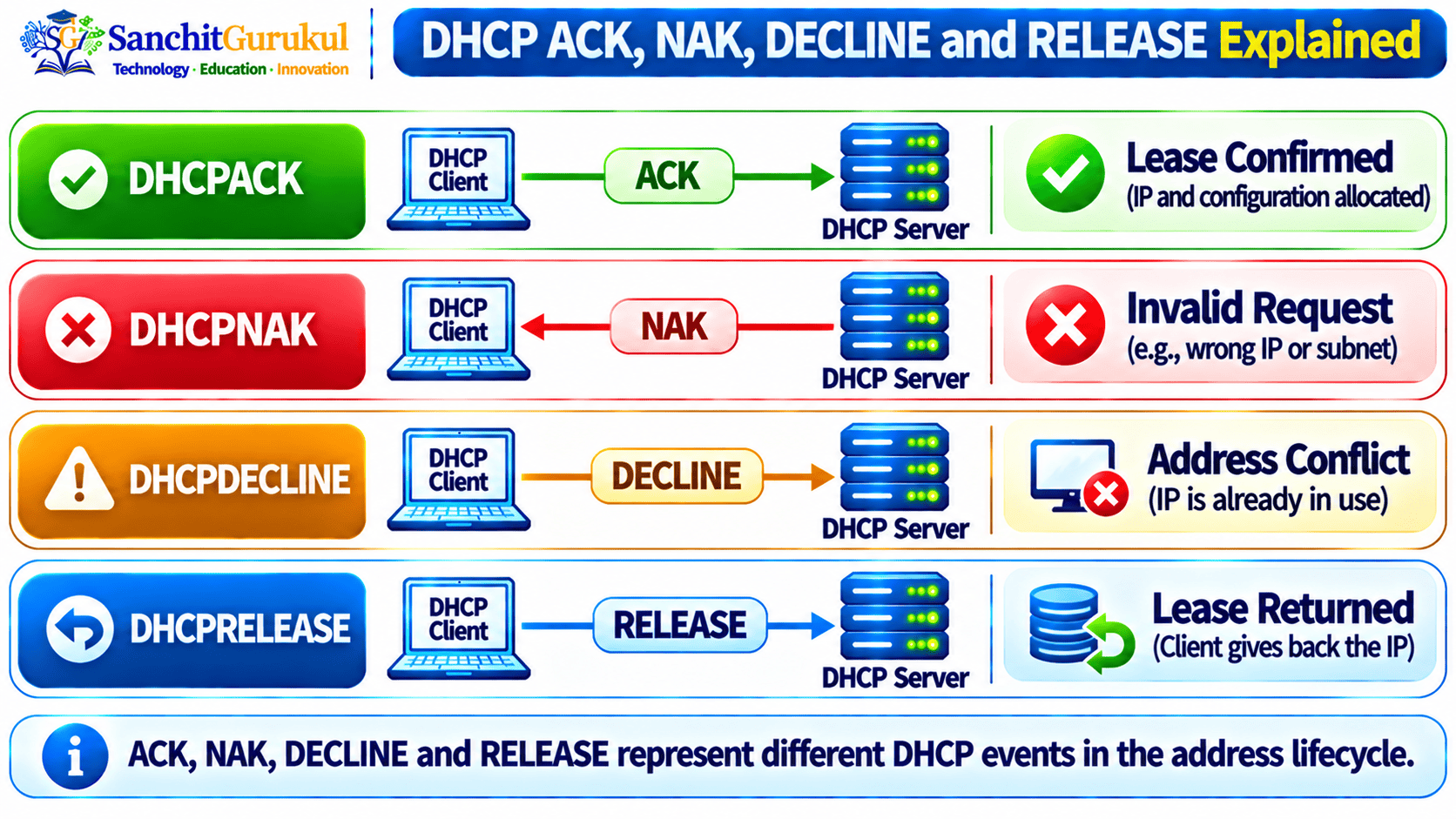
Packet-by-Packet DORA Analysis
A packet capture makes DHCP much easier to understand.
Consider this example.
Network
Client:
00:11:22:33:44:55

DHCP Server:
192.168.10.5

DHCP Pool:
192.168.10.50 - 192.168.10.200

Gateway:
192.168.10.1

DNS:
192.168.10.10
Packet 1 — DHCPDISCOVER
Client → Broadcast

Source:
0.0.0.0:68

Destination:
255.255.255.255:67

DHCP Message:
DHCPDISCOVER

Transaction ID:
0x12345678
Interpretation:
The client does not yet have usable IPv4 configuration and is looking for DHCP servers.
Packet 2 — DHCPOFFER
Server → Client

DHCP Message:
DHCPOFFER

Transaction ID:
0x12345678

yiaddr:
192.168.10.50

Server Identifier:
192.168.10.5

Lease:
8 Hours
Interpretation:
The DHCP server is offering the client 192.168.10.50.
Notice that the transaction ID matches the Discover.
Packet 3 — DHCPREQUEST
Client → Broadcast

DHCP Message:
DHCPREQUEST

Transaction ID:
0x12345678

Requested IP:
192.168.10.50

Server Identifier:
192.168.10.5
Interpretation:
The client selected the offer from 192.168.10.5 and is requesting 192.168.10.50.
Packet 4 — DHCPACK
Server → Client

DHCP Message:
DHCPACK

Transaction ID:
0x12345678

Assigned IP:
192.168.10.50

Subnet Mask:
255.255.255.0

Gateway:
192.168.10.1

DNS:
192.168.10.10

Lease:
8 Hours
Interpretation:
The server has confirmed the configuration.
The DORA process is complete.
What Should You Compare?
When following one DHCP transaction in Wireshark, check:
- Transaction ID
- Client MAC address
- DHCP Message Type
- Requested IP Address
yiaddr- Server Identifier
- Lease time
- Subnet mask
- Router option
- DNS option
giaddrwhen DHCP Relay is involved
Capturing DHCP with Wireshark and tcpdump
DHCP troubleshooting becomes much easier when you examine the actual exchange.
Wireshark Display Filter
A commonly useful filter is:
dhcpDepending on the Wireshark version or capture decoding, DHCPv4 information may also be associated with BOOTP terminology because DHCP uses the BOOTP message structure.
Filter by UDP Ports
You can also investigate:
udp.port == 67 || udp.port == 68Linux tcpdump
Capture DHCP traffic:
sudo tcpdump -nn -i any 'udp port 67 or udp port 68'For more detail:
sudo tcpdump -nn -vvv -i any 'udp port 67 or udp port 68'What a Healthy Capture Should Show
A successful new-client exchange commonly looks like:
DHCPDISCOVER
DHCPOFFER
DHCPREQUEST
DHCPACK
A problematic sequence might look like:
DHCPDISCOVER
DHCPDISCOVER
DHCPDISCOVER
This strongly suggests the client is transmitting Discover messages but not receiving a usable offer.
Another example:
DHCPDISCOVER
DHCPOFFER
DHCPREQUEST
DHCPNAK
Here the server is explicitly rejecting the requested configuration.

Common DORA Failures
Following the packets in order helps isolate where DHCP is failing.
DISCOVER but No OFFER
Capture:
DHCPDISCOVER
DHCPDISCOVER
DHCPDISCOVER
Possible causes include:
- DHCP server unavailable
- DHCP scope exhausted
- Wrong VLAN
- DHCP Relay missing
- Incorrect helper address
- Routing problem between relay and server
- ACL or firewall blocking DHCP
- DHCP snooping configuration problem
OFFER Arrives but No REQUEST
Capture:
DHCPDISCOVER
DHCPOFFER
Investigate:
- Client behavior
- Multiple competing offers
- Client operating-system problems
- Packet loss
- Security controls
- Invalid offer information
REQUEST Followed by NAK
Capture:
DHCPDISCOVER
DHCPOFFER
DHCPREQUEST
DHCPNAK
Investigate:
- Incorrect subnet
- Old address from another network
- Invalid lease state
- DHCP server policy
- Scope configuration
- Relay subnet information
ACK Received but Client Cannot Communicate
Capture:
DHCPDISCOVER
DHCPOFFER
DHCPREQUEST
DHCPACK
DORA completed successfully.
Now verify:
- Subnet mask
- Default gateway
- DNS servers
- VLAN configuration
- Local firewall
- ARP
- Routing
- Upstream connectivity
The problem may no longer be DHCP address assignment.
Repeated DECLINE Messages
Investigate:
- Duplicate IP addresses
- Static devices inside DHCP pools
- Incorrect exclusions
- Multiple DHCP servers
- Address conflict detection
- DHCP database consistency
DORA with a DHCP Relay
When the DHCP server is on another subnet, a DHCP Relay Agent can carry the exchange between networks.
Example:
Client Network:
192.168.10.0/24

Client Gateway / Relay:
192.168.10.1

DHCP Server:
10.10.10.20
The basic sequence remains:
Client → DHCPDISCOVER
Relay → DHCP Server

DHCP Server → DHCPOFFER
Relay → Client

Client → DHCPREQUEST
Relay → DHCP Server

DHCP Server → DHCPACK
Relay → Client
The relay can populate:
giaddr:
192.168.10.1
This helps the server identify the subnet and choose the correct DHCP scope.
DORA vs Other DHCP Messages
The easiest way to remember the different DHCP messages is by identifying who sends them and why.
| Message | Normally Sent By | Main Purpose |
|---|---|---|
| DHCPDISCOVER | Client | Find DHCP servers |
| DHCPOFFER | Server | Offer address/configuration |
| DHCPREQUEST | Client | Request selected address or manage lease |
| DHCPACK | Server | Confirm configuration |
| DHCPNAK | Server | Reject invalid client configuration |
| DHCPDECLINE | Client | Report offered address already in use |
| DHCPRELEASE | Client | Give up an existing lease |
| DHCPINFORM | Client | Request configuration options without requesting a new address lease |
RFC 2131 defines these DHCP message roles, while RFC 2132 assigns the corresponding DHCP Message Type values through Option 53.
DHCP Message Type Values
| Option 53 Value | Message |
|---|---|
| 1 | DHCPDISCOVER |
| 2 | DHCPOFFER |
| 3 | DHCPREQUEST |
| 4 | DHCPDECLINE |
| 5 | DHCPACK |
| 6 | DHCPNAK |
| 7 | DHCPRELEASE |
| 8 | DHCPINFORM |
Key Takeaways
- DORA stands for Discover, Offer, Request and Acknowledge.
- DHCPv4 normally uses UDP port 68 for the client and UDP port 67 for the server.
- A new client commonly sends DHCPDISCOVER using
0.0.0.0as its source address and broadcast communication to find DHCP servers. - DHCPOFFER proposes an address and other configuration, but the normal allocation is not complete yet.
- DHCPREQUEST identifies the address and server selected by the client during initial allocation.
- DHCPACK confirms the lease and provides the final configuration.
- DHCPNAK is sent by a server when the client’s requested or assumed network configuration is not valid.
- DHCPDECLINE is sent by a client when the offered address appears to already be in use.
- DHCPRELEASE allows a client to voluntarily return its lease.
- DHCPREQUEST is also used during other lease states, so it should not always be interpreted as the third step of a new DORA exchange.
- Matching the transaction ID is one of the easiest ways to follow the same DHCP conversation in a packet capture.
- Important packet-analysis fields include
yiaddr,giaddr, Option 50, Option 53, Option 54, lease time, router information and DNS information. - A healthy initial allocation commonly appears as:
DHCPDISCOVER
DHCPOFFER
DHCPREQUEST
DHCPACK- When troubleshooting DHCP, identify the last successful packet and investigate why the expected next message did not appear.
DHCP may appear simple because users normally see only the final IPv4 address.
Underneath that address, however, DHCP uses a structured packet exchange to discover servers, propose configuration, select an offer, confirm a lease, reject invalid configurations, detect conflicts, and release addresses.
Understanding the individual packets makes DHCP troubleshooting much more predictable.
Instead of asking only:
“Why did the client not get an IP address?”
you can ask:
“Which DHCP message was the last one successfully exchanged?”
That question often leads directly toward the actual problem.
Useful Links and References
SanchitGurukul Resources
Official Technical References
Your feedback matters
Was this post helpful?
Discussion
0 approved comments
No approved comments yet. You can start the discussion below.
Leave a Comment
No login is required. Name and email are used for moderation/security. Your email is never displayed publicly. All comments require administrator approval.
Discover more from SanchitGurukul
Subscribe to get the latest posts sent to your email.


