
Not every firewall works in exactly the same way.
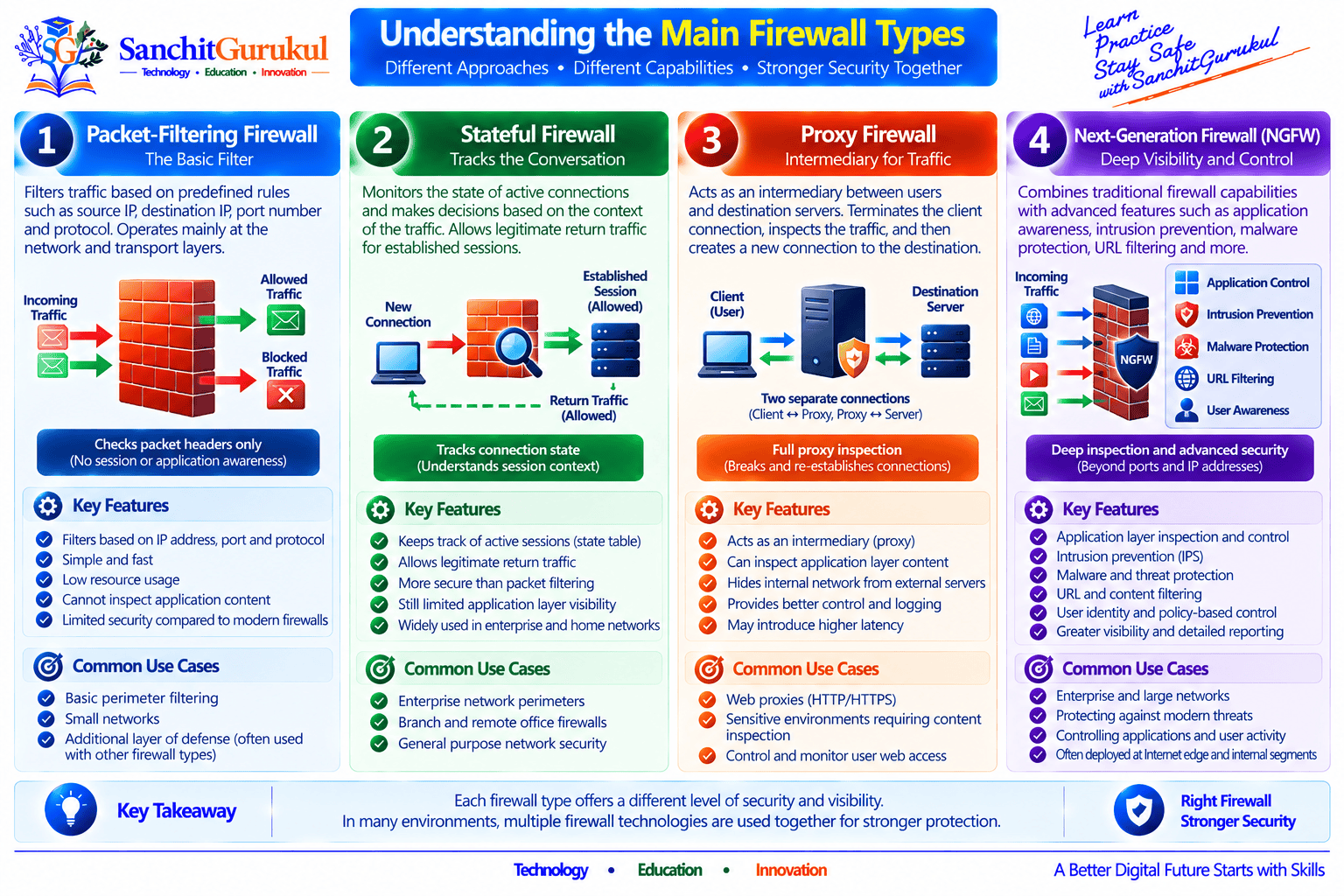
A simple firewall may make decisions using information such as IP addresses, protocols, and ports. A stateful firewall can keep track of active connections. A proxy firewall may act as an intermediary between communicating systems, while a modern Next-Generation Firewall (NGFW) can provide application awareness and additional security inspection.
There are also different ways to deploy firewalls. Some protect an entire network, some run directly on individual computers, some operate as virtual appliances, and others are delivered through cloud infrastructure or security services.
Understanding these differences is important because the word firewall describes a broad family of security technologies rather than one single design.
Understanding Firewall Types
Why Are There Different Types of Firewalls?
Networks have changed considerably over time.
Early network security requirements were relatively simple. Administrators often needed to control communication based primarily on:
- Source address
- Destination address
- Protocol
- Port
Modern environments are more complicated.
Organizations now operate:
- Web applications
- Cloud workloads
- Remote users
- SaaS applications
- Mobile devices
- Encrypted applications
- IoT devices
- Hybrid data centers
- Multiple security zones
Attack techniques have also become more sophisticated.
As a result, firewall technologies have developed additional capabilities for understanding connections, applications, users, and threats.
Two Useful Ways to Classify Firewalls
Firewall types become easier to understand when we separate two questions.
Question 1: How does the firewall process or understand traffic?
Examples include:
- Packet filtering
- Stateful inspection
- Proxy processing
- Next-generation inspection
Question 2: How or where is the firewall deployed?
Examples include:
- Network firewall
- Host-based firewall
- Physical appliance
- Virtual firewall
- Cloud firewall
- Firewall as a Service
This distinction prevents a common misunderstanding.
A virtual firewall, for example, does not describe how intelligently traffic is inspected. It describes how the firewall is deployed.
That virtual firewall could still be stateful or provide NGFW capabilities.
Major Firewall Technologies
Packet-Filtering Firewall
A packet-filtering firewall makes traffic decisions using information available from packet headers.
Typical information may include:
- Source IP address
- Destination IP address
- Protocol
- Source port
- Destination port
Consider a web server with the IP address:
192.0.2.50
The organization wants Internet users to access HTTPS but does not want them accessing SSH.
A simplified policy might look like this:
| Destination | Protocol | Port | Action |
|---|---|---|---|
| 192.0.2.50 | TCP | 443 | Allow |
| 192.0.2.50 | TCP | 22 | Deny |
The firewall examines the relevant packet information and applies the configured rule.
Limitation of Basic Packet Filtering
Imagine that an organization permits TCP port 443.
We commonly associate port 443 with HTTPS, but simply allowing a port does not necessarily mean the firewall understands the actual application or content using that connection.
This distinction becomes increasingly important in modern networks where applications can use common ports and much traffic is encrypted.

Stateful Firewall
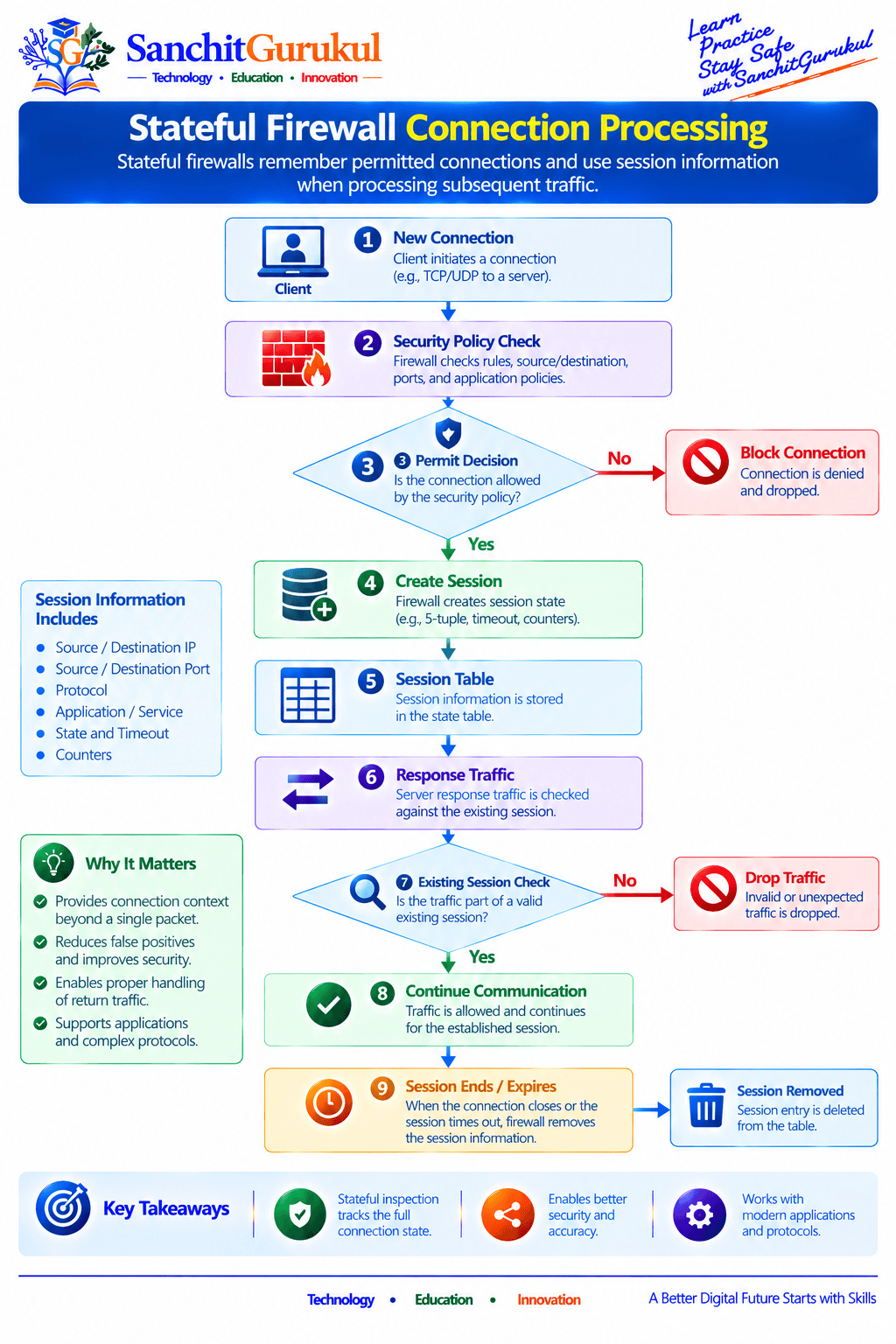
A stateful firewall goes beyond examining packets independently.
It maintains information about active connections.
Suppose a laptop initiates an HTTPS connection to a web server.
The firewall can record information about the permitted session. When response traffic returns, the firewall can determine that it belongs to an existing connection.
This provides useful context that simple stateless packet evaluation does not have.
A simplified session entry might contain information such as:
| Session Information | Example |
|---|---|
| Source | 10.10.10.25 |
| Destination | 203.0.113.20 |
| Protocol | TCP |
| Destination Port | 443 |
| State | Established |
The actual information stored depends on the firewall implementation.
Proxy Firewall
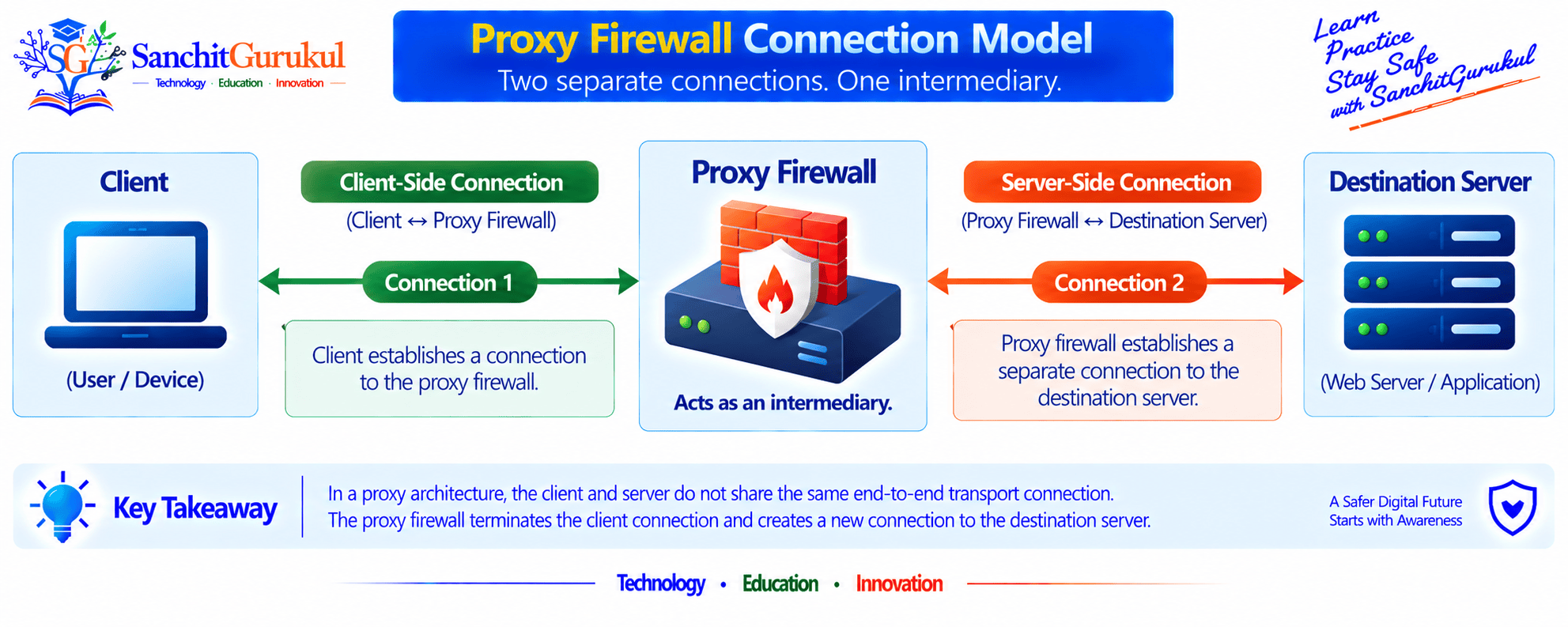
A proxy firewall can operate as an intermediary between communicating systems.
Instead of the original client connection simply passing directly through the firewall, a proxy architecture may terminate the client-side connection and establish a separate connection toward the destination.
Consider:
Client
The client communicates with the proxy.
Proxy
The proxy processes the communication according to its capabilities and policies.
Destination Server
The proxy establishes or manages communication toward the destination.
This separation can provide additional control and application-level visibility depending on the proxy technology.
Practical Proxy Example
A secure web proxy may receive a user’s web request, evaluate applicable policy, and then communicate with the destination web service on the user’s behalf.
Depending on the product and configuration, it may enforce controls such as:
- URL filtering
- User authentication
- Content policies
- Malware inspection
- Logging
Proxy behavior varies considerably among products and protocols, so the term should not be interpreted as one universal implementation.
Next-Generation Firewall
A Next-Generation Firewall, commonly called an NGFW, combines traditional firewall capabilities with deeper traffic visibility and security functions.
Depending on the product, licensing, and configuration, an NGFW may provide:
- Stateful inspection
- Application identification
- User-aware security policy
- Intrusion prevention
- URL filtering
- Malware detection
- File inspection
- DNS security
- TLS inspection
- Threat intelligence
- Advanced logging
One important difference is the ability to make policies using more than just ports.
Imagine that TCP port 443 is permitted.
A traditional port-based policy primarily knows that the connection is using TCP port 443.
An NGFW may be able to identify the actual application using that connection and apply additional security policy.
Firewall Deployment Types
The previous firewall types mainly describe traffic-processing and security capabilities.
Now consider where and how a firewall is deployed.
Network Firewall
A network firewall controls communication crossing a network boundary.
For example, one firewall may separate:
- Internet
- Employee network
- Server network
- Guest network
- Management network
This allows centralized security policies to control communication among different areas.
Host-Based Firewall
A host-based firewall runs directly on an endpoint or server.
Examples include firewall functionality built into common operating systems.
Suppose a company has a Windows server.
Even if a network firewall protects the server network, the server’s local firewall can provide another layer of access control directly on the host.
This can be useful because not all communication necessarily crosses the same network firewall.
Physical Firewall
A physical firewall is a dedicated hardware appliance deployed in the network.
Physical appliances are common at:
- Internet gateways
- Data centers
- Large offices
- Branch offices
- Network segmentation boundaries
Hardware platforms can be designed for particular throughput, interface, acceleration, redundancy, and operational requirements.
Virtual Firewall
A virtual firewall runs as a virtualized software appliance rather than requiring a dedicated physical appliance for each firewall instance.
Virtual firewalls are useful in:
- Virtualized data centers
- Private clouds
- Public clouds
- Lab environments
- Software-defined architectures
They can provide many of the same logical security capabilities as physical firewalls, depending on the product.
Cloud Firewall
Cloud environments introduce security controls designed specifically for cloud architectures.
A cloud firewall may be implemented as:
- Virtual firewall appliances
- Cloud-native firewall services
- Managed network security services
- Distributed security controls
The exact architecture differs between cloud providers and security vendors.
Firewall as a Service
Firewall as a Service (FWaaS) delivers firewall functionality through a cloud-based security service.
Instead of forcing every user or branch to send traffic through a traditional centralized physical firewall, organizations can use distributed cloud security infrastructure.
FWaaS is often associated with broader architectures such as Secure Access Service Edge (SASE), although the two terms are not interchangeable.

Comparing Firewall Types
Quick Comparison
| Firewall Type | Main Idea | Typical Strength | Important Limitation or Consideration |
|---|---|---|---|
| Packet Filtering | Checks packet information | Simple traffic control | Limited application context |
| Stateful | Tracks connections | Session awareness | Still depends on correct policies |
| Proxy | Acts as intermediary | Protocol/application control depending on implementation | Additional processing and design considerations |
| NGFW | Deeper traffic and security awareness | Application and threat-based controls | Complexity, licensing and resource requirements |
| Host-Based | Protects individual system | Endpoint-level control | Must be managed across hosts |
| Network Firewall | Protects network boundaries | Centralized network enforcement | Traffic must traverse the enforcement point |
| Virtual Firewall | Software-based deployment | Flexible virtualization/cloud deployment | Performance depends on environment and architecture |
| Cloud/FWaaS | Cloud-delivered enforcement | Distributed and scalable deployment options | Architecture and provider capabilities vary |
This table should be used as a learning aid rather than an absolute product comparison.
Real firewall platforms frequently combine multiple technologies.
Which Firewall Is Best?
There is no universally “best” firewall type.
The appropriate solution depends on requirements.
For example:
Small Home Network
A firewall integrated into the Internet router combined with host-based endpoint firewalls may satisfy many basic requirements.
Enterprise Office
An NGFW may provide centralized Internet security, segmentation, application visibility, VPN capabilities, and threat prevention.
Data Center
Organizations may use high-capacity physical or virtual firewalls to separate application environments and sensitive network segments.
Cloud Environment
Virtual firewalls, cloud-native firewall services, distributed security controls, or combinations of these may be appropriate.
Remote Workforce
Cloud-delivered security services and endpoint controls may become more important when users are no longer consistently located behind the corporate network firewall.

Multiple Firewall Types Can Work Together
A mature environment often uses multiple layers.
For example, an employee laptop may have a host firewall.
Traffic may then pass through an enterprise NGFW.
A sensitive application network may have additional segmentation controls.
Cloud workloads may have separate cloud-native or virtual firewall policies.
This is not necessarily unnecessary duplication.
Different controls can protect different boundaries and reduce reliance on a single security layer.
Key Takeaways and Summary
Key Takeaways
- There are several types of firewalls because different environments require different levels and locations of security enforcement.
- Packet-filtering firewalls primarily use network and transport information to control traffic.
- Stateful firewalls maintain information about active network connections.
- Proxy firewalls can act as intermediaries between clients and destination systems.
- NGFWs can add application awareness and additional security inspection capabilities.
- Host-based and network firewalls protect different security boundaries.
- Physical, virtual, and cloud firewalls describe deployment approaches rather than necessarily describing inspection depth.
- A single firewall product can belong to several firewall categories at the same time.
- Organizations commonly combine different firewall technologies rather than relying on one security control.
- Firewall selection should be driven by security, traffic, architecture, performance, availability, and operational requirements.
Summary
The term firewall covers multiple security technologies.
Packet-filtering firewalls provide basic traffic control, while stateful firewalls add connection awareness. Proxy firewalls can intermediate communication, and Next-Generation Firewalls extend traditional firewall capabilities with deeper application and threat visibility.
Firewalls can also be deployed in different ways. They may run directly on individual systems, protect network boundaries, operate as physical or virtual appliances, or be delivered through cloud infrastructure and security services.
The most important lesson is not to think of these firewall types as competitors where one must always replace another. Modern security architectures often combine several approaches to protect different systems and network boundaries.
Useful Links and References
SanchitGurukul Static Resources
Official External References
Your feedback matters
Was this post helpful?
Discussion
0 approved comments
No approved comments yet. You can start the discussion below.
Leave a Comment
No login is required. Name and email are used for moderation/security. Your email is never displayed publicly. All comments require administrator approval.
Discover more from SanchitGurukul
Subscribe to get the latest posts sent to your email.

