
Prerequisites: Basic HTTP, HTTPS, Web Servers and Firewall Concepts
Imagine you manage an online shopping website.
Customers visit the website to search for products, add items to their shopping carts and place orders.
Every time someone opens a page, searches for a product or submits a form, their browser sends a request to the web server.
Most requests are legitimate.
However, an attacker may send specially crafted requests to exploit weaknesses in the website.
For example, an attacker might attempt to insert harmful SQL instructions into an application input field.
How can the server identify and block some of these suspicious requests before the web application processes them?
One security solution is a Web Application Firewall (WAF).
A WAF examines HTTP traffic according to configured security rules.
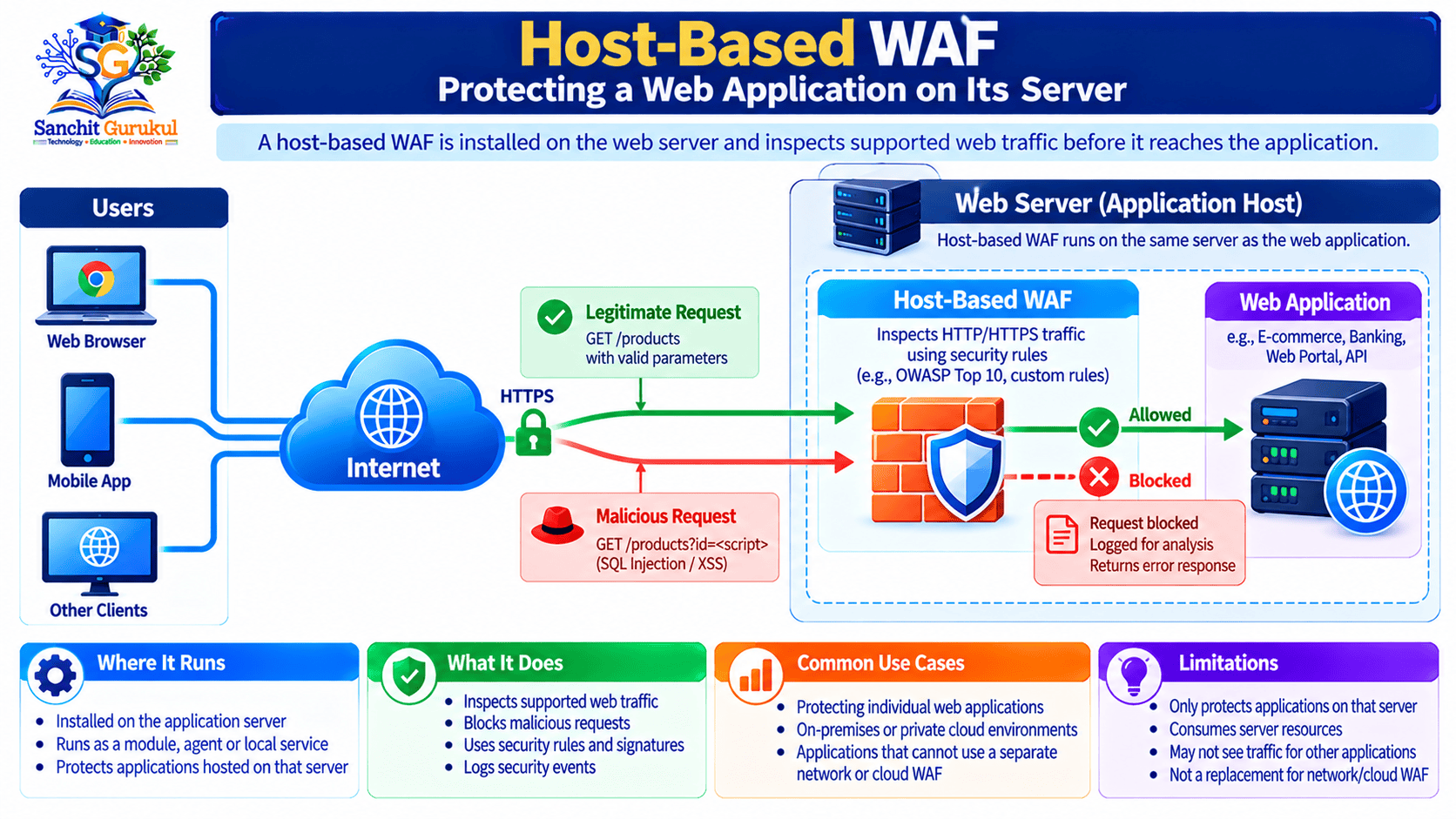
A Host-Based Web Application Firewall is a WAF deployed within the server environment hosting the web application, commonly through a web-server module or another locally integrated component.
It helps protect the application without requiring every request to pass through a separate external WAF service.
However, a host-based WAF is not a replacement for secure application development or timely security updates.
In this article, you will learn:
- What a host-based WAF is
- How it differs from traditional network firewalls
- How host-based WAFs inspect web requests
- Common threats a WAF can help detect
- How WAF engines and security rules work together
- Differences between host-based, network-based and cloud-based WAFs
- Benefits and limitations
- A simple real-world example
- Best practices for safe deployment and monitoring
What Is a Host-Based WAF and Why Is It Used?
A Host-Based Web Application Firewall is software deployed within the hosting environment of a web application to inspect supported HTTP traffic.
It is commonly integrated with a web server or application-serving component.
Its primary purpose is to help detect and handle requests that may contain web application attacks.
What Does a WAF Protect?
A WAF is designed primarily to protect HTTP-based applications.
Examples include:
- E-commerce websites
- Online banking portals
- Login pages
- Content management systems
- Customer portals
- REST APIs
- Business web applications
HTTP is the protocol used by browsers and many applications to communicate with web services.
HTTPS adds TLS protection to HTTP communication.
The WAF needs access to suitable HTTP information to inspect requests meaningfully.
For encrypted HTTPS traffic, that generally means inspection occurs where traffic has been decrypted or where appropriate TLS termination and integration are available.
Where Is a Host-Based WAF Installed?
A host-based WAF can run:
- As a supported web-server module
- Through a connector integrated into the web server
- As a locally deployed security component in the application-serving environment
For example, a compatible WAF engine may be integrated with Apache or Nginx.
The exact method depends on the web server, WAF engine and supported software versions.
Host-Based WAF vs Traditional Network Firewall
A traditional network firewall usually makes decisions based on information such as:
- Source IP address
- Destination IP address
- Protocol
- Port
- Connection state
A WAF analyzes web application communication in more detail.
It may inspect:
- URLs
- HTTP methods
- Request headers
- Query parameters
- Form fields
- Request bodies
- Cookies
| Network Firewall | Web Application Firewall |
|---|---|
| Controls network connections | Inspects web application traffic |
| Commonly works with IPs and ports | Examines HTTP request information |
| Can permit TCP port 443 | Can inspect supported HTTPS requests after decryption |
| Protects network access | Helps detect web application attacks |
Both provide different types of protection and can work together.
How a Host-Based WAF Works — Request Inspection and Rule Enforcement
To understand host-based WAF operation, consider a simple website search form.
A customer types a product name and clicks Search.
The browser sends an HTTP request containing the search value.
The WAF can inspect the request before the application handles it.
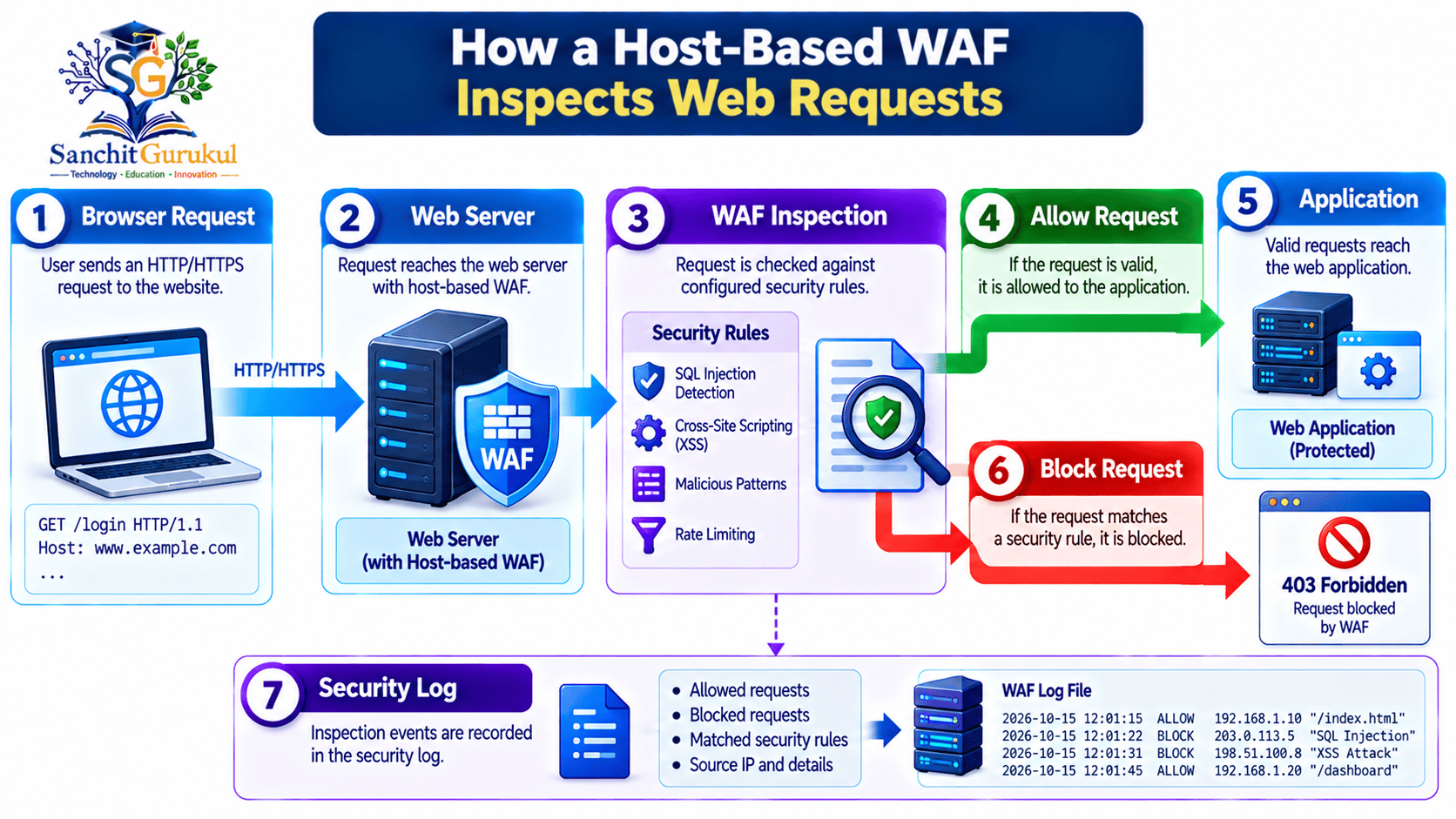
Step 1 — The Browser Sends a Request
A customer requests a product page.
For example:
https://shop.example.com/products?category=books
The request reaches the web-server environment.
Step 2 — The WAF Inspects the Request
The WAF examines supported HTTP information.
Depending on the configuration, this can include:
- Requested URL
- HTTP method
- Query values
- Headers
- Cookies
- Body content
The inspection may identify patterns commonly associated with attacks.
Step 3 — Security Rules Are Evaluated
The WAF compares relevant information against configured security rules.
Some rules identify suspicious input patterns.
Others may restrict particular requests or enforce application-specific policies.
For example, an administrator could configure a policy that only permits expected HTTP methods for a particular endpoint.
Step 4 — The WAF Takes an Action
Depending on the policy and operating mode, the WAF may:
- Allow the request
- Log the request
- Block the request
- Return an error response
- Apply another supported action
A request identified as suspicious does not automatically mean an attack has been confirmed.
Step 5 — Allowed Requests Reach the Application
If the request is permitted, the web application processes it.
For example, the application may retrieve products from a database and prepare an HTML response.
Step 6 — Optional Response Inspection
Some WAF engines can inspect supported outgoing responses.
This may help identify certain suspicious response content or apply additional controls.
However, response inspection is not universally enabled or supported in every deployment.
It may also introduce resource and performance costs.
Step 7 — Logging and Monitoring
The WAF may record:
- Request details
- Rule matches
- Security actions
- Timestamps
- Client information
- Rule identifiers
Administrators can use these records to investigate suspicious activity and improve WAF configuration.
What Attacks Can a Host-Based WAF Help Detect?
Host-based WAFs can help identify several common categories of suspicious HTTP requests.
The exact protection depends on the WAF engine, security rules and application.
1. SQL Injection Attempts
SQL injection occurs when untrusted input affects the way an application constructs or executes database queries.
Some WAF rules can detect suspicious SQL-related patterns in HTTP requests.
However, the primary protection is secure database access, including correctly implemented parameterized queries.
2. Cross-Site Scripting (XSS) Attempts
Cross-Site Scripting involves injecting content that may execute as script in another user’s browser.
A WAF may recognize some known XSS-related input patterns.
However, it cannot reliably prevent every kind of XSS.
In particular, client-side or DOM-based XSS may occur without a suspicious request passing through the WAF.
Applications still need appropriate output encoding, safe handling of untrusted content and other suitable protections.
3. Path Traversal Attempts
Path traversal attacks attempt to access files outside an intended directory or file location.
A WAF may identify some suspicious path patterns.
However, applications must also validate file access and enforce correct authorization.
4. Suspicious File Upload Requests
Some WAFs can inspect selected upload requests according to supported settings.
For example, a policy might restrict unexpected file types or suspicious request content.
However, secure file upload handling also requires:
- Appropriate file validation
- Storage restrictions
- Access controls
- Size limits
- Safe processing
5. Selected Automated Abuse
A WAF may support controls that limit certain request patterns or help identify suspicious automation.
For example, repeated login requests may be logged or restricted.
However, effective protection against credential stuffing or distributed automation may require additional tools and application controls.
What a WAF Cannot Guarantee
A host-based WAF cannot be expected to prevent every:
- Account takeover
- Authorization error
- Insecure business transaction
- Application design flaw
- Client-side XSS vulnerability
- Data exposure
- Infrastructure attack
For example, a legitimate authenticated user may request another customer’s order information because the application fails to check authorization properly.
The request may appear normal to the WAF.
The underlying application must perform the authorization check.
Common Threats and WAF Limitations
| Threat | Possible WAF Contribution | Additional Protection Needed |
|---|---|---|
| SQL Injection | Detect selected suspicious inputs | Parameterized queries |
| XSS | Detect selected attack patterns | Safe output handling |
| Path Traversal | Detect suspicious paths | Secure file access controls |
| Malicious Uploads | Apply supported request rules | Safe file processing |
| Brute-Force Login Attempts | Rate controls where supported | MFA and account protections |
| Authorization Errors | Limited visibility | Server-side access checks |
| Business Logic Abuse | Limited application understanding | Application design and validation |
Host-Based WAF vs Network-Based WAF vs Cloud-Based WAF
WAFs can be deployed in different locations.
The main difference is where inspection occurs and who manages the security infrastructure.
Host-Based WAF
Runs within the application hosting environment.
It is commonly managed alongside the server or application infrastructure.
Network-Based WAF
Operates as a separate appliance, service or proxy within the organization’s network environment.
It may protect multiple applications, depending on its configuration and capacity.
Cloud-Based WAF
Operates through a provider-managed or cloud-hosted service.
Web requests may pass through the cloud WAF before reaching the application origin.
Deployment Comparison
| Feature | Host-Based WAF | Network-Based WAF | Cloud-Based WAF |
|---|---|---|---|
| Deployment | Application host environment | Separate network component | Cloud-hosted service |
| Management | Customer or hosting administrator | Customer or managed provider | Provider and customer responsibilities |
| Resource Usage | Shares host resources | Uses separate infrastructure | Mainly provider infrastructure |
| Coverage | Configured local applications | One or more applications | Configured websites or services |
| Custom Rules | Depends on engine | Depends on product | Depends on provider and plan |
| Scaling | Requires host capacity planning | Requires infrastructure planning | Depends on cloud service capabilities |
| Maintenance | Local software and rules | Appliance/proxy and rules | Service settings and provider maintenance |
No deployment type is automatically the best for every environment.
Can Host-Based and Cloud WAFs Work Together?
Yes.
An organization might use a cloud WAF for public-facing traffic and a host-based WAF for selected checks near the application.
However, overlapping rules can create operational complexity.
Security teams should avoid unnecessary duplicate blocking and carefully monitor legitimate application traffic.

Practical Example — Protecting an E-Commerce Website with a Host-Based WAF
Consider a company running an online store on an Apache web server.
The website contains:
- Product search
- Customer login
- Shopping cart
- Order placement
The company wants additional protection against suspicious web requests.
It decides to deploy a compatible host-based WAF.
Step 1 — Install a Supported WAF Engine
The administrator chooses a WAF engine supported by the web server.
One example is ModSecurity, an open-source WAF engine.
The administrator verifies the appropriate installation method and version compatibility.
Installing the software alone does not guarantee effective protection.
Step 2 — Configure Security Rules
The administrator enables a compatible rule set.
For example, the OWASP Core Rule Set (CRS) contains generic attack-detection rules designed for compatible WAF engines.
The WAF engine performs inspection.
The rule set provides detection logic.
These are related but separate components.
Step 3 — Start with Monitoring
Before enforcing blocking rules on production traffic, the administrator evaluates the configuration in a staging environment or suitable detection-only mode.
The goal is to identify suspicious requests while checking whether legitimate customers might be affected.
Step 4 — Review Security Events
Suppose an HTTP request contains input resembling a known SQL injection pattern.
A suitable WAF rule may match the request.
The WAF can record the relevant rule information.
However, the match still requires proper interpretation.
A legitimate request may sometimes resemble an attack pattern.
Step 5 — Enable Blocking After Testing
Once the administrator understands the rule behavior, approved blocking policies can be enabled.
When a request matches the applicable enforcement condition, the WAF may reject it.
Other valid requests continue to the application.
Step 6 — Monitor False Positives
A false positive occurs when a WAF incorrectly treats legitimate traffic as suspicious.
For example, a customer may enter a technical phrase into a search field that resembles an attack signature.
The WAF might block the request even though it is harmless.
The administrator should review the event and adjust the policy narrowly when appropriate.
A broad rule disablement may reduce protection unnecessarily.
Example WAF Event
Time: 2026-10-15 10:30:00
Application: shop.example.com
Request Path: /search
Action: Blocked
Reason: Matched configured security rule
Rule ID: Example-Rule-1001
This output is illustrative and does not represent a particular ModSecurity or CRS log format.
What Can We Learn from This Example?
A host-based WAF can:
- Inspect supported HTTP requests
- Apply generic and customized rules
- Log suspicious activity
- Block selected requests
- Provide useful information for investigation
It cannot guarantee that every attack will be detected.
The web application must still use secure coding and proper access controls.
Benefits, Limitations and Best Practices for Host-Based WAFs
A host-based WAF can be valuable where local deployment and application-specific rules are appropriate.
However, it has operational trade-offs.
Important Benefits
Application-Specific Rules
Administrators can create policies suited to known application behavior.
Local Deployment
Inspection can occur within the application hosting environment.
Security Logging
WAF events can support monitoring and investigations.
Flexible Integration
Supported engines can work with certain web-server configurations.
Additional Protection
Rules can help reduce exposure to selected common web attacks.
Important Limitations
Server Resource Usage
Inspection consumes CPU, memory and other resources on the hosting system.
Configuration Effort
Rules need testing and maintenance.
False Positives
Legitimate requests may be blocked accidentally.
Incomplete Attack Coverage
Some vulnerabilities cannot be reliably prevented through request inspection.
Distributed Management
Deploying separate WAF instances across many servers can increase administrative work.
Availability Impact
Incorrect rules or WAF failures can disrupt the protected application.
Benefits and Limitations Comparison
| Benefit | Limitation |
|---|---|
| Local control of rules | Requires local administration |
| Application-specific policies | Needs careful tuning |
| HTTP attack detection | Cannot prevent every vulnerability |
| Security event logging | Logs require review and protection |
| Web-server integration | Uses hosting resources |
| Can be combined with other controls | Adds configuration complexity |
Recommended Best Practices
1. Keep the WAF Updated
Use maintained, compatible WAF software and security rules.
2. Test Before Blocking
Review detection behavior before introducing blocking policies that could affect real users.
3. Protect Sensitive Log Data
Avoid unnecessarily recording passwords, authentication tokens or payment information.
4. Review False Positives
Investigate legitimate requests that are incorrectly blocked.
5. Verify HTTPS Inspection
Confirm that the WAF receives the appropriate HTTP information after TLS termination or through another supported integration.
6. Monitor Application Performance
Check CPU, memory, response time and request-processing delays.
7. Protect the Origin Server
Use appropriate access controls and network security measures.
8. Maintain Secure Application Code
Continue security testing, patching, input validation and access-control reviews.
Key Takeaways
Core Concepts
- A WAF helps protect HTTP-based applications.
- A host-based WAF operates within the application hosting environment.
- It commonly uses a web-server module or locally integrated component.
- It is different from a traditional network firewall.
How It Works
- The WAF examines supported HTTP requests.
- Security rules identify selected suspicious patterns.
- Matching requests may be logged, allowed or blocked.
- Some implementations also support response inspection.
- The WAF does not automatically inspect application source code.
Protection and Limitations
- WAF rules can help detect SQL injection and some XSS attempts.
- They do not eliminate all application vulnerabilities.
- Authorization and business logic require application-level protections.
- False positives can affect legitimate users.
- Security updates and monitoring remain important.
Deployment and Operations
- Host-based WAFs share resources with the hosting environment.
- Network-based and cloud-based WAFs provide alternative deployment models.
- Choose a supported WAF engine and compatible rule set.
- Test policies before enabling blocking.
- Combine WAF protection with secure coding and other security controls.
Host-based Web Application Firewalls provide an additional security layer for web applications.
They inspect supported HTTP traffic using configured rules and can help identify selected application-layer attacks.
Their local deployment can provide useful control over web-server security policies and event logging.
However, host-based WAFs also consume server resources and require careful configuration, updates and monitoring.
They cannot reliably prevent every vulnerability or replace secure coding practices.
For beginners, the most important lesson is understanding the difference between a WAF detecting suspicious requests and an application being securely designed.
Both are important parts of a strong web application security approach.
Next in This Series: ModSecurity and OWASP Core Rule Set Explained — WAF Engines, Detection Rules, Logging and Blocking Modes.
Useful Links and References
SanchitGurukul Static Resources
Official External References
Your feedback matters
Was this post helpful?
Discussion
0 approved comments
No approved comments yet. You can start the discussion below.
Leave a Comment
No login is required. Name and email are used for moderation/security. Your email is never displayed publicly. All comments require administrator approval.
Discover more from SanchitGurukul
Subscribe to get the latest posts sent to your email.


