
Imagine an office with two departments.
The Human Resources department uses VLAN 10.
The IT department uses VLAN 20.
Both departments connect to the same physical network switch.
Computers within VLAN 10 can communicate with each other.
Computers within VLAN 20 can also communicate.
But what happens when an HR computer needs to access a server in the IT network?
A traditional Layer 2 switch cannot route IP traffic between these VLANs.
Normally, a router would be required.
However, a Layer 3 switch can perform both Ethernet switching and IP routing.
This allows devices in different VLANs or subnets to communicate through the same routing-capable switching infrastructure.
In this article, we will understand:
- What a Layer 3 switch is
- How Layer 2 switching differs from Layer 3 routing
- How inter-VLAN routing works
- What Switch Virtual Interfaces (SVIs) do
- How routing tables and hardware forwarding work
- Common enterprise use cases
- How to configure and troubleshoot inter-VLAN routing
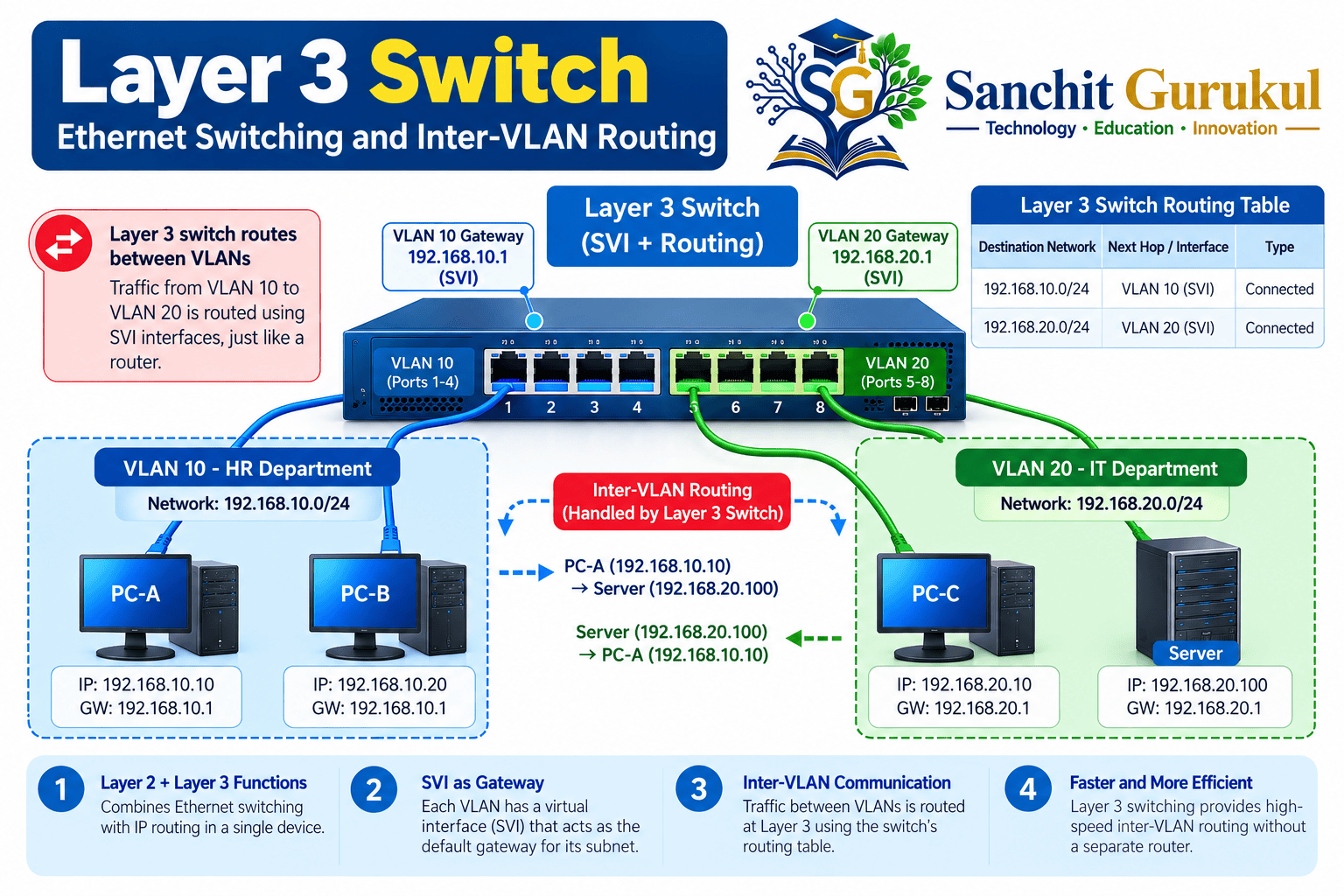
What Is a Layer 3 Switch and How Does It Work?
A Layer 3 switch, also called a multilayer switch, is a networking device capable of performing both Layer 2 Ethernet switching and Layer 3 IP routing.
At Layer 2, it uses MAC addresses to forward Ethernet frames within a VLAN.
At Layer 3, it examines destination IP addresses and uses routing information to forward packets between networks.
Layer 2 Switch vs Layer 3 Switch vs Router
| Feature | Layer 2 Switch | Layer 3 Switch | Router |
|---|---|---|---|
| Ethernet Switching | Yes | Yes | Platform-dependent |
| MAC Address Learning | Yes | Yes | On applicable Ethernet interfaces |
| IP Routing | No | Yes | Yes |
| Inter-VLAN Routing | No | Yes | Yes |
| Switch Virtual Interfaces | Management on some models | Routing and management | Platform-dependent |
| Typical Deployment | LAN access | Campus access, distribution or core | WAN, internet edge, branch or core |
A Layer 3 switch is often optimized for high-throughput routing within campus or enterprise networks.
However, it is not automatically faster than every router.
Performance and available features depend on the hardware, software and forwarding design.
How Does a Layer 3 Switch Forward Traffic?
A Layer 3 switch maintains information for both switching and routing.
MAC Address Table
Identifies which switchport can reach a learned MAC address within a VLAN.
Routing Table
Identifies available IP network routes and next hops.
Neighbor Information
Associates directly reachable IP neighbors with link-layer addresses, such as through ARP for IPv4.
Hardware Forwarding Tables
Many enterprise switches use specialized forwarding hardware and programmed forwarding entries to process traffic efficiently.
SVIs and Routed Ports
Layer 3 switches commonly support two types of Layer 3 interfaces.
Switch Virtual Interface (SVI)
A logical IP interface associated with a VLAN.
Example:
interface vlan 10
Routed Physical Port
A physical switch interface operating as a Layer 3 interface rather than as a Layer 2 switchport.
On supported Cisco platforms, this commonly uses:
no switchport
The exact interface capabilities depend on the switch model and software feature set.
How Inter-VLAN Routing Works on a Layer 3 Switch
Inter-VLAN routing allows IP communication between devices located in different VLAN subnets.
The Layer 3 switch provides a gateway for each routed VLAN.
Example Network
| Device | VLAN | IP Address | Gateway |
|---|---|---|---|
| PC-A | 10 | 192.168.10.10 | 192.168.10.1 |
| PC-B | 20 | 192.168.20.10 | 192.168.20.1 |
| SVI VLAN 10 | 10 | 192.168.10.1 | — |
| SVI VLAN 20 | 20 | 192.168.20.1 | — |
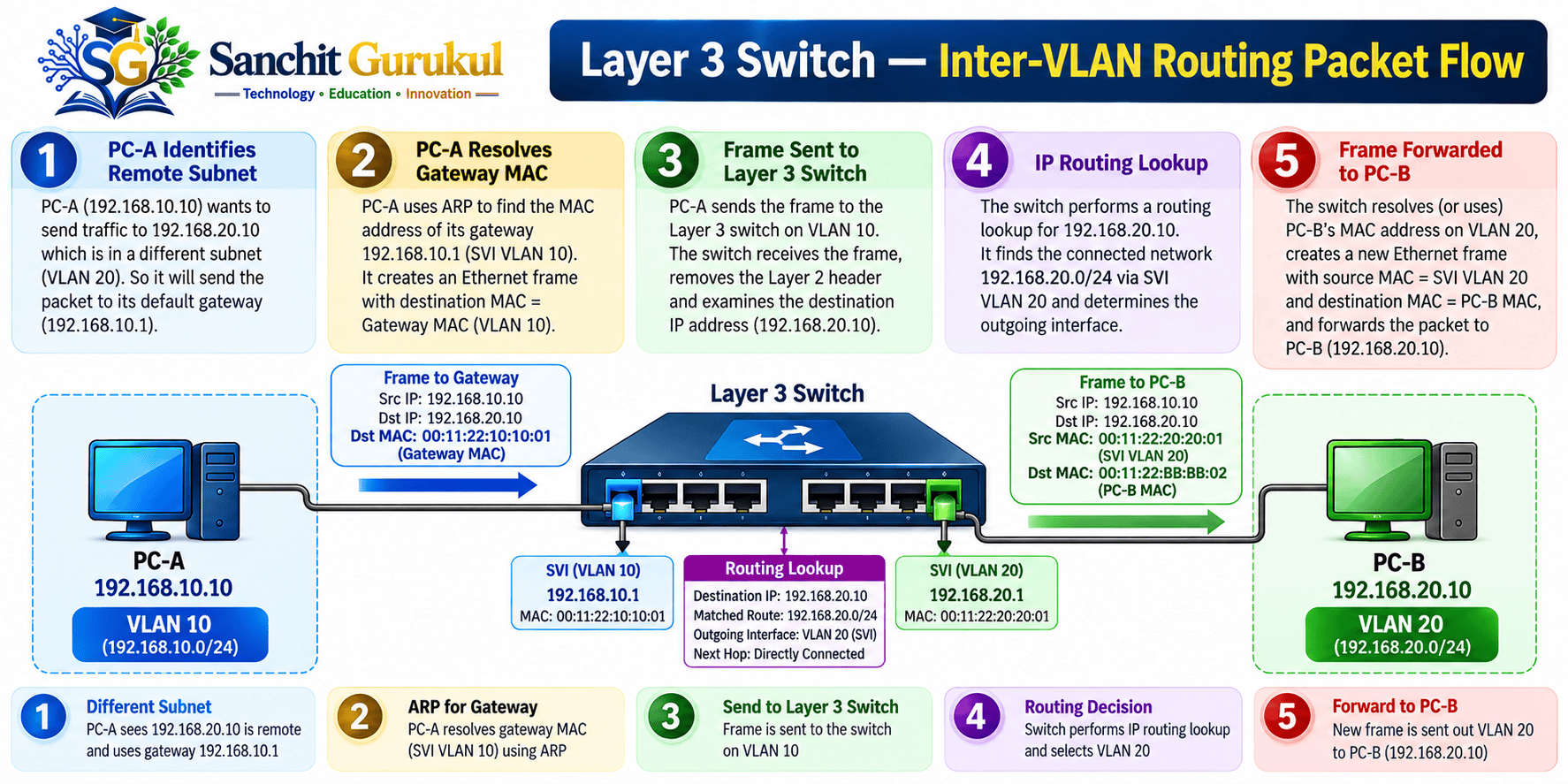
Step 1 — PC-A Identifies a Remote Network
PC-A wants to communicate with PC-B.
Destination IP:
192.168.20.10
PC-A compares this destination with its own subnet.
It determines that PC-B is outside its local subnet.
Therefore, PC-A sends the packet toward its default gateway.
Step 2 — PC-A Resolves the Gateway MAC Address
PC-A uses ARP to discover the MAC address of 192.168.10.1, if the mapping is not already cached.
The Layer 3 switch responds using the appropriate gateway MAC address.
PC-A then sends an Ethernet frame toward the gateway.
The IP packet inside the frame still contains:
Source IP: 192.168.10.10
Destination IP: 192.168.20.10
Step 3 — The Switch Performs an IP Routing Lookup
The Layer 3 switch receives the packet at its VLAN 10 routing interface.
It examines the destination IP address.
The routing table contains the directly connected network:
192.168.20.0/24
The switch selects VLAN 20 as the outgoing Layer 3 network.
Step 4 — The Switch Forwards the Packet
The switch reduces the IPv4 TTL and updates the IPv4 header checksum.
It creates the appropriate outgoing Ethernet frame using the next-hop or destination MAC information.
For this directly connected example, the destination MAC belongs to PC-B.
The routed packet is delivered through VLAN 20.
Step 5 — PC-B Sends a Reply
PC-B sends the return packet toward its default gateway.
The Layer 3 switch routes the reply back to VLAN 10.
Communication succeeds when the forwarding paths, addressing and applicable security policies are correct.
Important Features and Enterprise Use Cases
Layer 3 switches provide routing capabilities alongside traditional switching features.
Important Features
| Feature | Purpose |
|---|---|
| Inter-VLAN Routing | Routes between VLAN subnets |
| SVIs | Provides logical VLAN gateway interfaces |
| Routed Ports | Allows supported physical ports to operate at Layer 3 |
| Static Routing | Uses administrator-configured routes |
| Dynamic Routing | Learns routes through supported routing protocols |
| ACLs | Controls traffic based on configured rules |
| QoS | Classifies and prioritizes network traffic |
| IPv4/IPv6 Routing | Routes supported IP address families |
| Hardware Forwarding | Accelerates forwarding on capable platforms |
Static and Dynamic Routing
A static route is manually configured by an administrator.
Dynamic routing protocols allow supported devices to exchange routing information and respond to topology changes.
Depending on the platform and license, a Layer 3 switch may support protocols such as OSPF, EIGRP, IS-IS or BGP.
Not every Layer 3 switch supports every routing protocol.
Some entry-level models support only static routing or a limited set of Layer 3 features.
Where Are Layer 3 Switches Used?
Enterprise Campus Networks
Provide routing between user, server, voice and other internal VLANs.
Distribution Layer
Aggregate access switches and provide Layer 3 connectivity between network segments.
Routed Access Networks
Support designs where IP routing extends toward the access layer.
Data Centers
Provide high-performance Layer 3 connectivity between network segments and network fabric components.
Layer 3 Switch vs Router — Which Should You Choose?
A Layer 3 switch is often suitable for high-speed routing within an enterprise LAN.
A router may be preferable where the deployment requires specialized WAN connectivity, internet-edge capabilities, particular tunneling functions or other features not supported by the switch.
The correct choice depends on operational requirements rather than the device name alone.

Practical Cisco Lab — Configure Inter-VLAN Routing
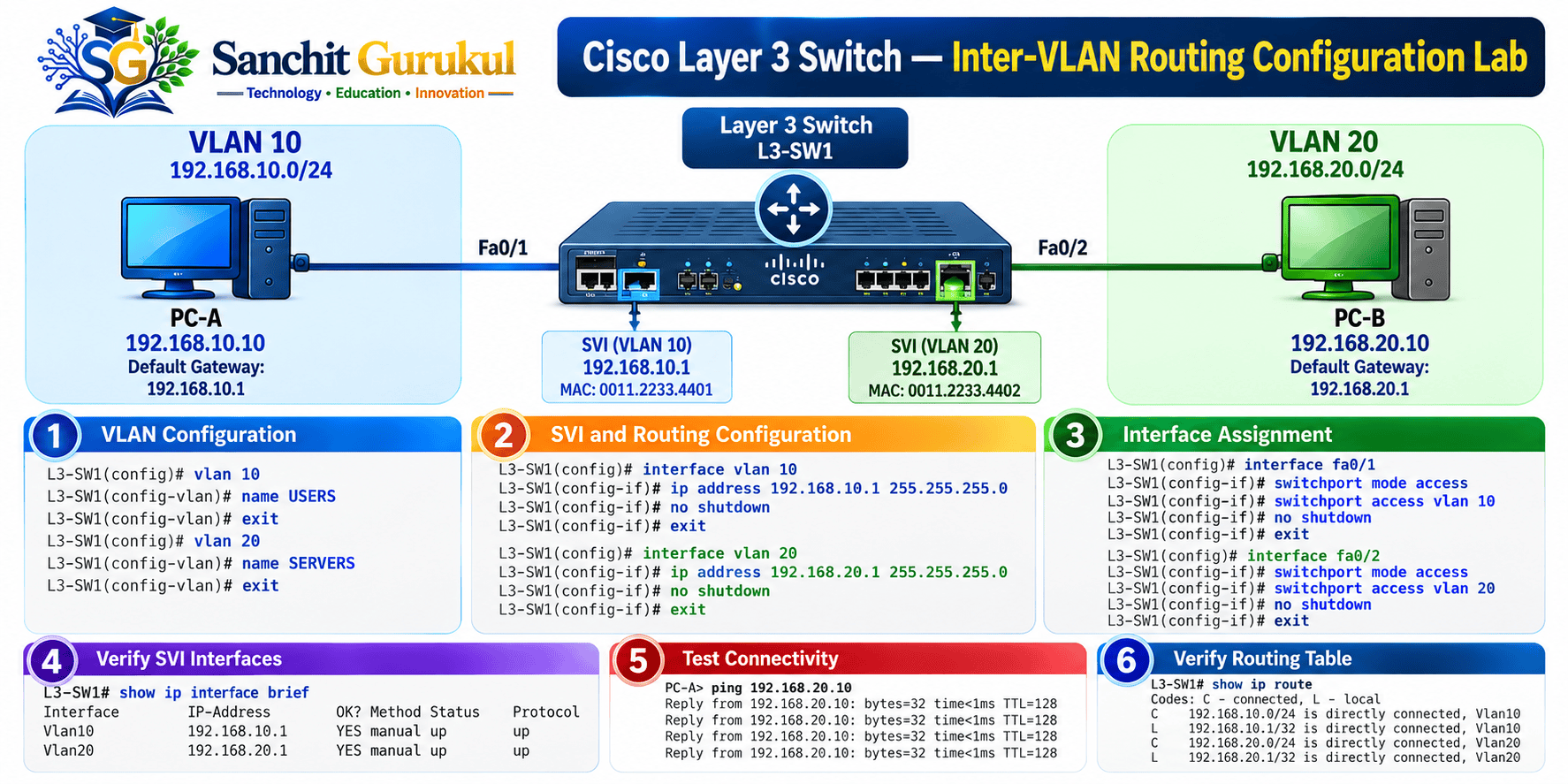
This lab demonstrates how a Layer 3 switch can route IP traffic between two VLANs using Switch Virtual Interfaces.
Lab Objectives
- Create VLAN 10 and VLAN 20
- Assign access ports
- Configure an SVI for each VLAN
- Enable IPv4 routing
- Configure endpoint default gateways
- Verify inter-VLAN connectivity
- Examine the routing table
Prerequisites
Use:
- One Cisco Layer 3 switch
- Two computers
- Two Ethernet connections
- Cisco Packet Tracer
For Packet Tracer, select a multilayer switch model that supports ip routing, such as a suitable Catalyst 3560 model.
This lab uses FastEthernet0/1 and FastEthernet0/2. Adjust the interface names if your selected switch uses different ports.
IP Addressing Plan
| Device | Interface | IP Address | Gateway |
|---|---|---|---|
| PC-A | Fa0/1, VLAN 10 | 192.168.10.10/24 | 192.168.10.1 |
| PC-B | Fa0/2, VLAN 20 | 192.168.20.10/24 | 192.168.20.1 |
| L3-SW1 | VLAN 10 SVI | 192.168.10.1/24 | — |
| L3-SW1 | VLAN 20 SVI | 192.168.20.1/24 | — |
Step 1 — Configure VLANs
On the Layer 3 switch:
enable
configure terminal

hostname L3-SW1

vlan 10
 name HR
exit

vlan 20
 name IT
exit

end
Step 2 — Configure Access Ports
configure terminal

interface FastEthernet0/1
 description PC-A-HR
 switchport mode access
 switchport access vlan 10
 no shutdown
exit

interface FastEthernet0/2
 description PC-B-IT
 switchport mode access
 switchport access vlan 20
 no shutdown
exit

end
Step 3 — Configure the SVIs
configure terminal

interface vlan 10
 description HR-GATEWAY
 ip address 192.168.10.1 255.255.255.0
 no shutdown
exit

interface vlan 20
 description IT-GATEWAY
 ip address 192.168.20.1 255.255.255.0
 no shutdown
exit

end
Each SVI provides a Layer 3 gateway for its corresponding VLAN.
Step 4 — Enable IP Routing
configure terminal

ip routing

end
The ip routing command enables IPv4 routing on supported Cisco Layer 3 switches.
Without the appropriate routing capability enabled, multiple configured SVIs do not automatically provide inter-VLAN routing.
Step 5 — Configure the Computers
In Packet Tracer:
PC → Desktop → IP Configuration
Configure PC-A:
IP Address: 192.168.10.10
Subnet Mask: 255.255.255.0
Default Gateway: 192.168.10.1
Configure PC-B:
IP Address: 192.168.20.10
Subnet Mask: 255.255.255.0
Default Gateway: 192.168.20.1
Step 6 — Verify SVI Status
On L3-SW1:
show ip interface briefExpected relevant output:
Interface    IP-Address       Status    Protocol
Vlan10       192.168.10.1     up        up
Vlan20       192.168.20.1     up        up
For an SVI to become operational, its VLAN generally needs an eligible active Layer 2 forwarding port or trunk, along with other platform-specific operational requirements.
Step 7 — Verify the Routing Table
show ip routeExpected relevant routes:
C 192.168.10.0/24 is directly connected, Vlan10
C 192.168.20.0/24 is directly connected, Vlan20
The letter C identifies a directly connected route.
The exact displayed format varies by IOS release.
Step 8 — Test Inter-VLAN Communication
From PC-A:
ping 192.168.20.10Expected successful result:
Reply from 192.168.20.10: bytes=32 time<1ms TTL=127
Reply from 192.168.20.10: bytes=32 time<1ms TTL=127
This is illustrative output. Actual latency and TTL vary by host, platform and routing behavior.
The result confirms that PC-A can reach PC-B through the Layer 3 switch.
Step 9 — Test the Reverse Direction
From PC-B:
ping 192.168.10.10Expected:
Successful communication.
Both VLANs have working Layer 3 gateways.
Step 10 — Save the Configuration
copy running-config startup-configCommon Layer 3 Switch Troubleshooting Problems
A Layer 3 switch can have functioning physical links while inter-VLAN routing still fails.
Common Failure Scenarios
| Symptom | Possible Cause | Verification |
|---|---|---|
| SVI down/down | VLAN or active forwarding-port issue | show ip interface brief |
| Incorrect VLAN | Wrong access-port assignment | show vlan brief |
| VLANs cannot communicate | IP routing disabled | show running-config |
| PC cannot reach gateway | Wrong host IP or VLAN | Ping gateway; check VLAN |
| Remote network unavailable | Missing route | show ip route |
| Ping works but TCP service fails | ACL or application issue | Check ACLs and endpoint service |
Useful Cisco Commands
Check SVI Status
show ip interface briefVerify VLAN Membership
show vlan briefCheck the Routing Table
show ip routeCheck MAC Learning
show mac address-table dynamicCheck ARP Entries
show ip arpCheck Access Control Lists
show access-listsTroubleshooting Order
- Verify that the physical ports are operational.
- Confirm VLAN creation and access-port membership.
- Check that the SVIs are operational.
- Verify host IP addresses and default gateways.
- Confirm that IP routing is enabled.
- Examine the routing table.
- Check applicable ACLs and forwarding restrictions.
- Retest communication after correcting the identified problem.
Key Takeaways
Core Concepts
- A Layer 3 switch supports Ethernet switching and IP routing.
- MAC addresses are used for Layer 2 forwarding.
- IP addresses and routing information are used for Layer 3 forwarding.
- Layer 3 switches commonly use hardware-assisted forwarding.
Inter-VLAN Routing
- VLANs create separate Layer 2 broadcast domains.
- SVIs can provide default gateways for VLAN subnets.
- IP routing must be enabled on supported platforms.
- Different VLAN subnets can communicate through the Layer 3 switch when routing and policies permit.
Operations and Troubleshooting
- Check SVI operational status.
- Verify VLAN assignments.
- Confirm endpoint default gateways.
- Examine connected and remote routes.
- Check ACLs when connectivity is unexpectedly blocked.
Layer 3 switches are important components of enterprise and campus networks.
They combine Ethernet switching with IP routing to provide connectivity between VLANs and subnets.
Understanding SVIs, default gateways, routing tables and forwarding behavior helps network administrators design and troubleshoot more scalable networks.
A practical next step is to configure inter-VLAN routing, verify the routing table and observe how packets move between different VLANs.
Useful Links and References
SanchitGurukul Static Resources
Official External References
Your feedback matters
Was this post helpful?
Discussion
0 approved comments
No approved comments yet. You can start the discussion below.
Leave a Comment
No login is required. Name and email are used for moderation/security. Your email is never displayed publicly. All comments require administrator approval.
Discover more from SanchitGurukul
Subscribe to get the latest posts sent to your email.


