
Imagine you created an account on an online shopping website several years ago using:
Email: [user@example.com](mailto:user@example.com)
Password: Tiger@123
Later, that website suffers a data breach and your credentials are exposed.
The criminal does not stop at the shopping website.
They try:
[user@example.com](mailto:user@example.com) + Tiger@123
on your:
- Social media
- Streaming services
- Shopping accounts
- Cloud services
If you reused the same password, some of those login attempts may succeed.
This is called credential stuffing.
A simple definition is:
Credential Stuffing = Using Previously Stolen Username and Password Combinations to Attempt Logins on Other Accounts
Credential stuffing works primarily because people often reuse passwords across different services.
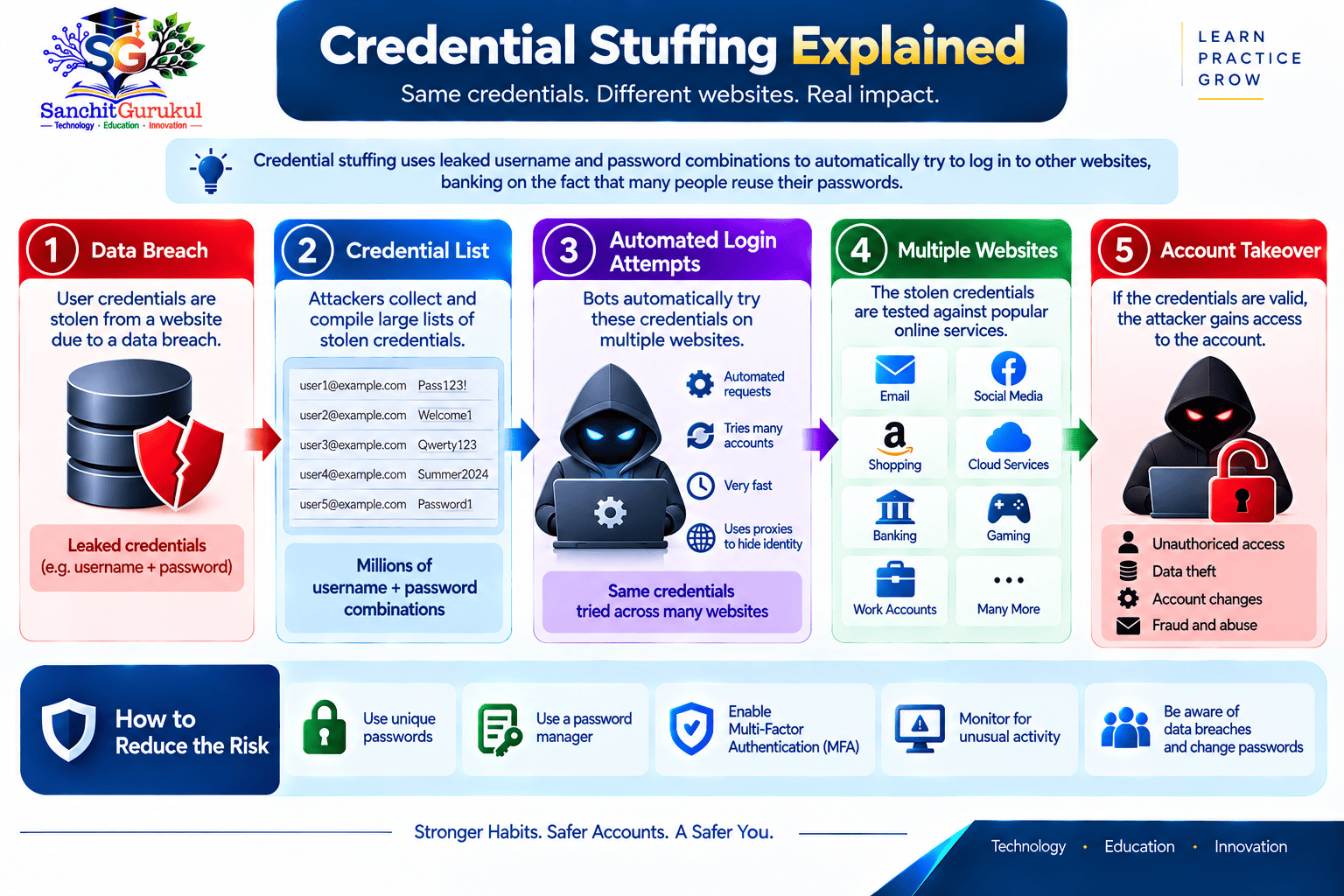
How Credential Stuffing Works
Credential stuffing normally begins with credentials that have already been exposed.
A typical attack follows this pattern:
CREDENTIALS STOLEN → CREDENTIAL LIST CREATED → AUTOMATED LOGIN ATTEMPTS → PASSWORD REUSE FOUND → ACCOUNT ACCESSED
Step 1 — Credentials Are Exposed
Credentials may originate from:
- Data breaches
- Phishing
- Malware
- Previous account compromises
The attacker may obtain combinations such as:
Email + Password
or:
Username + Password
Step 2 — Credentials Are Tested Elsewhere
The same combination is tried against other online services.
For example:
Shopping Password → Email
Shopping Password → Social Media
Shopping Password → Cloud Account
Step 3 — Reused Password Works
If the victim reused the password, authentication may succeed.
Step 4 — Account Is Abused
The attacker may then:
- Access personal information
- Change account settings
- Make purchases
- Impersonate the victim
- Search for additional information
- Attempt to compromise connected accounts
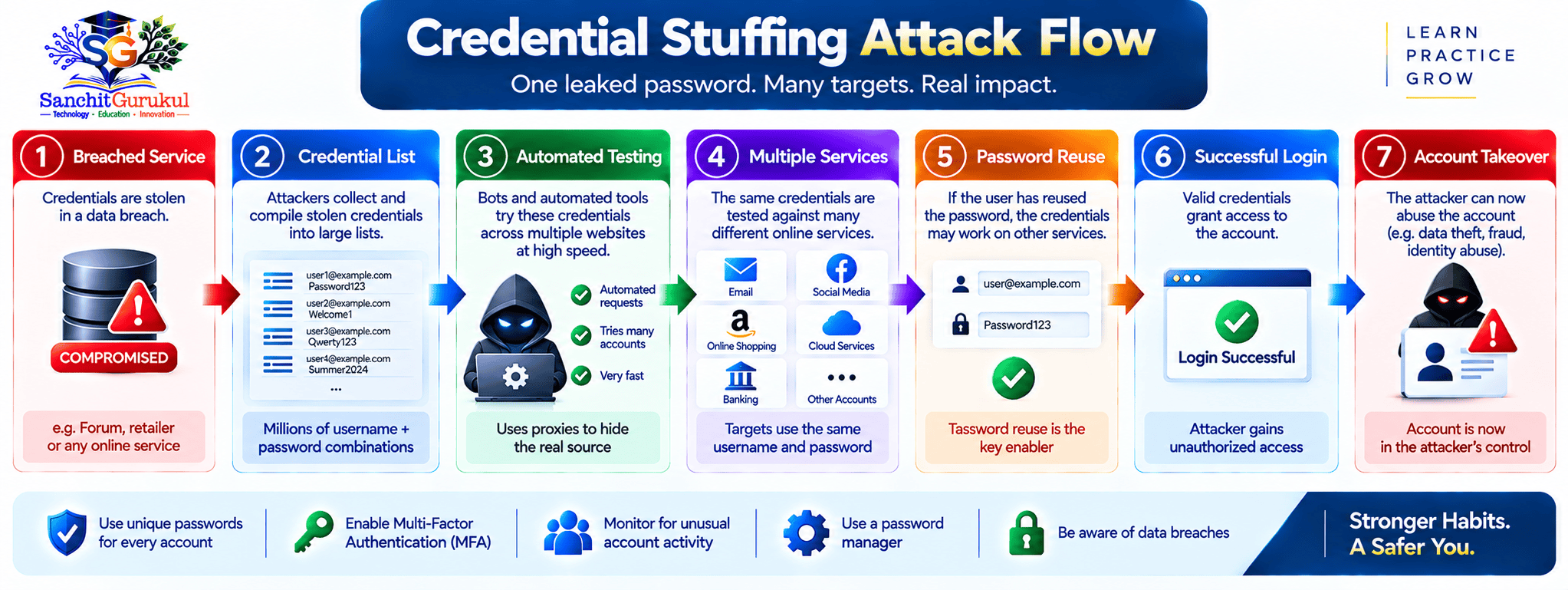
Simple Example
Suppose a user has:
| Service | Password |
|---|---|
| Shopping Site | Example-A |
Example-A |
|
| Social Media | Example-A |
| Cloud Storage | Example-B |
If Example-A is exposed from the shopping site, three accounts may potentially be at risk.
The cloud account has a different password, so that particular stolen credential would not directly work there.
Why Automation Makes the Attack Effective
Criminals do not necessarily test credentials manually.
Automated systems can attempt large numbers of login combinations.
The attacker is looking for the relatively small percentage of users who reused credentials.
Even if most attempts fail, successful accounts may still make the attack worthwhile.
Credential Stuffing vs Other Password Attacks
Credential stuffing is sometimes confused with brute force or password spraying.
They are different.
Credential Stuffing
The attacker already has:
Username + Password
from an earlier compromise.
They test that combination against other services.
Password Spraying
The attacker tries a small number of commonly used passwords against many accounts.
Conceptually:
Many Users + Few Common Passwords
Brute-Force Attack
The attacker attempts many possible passwords until the correct one is discovered.
Conceptually:
One or More Accounts + Many Password Guesses
Phishing
The attacker tricks the victim into directly revealing credentials through:
- Fake email
- Fake login page
- Fraudulent message
Phishing may actually produce credentials that are later used in credential stuffing.
| Attack | Main Technique |
|---|---|
| Credential Stuffing | Reuse already stolen credentials |
| Password Spraying | Try common passwords across users |
| Brute Force | Guess many passwords |
| Phishing | Trick victim into revealing password |
Why Credential Stuffing Can Lead to Account Takeover
Credential stuffing becomes particularly dangerous when the compromised account provides access to other services.
Email Accounts
Email is a high-value target because it commonly supports password recovery.
If an attacker enters your email account, they may attempt:
Forgot Password → Reset Other Account
This can turn one successful credential-stuffing login into a much larger compromise.
Shopping Accounts
A compromised shopping account may expose:
- Addresses
- Order history
- Saved payment information
- Personal details
Social Media
The attacker may:
- Impersonate the victim
- Contact friends
- Send scam messages
- Change account information
Cloud Accounts
Cloud storage may contain:
- Personal documents
- Photographs
- Work information
- Identity documents
Work Accounts
Credential reuse involving workplace accounts can be particularly serious.
A compromised employee account may expose organizational resources depending on the permissions associated with that account.
MFA Can Interrupt the Attack
Suppose the criminal has the correct:
Username + Password
but the account also requires another authentication factor.
The password alone may no longer be enough.
This is one reason multi-factor authentication is strongly recommended for important accounts.
Warning Signs and How to Protect Yourself
Credential stuffing may initially look like an ordinary login attempt.
Watch for:
Unexpected Login Alerts
You receive:
“New login attempt detected.”
but you were not logging in.
Unexpected MFA Prompts
Your authenticator asks you to approve a sign-in you did not initiate.
Multiple Accounts Show Suspicious Activity
Especially when those accounts shared the same password.
Password Reset Notifications
You receive reset messages you did not request.
Unknown Devices or Locations
Your account security page shows unfamiliar activity.
Account Suddenly Becomes Inaccessible
The attacker may have changed:
- Password
- Recovery email
- Recovery phone
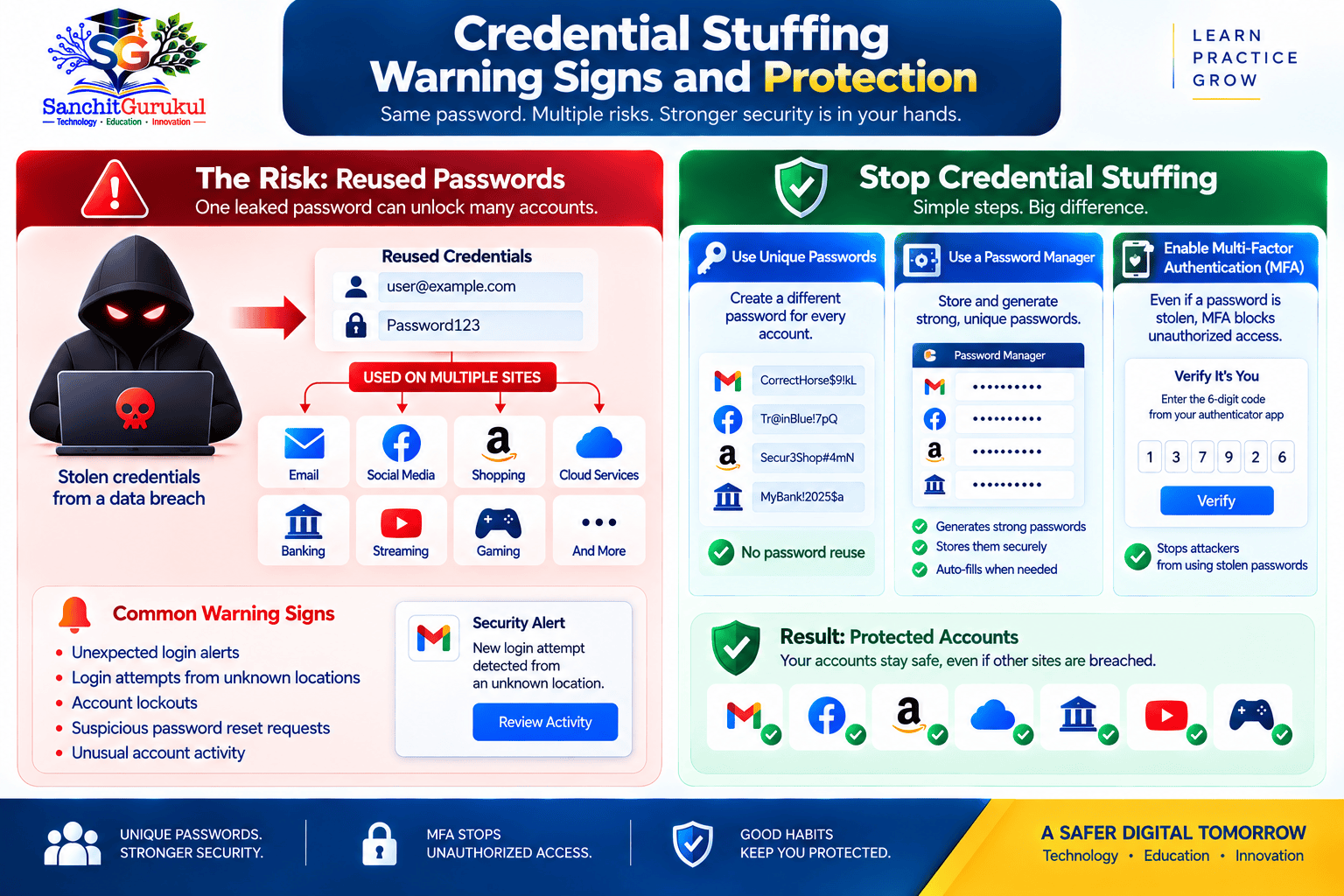
Use a Unique Password for Every Important Account
This is the most important defence against credential stuffing.
Instead of:
Email → SamePassword
Shopping → SamePassword
Social Media → SamePassword
use:
Email → Unique Password A
Shopping → Unique Password B
Social Media → Unique Password C
If one service is breached, the exposed password should not automatically unlock the others.
Use a Password Manager
Remembering many strong, unique passwords can be difficult.
A reputable password manager can help:
- Generate passwords
- Store passwords
- Reduce password reuse
Enable MFA
Enable multi-factor authentication where available, especially for:
- Financial accounts
- Work accounts
- Cloud services
- Social media
Where supported, phishing-resistant authentication methods provide even stronger protection.
Never Approve Unexpected Authentication
If an MFA request appears unexpectedly:
Reject it.
Then investigate why someone may be trying to access the account.
Protect Your Primary Email
Because email is commonly used for account recovery, give it:
- Unique password
- MFA
- Updated recovery information
Avoid Predictable Password Variations
Changing:
Tiger@2025
to:
Tiger@2026
does not create the same protection as using a genuinely different password.
What to Do If Your Credentials May Be Compromised
If you discover that a password may have been exposed, act before someone successfully reuses it.
Change the Compromised Password
Use the official website or application.
Choose a completely new password.
Find Everywhere You Reused It
This is critical.
Ask:
“Where else did I use this password?”
Change it on every affected account.
Prioritize Important Accounts
Start with:
- Primary email
- Financial accounts
- Work accounts
- Cloud storage
- Social media
- Shopping and other services
Enable or Review MFA
Confirm that only your legitimate:
- Authentication methods
- Phone numbers
- Trusted devices
are registered.
Review Active Sessions
Where supported:
Sign Out Other Sessions
and remove unknown devices.
Review Recovery Information
Check whether anyone changed:
- Recovery email
- Recovery phone
- Security settings
Check Account Activity
Look for:
- Unknown logins
- Purchases
- Messages
- Profile changes
- Connected applications
Be Alert for Follow-Up Phishing
A criminal who knows your email address and an old password may send convincing messages such as:
“We detected your password in a breach. Click here immediately.”
Do not use unsolicited links to secure the account.
Open the service independently.
If an Account Has Already Been Taken Over
Use the provider’s official account-recovery process.
If financial fraud has occurred in India:
Call 1930
and report through:
For workplace credentials, immediately inform the appropriate IT or security team.
Preserve relevant:
- Login alerts
- Emails
- Screenshots
- Device information
- Security notifications
- Transaction records
Summary
Credential stuffing is an account attack that uses credentials stolen from an earlier compromise.
The attacker does not necessarily need to guess your password.
They may already have it.
The attack works because users sometimes reuse passwords across multiple services.
The basic attack chain is:
CREDENTIAL LEAK → AUTOMATED LOGIN ATTEMPTS → PASSWORD REUSE → SUCCESSFUL LOGIN → ACCOUNT TAKEOVER
The most important distinction is:
Credential Stuffing = Previously Stolen Passwords
Password Spraying = Common Passwords
Brute Force = Password Guessing
Phishing = Tricking Users Into Revealing Passwords
The strongest defence against credential stuffing is:
UNIQUE PASSWORDS + PASSWORD MANAGER + MFA
Useful Links and References
SanchitGurukul Static Resources
Official External References
Your feedback matters
Was this post helpful?
Discussion
0 approved comments
No approved comments yet. You can start the discussion below.
Leave a Comment
No login is required. Name and email are used for moderation/security. Your email is never displayed publicly. All comments require administrator approval.
Discover more from SanchitGurukul
Subscribe to get the latest posts sent to your email.