
Imagine you are logging in to your email account.
You enter your username and password.
Within seconds, the website verifies your credentials and allows you to access your inbox.
But how does the website know whether your password is correct?
Does it store your original password? How does it protect that password from attackers?
The answer involves password-based authentication.
Password-based authentication is a security method that verifies a user’s claimed identity using a secret password associated with an account.
It remains widely supported across operating systems, websites, enterprise applications and cloud services.
However, passwords are vulnerable to phishing, credential theft, password reuse and automated guessing.
Modern password security therefore requires more than simply choosing a complicated password.
In this article, you will learn:
- What password-based authentication is
- How password registration and login verification work
- Why secure systems use password hashing and salting
- Common password attacks and security risks
- Modern password recommendations from NIST and OWASP
- How password managers and MFA improve security
- Why passkeys offer stronger phishing resistance
- How to demonstrate password hashing using Python
- Best practices for users, developers and administrators
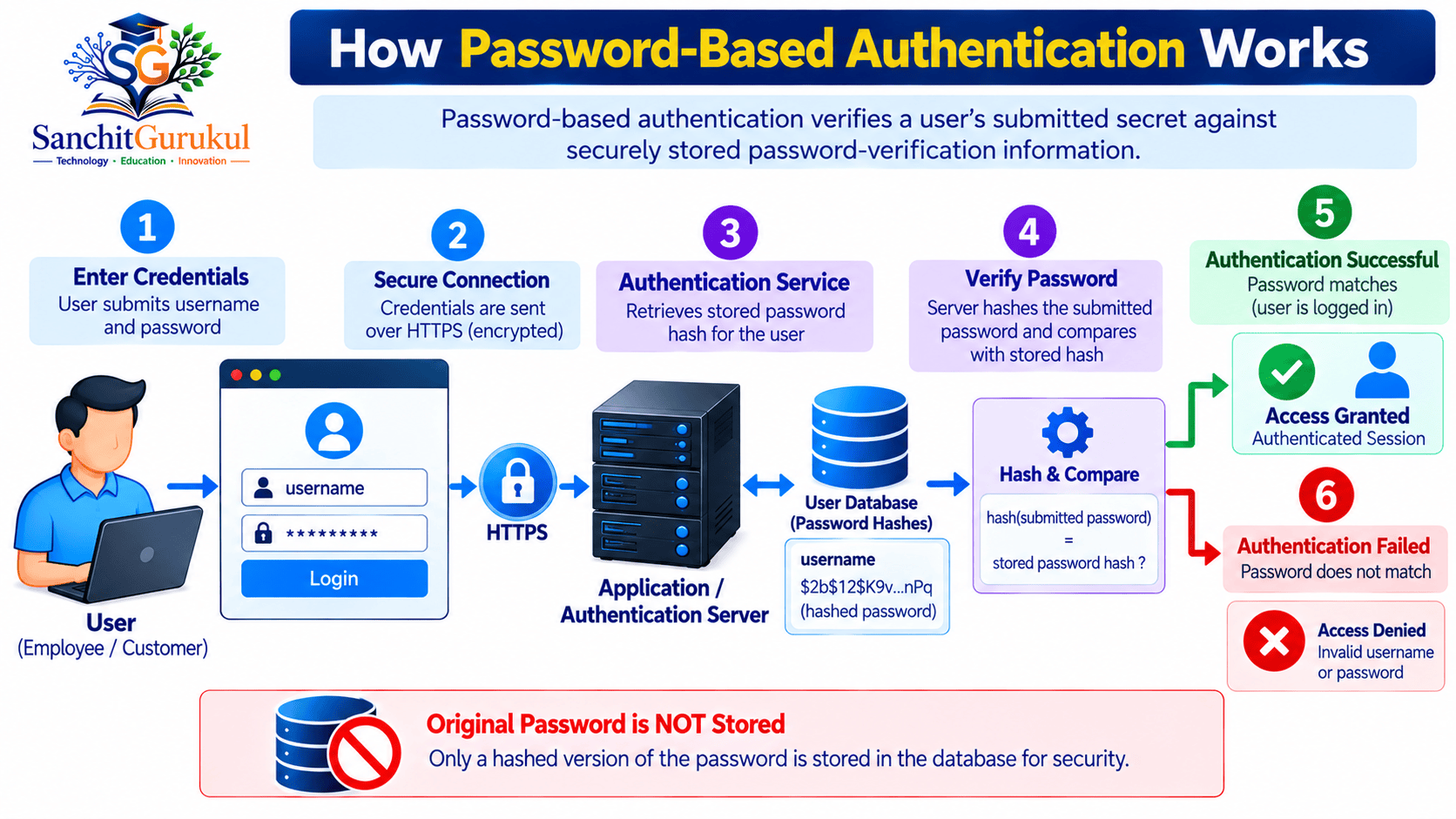
What Is Password-Based Authentication and How Does It Work?
Password-based authentication is a method of verifying identity through a memorized or recorded secret.
It belongs to the something you know authentication-factor category.
The user normally provides:
- An account identifier, such as a username or email address.
- A password associated with that account.
The system verifies the password before allowing the user to proceed.
Authentication vs Authorization
Authentication and authorization are different security functions.
| Concept | Purpose | Example |
|---|---|---|
| Identification | Claims an identity | Entering an email address |
| Authentication | Verifies the claimed identity | Checking a password |
| Authorization | Determines permitted actions | Allowing access to a mailbox |
| Session Management | Maintains authenticated state | Using a protected session cookie |
Successful password verification does not automatically grant permission to every resource.
Applications must still enforce authorization.
Step 1 — Password Registration
When a user creates an account, the application requests a password.
A properly designed system checks the password against its security policy.
For example, it may reject passwords found in a list of commonly used or compromised passwords.
The application then processes the password using a suitable password-hashing algorithm.
Step 2 — Secure Password Storage
Instead of storing the original password, the application stores password-verification information.
This typically includes:
- Password hash
- Unique random salt
- Hashing algorithm identifier
- Cost parameters
The salt is not a secret.
It helps ensure that accounts using the same password do not automatically receive identical stored hashes.
Step 3 — User Login
The user submits their username and password through a protected connection.
For web applications, HTTPS protects the credentials while they travel between the browser and the server.
The server identifies the relevant password record.
Step 4 — Password Verification
The server applies the recorded password-hashing algorithm and parameters to the submitted password.
It uses the salt stored for that account.
The resulting hash is securely compared with the stored hash.
Step 5 — Authentication Result
If the verification succeeds, the application may establish an authenticated session, subject to account status, MFA and other policies.
If verification fails, authentication is rejected.
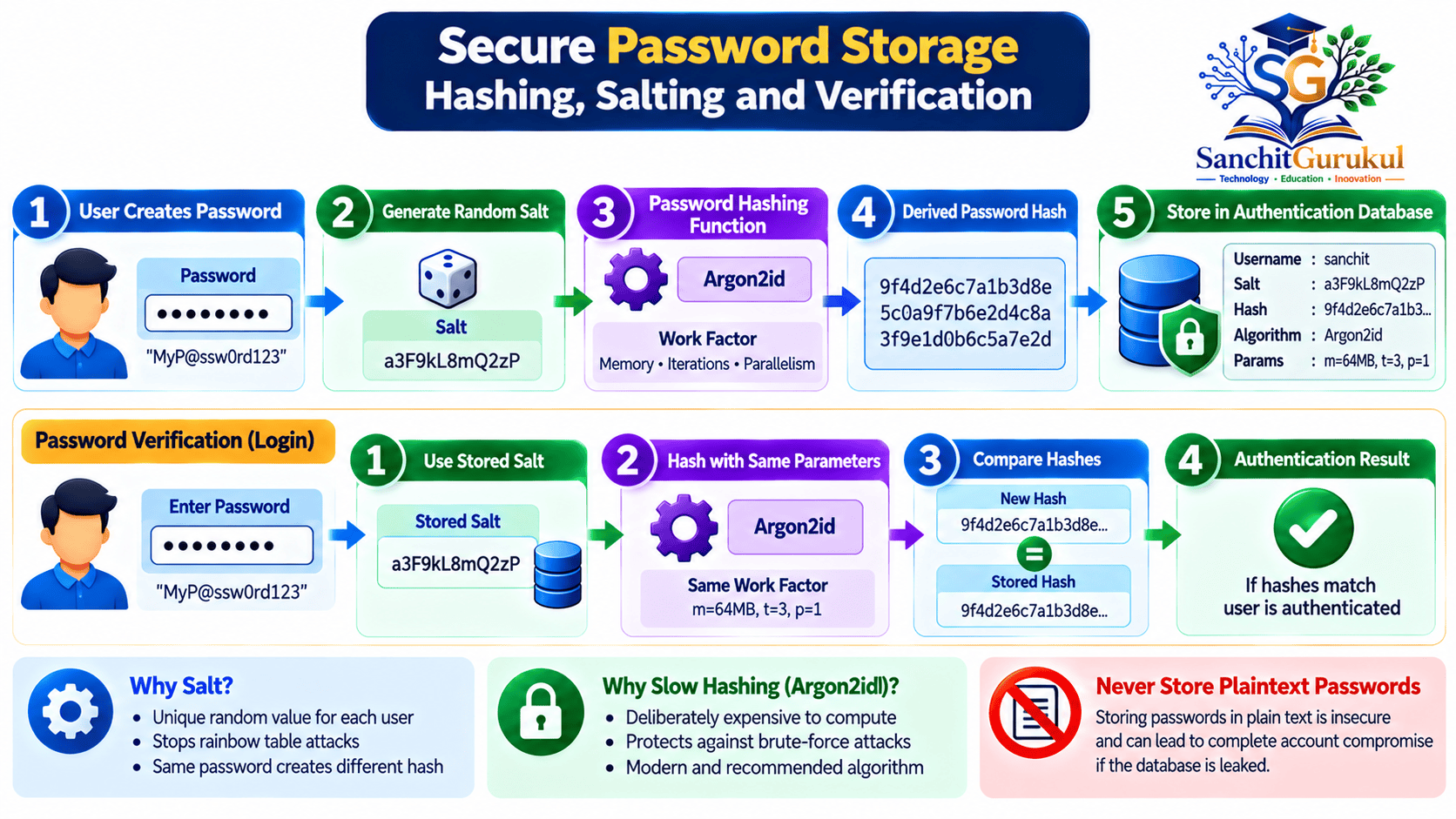
How Password Hashing, Salting and Secure Storage Work
One of the most important security controls in password authentication is protecting passwords stored by the application.
Storing passwords in plaintext creates a serious security risk.
If attackers compromise a database containing plaintext passwords, they can immediately obtain those credentials.
Secure systems instead use specialized password-hashing algorithms.
What Is Password Hashing?
Password hashing transforms a password into a derived value using a cryptographic algorithm.
A password hash is not intended to be decrypted to recover the original password.
However, attackers who obtain a hash can attempt to guess the password by testing candidate passwords against it.
For this reason, hashing alone is not enough.
The hashing algorithm must make each guessing attempt computationally expensive.
What Is a Password Salt?
A salt is a random value generated for an individual password record.
The salt is processed together with the password during hashing.
For example:
| User | Password Used | Random Salt | Result |
|---|---|---|---|
| User A | Same example password | Salt A | Hash A |
| User B | Same example password | Salt B | Hash B |
Even though the two users selected the same password, different salts produce different stored hashes with a suitable password-hashing scheme.
This makes precomputed attacks less practical and prevents attackers from identifying matching passwords merely by comparing stored hash values.
What Is a Work Factor?
A work factor controls how much processing effort an algorithm requires.
Some password-hashing algorithms also use configurable memory requirements.
Increasing these costs can make large-scale offline password guessing more expensive.
However, excessively high values can affect legitimate login performance.
Organizations must select appropriate parameters and periodically review them as hardware capabilities change.
Recommended Password-Hashing Algorithms
| Algorithm | Current Guidance |
|---|---|
| Argon2id | Preferred for new applications where supported |
| scrypt | Strong memory-hard alternative |
| bcrypt | Common in legacy systems; verify implementation limits |
| PBKDF2-HMAC-SHA-256 | Appropriate in some environments, including applicable FIPS requirements |
| Plain SHA-256 | Not suitable by itself for password storage |
| MD5 / SHA-1 | Not suitable for new password storage implementations |
OWASP’s current Password Storage Cheat Sheet recommends Argon2id with appropriate memory and iteration settings.
One published minimum Argon2id configuration is:
- Memory: 19 MiB
- Iterations: 2
- Parallelism: 1
These are baseline parameters rather than universally optimal values.
Actual deployments must consider performance, load and future upgrades.
Password Hashing vs Encryption
Hashing and encryption serve different purposes.
| Hashing | Encryption |
|---|---|
| Intended as a one-way transformation | Designed for reversible decryption with the correct key |
| Suitable password-verification schemes are deliberately expensive | Used to protect data confidentiality |
| Verification does not require recovering the original password | Authorized parties may recover plaintext |
| Uses salts and cost parameters in password-storage applications | Uses cryptographic keys and appropriate modes |
Passwords should ordinarily be stored using specialized password-hashing functions, not reversible encryption.
What Is a Pepper?
A pepper is an additional secret used in some password-storage designs.
Unlike a salt, the pepper must remain confidential.
It should be stored separately from the password database, preferably using protected secret-management infrastructure.
A pepper provides additional defense but does not replace a unique salt or an appropriate password-hashing algorithm.
Common Password Attacks and Authentication Risks
Password-based authentication is widely supported, but attackers use several techniques to compromise credentials.
Some attacks target the login interface.
Others target users, databases or insecure password recovery systems.
1. Brute-Force Attack
An attacker repeatedly attempts different passwords against an account.
Applications should use rate limiting and monitoring to restrict automated guessing.
2. Dictionary Attack
An attacker tests passwords from lists of common words, phrases and predictable patterns.
Examples of weak patterns include simple sequences, repeated characters and easily guessed combinations.
3. Credential Stuffing
Attackers use username-password pairs obtained from breaches of other services.
This attack is especially effective when users reuse passwords across accounts.
4. Password Spraying
An attacker tests a small number of common passwords across many accounts.
This can avoid triggering controls that focus only on repeated failures against one username.
5. Phishing
Attackers create fraudulent websites, messages or login prompts to convince users to reveal their passwords.
Even a long and unique password can be stolen through phishing.
6. Offline Password Guessing
If attackers obtain a database containing password hashes, they may attempt offline guessing.
Online account rate limits no longer protect that stolen database.
Strong password-hashing algorithms, salts and high-entropy passwords help reduce this risk.
7. Malware and Credential Theft
Malicious software can attempt to capture passwords, steal browser credentials or compromise authenticated sessions.
Password complexity does not protect against every form of malware or session theft.
Common Attacks and Recommended Controls
| Attack | Main Risk | Recommended Defense |
|---|---|---|
| Brute Force | Repeated guessing | Rate limiting |
| Dictionary Attack | Predictable passwords | Password blocklists |
| Credential Stuffing | Reused credentials | Unique passwords and MFA |
| Password Spraying | Common passwords across accounts | Monitoring and throttling |
| Phishing | Credential disclosure | Phishing-resistant authentication |
| Offline Guessing | Stolen password hashes | Argon2id or suitable alternative |
| Malware | Credential or session theft | Endpoint security and monitoring |

Modern Password Security Best Practices — NIST and OWASP
Password security recommendations have evolved.
Older policies often emphasized special characters, frequent password changes and complicated composition rules.
Modern guidance places greater emphasis on password length, uniqueness, compromised-password screening and secure authentication design.
Current NIST Password Recommendations
NIST SP 800-63B-4, published in July 2025, provides requirements for password verifiers within its digital identity framework.
| Security Requirement | NIST Guidance |
|---|---|
| Minimum Length — Single Factor | At least 15 characters |
| Minimum Length — Used with MFA | At least 8 characters |
| Maximum Supported Length | Should permit at least 64 characters |
| Mandatory Character Mixtures | Do not require |
| Periodic Password Expiration | Do not require without evidence of compromise |
| Compromised Password Screening | Required |
| Password Managers and Autofill | Must be allowed |
| Login Rate Limiting | Required |
| Password Hints | Unauthenticated hints prohibited |
| Security Questions | Not permitted as password-selection authentication checks |
These requirements apply to the password-verifier systems covered by the standard.
They are not automatically rules for every local device PIN or every legacy application.
1. Prefer Long, Unique Passwords
Length is an important part of password strength.
For accounts that still require passwords, use long, unpredictable passwords that are unique to each service.
A password manager can generate suitable random passwords.
For a password you must memorize, a sufficiently long passphrase made from independently and randomly selected words can be easier to remember than a short, complicated password.
2. Avoid Password Reuse
Every important account should use a different password.
If one provider experiences a data breach, a unique password prevents that same credential from being directly reused against other accounts.
3. Use a Password Manager
A password manager can:
- Generate long, unique passwords
- Store credentials in an encrypted vault
- Reduce password reuse
- Support autofill
- Simplify account management
Protect the password manager with a strong master secret and available MFA or passkey protection.
4. Screen Compromised Passwords
When users create or change passwords, the application should check whether the proposed password appears in an appropriate blocklist.
This can prevent users from choosing known compromised or very common passwords.
Organizations must perform these checks without unnecessarily exposing submitted passwords to external parties.
5. Avoid Arbitrary Password Expiration
Routine password changes can encourage predictable patterns.
Under current NIST guidance, password changes should not be forced periodically without a relevant reason.
A password should be changed when compromise is suspected or confirmed, or when an applicable risk event requires replacement.
6. Implement Authentication Rate Limiting
Rate limiting restricts automated password guessing.
Controls may include:
- Progressive delays
- Per-account request limits
- Suspicious-login detection
- Risk-based verification
- Temporary restrictions
Account lockout policies must be designed carefully.
Permanent or easily triggered lockouts can allow attackers to deny service to legitimate users.
7. Secure Login and Recovery
Applications should:
- Require HTTPS for password submission.
- Avoid exposing whether a username exists.
- Use secure password-reset tokens.
- Make reset tokens single-use and time-limited.
- Avoid revealing passwords in logs or error messages.
- Invalidate appropriate sessions after credential compromise.
- Protect password resets and MFA enrollment changes.
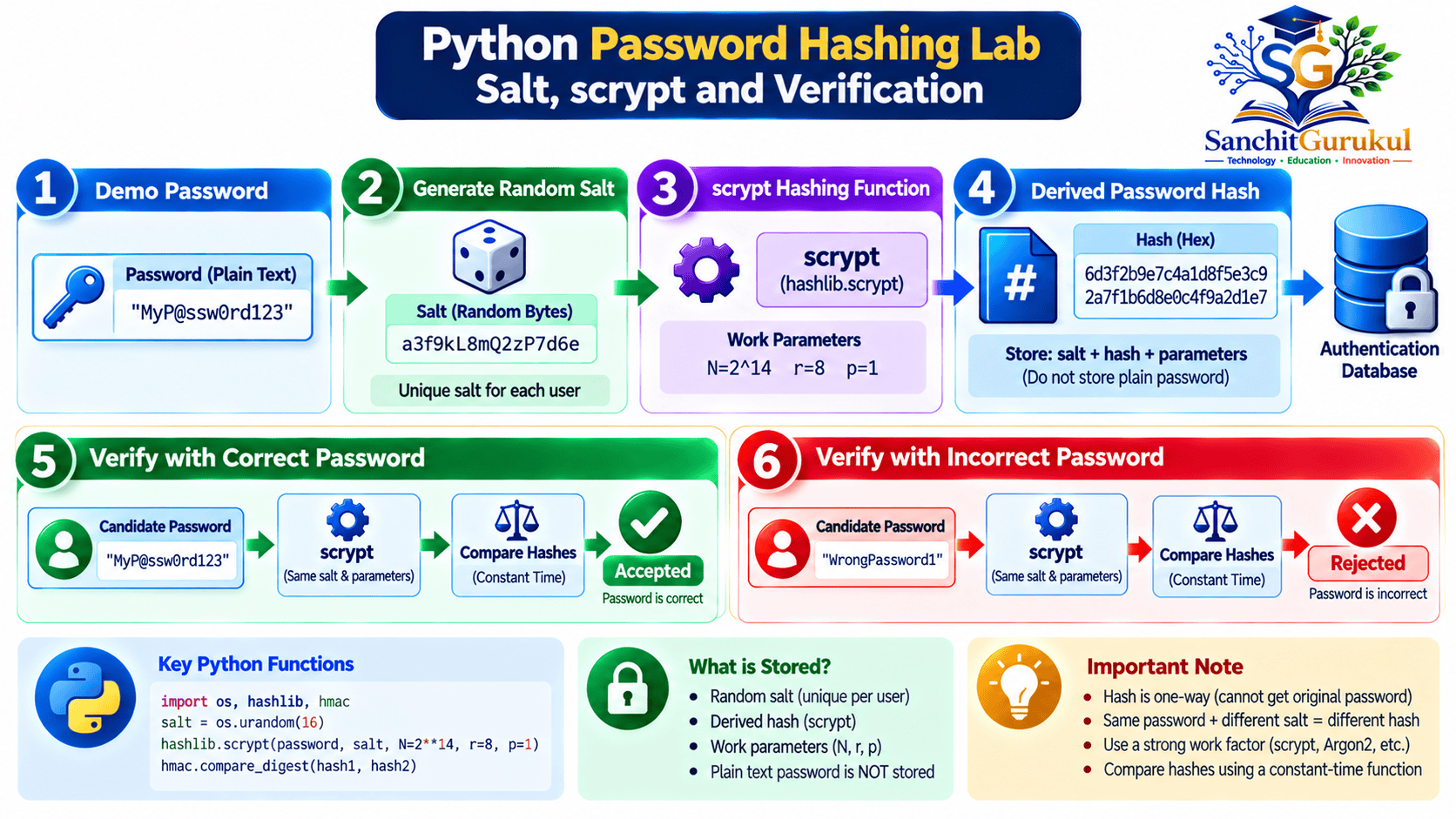
Practical Python Lab — Understand Password Hashing and Verification
This lab demonstrates how a password can be processed using a unique random salt and a password-hashing function.
You will also verify that the matching password is accepted while an incorrect password is rejected.
The exercise uses Python’s standard library.
No external package or commercial software is required.
Lab Requirements
- Ubuntu, Windows or macOS with compatible Python 3 installed
- Terminal access
- Basic understanding of running Python scripts
- A local test environment
This example uses hashlib.scrypt.
OWASP recommends Argon2id for new applications where supported, with scrypt as a suitable memory-hard alternative.
The scrypt parameters used here follow one of OWASP’s published minimum configurations:
N = 2^14r = 8p = 5
The script is a local teaching demonstration, not a complete production authentication system.
Step 1 — Verify Python Installation
Open a terminal.
Execute:
python3 --versionIllustrative output:
Python 3.x.xThe actual version will depend on your installation.
On Windows, the Python command may be python or py instead.
Step 2 — Create the Lab Script
Create a new Python file.
On Ubuntu:
nano sg_password_lab.pyPaste the following Python code.
import hashlib
import hmac
import secrets

# Disposable demonstration password only.
# Never place real account passwords in source code.
password = "Demo-Passphrase-Only-2026"

# Generate a unique random salt.
salt = secrets.token_bytes(16)

# OWASP-listed scrypt parameter combination.
params = {
    "n": 2**14,
    "r": 8,
    "p": 5,
    "dklen": 32,
    "maxmem": 64 * 1024 * 1024,
}

# Derive a password hash.
stored_hash = hashlib.scrypt(
    password.encode("utf-8"),
    salt=salt,
    **params
)

def verify(candidate):
    candidate_hash = hashlib.scrypt(
        candidate.encode("utf-8"),
        salt=salt,
        **params
    )

    return hmac.compare_digest(
        stored_hash,
        candidate_hash
    )

print("Salt length:", len(salt), "bytes")
print("Hash length:", len(stored_hash), "bytes")

print(
    "Correct password accepted:",
    verify(password)
)

print(
    "Wrong password accepted:",
    verify("Wrong-Demo-Passphrase")
)
Save the file.
In Nano, press Ctrl + O, confirm the filename, and press Ctrl + X.
Step 3 — Run the Password Verification Lab
Execute:
python3 sg_password_lab.pyExpected output:
Salt length: 16 bytes
Hash length: 32 bytes
Correct password accepted: True
Wrong password accepted: False
This output was verified using Python.
The randomly generated salt and derived hash values differ between executions, although their configured lengths remain the same.
Step 4 — Understand the Results
Salt Generation
secrets.token_bytes(16) generates 16 cryptographically random bytes.
Password Hashing
hashlib.scrypt() derives a hash using the password, salt and work-factor parameters.
Correct Password Verification
The candidate password produces the expected hash when processed with the same salt and parameters.
Incorrect Password Verification
A different password produces a different derived value, causing verification to fail.
Secure Comparison
hmac.compare_digest() performs a comparison designed to reduce timing-analysis risks.
Step 5 — Understand What a Real Application Must Add
This lab keeps the salt and hash only in memory.
A production system would need additional features, including:
- Secure storage of the salt, hash and algorithm parameters
- Account registration and lifecycle management
- Compromised-password screening
- Login rate limiting
- Secure password input
- Protected network communication
- Session management
- Password reset and recovery
- MFA support
- Monitoring and audit logging
Production applications should use well-maintained authentication frameworks and libraries rather than relying on this demonstration as a complete login system.
Lab Verification Summary
| Test | Expected Result |
|---|---|
| Python Installed | Version displayed |
| Salt Generation | 16 random bytes |
| Password Hash | 32 derived bytes |
| Correct Password | Accepted |
| Incorrect Password | Rejected |
| Plaintext Password Database | Not used |
| External Authentication Service | Not required |
Password Authentication vs MFA and Passkeys
Password-based authentication remains useful, but it has an important limitation.
A password is a shared secret that can be typed into a fraudulent website.
Even a strong password can therefore be stolen through phishing.
Password-Only Authentication
A user authenticates with a password.
If an attacker obtains the password, the attacker may be able to access the account unless another control blocks the login.
Password with MFA
MFA adds authentication evidence from another factor.
For example, a password may be combined with a cryptographic security key or an authenticator-generated code.
This reduces dependence on the password alone.
However, not every MFA method is phishing-resistant.
Passkey Authentication
Passkeys use public-key cryptography instead of a shared password.
The authentication process is tied to the legitimate service, helping prevent phishing websites from using the credential.
Authentication Method Comparison
| Method | Main Benefit | Limitation |
|---|---|---|
| Password Only | Familiar and widely supported | Phishing and reuse risks |
| Password + TOTP | Adds another factor | Codes can be phished |
| Password + Security Key | Stronger authentication with suitable protocols | Requires authenticator management |
| Passkey / FIDO2 | Phishing-resistant cryptographic authentication | Requires supported services and recovery planning |
When supported, properly implemented phishing-resistant authentication provides stronger protection than password-only login.
Organizations should also protect account recovery and authenticated sessions.
Otherwise, attackers may bypass a strong login method by exploiting weaker processes.
Key Takeaways
Core Authentication Concepts
- Password-based authentication verifies knowledge of a secret.
- Authentication and authorization are separate security functions.
- Successful authentication may establish an application session.
- Passwords are not inherently phishing-resistant.
Password Storage and Verification
- Never store plaintext passwords.
- Use dedicated password-hashing algorithms.
- Argon2id is preferred for new applications where supported.
- Generate a unique random salt for each password record.
- Use appropriate hashing cost parameters and secure comparison.
Modern Password Security
- Prefer long, unique passwords.
- Avoid password reuse.
- Support password managers and autofill.
- Screen commonly used and compromised passwords.
- Avoid unnecessary periodic password changes.
- Implement login rate limiting and secure account recovery.
Protection Against Attacks
- Phishing can compromise even strong passwords.
- Credential stuffing exploits password reuse.
- Password spraying targets many accounts.
- Secure hashing helps resist offline password guessing.
- MFA and passkeys provide additional protection.
Password-based authentication continues to play an important role in modern cybersecurity.
Its simplicity and broad compatibility make it suitable for many systems, but passwords alone cannot defend against every authentication threat.
Organizations must protect stored credentials using appropriate password-hashing algorithms, implement modern password policies and restrict automated login attempts.
Users should create unique passwords, use trusted password managers and enable stronger authentication methods where available.
Understanding how password authentication works also provides a foundation for learning MFA, passwordless authentication, passkeys and modern identity security.
Next in This Series: Multi-Factor Authentication (MFA) Explained — OTP, TOTP, Push Authentication and Security Keys.
Useful Links and References
SanchitGurukul Static Resources
Official External References
Your feedback matters
Was this post helpful?
Discussion
0 approved comments
No approved comments yet. You can start the discussion below.
Leave a Comment
No login is required. Name and email are used for moderation/security. Your email is never displayed publicly. All comments require administrator approval.
Discover more from SanchitGurukul
Subscribe to get the latest posts sent to your email.