Prerequisites: Basic Computer Knowledge
Imagine you want your computer to perform a simple task.
You might want it to:
- Calculate students’ marks.
- Rename several files.
- Read information from a spreadsheet.
- Check whether a website is responding.
- Create a simple application.
You could perform some of these tasks manually, but that can become time-consuming when you need to repeat them.
A programming language allows you to give instructions to a computer so that it can perform tasks automatically.
One of the most widely used programming languages for this purpose is Python.
Python is popular because its code is relatively easy to read and its syntax is approachable for beginners.
A simple Python program can display a message using just one line:
print("Hello, World!")Hello, World!This small example demonstrates how Python can execute an instruction.
But Python can do much more than display messages.
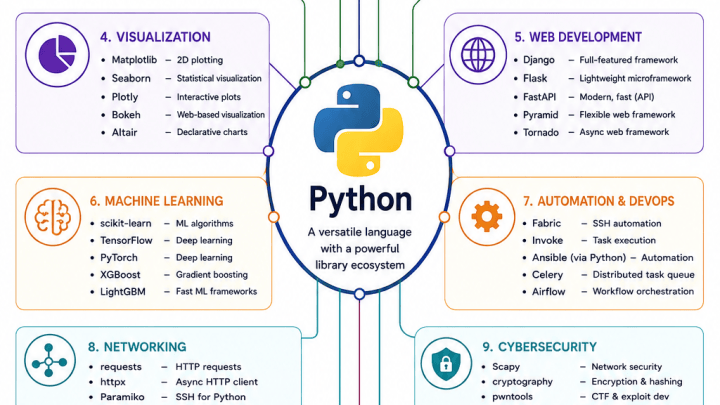
It is used in web applications, automation, networking, cybersecurity, data analysis, Artificial Intelligence and many other fields.
In this article, you will learn:
- What Python programming is
- Why Python is considered beginner-friendly
- How Python programs run
- Important features of Python
- Basic Python syntax and commands
- Variables, conditions, loops and functions
- Where Python is used
- Advantages and limitations
- How to get started with your first Python program
What Is Python and Why Is It Popular?
Python is a high-level, general-purpose programming language.
It was created by Guido van Rossum and first publicly released in 1991.
Python can be used to build many different kinds of software.
What Does High-Level Language Mean?
Computers ultimately execute machine instructions.
Those instructions are difficult for humans to write and maintain directly.
High-level languages allow programmers to write instructions using more understandable structures.
For example, Python allows you to write:
total = 10 + 20
print(total)30You do not need to write the individual machine instructions required to perform this calculation.
Python and its runtime environment handle much of that work.
Why Is Python Beginner-Friendly?
Python has several characteristics that make it approachable.
Readable Syntax
Python code often resembles simple written instructions.
Fewer Formatting Symbols
Many tasks require fewer braces and other punctuation than in some programming languages.
Large Standard Library
Python includes modules for many common programming tasks.
Third-Party Packages
Developers can install additional libraries to extend Python’s capabilities.
Cross-Platform Support
Python runs on Windows, Linux, macOS and several other environments.
Is Python Free?
Yes.
Python is open-source software, distributed under the Python Software Foundation License.
You can download and use Python without purchasing a programming-language license.
Many third-party tools are also free, although individual packages and hosted services may have their own licenses or costs.
Is Python Only for Beginners?
No.
Python is used for both introductory programming and professional software development.
Beginners may use Python to create basic calculations.
Experienced developers may use it for:
- Automated testing
- Web services
- Scientific computing
- Data analysis
- Networking tools
- Machine learning applications
The language is approachable, but advanced applications can still be complex.
How Python Works — Source Code, Interpreter and Execution
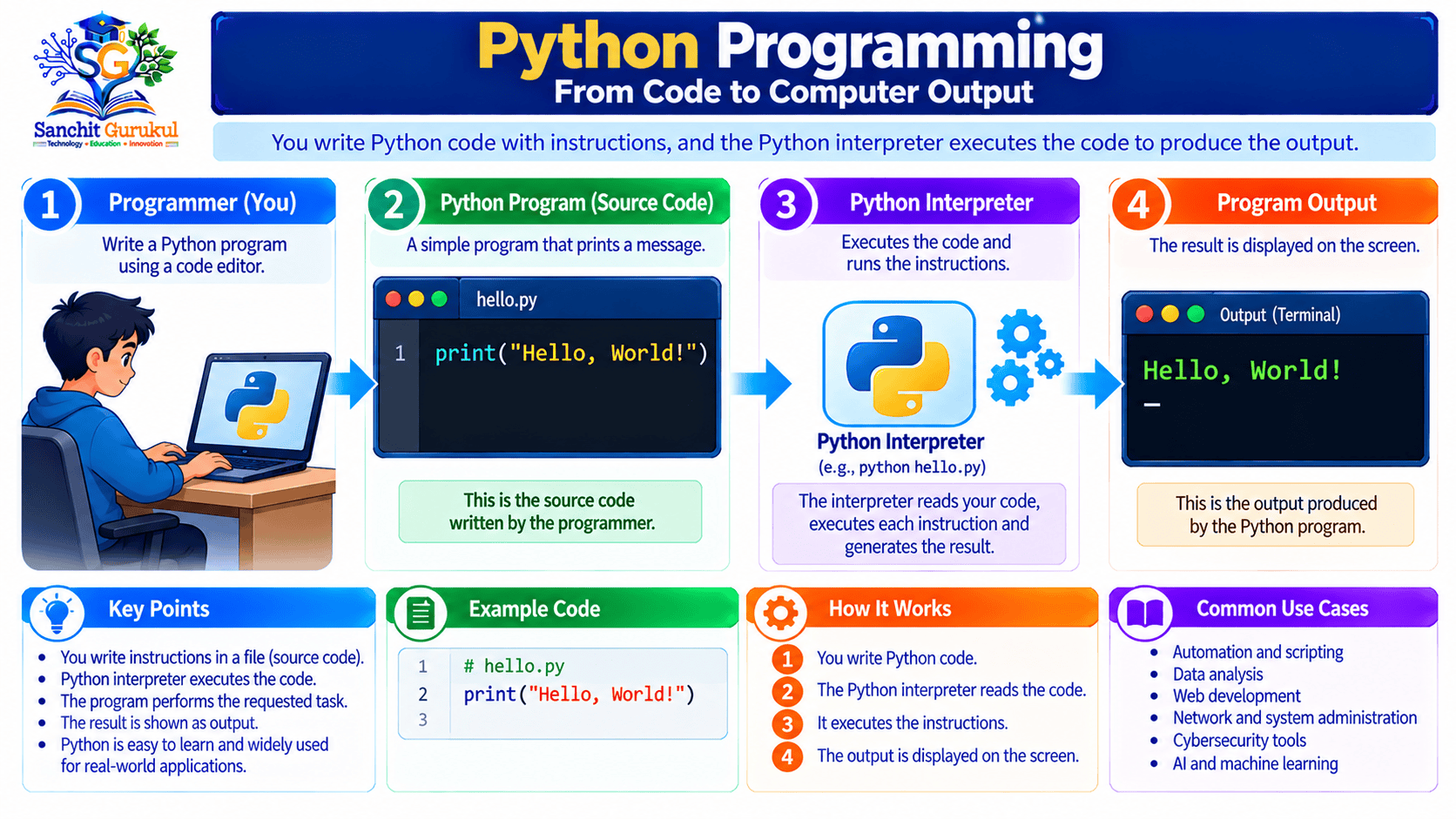
When you write Python instructions, you create source code.
Source code is the program written by a developer.
Python software then processes that code so the computer can execute it.
What Is an Interpreter?
An interpreter is software that runs programs written in a supported programming language.
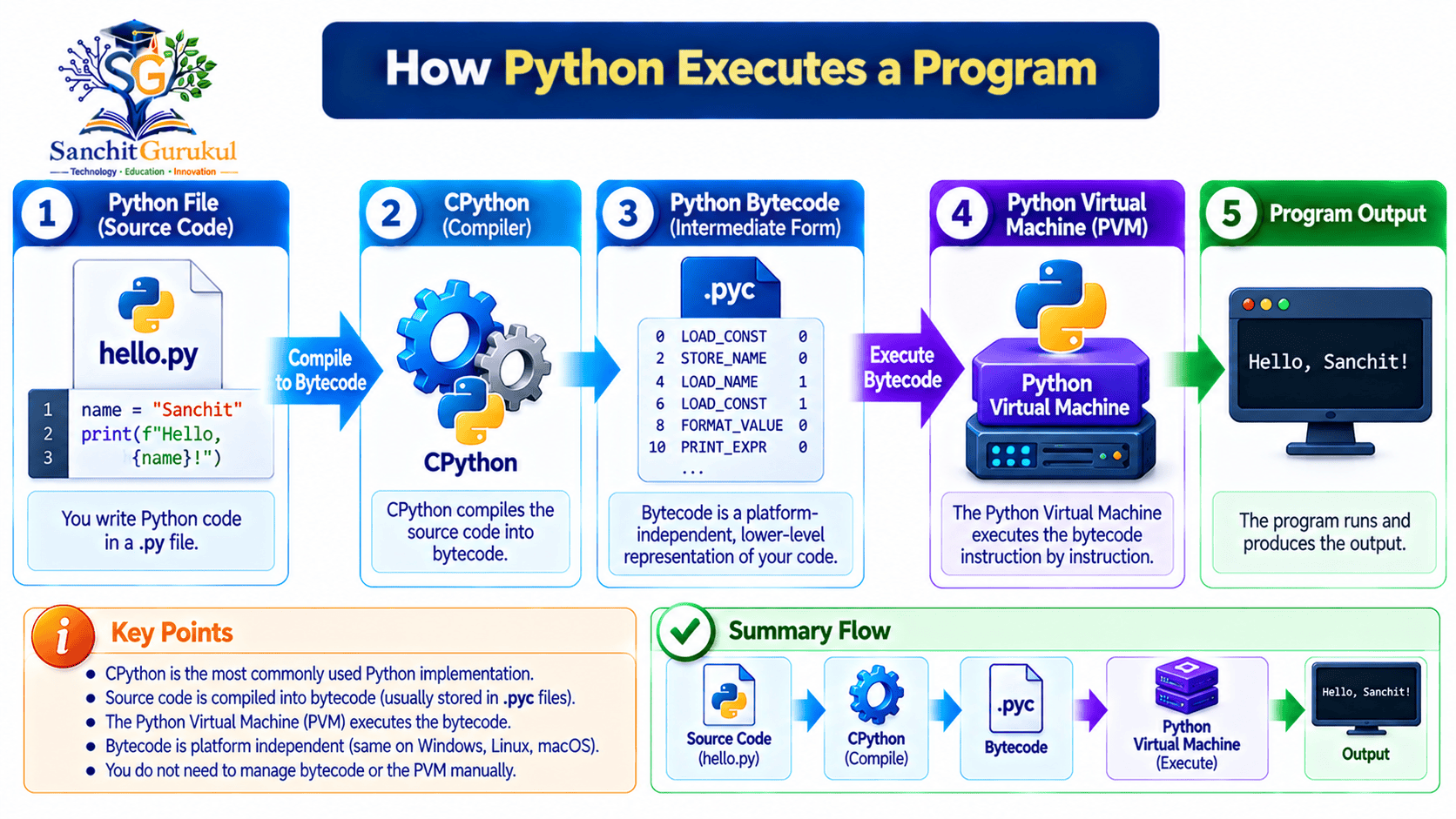
The most common Python implementation is called CPython.
CPython typically converts Python source code into an intermediate form called bytecode.
The Python virtual machine then executes this bytecode.
For beginners, the important idea is that Python handles these steps for you.
You normally do not need to compile a separate executable manually before running a simple Python script.
How a Python Program Runs
Consider a file named:
hello.py
It contains:
print("Welcome to Python!")When you run the file with Python, the program displays:
Welcome to Python!What Is a Python Script?
A Python script is a file containing Python instructions.
Python source files commonly use the extension:
.py
Examples:
hello.pycalculator.pynetwork_check.py
The file extension helps identify the file as Python source code.
Important Python Characteristics
| Feature | Simple Meaning |
|---|---|
| High-Level | Uses readable programming instructions |
| Interpreted Environment | Commonly executed through a Python runtime |
| Dynamically Typed | Variables do not require explicit type declarations |
| General-Purpose | Suitable for many kinds of applications |
| Cross-Platform | Available on several operating systems |
| Multi-Paradigm | Supports different programming styles |
| Extensive Libraries | Includes built-in and third-party functionality |
What Does Dynamically Typed Mean?
In Python, you do not normally declare a variable’s type before assigning a value.
For example:
age = 18
student_name = "Asha"

print(age)
print(student_name)18
AshaHere:
18is an integer."Asha"is a string containing text.
Python determines the types of these values during execution.
Dynamic typing does not mean Python has no types.
Values still have types, and incompatible operations can cause errors.
Python Basics — Syntax, Variables, Conditions, Loops and Functions
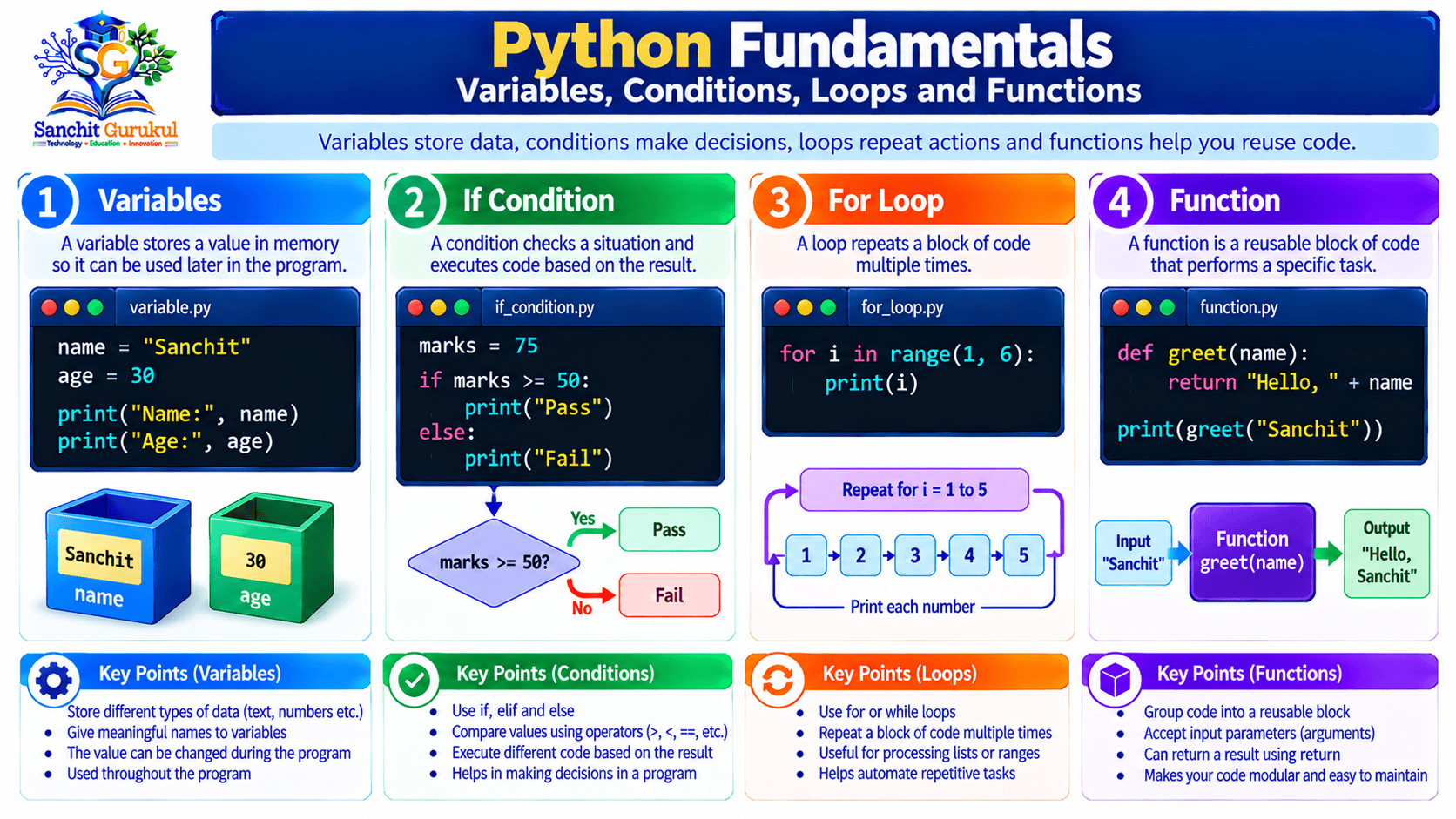
Before creating larger applications, it is useful to understand a few basic Python features.
1. Python Uses Indentation
Indentation means adding spaces at the beginning of a line.
Python uses indentation to define blocks of code.
For example:
age = 20

if age >= 18:
print("You are an adult.")You are an adult.The indented print() statement belongs to the if block.
Python commonly uses four spaces for each indentation level.
Incorrect indentation can cause a program to fail.
2. Variables Store Values
A variable is a name used to refer to a value.
For example:
student = "Rahul"
marks = 85

print(student)
print(marks)Rahul
85Here, student and marks are variable names.
3. Conditions Make Decisions
A condition allows the program to select what happens next.
For example:
marks = 75

if marks >= 40:
    print("Pass")
else:
print("Fail")PassThis program checks whether the marks meet the passing requirement.
4. Loops Repeat Instructions
A loop runs a block of code multiple times.
For example:
for number in range(1, 4):
print(number)1
2
3The range(1, 4) expression produces the integers 1, 2 and 3.
The ending value, 4, is not included.
5. Functions Organize Reusable Code
A function is a named block of code that performs a task.
For example:
def greet(name):
    print("Hello,", name)

greet("Asha")
greet("Rahul")Hello, Asha
Hello, RahulThe function greet() can be called multiple times with different names.
6. Lists Store Multiple Items
A list is a collection of values.
For example:
fruits = ["Apple", "Mango", "Banana"]

print(fruits[0])
print(fruits[1])Apple
MangoPython lists use zero-based indexing.
This means the first item has index 0.
Basic Python Concepts Summary
| Concept | Purpose |
|---|---|
print() |
Displays output |
| Variable | Stores a reference to a value |
if |
Runs code when a condition is true |
else |
Runs an alternative block |
for |
Repeats instructions |
def |
Defines a function |
| List | Stores multiple values |
| Indentation | Defines code blocks |
Practical Example — Install Python and Run Your First Program
This short exercise helps you run a Python program on your own computer.
You do not need third-party libraries for this example.
Step 1 — Install Python
Visit the official website:
https://www.python.org/downloads/
Choose a supported Python 3 release suitable for your operating system.
Follow the installer’s instructions.
On some Windows installations, you may need to select the appropriate options for making Python available from the command line.
Step 2 — Verify Python Installation
On Windows, open Command Prompt or PowerShell.
py --versionOn Linux or macOS, Python 3 is commonly available through:
python3 --versionThe result should display the installed version.
For example:
Python 3.x.yHere, 3.x.y represents your installed Python 3 version.
The exact version will differ.
Step 3 — Create a Python File
Open a text editor or code editor.
Create a new file named:
my_first_program.py
Add this code:
student_name = "Asha"
marks = 85

print("Student:", student_name)
print("Marks:", marks)

if marks >= 40:
    print("Result: Pass")
else:
    print("Result: Fail")
Save the file.
Step 4 — Run the Program
Open a terminal in the folder containing the file.
On Windows:
py my_first_program.pyOn Linux or macOS:
python3 my_first_program.pyStep 5 — Check the Output
Student: Asha
Marks: 85
Result: Pass
The program displays the student’s name, marks and calculated result.
Step 6 — Change the Marks
Now change:
marks = 85
to:
marks = 25
Run the program again.
The expected output becomes:
Student: Asha
Marks: 25
Result: Fail
The program’s condition produces a different result because the input value changed.
What Did You Learn?
This small exercise introduces:
- Variables
- Text output
- Numerical values
- Conditions
- Indentation
- Running a Python script
These concepts are enough to start writing useful beginner programs.
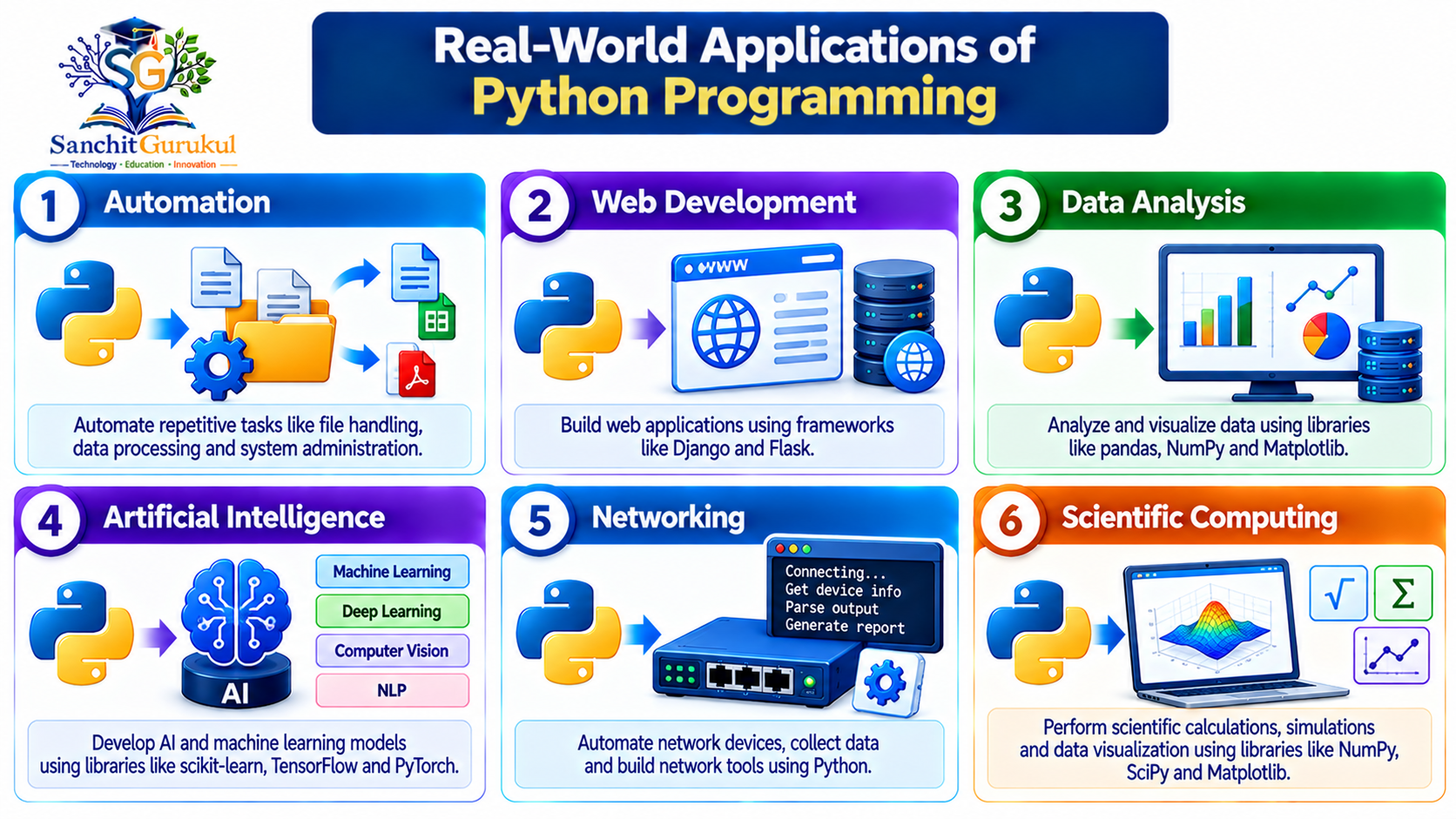
Where Python Is Used — Automation, Web Development, Networking and AI
Python supports many types of applications.
You do not need to learn every field before starting.
Choose an area based on your interests.
1. Automation
Python can automate repetitive computer tasks.
Examples include:
- Renaming files
- Organizing folders
- Processing text files
- Creating reports
- Checking application status
This is useful for students, office workers and system administrators.
2. Web Development
Python can be used to create web applications and APIs.
Popular frameworks include:
- Django
- Flask
- FastAPI
These tools provide different ways to build web services.
3. Data Analysis
Python supports processing and analyzing datasets.
Common libraries include:
- NumPy
- pandas
- Matplotlib
These libraries can help developers work with numerical data, tables and charts.
4. Artificial Intelligence and Machine Learning
Python is widely used in AI-related software development.
Common libraries and frameworks include:
- scikit-learn
- PyTorch
- TensorFlow
Python often acts as a convenient programming interface to optimized numerical code.
5. Networking and Cybersecurity
Python can help network professionals:
- Process device logs
- Analyze configuration files
- Query supported APIs
- Check network connectivity
- Automate authorized administrative tasks
For example, a network administrator might use Python to read interface information from network devices through approved APIs.
6. Scientific and Educational Applications
Python is used to support mathematical calculations, research and education.
Its readable syntax makes it useful for teaching programming fundamentals.
Common Python Use Cases
| Area | Example |
|---|---|
| Automation | Rename multiple files |
| Web Development | Build an application backend |
| Data Analysis | Calculate sales summaries |
| AI and ML | Train or use supported models |
| Networking | Process router logs |
| Cybersecurity | Analyze authorized security events |
| Education | Teach programming concepts |
| Scientific Computing | Perform numerical calculations |
Python Libraries, Advantages and Limitations
Python includes built-in functionality and supports additional software packages.
These make many programming tasks easier.
What Is the Python Standard Library?
The standard library is a collection of modules included with Python.
A module contains reusable code.
For example, Python includes the math module for mathematical operations.
import math

print(math.sqrt(81))9.0The sqrt() function calculates a square root.
You do not need to install an additional package for this example.
What Is pip?
pip is a commonly used Python package installer.
It helps install packages that are not included in the standard library.
For example, a project might require a third-party library.
Such packages are often available through the Python Package Index (PyPI).
What Is a Virtual Environment?
A virtual environment is an isolated Python environment for a project.
It helps prevent package dependencies in one project from unexpectedly affecting another.
For beginners, it is useful to know that virtual environments exist.
You do not need one to run the simple programs shown earlier.
When using third-party libraries, creating a virtual environment is recommended.
Official guidance is available at:
https://packaging.python.org/en/latest/guides/installing-using-pip-and-virtual-environments/
Advantages of Python
Easy to Read
Python syntax is generally clear and beginner-friendly.
Versatile
The language supports many different applications.
Large Ecosystem
Numerous libraries and frameworks are available.
Cross-Platform
Python can run on several operating systems.
Rapid Development
Many applications can be written with relatively little code.
Community and Documentation
Python has extensive official documentation and educational resources.
Limitations of Python
Performance
Some CPU-intensive Python code can execute more slowly than equivalent optimized native code.
However, performance depends on the workload, implementation and libraries.
Memory Usage
Python objects and runtime features can require additional memory compared with some lower-level approaches.
Mobile Application Development
Python is not the dominant language for native Android or iOS applications.
Dependencies and Deployment
Applications using external packages may require version management and suitable deployment procedures.
Concurrency Considerations
The Global Interpreter Lock (GIL) can affect CPU-bound multithreaded execution in ordinary GIL-enabled CPython builds.
However, newer CPython releases support optional free-threaded builds, so it is no longer correct to describe the GIL as an unavoidable limitation of every CPython installation.
Free-threaded support also requires attention to compatibility and thread safety.
Advantages vs Limitations
| Advantage | Limitation |
|---|---|
| Beginner-friendly syntax | Code can still contain mistakes |
| Extensive libraries | Dependencies need maintenance |
| Broad application support | Not ideal for every workload |
| Rapid development | Some CPU-heavy tasks need optimization |
| Cross-platform availability | OS-specific behavior may vary |
| Supports many programming styles | Larger systems still need good design |
Key Takeaways
Core Python Concepts
- Python is a high-level, general-purpose programming language.
- It was created by Guido van Rossum and first released in 1991.
- Python is known for readable syntax.
- Source files commonly use the
.pyextension. - CPython normally compiles source code into bytecode before execution.
Programming Fundamentals
- Variables refer to values.
print()displays output.ifandelsecontrol decisions.- Loops repeat instructions.
- Functions organize reusable code.
- Indentation defines code blocks.
Applications and Tools
- Python is used in automation, web development, data analysis and AI.
- It is also useful in networking and cybersecurity.
- The standard library provides built-in modules.
- Third-party packages extend Python functionality.
- Virtual environments help separate project dependencies.
Benefits and Limitations
- Python is approachable for beginners.
- It supports many operating systems.
- Some workloads require performance optimization.
- Package management requires attention.
- Cross-platform code may need adjustments.
- Python still requires testing and secure development practices.
Python is an important and widely used programming language.
It provides readable syntax, useful built-in tools and a large collection of third-party libraries.
Beginners can use Python to understand programming concepts such as variables, conditions, loops and functions.
More experienced developers use it for automation, web applications, data processing, networking, cybersecurity and Artificial Intelligence.
Python also has limitations involving performance, resource usage and software dependencies.
However, these considerations do not prevent it from being a strong choice for learning programming and building many practical applications.
The best way to begin is by writing simple programs, running them and understanding why the results change.
Next in This Series: Python Variables and Data Types Explained — Strings, Integers, Floats, Booleans and Beginner Examples.
Useful Links and References
SanchitGurukul Static Resources
Official External References
Your feedback matters
Was this post helpful?
Discussion
0 approved comments
No approved comments yet. You can start the discussion below.
Leave a Comment
No login is required. Name and email are used for moderation/security. Your email is never displayed publicly. All comments require administrator approval.
Discover more from SanchitGurukul
Subscribe to get the latest posts sent to your email.