
Imagine a small office with 30 employees sharing a 50 Mbps internet connection.
Some employees are attending online meetings.
Others are downloading large files, watching training videos or accessing cloud applications.
Suddenly, a large file upload starts using almost all the available upload bandwidth.
Employees attending video meetings begin experiencing problems.
Their voices break, video freezes and conversations become difficult to understand.
Why does this happen?
Different applications have different network requirements.
A file download can often tolerate a short delay.
However, a live voice conversation needs packets to arrive with little delay and relatively consistent timing.
When network traffic exceeds available capacity, packets may wait in queues or be dropped.
One technology that helps manage this situation is Quality of Service (QoS).
QoS is a collection of networking techniques used to control how different types of traffic are handled.
It can give important applications preferential treatment when network resources are limited.
However, QoS cannot create additional bandwidth or guarantee perfect network performance.
In this article, you will learn:
- What QoS is and why networks use it
- How QoS works during network congestion
- Important terms such as bandwidth, latency, jitter and packet loss
- How network traffic is classified and prioritized
- What DSCP marking means
- How queuing, shaping and policing work
- Differences between DiffServ and IntServ
- Common QoS applications in offices, VoIP and video conferencing
- Benefits, limitations and best practices
- How to understand and troubleshoot a simple QoS problem

What Is Quality of Service (QoS) and Why Is It Important?
Quality of Service (QoS) refers to networking methods used to manage traffic according to defined performance requirements and policies.
These methods can influence:
- Which packets receive priority
- How packets wait in queues
- How much bandwidth certain traffic classes can use
- How excess traffic is handled
- How traffic is marked for treatment by other devices
QoS is particularly useful when multiple applications compete for limited network capacity.
What Happens Without QoS?
Consider a router connected to a 20 Mbps WAN link.
Three applications are sending traffic:
| Application | Offered Traffic |
|---|---|
| Voice Calls | 2 Mbps |
| Video Meetings | 8 Mbps |
| File Downloads | 20 Mbps |
| Total | 30 Mbps |
The applications collectively offer 30 Mbps of traffic, but the WAN can transmit only 20 Mbps.
The router cannot send every packet immediately.
Packets may accumulate in an output queue.
If the queue becomes full, some packets may be dropped.
Without an appropriate traffic-management policy, important voice packets may experience unwanted delays or losses.
What Changes When QoS Is Enabled?
An administrator may configure the router to recognize different application categories.
For example:
Voice Traffic
Receive low-delay priority treatment within a controlled bandwidth limit.
Video Conferencing
Receive an appropriate bandwidth allocation and queue treatment.
File Downloads
Use the remaining available bandwidth and tolerate more waiting when necessary.
This can improve voice and video performance during congestion.
However, the exact outcome depends on the router, traffic levels and QoS policy.
Important Network Performance Terms
Before learning QoS techniques, understand four important terms.
| Term | Simple Meaning | Example |
|---|---|---|
| Bandwidth | Capacity of a network link | 100 Mbps WAN connection |
| Latency | Time needed for data to travel | Delay during a voice call |
| Jitter | Variation in packet delay | Voice packets arriving unevenly |
| Packet Loss | Packets failing to reach the destination | Missing voice or video data |
Bandwidth
Bandwidth describes the data-carrying capacity of a link.
For example, a router may connect to the internet through a 100 Mbps service.
The network cannot continuously transmit 150 Mbps over a link whose available capacity is only 100 Mbps.
QoS cannot change this physical or contracted limit.
Latency
Latency is network communication delay.
A common measurement is Round-Trip Time (RTT), which measures the time taken for a request or probe to receive a response.
Higher latency can make interactive applications feel less responsive.
Jitter
Jitter describes variation in packet delay.
For example, voice packets may arrive at inconsistent intervals.
Even if average latency is reasonable, large changes in delay can affect real-time communication.
Packet Loss
Packet loss occurs when packets do not reach their intended destination.
Possible causes include:
- Network congestion
- Interface errors
- Wireless interference
- Routing problems
- Traffic filtering
- Device resource limitations
QoS can help reduce congestion-related problems for selected traffic.
However, it cannot repair a damaged cable, eliminate wireless interference or correct every routing issue.
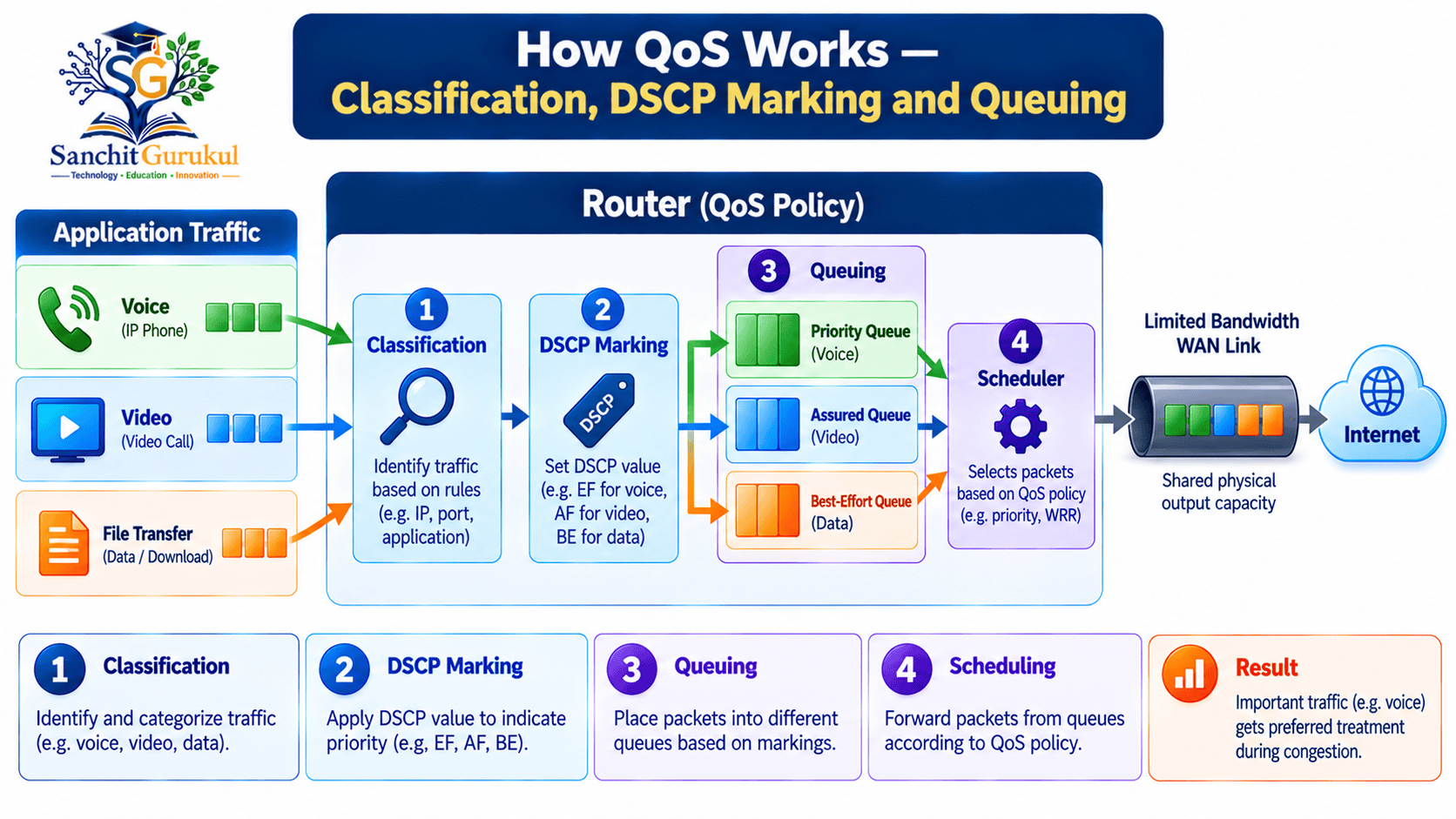
How QoS Works — Classification, Marking and Queuing
QoS does not rely on one single method.
It uses several functions that work together.
Three of the most important are:
- Classification
- Marking
- Queuing and scheduling
1. Traffic Classification
Classification means identifying packets according to configured conditions.
For example, a router may distinguish:
- VoIP communication
- Video conferencing
- Business applications
- File downloads
- General web traffic
Classification may use information such as:
- Source or destination address
- Protocol
- Port number
- VLAN information
- Existing packet markings
- Supported application identification
Administrators must choose suitable conditions.
Using only TCP or UDP ports may not reliably identify every modern application.
2. Traffic Marking
After classification, a network device may mark packets.
A marking is information in the packet header that indicates a traffic class.
Other compatible devices can use this marking to decide how to handle the traffic.
One important marking mechanism is Differentiated Services Code Point (DSCP).
What Is DSCP?
DSCP is a six-bit field within the IP Differentiated Services field.
It can represent 64 possible values, numbered from 0 to 63.
Network devices use DSCP values to select configured forwarding behavior.
Common examples include:
| Traffic Treatment | DSCP Name | Decimal Value |
|---|---|---|
| Default Best Effort | CS0 | 0 |
| Expedited Forwarding | EF | 46 |
| Assured Forwarding Example | AF31 | 26 |
| Class Selector Example | CS3 | 24 |
These are standard codepoint names and values.
However, the appropriate marking for an application depends on network policy.
For example, EF is commonly associated with low-delay voice traffic.
That does not mean every packet marked EF will automatically receive priority on every network.
What Does DSCP EF 46 Mean?
EF stands for Expedited Forwarding.
RFC 3246 defines the EF forwarding behavior.
EF is intended to support services that require low delay, low delay variation and low loss under appropriate traffic conditions.
A router must implement suitable forwarding behavior for that class.
Simply changing a packet’s DSCP value does not guarantee better performance.
3. Queuing and Scheduling
When a router can transmit packets immediately, they may not need to wait in an output queue.
When traffic arrives faster than the link can transmit it, packets may wait.
A queue is a waiting area for packets.
A scheduler determines which eligible queued packets are transmitted next.
QoS policies can provide different treatments to different queues.
For example:
- A voice queue may receive controlled priority.
- A business application queue may receive allocated service.
- A best-effort queue may use remaining capacity according to policy.
Why QoS Markings May Change Across Networks
Suppose an office router marks voice packets as EF.
The packets then pass through an ISP network.
The ISP may:
- Preserve the marking
- Change the marking
- Ignore the marking
- Apply a different forwarding policy
This depends on the service agreement and network configuration.
Therefore, QoS treatment across multiple networks cannot be assumed simply because packets were marked at the source.
QoS Techniques — Priority Queuing, Shaping, Policing and DiffServ
Different QoS mechanisms solve different traffic-management problems.
1. First-In, First-Out (FIFO) Queuing
FIFO is a basic queuing method.
Packets are processed in their order of arrival.
For example, if three packets arrive in this order:
- File download packet
- Voice packet
- Video packet
A simple FIFO queue normally transmits them in the same order, subject to normal forwarding behavior.
FIFO does not provide separate treatment based on application importance.
2. Priority Queuing (PQ)
Priority Queuing gives selected traffic classes precedence over others.
For example, voice packets may receive high-priority treatment.
This can reduce queuing delay for time-sensitive traffic.
However, strict priority must be configured carefully.
If unrestricted high-priority traffic continuously consumes output capacity, lower-priority traffic may experience excessive delays or starvation.
For this reason, production designs often control the amount of traffic admitted to priority treatment.
3. Weighted Fair Queuing (WFQ)
Weighted Fair Queuing distributes service among traffic flows or classes according to a weighting method.
The exact behavior depends on the implementation.
For example, a scheduler may provide a greater share of service to a class with a larger configured weight.
Unlike unrestricted strict priority, weighted scheduling helps maintain service for multiple eligible traffic classes.
4. Traffic Shaping
Traffic shaping controls the rate at which traffic is transmitted, usually by buffering packets and scheduling them for later transmission.
5. Traffic Policing
Traffic policing checks whether traffic stays within configured limits.
When traffic exceeds the allowed profile, a policer may:
- Drop excess packets
- Change packet markings
- Apply another configured action
Policing does not normally buffer excess traffic for later transmission in the same manner as shaping.
Shaping vs Policing
| Feature | Traffic Shaping | Traffic Policing |
|---|---|---|
| Main Purpose | Regulate transmission rate | Enforce traffic rate/profile |
| Excess Traffic | Usually queued temporarily | Often dropped or remarked |
| Additional Buffering | Common | Not the primary mechanism |
| Direction | Typically outgoing | Inbound or outbound, depending on platform |
| Typical Use | Match downstream capacity | Enforce contracted traffic limits |
| Possible Effect | Additional queuing delay | Packet loss or remarking |
6. Congestion Avoidance
Some QoS mechanisms attempt to manage queue growth before buffers become full.
An example is Random Early Detection (RED).
RED can begin probabilistically dropping packets before a queue reaches its absolute limit.
Its effectiveness depends on configuration and traffic behavior.
Modern networks may use other active queue-management techniques.
These mechanisms are not mandatory for every QoS deployment.
7. DiffServ — Differentiated Services
DiffServ is a scalable IP traffic-management approach.
Instead of maintaining detailed reservations for every individual connection, DiffServ groups traffic into classes.
Packets carry DSCP markings that can be used to select forwarding behavior at compatible network devices.
For example:
| Traffic Class | Illustrative Treatment |
|---|---|
| Voice | Controlled low-delay forwarding |
| Video | Appropriate bandwidth and queuing treatment |
| Business Applications | Allocated service according to policy |
| File Downloads | Best-effort or lower-priority treatment |
The actual classes and markings depend on the network design.
8. IntServ — Integrated Services
Integrated Services, or IntServ, is another QoS architecture.
It is designed around providing services to particular traffic flows.
The Resource Reservation Protocol (RSVP) can be used to request network resources along a path.
However, IntServ and RSVP are not required for every modern QoS deployment.
Many enterprise networks primarily use DiffServ-style traffic classes and queuing policies.
DiffServ vs IntServ
| Feature | DiffServ | IntServ |
|---|---|---|
| Approach | Traffic classes | Per-flow service model |
| Traffic Identification | Commonly DSCP | Flow-specific signaling and state |
| Reservation | Not inherently required per flow | May use RSVP |
| Scalability | Designed for aggregation | Can require more per-flow state |
| Common Learning Focus | Classification and queue treatment | Resource reservation concepts |

Where QoS Is Used — Voice, Video, Business Applications and WAN
QoS is useful when particular traffic has important delay or bandwidth requirements.
However, not every application requires the highest priority.
The goal is to create balanced policies that support overall network performance.
1. VoIP Phone Calls
VoIP applications transmit voice using IP packets.
Voice communication is sensitive to excessive delay, delay variation and packet loss.
For example, during an office call, someone uploading a large file may fill the router’s outgoing queue.
A suitable QoS policy may help voice packets spend less time waiting.
This can improve call quality during congestion.
2. Video Conferencing
Video conferencing involves audio and video streams.
Both require network resources, but their performance needs may differ.
Audio continuity is often particularly important for understanding conversations.
A QoS design may distinguish voice media, video media and other application traffic.
The correct priority assignments depend on the application, network and available bandwidth.
3. Business Applications
Some business applications require responsive communication.
Examples include:
- Interactive business software
- Remote desktop
- Selected transaction processing
- Enterprise communication platforms
QoS can provide these applications with suitable forwarding treatment when network capacity is limited.
4. Backup and File Transfers
Large backups and file transfers can consume substantial bandwidth.
However, they can often tolerate slower completion better than real-time communication can tolerate interruptions.
An administrator might therefore configure backups to use available capacity without disrupting time-sensitive applications.
5. WAN and Branch Connectivity
A company may connect multiple branches through WAN services.
If voice, business data and file transfers share limited WAN capacity, QoS may help maintain acceptable application performance.
QoS policies should be coordinated with the WAN service provider where necessary.
6. Home and Small Office Internet Connections
Some home routers provide options such as:
- Device priority
- Gaming priority
- Video call priority
- Smart Queue Management
- Upload/download bandwidth limits
These features vary by manufacturer and firmware.
They may help when a home network experiences congestion.
However, prioritization does not fix inadequate Wi-Fi coverage, faulty network equipment or every ISP problem.
QoS Application Priorities Are Not Universal
A common misconception is that voice should always have the highest priority and every other application should receive a lower priority.
In practice, priorities depend on business requirements.
For example, industrial control traffic or certain network control functions may have important requirements of their own.
A good QoS policy considers:
- Application importance
- Required bandwidth
- Delay sensitivity
- Packet loss sensitivity
- Traffic volume
- Existing network capacity
QoS Troubleshooting — A Simple Office Network Example
A complex laboratory is not necessary to understand basic QoS troubleshooting.
Consider a practical office problem.
Scenario — Voice Calls Break During Large Uploads
An office has:
| Component | Example |
|---|---|
| Users | 20 |
| Internet Download | 100 Mbps |
| Internet Upload | 20 Mbps |
| Applications | VoIP, video calls, file uploads |
| Main Complaint | Voice breaks during large uploads |
The office router connects to a broadband service.
Employees report that voice calls work normally during quiet periods.
However, calls become unstable when several users upload large files.
Step 1 — Identify When the Problem Occurs
Check whether the problem happens:
- All the time
- Only during heavy uploads
- During downloads
- Only on Wi-Fi
- At specific times
This helps identify whether congestion may be involved.
Step 2 — Check Available Upload Capacity
Suppose the office has 20 Mbps of upstream capacity.
If multiple uploads collectively use almost all of it, packets may accumulate at the router or ISP.
Voice traffic may then experience additional delay.
Step 3 — Review Router Traffic Statistics
Look for:
- WAN interface utilization
- Output queue drops
- Current upload traffic
- QoS policy counters, if available
- Device CPU utilization
- Interface errors
High utilization alone does not prove that QoS is the problem.
However, it can help identify whether congestion is occurring.
Step 4 — Review the QoS Policy
Check whether the router supports suitable traffic classification and queuing.
Determine:
- Whether voice traffic is recognized correctly
- Whether other traffic consumes the priority class
- Whether the router has appropriate shaping configured
- Whether output queues are dropping packets
Do not assume the same commands or configuration apply to all routers.
Step 5 — Apply Appropriate Traffic Management
A suitable design might include:
Voice Traffic
Receive controlled low-delay treatment.
Business Applications
Receive appropriate bandwidth allocation.
File Uploads
Use available bandwidth without overwhelming the WAN bottleneck.
WAN Shaping
Regulate outgoing traffic according to actual available service capacity.
The exact configuration should be based on device capabilities and measured performance.
Step 6 — Verify the Result
After applying an approved change, compare:
- Voice call quality
- Upload throughput
- Queue drops
- Round-trip latency
- Application responsiveness
Test with and without competing traffic.
Avoid assuming that successful configuration means the problem is solved.
Step 7 — Check Other Possible Causes
If performance remains poor, investigate:
- Wi-Fi interference
- Insufficient ISP capacity
- Packet loss upstream
- Routing problems
- Firewall performance
- Client device problems
- Application or provider issues
QoS is one part of network troubleshooting, not the answer to every performance problem.

QoS Best Practices, Benefits and Limitations
QoS policies should be understandable, measurable and appropriate for the network.
Adding unnecessary traffic classes can make management more difficult.
1. Identify Important Applications
Determine which applications are:
- Time-sensitive
- Critical for business
- Bandwidth-intensive
- Able to tolerate delays
Do not assign the highest priority to every application.
2. Find the Actual Bottleneck
QoS has the greatest effect where packets compete for limited resources.
For example, a 1 Gbps LAN switch connected to a 20 Mbps internet service may experience congestion on the WAN side rather than the LAN side.
The policy must be applied where it can influence the relevant traffic.
3. Configure Trust Boundaries
Not every incoming DSCP value should automatically be trusted.
A network may need to classify or remark traffic at appropriate boundaries.
Otherwise, improperly marked traffic could receive more favorable treatment than intended.
4. Use Controlled Priority Queuing
Priority traffic should be managed within appropriate limits.
Without controls, excessive priority traffic can disadvantage other applications.
5. Coordinate QoS with Service Providers
If traffic crosses an ISP or WAN service, verify whether the provider supports agreed traffic classes and marking behavior.
A DSCP value configured on a customer router does not guarantee the same treatment throughout the internet.
6. Monitor and Adjust Policies
Review:
- Queue utilization
- Packet drops
- Class bandwidth usage
- Application performance
- WAN utilization
- Device CPU and memory
Update policies when application or traffic requirements change.
7. Avoid Unnecessary Complexity
For a small network, a simple and well-designed policy may be better than many traffic classes with complicated rules.
QoS should solve an identified performance requirement.
Benefits and Limitations of QoS
| Benefit | Important Limitation |
|---|---|
| Prioritizes selected traffic | Does not create bandwidth |
| Can reduce queuing delay | Cannot remove propagation delay |
| Supports real-time applications | Does not guarantee perfect voice quality |
| Manages congested links | Requires suitable policy placement |
| Can allocate service among classes | Incorrect policies can harm other traffic |
| Supports traffic shaping | Buffering can add delay |
| Improves control of network resources | Requires testing and monitoring |
| Helps enterprise WAN design | External networks may use different QoS policies |
Key Takeaways
Core QoS Concepts
- QoS stands for Quality of Service.
- It manages how network traffic is handled according to configured policies.
- QoS is especially useful when available network capacity is limited.
- Different applications have different delay and bandwidth requirements.
- QoS cannot create additional bandwidth.
How QoS Works
- Classification identifies traffic.
- Marking identifies a traffic class.
- DSCP is a common IP traffic-marking mechanism.
- Queuing manages packets waiting for transmission.
- Scheduling determines how queued traffic receives service.
- DSCP markings only help when supported policies are applied.
Important QoS Techniques
- FIFO processes packets in arrival order.
- Priority Queuing gives selected traffic precedence.
- Weighted queuing distributes service according to configured weights.
- Shaping buffers and regulates outgoing traffic.
- Policing commonly drops or remarks traffic exceeding limits.
- DiffServ uses traffic classes and associated forwarding behavior.
- IntServ supports flow-oriented service models.
Practical Networking
- Voice and video applications are sensitive to delay and packet loss.
- File transfers can often tolerate additional delay.
- WAN bottlenecks are common locations for QoS policies.
- Priority traffic should be controlled.
- QoS effectiveness should be measured.
- Adequate bandwidth and reliable equipment remain essential.
Quality of Service is an important part of network traffic management.
It helps network administrators control how applications share available network resources.
By using classification, marking, queuing, shaping and policing, QoS can improve the treatment of selected applications when network links become congested.
It is particularly useful for voice calls, video conferencing and other time-sensitive services.
However, QoS does not automatically solve every performance problem.
Successful QoS design begins with understanding application requirements, identifying network bottlenecks and choosing suitable traffic-management policies.
For beginners, the most important lesson is to understand why different applications need different treatment.
Once these concepts are clear, more advanced topics such as DSCP, DiffServ, queuing algorithms and device-specific QoS configuration become easier to learn.
Next in This Series: DSCP and QoS Marking Explained — CS0, EF, AF Classes, Traffic Classification and Packet Prioritization.
Useful Links and References
SanchitGurukul Static Resources
Official External References
Your feedback matters
Was this post helpful?
Discussion
0 approved comments
No approved comments yet. You can start the discussion below.
Leave a Comment
No login is required. Name and email are used for moderation/security. Your email is never displayed publicly. All comments require administrator approval.
Discover more from SanchitGurukul
Subscribe to get the latest posts sent to your email.


