
Single Sign-On (SSO) is an authentication approach that allows a user to sign in through a trusted identity system and then access multiple authorized applications without repeatedly entering credentials for each application.
In simple terms:
Sign in once → Access multiple approved applications
For example, an employee signs in to the corporate identity platform.
After successful authentication, the employee may access:
- HR portal
- Collaboration platform
- CRM
- Expense system
- Internal applications
without separately entering a password for every application.
A simplified SSO flow is:
User → Identity Provider → Authentication → Application → Access
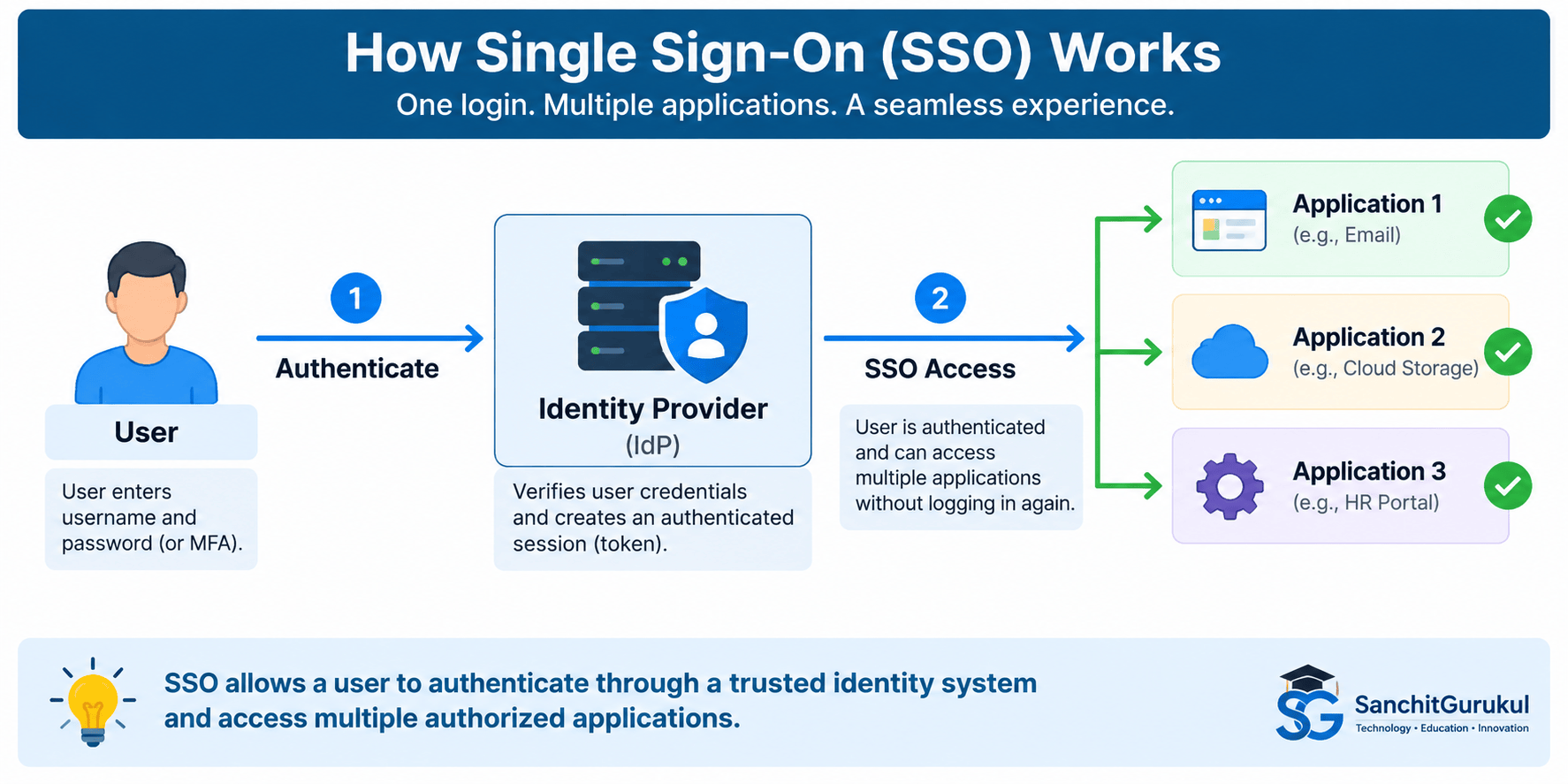
Understanding Single Sign-On
Without SSO, users may need separate credentials for many applications.
For example:
Username + Password
HR Portal
Username + Password
CRM
Username + Password
Expense System
Username + Password
This creates several challenges:
- Too many passwords
- Password reuse
- More password-reset requests
- Inconsistent authentication policies
- Difficult account management
- Poor user experience
SSO centralizes authentication.
Instead:
User
↓
Corporate Identity Provider
↓
Email + HR + CRM + Other Applications
What Is an Identity Provider?
An Identity Provider (IdP) is a system that authenticates identities and provides trusted identity information to other applications or services.
Examples of functions an IdP may provide include:
- User authentication
- MFA
- SSO
- Identity federation
- Access policies
- Session management
- Authentication logging
Applications that rely on the identity provider are commonly called service providers or relying parties, depending on the protocol and architecture.
Simple SSO Example
An employee opens a cloud-based HR application.
The HR application recognizes that authentication is handled by the company’s identity provider.
The employee is redirected to the corporate login page.
The user completes:
Username
Password
MFA
The identity provider verifies the user.
The user is then returned to the HR application with trusted authentication information.
The HR application determines whether the user is authorized to access the requested resources.
How SSO Works
SSO typically involves several components.
User
The person requesting access.
Identity Provider
The trusted system responsible for authenticating the user.
Application
The resource the user wants to access.
Authentication Session
After the user successfully authenticates, the identity provider may maintain a session that allows subsequent SSO requests without repeating the full login process each time.
Token or Assertion
The identity provider communicates authentication information to the application using a trusted protocol.
Depending on the technology, this may involve:
- SAML assertion
- OpenID Connect ID token
- Other trusted authentication mechanisms
The application validates this information before granting access.
Basic SSO Flow
A simplified flow looks like this:
Step 1
User opens an application.
↓
Step 2
Application redirects the user to the identity provider.
↓
Step 3
Identity provider authenticates the user.
↓
Step 4
Identity provider creates trusted authentication information.
↓
Step 5
Application validates that information.
↓
Step 6
Application checks authorization.
↓
Step 7
Access is allowed or denied.
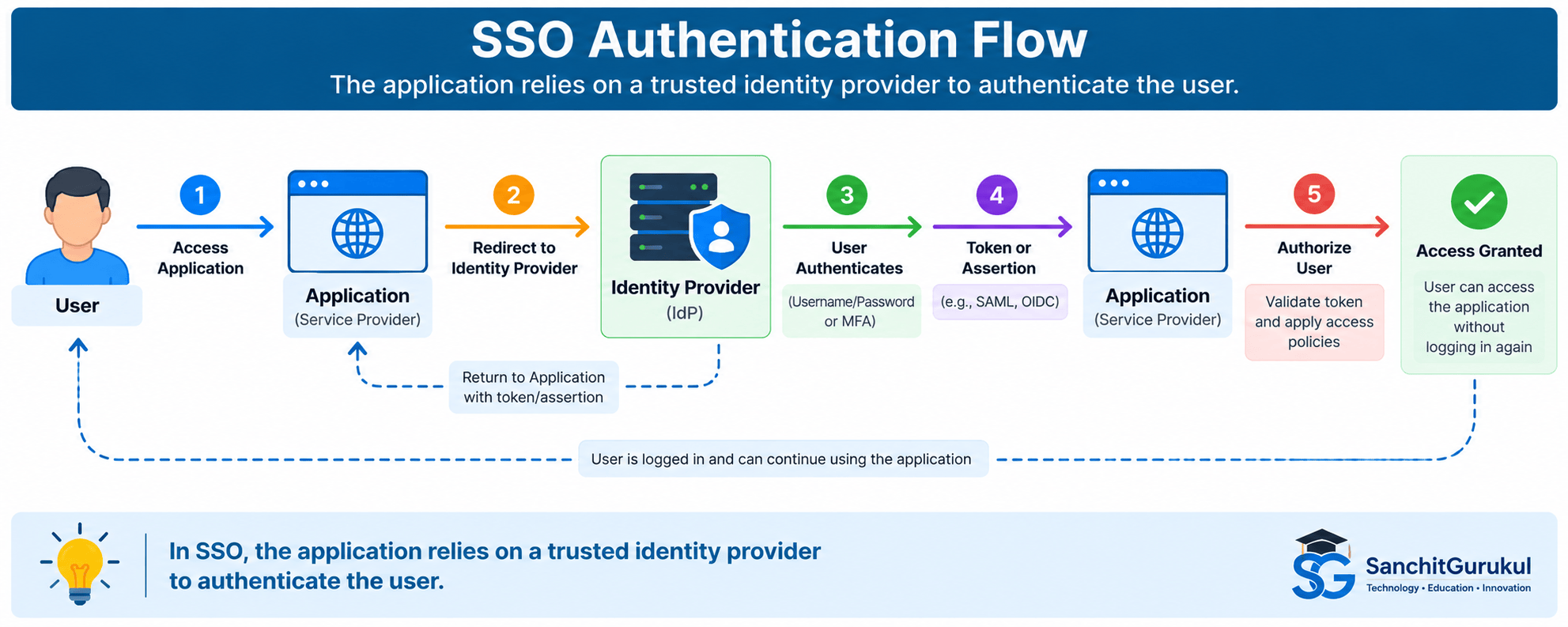
SSO Protocols and Technologies
Several standards are commonly used to implement modern SSO.
SAML
Security Assertion Markup Language (SAML) is widely used for enterprise web SSO.
A typical relationship involves:
Identity Provider
and:
Service Provider
The identity provider authenticates the user and sends a signed SAML assertion to the service provider.
This assertion can contain information about the authenticated identity.
OpenID Connect
OpenID Connect (OIDC) is an identity layer built on top of OAuth 2.0.
OIDC is widely used for:
- Modern web applications
- Mobile applications
- Cloud services
A simplified architecture is:
User → OpenID Provider → Application
The OpenID Provider authenticates the user and returns identity-related information through tokens.
OAuth 2.0 Is Not SSO by Itself
OAuth 2.0 is primarily an authorization framework.
It allows an application to obtain limited access to another service on behalf of a user or itself.
OpenID Connect adds an identity layer that supports authentication.
Therefore:
OAuth 2.0 = Delegated authorization framework
OpenID Connect = Authentication layer built on OAuth 2.0
Kerberos
Kerberos is another authentication protocol commonly associated with enterprise environments.
For example, Windows domain environments may use Kerberos to allow authenticated users to access multiple domain resources without repeatedly entering credentials.
The implementation is different from SAML or OIDC, but the user experience can still resemble SSO.
SSO Is a Concept, Not One Protocol
SSO does not require one specific technology.
It may be implemented using:
- SAML
- OpenID Connect
- Kerberos
- Other enterprise authentication mechanisms
Benefits and Security Risks of SSO
SSO can improve both security and usability when implemented correctly.
Fewer Passwords
Users may need to remember fewer passwords.
This can reduce:
- Password reuse
- Weak password practices
- Password-reset requests
Centralized Authentication
Instead of configuring authentication separately for every application, organizations can centralize controls such as:
- MFA
- Authentication policy
- Login monitoring
- Conditional access
- Account disablement
Faster Access Removal
Suppose an employee leaves the organization.
Without centralized identity management, administrators may need to disable accounts across many applications separately.
With properly integrated IAM and SSO:
Disable Central Identity
↓
SSO Access Stops Across Connected Applications
However, organizations should still verify whether applications maintain independent accounts, active sessions, local credentials, or other access paths.
Better User Experience
Users can move between authorized applications with fewer repeated login prompts.
This can improve productivity.
Centralized Visibility
SSO can provide centralized authentication logs such as:
- Login attempts
- Authentication failures
- MFA events
- Application access attempts
The Identity Provider Becomes Critical
Centralization also creates an important security dependency.
If an attacker compromises a user’s SSO identity, the attacker may potentially gain access to multiple connected applications.
Therefore, SSO should be protected with controls such as:
- MFA
- Strong authentication
- Conditional access
- Secure session handling
- Monitoring
- Least privilege
Availability Matters
If the identity provider becomes unavailable, users may be unable to access multiple applications.
Organizations should therefore consider:
- High availability
- Redundancy
- Disaster recovery
- Emergency access procedures
SSO improves centralization, but the central identity service becomes critical infrastructure.
SSO, MFA, IAM and Federation
These concepts are closely related but should not be confused.
SSO vs MFA
SSO
Reduces repeated authentication across applications.
MFA
Strengthens authentication by requiring multiple distinct factors.
They can work together:
User
↓
SSO Login
↓
MFA
↓
Multiple Authorized Applications
SSO does not replace MFA.
SSO vs IAM
IAM is the broader discipline for managing identities and access.
It includes capabilities such as:
- Identity lifecycle
- Authentication
- Authorization
- Provisioning
- Access reviews
- SSO
Therefore:
SSO is one capability within a broader IAM program.
SSO vs Federation
Federation allows separate identity domains or organizations to establish trust so that one identity system can provide authentication information to another service or organization.
For example:
Company Identity Provider
↓
Trusted SaaS Provider
The SaaS provider does not need to manage the employee’s primary password.
Federation is commonly used to enable SSO across organizational or service boundaries.
SSO vs Password Manager
A password manager stores and helps manage credentials.
Some password managers can automatically fill usernames and passwords into websites.
That may create a convenient user experience, but it is not necessarily the same architecture as federated SSO.
With SSO:
Application trusts the identity provider.
With password autofill:
Application may still perform its own independent username/password authentication.

SSO in Practical Environments
Example 1 — Corporate SaaS Applications
An organization uses:
- Microsoft 365
- HR application
- CRM
- Expense platform
Rather than maintaining separate passwords for each application, the applications are integrated with the corporate identity provider.
The employee authenticates centrally and then accesses authorized services.
Example 2 — Administrator Portal
Administrators may use SSO to access:
- Monitoring tools
- Network-management systems
- Security platforms
But highly privileged actions can still require stronger controls.
For example:
SSO Authentication
↓
MFA
↓
PAM
↓
Privileged Session
SSO should not automatically mean unrestricted administrative access.
Example 3 — Contractor
A contractor requires access to one project application.
SSO can authenticate the contractor while authorization restricts access to:
Project Application Only
The contractor does not need access to every corporate application.
Example 4 — Cloud Environment
Cloud platforms frequently integrate with enterprise identity providers.
Instead of maintaining separate administrator accounts in every cloud environment:
Central Identity
↓
Federated Authentication
↓
Assigned Cloud Role
This can improve identity lifecycle management and auditing.
Example 5 — Employee Leaves
An employee’s central identity is disabled.
Connected SSO applications should stop accepting new SSO authentication for that identity.
Security teams should also consider:
- Existing application sessions
- Local application accounts
- API tokens
- Personal access tokens
- Application-specific credentials
Common SSO Security Mistakes
Using SSO Without MFA
Centralizing access around one identity increases the importance of protecting that identity.
SSO should generally be combined with authentication controls appropriate to the risk.
Giving Everyone the Same Access
SSO authenticates users.
It should not automatically authorize every user for every application.
Use:
- Roles
- Groups
- Policies
- Least privilege
Weak Administrator Protection
IAM and SSO administrators may have significant control over the environment.
Protect these accounts through:
- MFA
- PAM
- Restricted administrative access
- Monitoring
- Dedicated admin identities
Ignoring Sessions
After authentication, applications may create sessions.
Security should consider:
- Session lifetime
- Idle timeout
- Token lifetime
- Logout behavior
- Revocation
Leaving Local Authentication Enabled
Some applications maintain local username/password authentication even after SSO is implemented.
If local authentication is unnecessary and poorly protected, attackers may use it to bypass centralized controls.
Organizations should review whether these alternate login paths are needed.
Poor Trust Configuration
SSO depends on trust between systems.
Incorrect configuration can create vulnerabilities involving:
- Redirects
- Tokens
- Certificates
- Signing configuration
- Application registration
Follow vendor and protocol-specific security guidance when configuring integrations.
No Emergency Access Plan
If the central identity provider becomes unavailable, administrators may need controlled emergency access.
Critical environments should define appropriate recovery procedures.
Building a Secure SSO Design
Step 1 — Use a Trusted Identity Provider
Select an identity platform appropriate to the organization’s security and availability requirements.
Step 2 — Integrate Applications Carefully
Identify:
- Which applications support SSO
- Which protocol they use
- Which attributes they require
- Whether local login remains available
Step 3 — Strengthen Authentication
Use appropriate controls such as:
- MFA
- Security keys
- Risk-based authentication
- Device requirements
Step 4 — Apply Least Privilege
SSO should not automatically grant application access.
Assign users only the applications and permissions they require.
Step 5 — Protect Administrator Accounts
Identity administrators should receive additional controls.
Consider:
- Separate admin accounts
- PAM
- Strong MFA
- Restricted administrative devices
Step 6 — Manage Sessions
Define appropriate:
- Session duration
- Token lifetime
- Reauthentication requirements
- Revocation procedures
Step 7 — Monitor Authentication
Monitor for:
- Failed login attempts
- Suspicious locations
- Unusual devices
- MFA changes
- Privileged authentication
- Impossible or unusual access patterns
Step 8 — Automate Identity Lifecycle
Connect SSO with IAM processes for:
Joiners
Movers
Leavers
Access should change as the user’s role changes.
Step 9 — Review Alternate Access Paths
Look for:
- Local passwords
- API tokens
- Service accounts
- Legacy authentication
- Emergency accounts
Step 10 — Plan for Failure
Because SSO centralizes authentication, design for:
- High availability
- Disaster recovery
- Secure emergency administration
Key Takeaways
- Single Sign-On (SSO) allows a user to authenticate through a trusted identity system and access multiple authorized applications without repeatedly entering credentials.
- SSO usually relies on a central Identity Provider (IdP).
- Applications trust authentication information supplied by the identity provider according to an established trust relationship.
- SSO does not mean a user’s password must be sent to every application.
- Common SSO technologies include SAML, OpenID Connect, Kerberos, and other enterprise authentication mechanisms.
- OAuth 2.0 is primarily an authorization framework and should not be confused with OpenID Connect authentication.
- SSO can reduce password fatigue and password reuse.
- SSO can centralize MFA and authentication policies.
- Authentication through SSO does not automatically authorize access to every application.
- IAM is broader than SSO.
- MFA strengthens authentication and works well with SSO.
- Federation establishes trust between identity domains and can enable cross-domain SSO.
- The identity provider becomes critical infrastructure and requires strong protection.
- Compromise of a central identity can potentially affect multiple connected applications.
- Local passwords, active sessions, tokens, and alternate login paths should still be considered.
- Administrator access to the identity platform should receive particularly strong protection.
- SSO should be combined with least privilege, IAM lifecycle management, monitoring, and appropriate session controls.
Useful Links and References
SanchitGurukul Static Resources
Official External References
Your feedback matters
Was this post helpful?
Discussion
1 approved comment
Leave a Comment
No login is required. Name and email are used for moderation/security. Your email is never displayed publicly. All comments require administrator approval.
Discover more from SanchitGurukul
Subscribe to get the latest posts sent to your email.