
Syslog is a widely used logging protocol and message format that allows operating systems, network devices, security appliances, and applications to send event information to another system for centralized collection.
Syslog is commonly used by:
- Routers
- Switches
- Firewalls
- Linux servers
- VPN gateways
- Wireless controllers
- Load balancers
- Applications
- Security appliances
- Infrastructure platforms
A network device might generate thousands of local events every day. Sending important events to a centralized collector allows administrators and security teams to retain and analyze those events independently of the original device.
Syslog is useful for:
- Operational monitoring
- Troubleshooting
- Security monitoring
- Incident investigation
- Audit logging
- Centralized log collection
- SIEM ingestion
However, Syslog itself does not perform advanced analysis.
It primarily provides a standardized way to represent and transport log messages.
A SIEM or log-management platform can receive those messages and then provide:
- Search
- Correlation
- Alerting
- Dashboards
- Retention
- Threat detection
- Investigation

What Is Syslog and How Does Its Architecture Work?
The modern Syslog protocol is defined by:
RFC 5424
One important architectural detail is that RFC 5424 defines the Syslog message format independently of the transport protocol.
UDP, TLS and other transport mappings are defined separately.
Syslog Originator
An originator creates Syslog messages.
Examples include:
- Router
- Firewall
- Linux server
- Application
- Authentication service
For example, a firewall may generate a message when an administrator logs in.
Syslog Collector
A collector receives Syslog messages.
The collector may:
- Write logs to files
- Store them in a database
- Forward them to a SIEM
- Parse structured fields
- Index them for searching
Examples of software commonly used for Syslog collection include:
- rsyslog
- syslog-ng
- SIEM collectors
- Network-management platforms
Syslog Relay
A relay receives Syslog messages and forwards them to another destination.
This is useful in large environments.
For example, branch offices might send logs to regional collectors, which then forward selected events to a central security platform.
Sender and Receiver
The RFC also distinguishes between:
- Transport sender
- Transport receiver
These describe the systems participating in the actual network transport of the message.
A relay can therefore act as:
- Receiver for one connection
- Sender for another
Syslog Is Not the Same as rsyslog
These names can be confusing.
Syslog
is the protocol and logging concept.
rsyslog
is a modern logging implementation commonly found on Linux.
syslog-ng
is another logging implementation.
systemd-journald
is the logging service used by many modern Linux distributions and can coexist with or forward data to Syslog-based systems.
Do not treat these terms as interchangeable.
Syslog Message Format, PRI, Severity and Facility
Modern RFC 5424 Syslog messages contain a well-defined structure.
A simplified format is:
VERSION TIMESTAMP HOSTNAME APP-NAME PROCID MSGID STRUCTURED-DATA MESSAGEA sample message might look like:
1 2026-07-15T10:15:30Z fw01.example.com firewall 4242 LOGIN [event@32473 user="admin" src="192.0.2.25"] Administrator login detectedEach field provides different information.
PRI — Priority Value
The beginning:
is called the:
PRI
PRI does not represent only severity.
It mathematically combines:
- Facility
- Severity
The formula is:
PRI = (Facility × 8) + SeverityFor example:
- Facility = Local0 = 16
- Severity = Warning = 4
Therefore:
(16 × 8) + 4 = 132which produces:
Severity Levels
Syslog severity ranges from:
0 to 7
A smaller number represents a more serious condition.
| Value | Severity | Typical Meaning |
|---|---|---|
| 0 | Emergency | System unusable |
| 1 | Alert | Immediate action required |
| 2 | Critical | Critical condition |
| 3 | Error | Error condition |
| 4 | Warning | Warning condition |
| 5 | Notice | Normal but significant event |
| 6 | Informational | General information |
| 7 | Debug | Diagnostic/debugging information |
Facility
The facility identifies the general category or subsystem associated with the event.
Common facilities include:
| Code | Facility |
|---|---|
| 0 | Kernel |
| 1 | User-level messages |
| 2 | |
| 3 | System daemons |
| 4 | Security / authorization |
| 5 | Syslog internal |
| 6 | Printer |
| 7 | Network news |
| 8 | UUCP |
| 9 | Clock daemon |
| 10 | Security / authorization |
| 11 | FTP |
| 12 | NTP |
| 13 | Log audit |
| 14 | Log alert |
| 15 | Clock daemon |
| 16–23 | Local0 through Local7 |
The local0 through local7 facilities are especially useful when organizations need custom categories for network devices or applications.
A facility should not automatically be interpreted as the exact physical device type.
Vendors and administrators may configure facilities differently.
VERSION
RFC 5424 includes a version field.
For RFC 5424 messages, this is commonly:
1TIMESTAMP
RFC 5424 supports a precise RFC 3339-style timestamp.
Example:
2026-07-15T10:15:30.125+05:30A good timestamp should include:
- Date
- Time
- Time zone
- Suitable precision
Accurate time is essential for event correlation.
HOSTNAME
Identifies the system that originally generated the event.
Example:
fw01.example.comAPP-NAME
Identifies the application or process.
Example:
sshdPROCID
Identifies a process or related execution context.
Example:
4242MSGID
Provides an identifier for the type of message.
Example:
LOGINSTRUCTURED-DATA
RFC 5424 can carry structured information.
Example:
[event@32473 user="admin" src="192.0.2.25"]Structured data allows collectors to process important fields without depending entirely on parsing free-form text.
MESSAGE
The final portion contains the human-readable or application-specific event information.
Example:
Administrator login detected
RFC 3164 vs RFC 5424
Many network devices still generate traditional BSD-style Syslog messages.
These are commonly associated with:
RFC 3164
However, RFC 3164 is an Informational RFC describing traditional observed BSD Syslog behavior, rather than the modern standardized protocol format defined by RFC 5424.
| Area | RFC 3164 Style | RFC 5424 |
|---|---|---|
| Message structure | Looser / legacy | Standardized |
| Version field | No | Yes |
| Timestamp | Legacy format | Modern structured timestamp |
| Time zone | Often absent | Supported |
| Structured data | No standardized field | Yes |
| Host/application metadata | Less consistent | Explicit fields |
| Modern structured logging | Limited | Better suited |
A legacy message might look like:
Jul 15 10:15:30 router01 interface: GigabitEthernet1/0/1 changed state to downwhile RFC 5424 provides much more explicit structure.
Syslog Transport, Ports and Security
A common misconception is:
Syslog always uses UDP 514.
UDP 514 is the traditional standardized transport, but Syslog can use other transport mechanisms.
UDP 514
RFC 5426 defines the transmission of Syslog messages over UDP.
The registered service is:
UDP 514
Advantages include:
- Simple
- Low overhead
- Widely supported
- No connection establishment
However, UDP provides no delivery acknowledgement.
Messages can be:
- Lost
- Reordered
- Dropped during congestion
The sender may never know.
Plain TCP Syslog
Many implementations also support Syslog over TCP.
TCP provides:
- Ordered delivery
- Flow control
- Retransmission at the transport layer
However, plain TCP Syslog has an important historical detail.
RFC 6587 documents commonly used TCP Syslog framing, but it is classified as Historic and notes that no consistent standard TCP port was established for this legacy transport.
TCP 514 is frequently encountered in products and configurations, but IANA assigns:
TCP 514 to the Shell service
not standardized Syslog/TCP.
Therefore, always verify the TCP port used by both sender and collector.
TCP Message Framing
Unlike UDP, TCP is a byte stream and does not preserve message boundaries automatically.
Syslog-over-TCP implementations therefore require framing.
Common approaches documented by RFC 6587 include:
- Octet-counting framing
- Non-transparent framing
Interoperability problems can occur when a sender and collector expect different framing methods.
Syslog over TLS
RFC 5425 defines:
Syslog over TLS
The registered default port is:
TCP 6514
TLS can provide:
- Confidentiality
- Integrity protection
- Server authentication
- Optional mutual certificate authentication
For security-sensitive environments, encrypted authenticated transport is generally preferable to sending logs as cleartext UDP across untrusted networks.
DTLS
Syslog can also be protected using DTLS in supported implementations.
IANA registers:
UDP 6514
for Syslog over DTLS.
Support is less universal than traditional UDP or TCP/TLS, so compatibility must be verified.
Transport Comparison
| Transport | Typical Port | Delivery Characteristics | Encryption |
|---|---|---|---|
| Syslog/UDP | 514/UDP | Best effort | No |
| Plain Syslog/TCP | Implementation dependent | TCP reliability | No |
| Syslog over TLS | 6514/TCP | TCP + TLS | Yes |
| Syslog over DTLS | 6514/UDP | Datagram based | Yes |
TCP Does Not Mean Guaranteed Log Retention
TCP improves network delivery compared with UDP.
It still does not guarantee that an event will eventually be stored permanently.
Messages may still be lost because of:
- Application queue overflow
- Disk exhaustion
- Collector failure
- Process crash
- Misconfiguration
Modern logging software can use local queues or disk-assisted buffers to improve resilience.
For environments requiring stronger delivery guarantees, some implementations also support protocols such as RELP.
Why Syslog Matters for Monitoring, Security and SIEM
Syslog remains important because network infrastructure produces valuable security information.
Network Troubleshooting
Routers and switches may log events such as:
- Interface state changes
- Routing neighbor failures
- Configuration changes
- Hardware alarms
- Authentication failures
For example:
Security Monitoring
Firewalls and security appliances can generate events involving:
- Denied connections
- VPN authentication
- Administrator logins
- IPS detections
- Malware events
- Configuration changes
Sending these events away from the originating device makes investigation more resilient if that device is later compromised.
SIEM Integration
Syslog is one common method for sending network-device telemetry to a SIEM.
The SIEM may then:
- Parse fields
- Normalize events
- Correlate multiple systems
- Apply detection rules
- Create alerts
- Build investigations
This distinction is important:
Syslog transports the event.
The SIEM analyzes the event.
Security Investigation
Central logs can help reconstruct an incident.
For example, investigators might correlate:
- Firewall connection
- VPN authentication
- Administrator login
- Configuration modification
using timestamps across multiple systems.
Compliance and Audit
Central logging can help organizations maintain:
- Administrative activity
- Authentication events
- Configuration changes
- Security-control events
for audit and retention requirements.
However, Syslog by itself does not make an organization compliant.
Retention, access controls, integrity, monitoring, and policy requirements still need to be implemented.
Practical Syslog Configuration and Troubleshooting
Linux systems commonly use software such as:
- rsyslog
- syslog-ng
- systemd-journald
The exact implementation depends on the distribution.
Generate a Local Test Message
The Linux logger command can generate a test event.
logger -p local0.notice "SanchitGurukul syslog test"Then review the local logging destination configured by the system.
On systems using systemd journal:
journalctl -n 20Example rsyslog Forwarding
A modern rsyslog forwarding configuration can define the destination explicitly.
Example TCP forwarding:
action(
    type="omfwd"
    target="logs.example.com"
    port="10514"
    protocol="tcp"
    queue.type="linkedList"
)
The queue helps prevent the remote destination from directly blocking the local logging pipeline during a temporary outage.
For production environments, use the port and transport expected by your collector.
Secure TLS Forwarding
For sensitive environments, configure the sender and collector for:
- TLS
- Valid certificates
- Trusted CA
- Peer verification
- Appropriate queueing
and normally use:
TCP 6514
for standardized Syslog over TLS.
Do not simply enable encryption while disabling certificate verification.
Check UDP Listener
On a Linux Syslog collector:
sudo ss -lunp | grep ':514'Check TLS Listener
sudo ss -lntp | grep ':6514'Capture UDP Syslog Traffic
On an authorized troubleshooting system:
sudo tcpdump -ni any udp port 514If packets appear on the network but no events reach the log application, investigate the receiver.
Test TLS Connectivity
openssl s_client
-connect logs.example.com:6514
-servername logs.example.com
Verify:
- TLS handshake
- Certificate trust
- Certificate name
- Validity dates
Troubleshooting Workflow
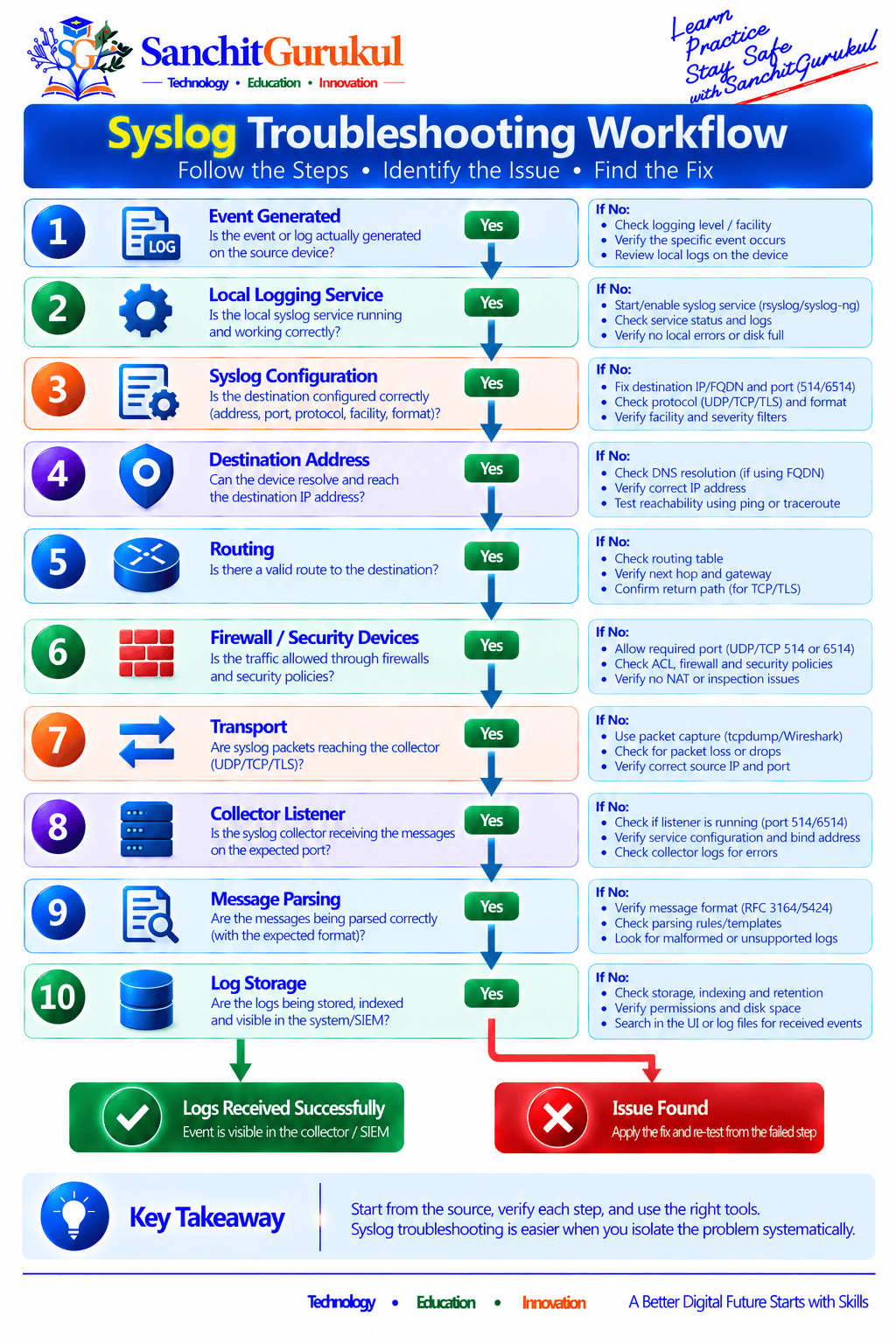
Step 1 — Confirm the Event Is Generated
Create a controlled test event using:
logger -p local0.notice "syslog connectivity test"Step 2 — Verify the Logging Service
For rsyslog:
systemctl status rsyslogStep 3 — Validate Configuration
For rsyslog:
rsyslogd -N1This checks the configuration for syntax problems.
Step 4 — Check Network Reachability
Confirm:
- Correct destination IP
- Routing
- ACL
- Firewall
- Correct port
- Correct protocol
UDP and TCP must be tested differently.
Step 5 — Check the Collector
Confirm the collector is listening on the same:
- IP address
- Port
- Transport
expected by the sender.
Step 6 — Verify Parsing
A collector can successfully receive a message but fail to parse it correctly.
Check whether the sender uses:
- RFC 3164
- RFC 5424
- Vendor-specific formatting
Step 7 — Verify Storage or SIEM Ingestion
If the collector receives the event but it does not appear in the SIEM, investigate:
- Parser
- Pipeline
- Filter
- Index
- Data source
- Retention configuration
Security Best Practices
Prefer Secure Transport
For important security logs crossing untrusted or shared networks, use authenticated encryption such as Syslog over TLS where supported.
Keep Logs Off the Source Device
A compromised server or firewall may allow an attacker to:
- Delete local logs
- Modify local logs
- Disable logging
Centralized logging makes this more difficult.
CISA recommends aggregating important security logs in a centralized location that attackers cannot easily tamper with.
Synchronize Time
Use accurate time synchronization across:
- Network devices
- Servers
- Firewalls
- Log collectors
- SIEM systems
A five-minute timestamp difference between systems can severely complicate incident investigation.
Protect the Collector
A central Syslog server contains sensitive operational information.
Restrict:
- Administrative access
- Network access
- File permissions
- API access
- Retention deletion
Use Queues and Buffers
Network outages should not immediately cause important logs to disappear.
Modern collectors and senders can use:
- Memory queues
- Disk queues
- Backpressure controls
according to their capabilities.
Monitor Logging Health
Monitor whether each important device is still sending logs.
A missing log source can be a security event itself.
Key Takeaways and Summary
Key Takeaways
- Syslog provides a standardized mechanism for representing and transporting event messages.
- RFC 5424 defines the modern Syslog message format.
- RFC 5424 is transport-independent.
- PRI combines both facility and severity.
- Severity ranges from 0 Emergency to 7 Debug.
- RFC 5424 includes structured fields such as timestamp, hostname, application, process ID and structured data.
- RFC 3164 describes older BSD-style Syslog behavior and remains common in network equipment.
- UDP 514 is the standardized traditional Syslog transport.
- UDP Syslog provides no delivery acknowledgement.
- Plain TCP Syslog exists in many implementations, but TCP 514 is not the IANA-standardized Syslog/TCP assignment.
- RFC 5425 defines secure Syslog over TLS using TCP 6514.
- TLS provides encryption and peer-authentication capabilities when certificates are correctly validated.
- TCP improves delivery behavior but does not guarantee permanent log retention.
- Queues and buffers improve logging resilience during outages.
- Syslog transports events; SIEM platforms perform higher-level correlation, detection and analysis.
- Centralized logging improves troubleshooting, security monitoring and incident investigation.
Summary
Syslog remains one of the most widely supported mechanisms for moving operational and security events across enterprise networks.
A typical architecture consists of:
Event Source → Syslog Sender → Network Transport → Collector → Log Platform or SIEM
The protocol provides important metadata including:
- Facility
- Severity
- Timestamp
- Hostname
- Application
- Process
- Message identifier
- Structured data
- Event text
Modern deployments should understand the difference between:
RFC 3164 legacy messages
and:
RFC 5424 structured Syslog
They should also select transport according to operational requirements.
For simple local environments, UDP may still be sufficient.
For security-sensitive centralized logging, encrypted and authenticated transport such as:
Syslog over TLS
is generally preferable.
Most importantly, logging should be treated as a complete operational pipeline.
Generating an event is only the beginning.
Organizations must also ensure that logs are:
Transported reliably → protected → received → parsed → stored → monitored → retained → investigated when necessary.
That complete process turns raw Syslog messages into useful operational and security intelligence.
Useful Links and References
SanchitGurukul Static Resources
Official External References
Your feedback matters
Was this post helpful?
Discussion
0 approved comments
No approved comments yet. You can start the discussion below.
Leave a Comment
No login is required. Name and email are used for moderation/security. Your email is never displayed publicly. All comments require administrator approval.
Discover more from SanchitGurukul
Subscribe to get the latest posts sent to your email.


