
Prerequisites: Basic Understanding of Computers and Networks
Imagine you open a website using your computer.
Your browser sends a request across the network, and the website returns the requested information.
But how does this communication actually happen?
How does your computer know where to send the request?
How does the network carry the information?
And how does the browser understand the response?
These questions become easier to understand with the OSI Model (Open Systems Interconnection Model).
The OSI model divides network communication into seven logical layers, each representing a different responsibility.
It helps students, network engineers and administrators understand how networks work and troubleshoot communication problems.
In this article, you will learn:
- What the OSI model is and why it is used
- The functions of all seven OSI layers
- Common protocols and technologies associated with each layer
- How data travels through the layers
- The difference between OSI and TCP/IP models
- How to use OSI layers for network troubleshooting

What Is the OSI Model?
OSI stands for Open Systems Interconnection.
It is a reference model developed through international standardization efforts, primarily associated with the International Organization for Standardization (ISO).
The original ISO reference model was standardized in 1984. The basic model is documented in ISO/IEC 7498-1:1994.
The OSI model provides a common way to describe network communication by separating it into seven layers.
It is not a network protocol itself.
Instead, it is a framework for understanding communication functions and organizing network technologies.
Why Is the OSI Model Important?
The OSI model is useful because it provides:
- Standardized terminology: A common language for discussing network communication.
- Simplified learning: Complex networking functions are divided into smaller concepts.
- Troubleshooting: Problems can be investigated according to their likely layer.
- Technology understanding: Network protocols and devices can be compared by their primary functions.
- Network design: Engineers can understand how communication technologies interact.
The Seven Layers of the OSI Model Explained
Layer 1 — Physical Layer
The Physical Layer handles the transmission and reception of raw bits across a physical medium.
A bit is the smallest unit of digital information, represented by 0 or 1.
This layer defines how bits are represented using electrical, optical or radio signals.
Main Functions:
- Transmitting and receiving physical signals
- Defining signaling methods and data rates
- Supporting physical media and interfaces
- Defining physical connectivity requirements
Examples:
- Copper network cables
- Fiber-optic connections
- Ethernet physical-layer interfaces
- Hubs and repeaters
- Wi-Fi radio transmission
Simple Example:
A computer sends network information through an Ethernet cable.
The Physical Layer handles the signaling used to carry those bits.
Data Unit: Bits
Layer 2 — Data Link Layer
The Data Link Layer organizes information into frames for communication over a local network link.
It is closely associated with MAC (Media Access Control) addressing.
A MAC address is a link-layer identifier used by technologies such as Ethernet. MAC addresses are not guaranteed to be globally unique in every situation.
Main Functions:
- Creating and processing frames
- Using source and destination MAC addresses
- Detecting certain transmission errors
- Supporting local network switching
- Controlling access to supported network media
Examples:
- Ethernet MAC
- IEEE 802.1Q VLAN tagging
- Point-to-Point Protocol (PPP)
- Ethernet switches
- Wi-Fi MAC functions
Ethernet includes both Data Link and Physical Layer specifications.
Ethernet commonly uses a Frame Check Sequence (FCS) based on CRC to detect damaged frames. Detection does not necessarily mean the frame will be repaired or retransmitted at this layer.
Simple Example:
Two computers connected to the same Ethernet switch exchange frames using MAC addresses.
Data Unit: Frame
Layer 3 — Network Layer
The Network Layer handles logical addressing and forwarding packets across interconnected networks.
It enables communication beyond a single local network.
Main Functions:
- Logical network addressing
- Packet forwarding
- Routing between networks
- Supporting communication across network boundaries
Examples:
- Internet Protocol version 4 (IPv4)
- Internet Protocol version 6 (IPv6)
- Internet Control Message Protocol (ICMP)
- Routers and Layer 3 switches
Simple Example:
A computer on one network communicates with a website hosted on another network.
Routers forward IP packets toward the destination according to their routing and forwarding information.
Data Unit: Packet
Layer 4 — Transport Layer
The Transport Layer provides communication services between applications running on different systems.
Two common transport protocols are TCP and UDP.
Main Functions:
- Identifying application endpoints using ports
- Transporting data between endpoints
- Supporting data segmentation where applicable
- Providing reliability and flow control when supported by the protocol
Examples:
- TCP (Transmission Control Protocol)
- UDP (User Datagram Protocol)
TCP provides reliable, ordered byte-stream communication using mechanisms such as acknowledgments and retransmissions.
UDP provides datagram communication without guaranteeing delivery, ordering or duplicate protection.
Simple Example:
A traditional HTTPS connection over TCP commonly uses destination port 443.
TCP manages the reliable transport of the data between endpoints.
Data Unit: TCP Segment or UDP Datagram
Layer 5 — Session Layer
The Session Layer represents functions used to establish, coordinate, maintain and end communication sessions.
A session is an ongoing exchange between communicating applications or systems.
Main Functions:
- Coordinating communication sessions
- Managing communication exchanges
- Supporting synchronization and recovery points where implemented
- Managing session-related communication state
Examples of Related Functions:
- Session coordination
- Application session management
- Remote procedure call session behavior
Simple Example:
An application maintains an ongoing authenticated interaction with a remote service.
Some of its session-management responsibilities resemble Layer 5 functions.
In modern TCP/IP applications, these functions are usually implemented within applications or related protocols rather than a separate OSI Session Layer.
Layer 6 — Presentation Layer
The Presentation Layer represents functions that determine how information is formatted, represented and interpreted between communicating applications.
Main Functions:
- Data representation and translation
- Data serialization and encoding
- Data compression and decompression
- Supporting cryptographic transformation functions
Examples of Related Technologies:
- Character encodings such as UTF-8
- JSON and other data formats
- JPEG image encoding
- Encryption and decryption functions
Simple Example:
A web application sends structured JSON data.
The receiving application interprets the transmitted data according to the agreed format.
Encryption technologies such as TLS also perform functions associated with data protection.
However, TLS should not be classified as exclusively Layer 6. Modern Internet protocol stacks do not map it neatly to a separate OSI Presentation Layer.
Layer 7 — Application Layer
The Application Layer provides network communication services to software applications.
It is the highest layer of the OSI model.
Main Functions:
- Supporting application-level network communication
- Defining application messages and operations
- Providing protocols for web, email, file transfer and name resolution
Examples:
- HTTP and HTTPS
- DNS
- FTP
- SMTP
- SSH
Simple Example:
When a browser accesses a website, HTTP defines the application-level request and response behavior.
The browser itself is an application, while HTTP is an application-layer protocol.
Data Unit: Application Data
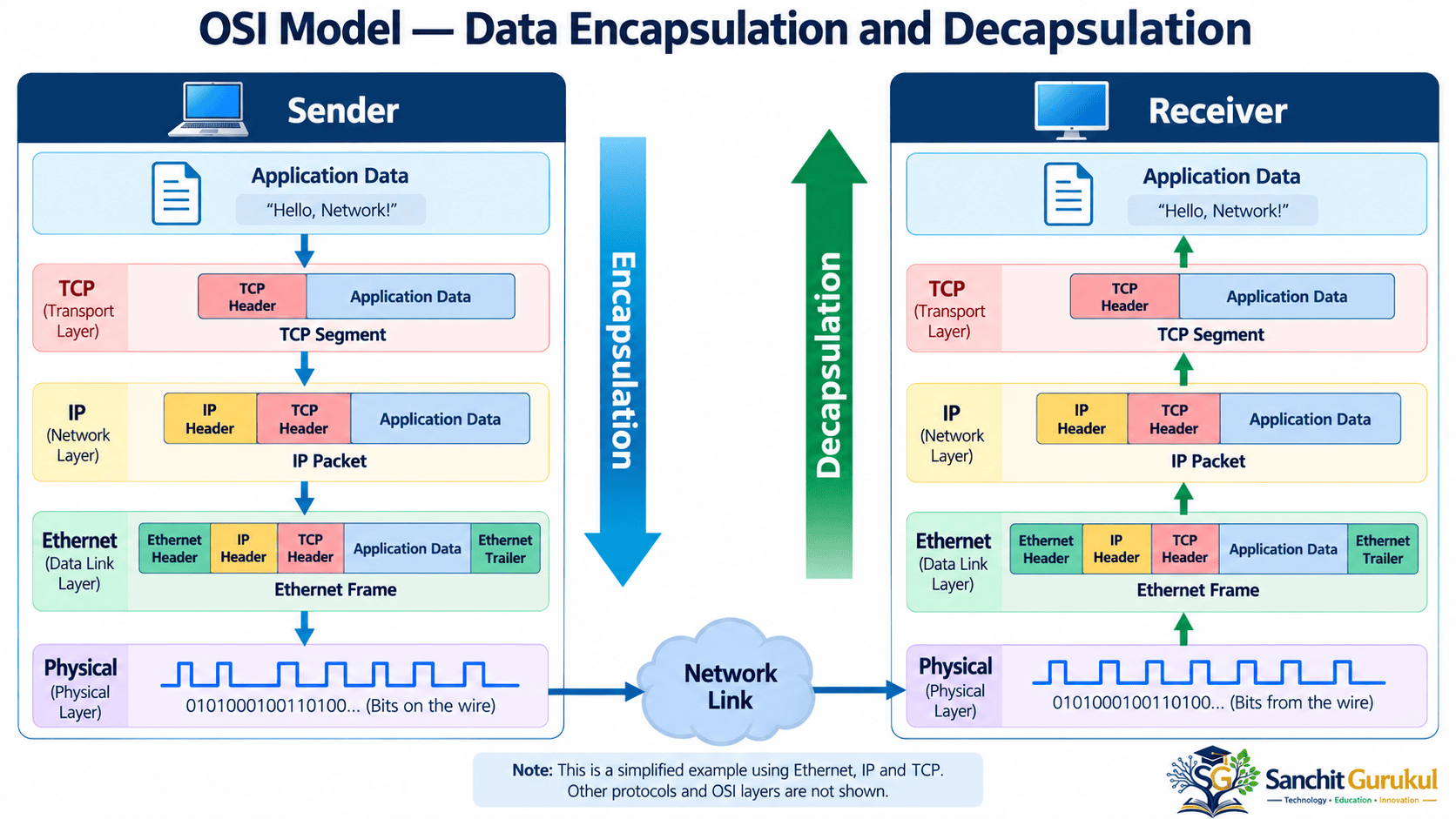
How Data Travels Through the OSI Layers
When information is sent across a network, it moves through the communication stack.
The process of adding protocol information as data moves downward is called encapsulation.
The receiving device processes the relevant protocol information in the reverse direction, called decapsulation.
Example — Opening a Website
Consider a common HTTPS connection using HTTP over TLS over TCP.
The simplified sending process is:
- The browser creates an HTTP request.
- TLS protects the application data.
- TCP carries the protected data using segments.
- IP provides addressing and packet delivery across networks.
- Ethernet places the IP packet into a frame on an Ethernet link.
- The Physical Layer transmits the information as signals.
At the receiving endpoint, the information is processed upward through the corresponding protocols.
Understanding Data Units
| Layer | Common Data Description |
|---|---|
| Layer 7 — Application | Application Data |
| Layer 6 — Presentation | Application Data |
| Layer 5 — Session | Application Data |
| Layer 4 — Transport | TCP Segment / UDP Datagram |
| Layer 3 — Network | IP Packet |
| Layer 2 — Data Link | Frame |
| Layer 1 — Physical | Bits / Signals |
The exact protocol headers and transformations depend on the technologies being used. Layers 5 and 6 do not necessarily create independent headers in a TCP/IP implementation.
OSI Model vs TCP/IP Model
The OSI and TCP/IP models both help explain network communication, but their structures differ.
The OSI model has seven layers.
The TCP/IP model is commonly represented using four layers:
- Application
- Transport
- Internet
- Link
OSI and TCP/IP Layer Mapping
| OSI Model | TCP/IP Model | Main Responsibility |
|---|---|---|
| Layer 7 — Application | Application | Application services |
| Layer 6 — Presentation | Application | Data representation and related functions |
| Layer 5 — Session | Application | Session-related functions |
| Layer 4 — Transport | Transport | Endpoint transport communication |
| Layer 3 — Network | Internet | IP addressing and routing |
| Layer 2 — Data Link | Link | Local link communication |
| Layer 1 — Physical | Link | Physical transmission |
Important Differences
OSI Model
- Uses seven logical layers.
- Provides detailed separation of communication functions.
- Commonly used for learning, design discussions and troubleshooting.
- Is a reference framework rather than a single deployed protocol suite.
TCP/IP Model
- Commonly uses four layers.
- Describes the Internet protocol architecture.
- Includes widely implemented protocols such as IP, TCP and UDP.
- Combines several OSI functions into broader layers.
Some educational materials also describe a five-layer Internet model by separating Data Link and Physical functions. This is a teaching variation.
Using the OSI Model for Network Troubleshooting
One of the most useful applications of the OSI model is troubleshooting.
Instead of investigating every possible problem at once, engineers can narrow the investigation to relevant communication functions.
Troubleshooting Examples
| Layer | Example Problem | What to Check |
|---|---|---|
| Layer 1 | Network link is down | Cable, optical signal, interface status |
| Layer 2 | Devices cannot communicate on the expected VLAN | VLAN membership, MAC learning, switching |
| Layer 3 | Remote network cannot be reached | IP address, gateway, routing |
| Layer 4 | TCP connection cannot be established | TCP handshake, ports, firewall rules |
| Layer 5 | Application session unexpectedly ends | Session state, timeouts |
| Layer 6 | Encrypted connection or data interpretation fails | TLS negotiation, certificates, encoding |
| Layer 7 | Website or service returns an error | DNS, HTTP responses, application logs |
These are troubleshooting categories, not proof that a problem belongs exclusively to one layer.
For example, an HTTPS failure may involve DNS, TCP, TLS, a firewall or the application itself.
Simple Troubleshooting Sequence
Suppose a user cannot open a website.
- Verify that the device has an active network connection.
- Check the local network, IP address and default gateway.
- Test whether the destination IP is reachable, where ICMP testing is permitted.
- Check whether the required TCP or UDP communication succeeds.
- Investigate DNS resolution, TLS negotiation and application responses.
This approach helps identify where communication is failing.
A failed ping alone does not prove a destination is unreachable because ICMP traffic may be filtered.
Key Takeaways
Core Concepts
- OSI stands for Open Systems Interconnection.
- The OSI model contains seven logical layers.
- Layer 1 handles physical transmission.
- Layer 2 handles local link framing and MAC functions.
- Layer 3 handles network addressing and routing.
- Layer 4 provides transport communication services.
- Layers 5 and 6 describe session and presentation functions.
- Layer 7 supports application-level network communication.
Practical Networking Concepts
- Data encapsulation prepares information for network transmission.
- Decapsulation processes received information.
- TCP and UDP provide different transport services.
- The TCP/IP model is commonly represented using four layers.
- Modern protocols do not always map neatly to individual OSI layers.
- The OSI model is especially useful for learning and systematic troubleshooting.
The OSI model remains one of the most useful foundations for learning computer networking.
It explains the major communication responsibilities, from physical signals to application services.
Understanding these layers helps learners recognize the roles of switches, routers, firewalls, transport protocols and applications.
Although real-world networks primarily use the TCP/IP protocol suite, the OSI model provides a valuable common language for network design, analysis and troubleshooting.
Useful Links and References
SanchitGurukul Resources
Official External References
Your feedback matters
Was this post helpful?
Discussion
0 approved comments
No approved comments yet. You can start the discussion below.
Leave a Comment
No login is required. Name and email are used for moderation/security. Your email is never displayed publicly. All comments require administrator approval.
Discover more from SanchitGurukul
Subscribe to get the latest posts sent to your email.


