
IPv6 uses different address types depending on how communication should occur.
The three fundamental IPv6 address types are:
- Unicast
- Anycast
- Multicast
Each solves a different networking requirement.
Unicast identifies one interface.
Anycast identifies multiple interfaces that provide the same address, with routing selecting one destination.
Multicast identifies a group of interfaces.
IPv6 does not use broadcast addressing.
Multicast replaces several functions for which IPv4 traditionally relied on broadcast.
Understanding these address types is important because they affect:
- Routing
- Network scalability
- Neighbor Discovery
- Service availability
- Local-link communication
- Address planning
- Security policy
- Troubleshooting

Understanding the IPv6 Addressing Model
An IPv6 address is:
128 bits long
and identifies an interface or a set of interfaces depending on the address type.
An individual interface may have several IPv6 addresses simultaneously.
For example, one server interface might have:
- Link-local address
- Global Unicast Address
- Unique Local Address
- Membership in several multicast groups
This is normal IPv6 behavior.
Unicast
A unicast address identifies a single interface.
A packet sent to a unicast address is delivered to the interface identified by that address.
Important IPv6 unicast forms include:
- Global Unicast
- Link-Local
- Unique Local
- Loopback
- Unspecified address for special protocol use
Anycast
An anycast address is assigned to multiple interfaces, normally on different nodes.
Traffic sent to that address is routed to one of those interfaces according to the routing system.
Anycast addresses are taken from unicast address space.
There is no special IPv6 prefix that tells you:
This is an anycast address.
Its anycast behavior comes from:
- Address assignment
- Routing advertisement
- Network design
Multicast
A multicast address represents a group of interfaces.
Traffic sent to the group can be delivered to the interfaces participating in that multicast group.
IPv6 multicast addresses begin with:
ff00::/8IPv6 Does Not Use Broadcast
IPv4 uses broadcast for several functions.
IPv6 does not define broadcast addresses.
Functions requiring communication with groups of systems use multicast instead.
This prevents many operations from automatically requiring every node on a network segment to process the same broadcast packet.
IPv6 Unicast Address Types
Unicast is the address type administrators encounter most often.
Global Unicast Address
A Global Unicast Address — GUA is used for globally routable IPv6 communication.
Example using the documentation prefix:
2001:db8:100:10::25The address may represent:
- Server
- Client
- Router
- Firewall
- Cloud workload
- Internet-facing application
Global Unicast Addresses support hierarchical routing.
A typical addressing plan might use:
Organization:
2001:db8:1234::/48

Headquarters:
2001:db8:1234:100::/56

Server VLAN:
2001:db8:1234:110::/64

Server:
2001:db8:1234:110::25
This hierarchy helps organizations design:
- Sites
- VLANs
- Security zones
- Routing summaries
Link-Local Address
IPv6 link-local addresses use:
fe80::/10Example:
fe80::1234:5678:90ab:cdefLink-local addresses are valid only on the local link.
Routers do not forward normal packets containing link-local source or destination addresses onto other links.
Link-local addresses are essential for IPv6 operations such as:
- Neighbor Discovery
- Router Discovery
- Router Advertisements
- Next-hop communication
- Routing protocol adjacencies
An interface can therefore have:
Global Address:
2001:db8:10::25/64

Link-Local Address:
fe80::1234:5678:90ab:cdef
at the same time.
Link-Local Zone Identifier
A system with multiple interfaces may need to know which interface contains a particular link-local destination.
For example, Linux may use:
fe80::1%ens18The:
%ens18
identifies the relevant interface or zone.
This matters because:
fe80::1could legitimately exist on more than one separate link.
Unique Local Address
Unique Local Addresses use:
fc00::/7The currently defined locally assigned form uses the L bit set to 1, producing addresses under:
fd00::/8A properly generated ULA prefix might resemble:
fd73:4b62:9a10::/48The Global ID should be generated according to the ULA allocation mechanism rather than simply selecting an easy value such as:
fd00::/48
for every organization.
ULAs can be routed inside:
- One organization
- Multiple interconnected private sites
- VPN environments
but they are not expected to be routed across the public IPv6 Internet.
ULA Is Not the Same as RFC1918 IPv4
ULAs are often compared with private IPv4 addresses because both support internal communication.
The comparison is useful but not exact.
ULA design attempts to provide a high probability of globally unique prefixes.
That helps reduce address collisions when:
- Networks merge
- VPNs connect
- Organizations interconnect private networks
Loopback
The IPv6 loopback address is:
::1/128It identifies the local node.
It is conceptually similar to IPv4:
127.0.0.1Unspecified Address
The unspecified IPv6 address is:
::/128It represents the absence of a usable IPv6 address in contexts where a source address is not yet available.
For example, Duplicate Address Detection may use:
::as a source address.
It must not be assigned to an interface as an ordinary host address.
Documentation Prefix
For examples and documentation, use:
2001:db8::/32Do not use this prefix for real production Internet addressing.
How IPv6 Anycast Works
Anycast is especially important for distributed services.
Suppose an organization operates the same DNS service from:
- Mumbai
- Singapore
- Amsterdam
- New York
Each site can advertise reachability for the same IPv6 anycast service address.
Routing then determines which service instance a client reaches.
Routing Determines the Selected Instance
Anycast is often described as:
Send traffic to the nearest server.
That wording needs qualification.
The selected destination is the one considered nearest according to the routing system’s path selection.
It is not necessarily:
- Geographically closest
- Lowest-latency server
- Least-loaded server
Routing policy determines the selected path.
Anycast Uses Unicast Address Syntax
An anycast address looks like an ordinary unicast address.
For example:
2001:db8:100::53could be:
- Unicast
- Anycast
depending on how it is assigned and routed.
You cannot determine that solely from the textual IPv6 address.
Common Anycast Uses
Anycast is useful for distributed infrastructure such as:
- DNS services
- CDN infrastructure
- DDoS mitigation platforms
- Distributed proxies
- Global service endpoints
Anycast and Scalability
Anycast can improve service architecture by allowing one logical service address to exist in multiple locations.
Benefits may include:
- Geographic service distribution
- Routing-based redundancy
- Simplified client configuration
- Reduced dependence on a single site
- Failure isolation
If one site stops advertising the route, routing may direct new traffic toward another available instance.
Anycast Is Not a Load Balancer
Anycast can distribute clients among service locations, but it should not be confused with an application load balancer.
Routing protocols generally do not know:
- CPU utilization
- Application queue depth
- Database health
- User-session state
Additional health-checking and routing-control mechanisms are normally required in a production anycast architecture.
Anycast Security Considerations
Because anycast depends heavily on routing, security should include:
- Routing-policy controls
- Prefix filtering
- Route monitoring
- RPKI where applicable
- Service health monitoring
- DDoS protection
A routing leak or hijack can potentially direct traffic away from intended anycast service instances.

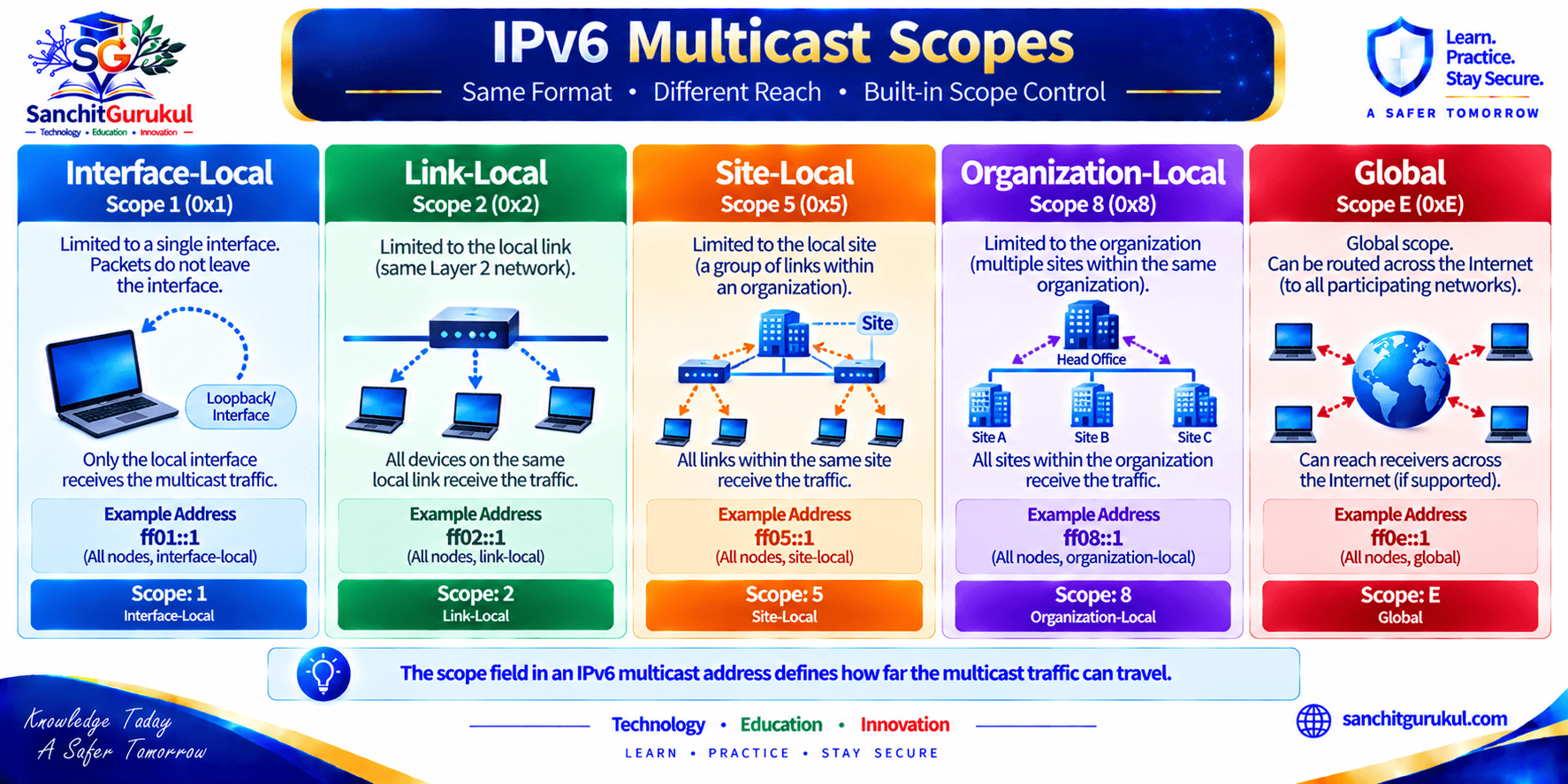
IPv6 Multicast Addresses and Scope
Multicast provides communication with a group of interfaces.
IPv6 multicast addresses begin with:
ff00::/8Multicast Address Structure
An IPv6 multicast address contains information including:
- Flags
- Scope
- Group identifier
The scope determines how far multicast traffic is intended to travel.
Examples include:
| Scope Value | Scope |
|---|---|
| 1 | Interface-Local |
| 2 | Link-Local |
| 3 | Realm-Local |
| 4 | Admin-Local |
| 5 | Site-Local |
| 8 | Organization-Local |
| E | Global |
Not every multicast group exists at every scope.
All-Nodes Multicast
The link-local all-nodes multicast address is:
ff02::1IPv6 nodes on the local link recognize this group.
It should not be treated as a generic multicast address for applications such as video streaming.
It is a protocol-defined all-nodes group.
All-Routers Multicast
The link-local all-routers address is:
ff02::2Router Solicitation uses this group when a host asks IPv6 routers on the local link to advertise themselves.
Solicited-Node Multicast
Neighbor Discovery uses solicited-node multicast addresses.
They fall within:
ff02::1:ff00:0/104Suppose a host owns:
2001:db8:10::25Its solicited-node multicast address is:
ff02::1:ff00:25Neighbor Solicitation can target this group rather than sending an ARP-style broadcast to every system.
Multicast Listener Discovery
IPv6 uses Multicast Listener Discovery — MLD to manage multicast listener membership between hosts and neighboring multicast routers.
MLD performs a role comparable to IGMP in IPv4 multicast environments.
Multicast and Network Efficiency
Multicast can improve distribution where the same information genuinely needs to reach multiple receivers.
Rather than a sender generating separate copies for every receiver, multicast-capable infrastructure can replicate packets where required.
However, actual efficiency depends on:
- Multicast routing
- Listener distribution
- Application design
- Network topology
Multicast Security
Multicast traffic requires security planning.
Consider:
- Which systems may join groups
- Which systems may transmit
- Where multicast should be routed
- Multicast scope
- Control-plane protection
- MLD behavior
Do not assume multicast is trusted simply because it remains inside a limited scope.
Address Types, Scalability and Security
Each IPv6 address type solves a different problem.
Comparison
| Address Type | Delivery Model | Typical Scope / Use | Routing Behavior |
|---|---|---|---|
| Global Unicast | One interface | Global communication | Normally routable |
| Link-Local | One interface | Single link | Not forwarded between links |
| Unique Local | One interface | Internal networks | Routable privately |
| Anycast | One selected interface | Distributed service | Routing selects one instance |
| Multicast | Group of interfaces | Protocol or application group | Scope/group dependent |
| Loopback | Local node | Local communication | Never leaves node |
| Unspecified | No assigned identity | Protocol initialization | Not an ordinary destination |
Scalability
Global Unicast
Supports hierarchical addressing and route aggregation.
Unique Local
Provides organization-independent internal addressing where that design is appropriate.
Anycast
Allows distributed service instances to share one logical address.
Multicast
Provides group communication without IPv6 broadcast.
These mechanisms solve different scalability challenges rather than representing better or worse versions of the same address type.
Security Depends on Policy
The address type does not automatically determine whether communication is secure.
A Global Unicast address can be:
- Firewalled
- Publicly accessible
- Internally restricted
A ULA can be:
- Properly segmented
- Completely unrestricted internally
An anycast service can be:
- Securely routed
- Vulnerable to bad routing policy
Security comes from controls such as:
- Stateful firewalling
- ACLs
- Segmentation
- Encryption
- Authentication
- Routing security
- Monitoring
IPsec Is Not Automatically Enabled
IPv6 supports use of IPsec, but IPv6 traffic is not automatically:
- Encrypted
- Authenticated
- Integrity protected
Actual protection requires security mechanisms to be configured and used.
For applications, this commonly includes technologies such as:
- TLS
- SSH
- IPsec VPNs
depending on the requirement.
Address Scope Is Not an Access-Control Policy
For example:
fe80::/10
has link-local scope.
That is a protocol property.
It does not mean every device on the link should automatically trust every other device using a link-local address.
Similarly:
fd00::/8
being locally used does not make the traffic safe.
Practical Identification and Troubleshooting
Understanding address types makes IPv6 troubleshooting easier.
View IPv6 Addresses on Linux
ip -6 addr showYou may see:
inet6 2001:db8:10::25/64 scope global
inet6 fe80::1234:5678:90ab:cdef/64 scope link
The interface has both:
- Global address
- Link-local address
This is normal.
View IPv6 Routes
ip -6 route showA default route may use a link-local next hop:
default via fe80::1 dev ens18Using a link-local address as an IPv6 router next hop is normal.
View Multicast Membership
ip -6 maddr showThis displays multicast addresses joined by interfaces.
Check IPv6 Neighbors
ip -6 neigh showNeighbor Discovery commonly involves:
- Link-local addresses
- Global addresses
- Solicited-node multicast
Wireshark Display Filters
Show IPv6:
ipv6IPv6 multicast:
ipv6.dst[0] == 0xffICMPv6:
icmpv6Router Advertisements:
icmpv6.type == 134Neighbor Solicitations:
icmpv6.type == 135Neighbor Advertisements:
icmpv6.type == 136Key Takeaways and Summary
Key Takeaways
- IPv6 defines three fundamental address types: Unicast, Anycast, and Multicast.
- IPv6 does not use broadcast addresses; multicast performs group-oriented functions instead.
- Global Unicast Addresses provide globally routable one-to-one IPv6 communication.
- Link-local addresses use
fe80::/10and remain on the local link. - Locally assigned Unique Local Addresses normally use
fd00::/8and can be routed inside private organizational networks. - Anycast uses ordinary unicast address syntax, so an address cannot be identified as anycast solely from its text.
- Anycast selects one service instance according to routing policy, not necessarily geographic distance or server load.
- IPv6 multicast uses
ff00::/8and includes scope information controlling the intended distribution area. - IPv6 address type or scope does not by itself provide authentication, encryption, or trust.
- Understanding address types makes routing, packet analysis, Neighbor Discovery, security policy and troubleshooting easier.
Summary
IPv6 address types exist because networks require different forms of packet delivery.
Unicast handles communication with one interface.
Important unicast categories include:
- Global Unicast
- Link-Local
- Unique Local
- Loopback
- Special-purpose addresses
Anycast allows the same address to be assigned to multiple service instances, while routing selects one destination.
This is particularly useful for distributed services such as:
- DNS
- CDN infrastructure
- Globally distributed applications
Multicast provides communication with groups of interfaces.
It is fundamental to several IPv6 functions, including Neighbor Discovery.
Important multicast examples include:
All Nodes:
ff02::1

All Routers:
ff02::2

Solicited-Node Range:
ff02::1:ff00:0/104
The most important distinction is that these address types define how traffic is addressed and delivered.
They do not determine whether that traffic is trusted or secure.
IPv6 security still depends on:
- Firewalling
- Segmentation
- Authentication
- Encryption
- Routing security
- Monitoring
Understanding these differences provides the foundation for more advanced IPv6 topics such as:
- Neighbor Discovery
- SLAAC
- IPv6 routing
- Anycast services
- Multicast networking
- IPv6 security
Useful Links and References
SanchitGurukul Static Resources
Official External References
Your feedback matters
Was this post helpful?
Discussion
0 approved comments
No approved comments yet. You can start the discussion below.
Leave a Comment
No login is required. Name and email are used for moderation/security. Your email is never displayed publicly. All comments require administrator approval.
Discover more from SanchitGurukul
Subscribe to get the latest posts sent to your email.


