
Transport Layer Security, commonly called TLS, is a cryptographic protocol used to protect communications between applications across a network.
TLS can provide three important security properties:
- Confidentiality — prevents unauthorized parties from reading protected data.
- Integrity — detects unauthorized modification of protected data.
- Authentication — allows a client to verify the identity of a server and, when required, allows the server to authenticate the client.
TLS is best known for protecting:
HTTPS
but it is also used with many other protocols and applications.
Examples include:
- Web applications
- APIs
- LDAP
- Database connections
- Messaging systems
- Some VPN technologies
- Service-to-service communication
TLS replaced the older Secure Sockets Layer, or SSL, protocols.
Modern systems should use:
- TLS 1.3
- Securely configured TLS 1.2 when compatibility requires it
Older SSL and TLS versions should not be used.

What Is TLS and Which Versions Should Be Used?
TLS evolved from Netscape’s earlier SSL protocol family.
The major generations include:
| Protocol | Current Status |
|---|---|
| SSL 2.0 | Obsolete and insecure |
| SSL 3.0 | Obsolete and insecure |
| TLS 1.0 | Deprecated |
| TLS 1.1 | Deprecated |
| TLS 1.2 | Still widely supported when securely configured |
| TLS 1.3 | Current preferred TLS generation |
TLS 1.0 and TLS 1.1
RFC 8996 formally deprecated both TLS 1.0 and TLS 1.1.
Modern deployments should not negotiate them.
TLS 1.2
TLS 1.2 remains widely deployed and can still provide strong security when configured using appropriate:
- Cipher suites
- Certificate validation
- Key exchange
- Protocol settings
However, TLS 1.2 contains considerably more configuration flexibility than TLS 1.3, including older cryptographic options that should no longer be enabled.
TLS 1.3
TLS 1.3 is defined by RFC 8446.
It significantly redesigned the protocol.
Major improvements include:
- Simpler handshake
- Reduced connection-establishment latency
- Removal of static RSA key exchange
- Removal of static Diffie-Hellman cipher suites
- Removal of obsolete cryptographic algorithms
- AEAD-only record protection
- Encryption of most handshake messages after
ServerHello - Simplified cipher suites
- Improved forward-secrecy properties
- Modern session resumption
- Optional 0-RTT early data
TLS 1.3 also removed TLS-level:
- Renegotiation
- Compression
Important July 2026 Change
RFC 9852 was published in July 2026 as an update to the TLS Best Current Practice.
For newly designed protocols using TLS:
TLS 1.3 must now be required.
This reflects the maturity and widespread deployment of TLS 1.3 and the security and privacy improvements it provides over TLS 1.2.
Where Does TLS Operate?
TLS is frequently described as operating between the application and transport layers.
That is a useful conceptual model, but it should not be interpreted too rigidly.
Traditional TLS applications commonly use:
TLS over TCP
For example:
HTTPS over TLS over TCP
However, modern protocols can integrate TLS differently.
QUIC, for example, uses TLS 1.3 as part of QUIC’s security architecture while QUIC itself runs over UDP.
Therefore, TLS should not be described as being permanently tied only to TCP.
How the TLS 1.3 Handshake Works
The TLS handshake establishes the cryptographic parameters that will protect the connection.
Older TLS explanations frequently describe a client generating a pre-master secret, encrypting it with the server’s RSA public key, and sending it to the server.
That describes older RSA key-exchange designs.
It is not how a normal TLS 1.3 handshake works.
Stage 1 — ClientHello
The client begins by sending a:
ClientHello
It can contain information including:
- Supported TLS versions
- Supported cipher suites
- Key-share information
- Supported cryptographic groups
- Signature algorithms
- Server Name Indication
- Application Layer Protocol Negotiation
- Other TLS extensions
The client normally includes ephemeral key-establishment information.
Stage 2 — ServerHello
The server responds with:
ServerHello
It selects parameters such as:
- TLS version
- Cipher suite
- Key share
At this point, both endpoints can derive handshake secrets from the agreed key-exchange material.
One important TLS 1.3 improvement is:
Handshake messages after ServerHello are encrypted.
Stage 3 — EncryptedExtensions
The server sends:
EncryptedExtensions
This contains negotiated TLS extensions that do not belong in ServerHello.
Stage 4 — Server Certificate
For normal certificate-authenticated TLS, the server sends its certificate chain.
The client must validate the certificate correctly.
Validation includes areas such as:
- Certificate chain
- Trusted issuing CA
- Certificate validity
- Intended certificate usage
- Service identity
For a web server such as:
www.example.com
the client must ensure that the certificate identifies that service correctly.
Stage 5 — CertificateVerify
The server sends:
CertificateVerify
This cryptographically proves possession of the private key corresponding to the public key in its certificate.
Possessing a certificate file without the associated private key is therefore not enough to impersonate the server.
Stage 6 — Finished
The server sends a:
Finished
message.
This authenticates the handshake transcript and demonstrates that the server possesses the expected handshake secrets.
Stage 7 — Client Finished
The client verifies:
- Certificate chain
- Server identity
- Cryptographic signatures
- Handshake integrity
The client then sends its own:
Finished
message.
After successful completion, application data can be exchanged using the negotiated traffic keys.

Mutual TLS
Normal public HTTPS commonly authenticates:
Server to client
TLS can also authenticate the client using a client certificate.
This is called:
Mutual TLS, or mTLS.
With mTLS:
- Client validates server certificate.
- Server validates client certificate.
mTLS is frequently used for:
- Internal APIs
- Service-to-service authentication
- Zero Trust architectures
- Administrative systems
- B2B integrations
- High-security environments
Certificates, Cipher Suites and TLS Encryption
Several cryptographic mechanisms work together inside TLS.
Understanding their different roles avoids many common misconceptions.
Digital Certificates
TLS commonly uses X.509 certificates for server authentication.
A certificate contains information including:
- Subject or service identity information
- Public key
- Issuer
- Validity period
- Signature algorithm
- Certificate extensions
The certificate is digitally signed by an issuing Certificate Authority.
Certificate Chain
A typical public certificate chain can contain:
- Server certificate
- Intermediate CA certificate
- Root CA trust anchor
The root CA is normally already trusted by the client operating system, browser, or application trust store.
The server normally sends the server certificate and required intermediate certificates.
Server Identity Verification
A valid cryptographic signature alone is not enough.
The client must verify that the certificate represents the service it intended to reach.
For modern TLS service identity verification, DNS names are represented using the certificate’s:
Subject Alternative Name, or SAN.
For example:
DNS:www.example.com
DNS:example.com
Current IETF guidance specifies that DNS identities should be checked using the appropriate subjectAltName entry rather than falling back to domain-like strings in the certificate’s Common Name.
Public Key vs Session Key
TLS uses asymmetric and symmetric cryptography for different purposes.
Public-key cryptography can help provide:
- Authentication
- Digital signatures
- Key establishment
Symmetric encryption protects the actual application data because it is far more efficient for bulk communication.
Once traffic secrets are established, each side derives symmetric keys for protecting TLS records.
TLS 1.3 Cipher Suites
TLS 1.2 cipher-suite names often specified several functions.
For example:
TLS_ECDHE_RSA_WITH_AES_128_GCM_SHA256This communicates information about:
- Key exchange
- Authentication
- Record encryption
- Hashing
TLS 1.3 simplified the model.
A TLS 1.3 cipher suite primarily identifies:
- AEAD record-protection algorithm
- Key length
- HKDF hash
Examples include:
TLS_AES_128_GCM_SHA256
TLS_AES_256_GCM_SHA384
TLS_CHACHA20_POLY1305_SHA256
Authentication and key exchange are negotiated separately.
AEAD
TLS 1.3 uses:
Authenticated Encryption with Associated Data, or AEAD.
Examples include:
- AES-GCM
- ChaCha20-Poly1305
AEAD simultaneously provides:
- Confidentiality
- Integrity/authenticity protection for encrypted records
Therefore, the old explanation that every modern TLS record uses separate:
Encryption + HMAC
is no longer generally correct.
Forward Secrecy
Forward secrecy limits the consequences of future compromise of long-term private keys.
Suppose an attacker records encrypted traffic today and later steals the server certificate’s private key.
With an ephemeral Diffie-Hellman-based handshake providing forward secrecy, that long-term private key alone should not allow the attacker to reconstruct the old traffic keys.
TLS 1.3 removed static RSA and static Diffie-Hellman public-key key exchange.
Public-key TLS 1.3 handshakes therefore use forward-secret key establishment.
Session Resumption, HTTPS, QUIC and Other TLS Uses
Session Resumption
Performing a complete handshake for every connection increases latency and computational work.
TLS therefore supports session resumption.
TLS 1.3 uses a pre-shared-key-based resumption mechanism, commonly associated with NewSessionTicket messages.
On a later connection, the client may use resumption information to reduce handshake work.
Benefits include:
- Lower latency
- Reduced CPU usage
- Faster repeated connections
0-RTT Early Data
TLS 1.3 optionally supports:
0-RTT early data
This allows a client resuming a previous connection to transmit some application data without waiting for a complete new handshake round trip.
The performance advantage comes with a major security consideration:
0-RTT data can be replayed.
Applications must therefore use 0-RTT only when their protocol and operation are designed to tolerate replay.
HTTPS
The best-known TLS application is:
HTTPS
Conceptually:
HTTP + TLS = HTTPSHTTPS protects HTTP communication between endpoints.
TLS helps prevent intermediaries from reading or modifying protected HTTP content.
However, HTTPS does not automatically make the application itself secure.
A website can still contain:
- SQL injection vulnerabilities
- Broken authentication
- Authorization flaws
- Cross-site scripting
- Application logic vulnerabilities
TLS protects the connection, not faulty application code.
TLS is widely used with email technologies such as:
- SMTP
- IMAP
- POP3
Some email protocols support upgrading an existing connection using:
STARTTLS
Security depends on enforcing TLS correctly and preventing downgrade to cleartext where the architecture requires encryption.
LDAP
LDAP can be protected using TLS through approaches such as:
- LDAP with StartTLS
- LDAP over TLS
This protects directory credentials and directory information while in transit.
QUIC and HTTP/3
HTTP/3 uses QUIC.
QUIC operates over UDP and integrates TLS 1.3 into its cryptographic handshake.
Therefore, HTTP/3 does not simply use the traditional:
HTTP + TLS + TCP
stack associated with HTTPS over HTTP/1.1 or HTTP/2.
VPN Technologies
Some VPN technologies use TLS as part of their security architecture.
For example, OpenVPN uses TLS for important control-plane functions such as:
- Authentication
- Key establishment
- Control-channel protection
The VPN data channel then uses derived cryptographic keys according to the VPN protocol design.
Voice and Messaging
TLS may protect signaling protocols used by communication applications.
For example, TLS can protect SIP signaling.
The actual voice media may instead be protected by technologies such as:
SRTP
Therefore, saying simply that “TLS encrypts VoIP” can be misleading because signaling and media may use different security protocols.
TLS Security Best Practices and Troubleshooting
TLS is strong when correctly implemented and configured.
Many real-world TLS problems result from:
- Old protocol versions
- Certificate errors
- Incorrect hostname verification
- Expired certificates
- Missing intermediate certificates
- Weak TLS 1.2 cipher suites
- Private-key exposure
- Client compatibility
- Incorrect SNI
- Application misconfiguration
Prefer TLS 1.3
For new designs:
Use TLS 1.3.
For existing systems requiring broader compatibility:
TLS 1.3 + securely configured TLS 1.2
is a common practical approach.
Disable:
- SSL 2.0
- SSL 3.0
- TLS 1.0
- TLS 1.1
Protect Private Keys
The server private key is highly sensitive.
Protect it using:
- Restricted file permissions
- Secure key stores
- HSM where appropriate
- Controlled backups
- Key rotation
- Limited administrative access
Never distribute private keys unnecessarily.
Automate Certificate Renewal
Expired certificates can create major outages.
Use automated certificate management where possible.
Monitor:
- Expiration date
- Renewal failures
- Certificate chain
- DNS names
- Revocation status where applicable
Validate Hostnames
Do not disable hostname verification simply because a certificate is otherwise trusted.
A certificate must represent the service the client intended to contact.
Avoid Weak TLS 1.2 Configuration
Where TLS 1.2 remains necessary, prefer modern AEAD cipher suites with appropriate ephemeral key exchange.
Avoid old cryptographic configurations simply to support obsolete clients unless there is a documented business requirement and compensating security controls.
Test TLS with OpenSSL
Check a TLS server:
openssl s_client -connect www.example.com:443 -servername www.example.comForce TLS 1.3 for testing:
openssl s_client
-connect www.example.com:443
-servername www.example.com
-tls1_3
Important information in the output can include:
- Certificate chain
- Certificate verification
- Negotiated TLS version
- Cipher suite
- Server certificate
- ALPN
- Session information
Test TLS 1.2
When troubleshooting compatibility:
openssl s_client
-connect www.example.com:443
-servername www.example.com
-tls1_2
If TLS 1.3 works but TLS 1.2 fails, investigate:
- Enabled protocol versions
- TLS 1.2 cipher configuration
- Client/server compatibility
Inspect a Certificate
openssl s_client
-connect www.example.com:443
-servername www.example.com
-showcerts
Test HTTPS with curl
curl -v https://www.example.com/Verbose output can help identify:
- DNS resolution
- Connection
- Certificate validation
- TLS version
- HTTP negotiation
- HTTP response
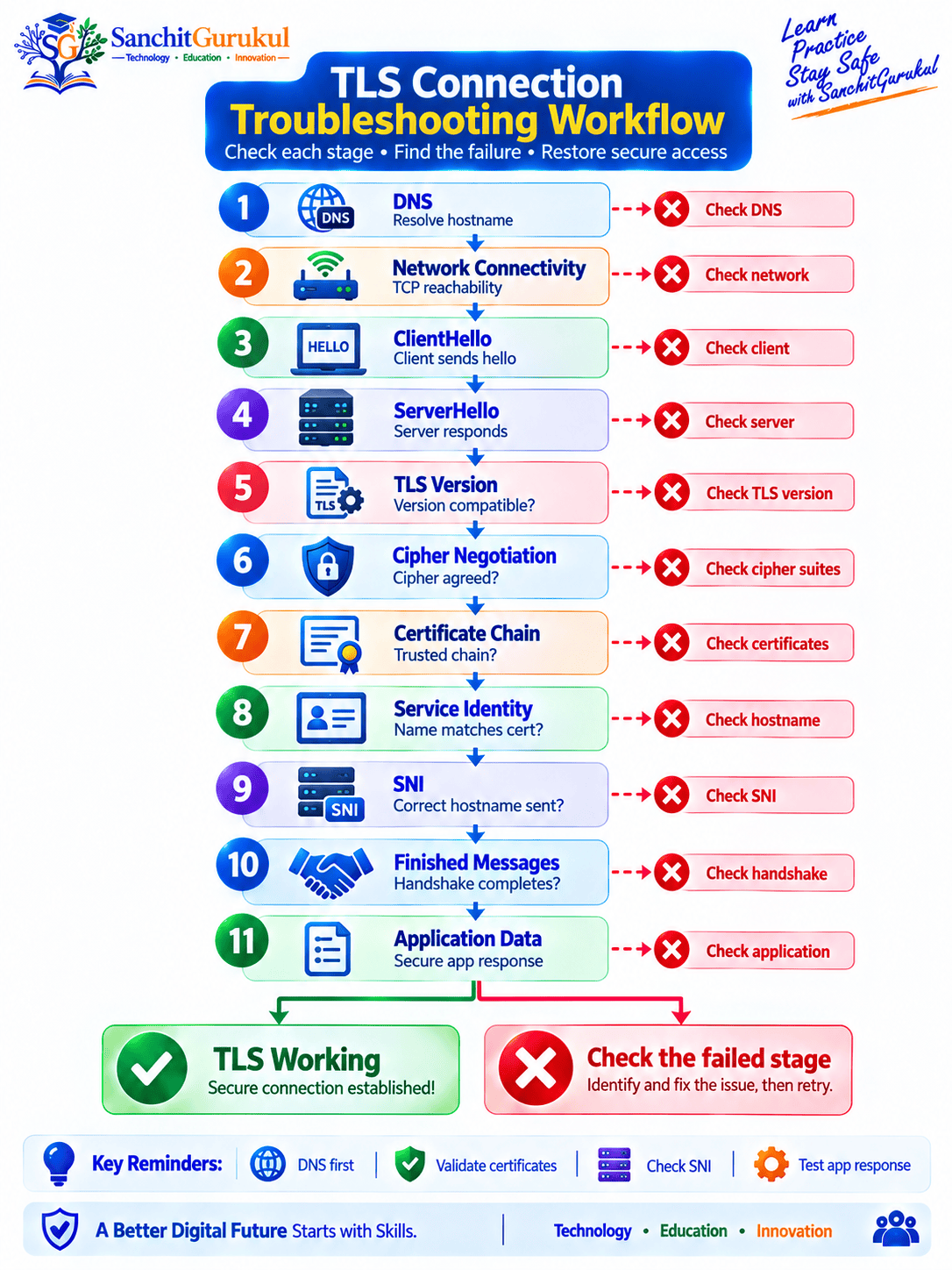
Common TLS Problems
Certificate Expired
Typical cause:
The certificate’s validity period has ended.
Fix:
Renew and deploy the correct certificate.
Certificate Name Mismatch
Example:
Client connects to:
api.example.combut the certificate identifies only:
www.example.comFix the certificate or connect using the correct service name.
Unknown Certificate Authority
Possible causes include:
- Private CA not trusted
- Missing root certificate
- Incorrect trust store
Do not simply disable certificate validation.
Correct the trust configuration.
Incomplete Certificate Chain
A server may send its own certificate but fail to provide required intermediate certificates.
Some clients may still work because they already possess the intermediate.
Others may fail.
Configure the correct certificate chain on the server.
TLS Version Mismatch
An old client may support only deprecated TLS versions while the server allows only modern versions.
The preferred fix is usually:
Upgrade the outdated client
rather than weakening the production server.
Cipher-Suite Mismatch
This occurs when the client and server cannot negotiate a compatible cryptographic configuration.
It is more commonly encountered with TLS 1.2 environments containing restrictive or legacy configurations.
Wrong SNI
Multiple HTTPS websites can share the same IP address.
The client sends the intended server name using:
Server Name Indication, or SNI.
An incorrect or missing SNI value can cause the server to return:
- Wrong certificate
- Wrong virtual host
- Handshake failure
Key Takeaways and Summary
Key Takeaways
- TLS protects network communication using authentication, confidentiality, and integrity mechanisms.
- TLS replaced the obsolete SSL protocol family.
- TLS 1.0 and TLS 1.1 are formally deprecated.
- TLS 1.2 remains usable when securely configured, but TLS 1.3 is preferred.
- July 2026 RFC 9852 requires newly designed protocols using TLS to require TLS 1.3.
- TLS 1.3 does not use the old RSA-encrypted pre-master-secret key-exchange model.
- TLS 1.3 encrypts most handshake messages after
ServerHello. - TLS 1.3 cipher suites use AEAD algorithms such as AES-GCM and ChaCha20-Poly1305.
- TLS 1.3 separates cipher-suite selection from authentication and key-exchange selection.
- X.509 certificates commonly authenticate TLS servers.
- Certificate validation must include service-identity verification, not merely trust in the issuing CA.
- Mutual TLS can authenticate both the client and server.
- TLS 1.3 supports session resumption and optional 0-RTT early data, but 0-RTT requires replay considerations.
- Forward secrecy limits exposure of previously captured sessions if a long-term key is later compromised.
- TLS secures data in transit but does not fix vulnerable applications or compromised endpoints.
- DNS, transport connectivity, TLS version, certificates, SNI and application behavior should be checked separately when troubleshooting.
Summary
Transport Layer Security is one of the foundational security protocols of the modern Internet.
It protects communications for technologies including:
- HTTPS
- APIs
- LDAP
- Databases
- Messaging
- Service-to-service communication
- Some VPN architectures
The fundamental TLS process involves:
Negotiating cryptographic capabilities, establishing shared traffic secrets, authenticating the required peers, and protecting subsequent application records using symmetric encryption.
TLS 1.3 significantly modernized this architecture.
It removed many legacy cryptographic options, simplified cipher suites, reduced handshake latency, encrypted more handshake metadata, and made secure deployment easier than older TLS generations.
For modern environments:
Prefer TLS 1.3.
Use securely configured TLS 1.2 only when compatibility requires it.
Avoid:
- SSL
- TLS 1.0
- TLS 1.1
- Weak TLS 1.2 cipher suites
- Disabled certificate validation
- Poor private-key protection
TLS is not simply “encryption.”
A secure TLS deployment requires:
Correct protocol versions + secure cryptography + valid certificates + proper service identity verification + protected private keys + good operational management.
When those components work together, TLS provides a strong foundation for protecting sensitive communications across untrusted networks.
Useful Links and References
SanchitGurukul Static Resources
Official External References
Your feedback matters
Was this post helpful?
Discussion
0 approved comments
No approved comments yet. You can start the discussion below.
Leave a Comment
No login is required. Name and email are used for moderation/security. Your email is never displayed publicly. All comments require administrator approval.
Discover more from SanchitGurukul
Subscribe to get the latest posts sent to your email.

