
Web applications constantly display information.
That information may come from:
- Users
- URLs
- Databases
- APIs
- Search fields
- Comments
- Profile information
- Application messages
Normally, the browser should display this information only as:
Data
The security problem begins when untrusted information is inserted into a web page in a way that allows the browser to interpret it as:
Executable content
This vulnerability is called:
Cross-Site Scripting — XSS
MITRE defines XSS under CWE-79 as improper neutralization of user-controlled input before that information is included in web-page output.
XSS is included in:
OWASP Top 10:2025 — A05 Injection.
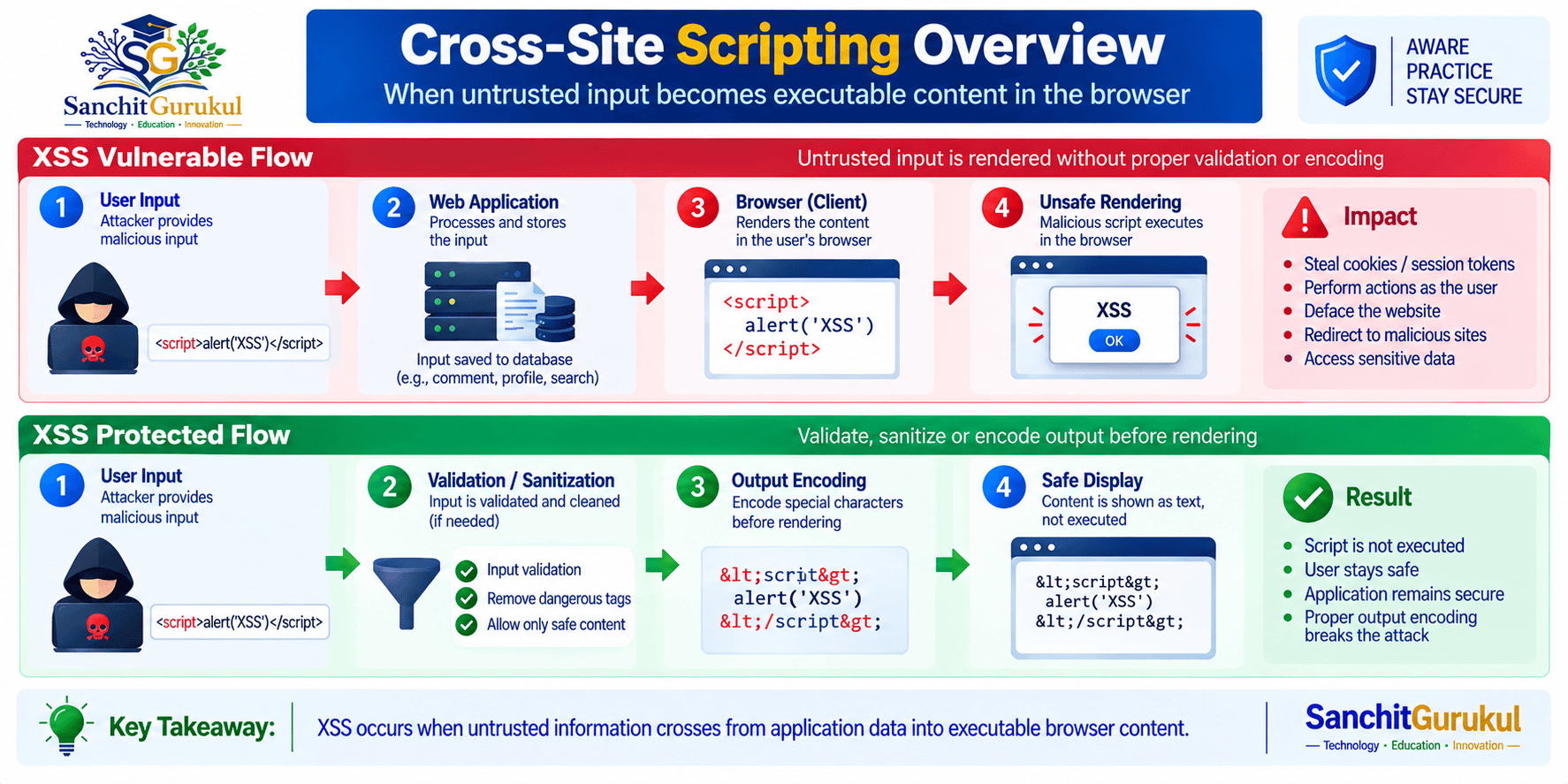
How Cross-Site Scripting Happens
A browser processes different types of content.
Examples include:
- HTML
- JavaScript
- CSS
- URLs
- HTML attributes
Applications frequently insert dynamic information into these contexts.
For example:
User enters:

Profile Display Name

Application retrieves:

Profile Display Name

Web page displays:

Profile Display Name
That is normal.
The vulnerability appears when the application does not correctly control how that information is placed into the page.
Data Becomes Browser Instructions
Conceptually, the vulnerable flow is:
Untrusted Input

Application

Unsafe Page Rendering

Browser Interprets Input as Active Content
The secure flow should instead be:
Untrusted Input

Application

Context-Aware Protection

Browser Displays Input as Data
OWASP explains that output encoding converts untrusted input into a form that browsers display as data instead of interpreting as executable content.
XSS Executes in the Browser
This is an important difference from vulnerabilities such as SQL injection.
With SQL injection, the interpreter is typically:
Database
With XSS, the relevant interpreter is:
Web Browser
OWASP notes that reflected and stored XSS commonly involve unsafe server-side generation of web content, while DOM-based XSS originates through unsafe client-side processing. In every case, the resulting active content executes in the browser.
Sources and Sinks
When reviewing XSS, two concepts are useful.
Source
Where untrusted information originates.
Examples:
- URL value
- Form submission
- API response
- Database record
- Browser location information
Sink
Where the information is placed in a way that may cause the browser to interpret it.
Some browser APIs can interpret strings as HTML or executable content.
For ordinary text, safer DOM operations should be preferred.
For example:
Required:

Display User Name as Text

Preferred:

Safe Text Rendering

Avoid:

Interpreting User Name as HTML
OWASP specifically recommends safe DOM properties such as textContent when the application needs to display untrusted information as ordinary text rather than HTML.
Reflected, Stored and DOM-Based XSS
Three major forms of XSS are commonly discussed:
- Reflected XSS
- Stored XSS
- DOM-Based XSS
Reflected XSS
Reflected XSS occurs when user-controlled information enters a request and is immediately included in the resulting web page without appropriate protection.
Conceptually:
User Request

Contains:

Search Term

Application Generates Page

Search Term Appears in Response
If the search value is safely encoded, the browser displays it as text.
If it is inserted into an unsafe context, the browser may interpret it differently.
MITRE describes reflected XSS as a situation where data from an HTTP request is reflected into the generated response without proper neutralization.
Stored XSS
Stored XSS occurs when untrusted information is first saved by the application.
Possible locations include:
- Database
- Comment system
- User profile
- Support ticket
- Message
- Product review
Later, another user views the stored content.
Conceptually:
User Submits Content

Application Stores Content

Another User Opens Page

Stored Content Is Rendered
If the stored value is rendered unsafely, the vulnerability can affect multiple users.
A dangerous assumption is:
It came from our database, therefore it is trusted.
Stored data may originally have come from an untrusted user.
DOM-Based XSS
Modern web applications perform significant processing directly inside the browser.
For example:
Browser Reads:

URL Information

Client-Side JavaScript Processes It

Application Updates Page
If JavaScript takes untrusted content and sends it to an unsafe DOM operation, DOM-based XSS may occur.
OWASP distinguishes DOM XSS because the unsafe injection occurs during client-side runtime processing rather than during server-generated HTML creation.
Simple Comparison
| Type | Where Untrusted Data Is Introduced | Typical Behavior |
|---|---|---|
| Reflected XSS | Request / response | Input is immediately returned in a page |
| Stored XSS | Persistent application storage | Input is saved and later displayed |
| DOM-Based XSS | Browser-side JavaScript | Client-side code places untrusted data into an unsafe sink |

What Can Happen When XSS Exists?
XSS runs inside the context of a legitimate web application.
This can allow malicious content to interact with functionality available to the victim’s browser session.
OWASP notes that XSS may lead to account impersonation, user-behavior observation, loading unwanted external content, and exposure of sensitive information.
Acting as the Logged-In User
Imagine:
Victim:

Already Authenticated

Application:

Contains XSS

Injected Browser Content:

Runs in Application Context
The malicious browser activity may potentially perform actions that the legitimate application permits the user’s session to perform.
This is one reason XSS can remain serious even when session cookies use:
HttpOnly
HttpOnly can prevent browser scripts from directly reading that cookie, but it does not fix the underlying XSS vulnerability or necessarily stop malicious content from issuing authenticated actions through the user’s browser.
Sensitive Information Exposure
Depending on application design, browser-accessible information may include:
- Page content
- User information
- Application data
- Browser storage
- Security tokens available to JavaScript
MDN notes that XSS code running in the application’s origin may interact with page content, browser storage, and authenticated application requests.
Application Interface Manipulation
XSS may alter what the user sees.
For example, malicious content might attempt to:
- Display false information
- Modify forms
- Present misleading prompts
- Redirect interactions
- Load unwanted content
Privileged Users Increase Risk
Suppose stored XSS appears inside an administrative dashboard.
The affected visitor may be:
Application AdministratorThat creates potentially greater impact because the victim has access to more sensitive application functionality.
XSS and the Same-Origin Context
Browsers normally isolate websites using the same-origin security model.
The important problem with XSS is that injected content executes as though it belongs to:
The vulnerable website itself.
MITRE notes that this violates the intended trust model because the victim’s browser executes attacker-controlled content within the affected application’s domain context.

Preventing Cross-Site Scripting
There is no single XSS prevention mechanism that works safely in every browser context.
OWASP recommends combining several controls depending on how the application uses untrusted data.
Use Framework Auto-Escaping
Modern frameworks often provide automatic output escaping.
Examples include templating and rendering systems in frameworks such as:
- React
- Angular
- Vue
- Django
- ASP.NET
- Modern server-side template engines
These protections reduce XSS risk when used correctly.
However, OWASP warns that frameworks can become vulnerable when developers bypass built-in protections or use unsafe rendering functionality.
Therefore:
Understand the framework’s escape mechanisms before disabling or bypassing them.
Use Context-Aware Output Encoding
Output encoding should match where the data is inserted.
Common contexts include:
- HTML body
- HTML attribute
- JavaScript
- URL
- CSS
For example:
Untrusted Data

Displayed as:

HTML Text

Protection:

HTML Output Encoding
A protection appropriate for one context may not automatically be safe for another.
OWASP emphasizes context-aware encoding because browsers interpret HTML, attributes, JavaScript, URLs and CSS differently.
Prefer Safe DOM APIs
If an application only needs to display text, prefer a text-oriented API.
For example:
Required:

Display Search Term

Preferred DOM Behavior:

Treat Search Term as Text
OWASP recommends safe properties such as:
textContent
for inserting ordinary untrusted text into the DOM rather than HTML-parsing sinks.
Sanitize HTML When HTML Is Actually Required
Sometimes an application intentionally allows rich text.
Examples include:
- Formatted comments
- Knowledge-base articles
- Rich-text editors
In this situation, simple output encoding would convert all formatting into ordinary text.
Instead, the application may require:
HTML Sanitization
A sanitizer permits approved markup while removing dangerous content.
OWASP recommends using a well-maintained sanitizer rather than attempting to create custom filtering logic.
Avoid Dangerous JavaScript Execution Patterns
Avoid passing untrusted content into browser functionality that interprets strings as:
- HTML
- JavaScript
- Executable instructions
OWASP recommends avoiding dangerous DOM sinks when safer alternatives exist.
CSP, Trusted Types and Defense in Depth
Modern browsers provide additional controls that can reduce XSS risk.
These should complement secure coding rather than replace it.
Content Security Policy — CSP
Content Security Policy
allows a website to tell browsers which resources and scripts are permitted.
A strong CSP can help restrict:
- Unapproved JavaScript
- Inline scripts
- Unexpected script sources
- Certain unsafe execution mechanisms
MDN describes XSS mitigation as one of CSP’s primary use cases.
Conceptually:
Web Application

Defines:

Approved Script Policy

Browser

Allows:
Approved Resources

Restricts:
Unapproved Script Execution
CSP Is Defense in Depth
A critical point:
CSP does not replace output encoding or sanitization.
MDN explicitly recommends sanitizing or safely rendering untrusted data and using CSP as an additional defensive layer if the primary protection fails.
OWASP similarly warns against treating CSP as the sole XSS defense.
Trusted Types
Modern browsers also support:
Trusted Types
Trusted Types can help reduce DOM-based XSS by restricting sensitive DOM sinks so they accept specially created trusted objects rather than arbitrary strings.
MDN notes that the require-trusted-types-for CSP directive can enforce Trusted Types at DOM XSS injection sinks.
Conceptually:
Untrusted String

Sanitization Policy

Trusted HTML Object

Approved DOM Sink
As of 2026, MDN marks the relevant Trusted Types CSP functionality as newly broadly available across current browser versions, while noting that older browsers may not support it.
WAF Protection
A Web Application Firewall may detect some XSS attempts.
However, a WAF should be considered:
Defense in Depth
rather than the main remediation.
OWASP specifically warns that WAF pattern matching does not fix the underlying XSS flaw and may miss client-side DOM-based vulnerabilities.
The preferred fix is:
Correct the unsafe rendering behavior in the application.
Finding XSS During Development and Testing
XSS should ideally be discovered before production.
Code Review
Review code where untrusted information reaches:
- HTML templates
- DOM manipulation
- HTML attributes
- URLs
- JavaScript execution contexts
Pay particular attention when applications deliberately disable:
- Auto-escaping
- Template encoding
- Framework sanitization
Static Application Security Testing — SAST
SAST can help identify flows such as:
Untrusted Source

Application Processing

Unsafe Browser Sink
Dynamic Application Security Testing — DAST
DAST tests the running application and may detect reflected or stored output-handling problems.
Client-Side Testing
DOM XSS often requires analysis of:
- JavaScript sources
- DOM sinks
- URL processing
- Browser runtime behavior
OWASP notes that DOM-based XSS differs from server-side XSS because the vulnerable processing can happen entirely in client-side code.
Test Every Input Location
Do not test only obvious form fields.
Potential sources include:
- Query parameters
- Path values
- API data
- Stored user content
- Browser storage
- URL fragments
- Third-party data
Security Testing in CI/CD
A useful development lifecycle is:
Source Code

Secure Code Review

SAST

Build

Application Security Testing

Deployment

Runtime Monitoring
Monitor Production Behavior
Useful security signals may include:
- CSP violations
- WAF detections
- Unexpected application errors
- Repeated suspicious input
- Changes to client-side application files
CSP reporting can also help identify policy violations during deployment and operation.
Practical XSS Security Checklist
Rendering
- Is automatic framework escaping enabled?
- Is output encoding appropriate for the rendering context?
- Are untrusted values displayed as text whenever possible?
- Are unsafe DOM sinks avoided?
HTML Content
- Is user-provided HTML actually necessary?
- Is permitted HTML processed by a maintained sanitizer?
- Are sanitizer libraries regularly updated?
JavaScript
- Does client-side code avoid interpreting untrusted strings as executable content?
- Are safer DOM APIs used?
- Are DOM sources and sinks reviewed?
Browser Security
- Is a strong CSP implemented where practical?
- Are inline-script dependencies minimized?
- Have Trusted Types been evaluated for modern client-side applications?
Authentication and Sessions
- Are session cookies appropriately protected?
- Are sensitive tokens kept out of browser-accessible locations where practical?
- Are privileged application pages given additional security attention?
Testing
- Is XSS included in secure code review?
- Is SAST used where appropriate?
- Is DAST included in application testing?
- Are stored and DOM-based XSS specifically tested?
Monitoring
- Are CSP violations reviewed?
- Are WAF findings correlated with application events?
- Are unexpected client-side errors monitored?
- Are application-security findings retested after remediation?
Key Takeaways and Summary
Key Takeaways
- XSS stands for Cross-Site Scripting.
- XSS occurs when untrusted information reaches a web page without appropriate neutralization and is interpreted as active browser content.
- MITRE maps Cross-Site Scripting primarily to CWE-79.
- XSS is included in OWASP Top 10:2025 A05 — Injection.
- The three commonly recognized forms are Reflected XSS, Stored XSS and DOM-Based XSS.
- Reflected XSS immediately returns unsafe request information in generated content.
- Stored XSS persists untrusted information before it is later rendered to users.
- DOM-based XSS occurs when client-side code sends untrusted data into an unsafe browser sink.
- Modern frameworks reduce XSS risk through templating and auto-escaping, but developers can reintroduce vulnerabilities by bypassing those protections.
- Context-aware output encoding is a primary XSS prevention technique.
- HTML sanitization is appropriate when an application intentionally needs to render user-controlled HTML.
- Safe DOM APIs such as
textContentshould be preferred when displaying untrusted information as ordinary text. - CSP provides valuable defense in depth but does not replace proper encoding or sanitization.
- Trusted Types can further reduce DOM XSS risk by controlling access to sensitive browser injection sinks.
- WAF protection can supplement secure coding but should not be relied on as the primary XSS defense.
Summary
XSS can be simplified as:
Untrusted Input

Unsafe Rendering

Browser Interprets Active Content

Content Executes in Application Context

User or Application Impact
The secure model is:
Untrusted Input

Understand Output Context

Encode or Sanitize Appropriately

Use Safe Browser APIs

Browser Displays Intended Content

CSP Provides Additional Protection
The most important distinction is:
Data should remain data.
If an application intends to display:
User Name

Search Term

Comment

Product Description
the browser should not unexpectedly interpret that information as:
Application instructions.
OWASP emphasizes that no single technique prevents every form of XSS. Secure applications combine framework protections, context-aware output encoding, sanitization where HTML is necessary, safe DOM APIs, and browser defenses such as CSP.
The most important XSS prevention principle is:
Never send untrusted data into an executable browser context unless it has been processed specifically and safely for that context.
Keep:
Application code
separate from:
Untrusted application data.
Useful Links and References
SanchitGurukul Static Resources
Official External References
Your feedback matters
Was this post helpful?
Discussion
0 approved comments
No approved comments yet. You can start the discussion below.
Leave a Comment
No login is required. Name and email are used for moderation/security. Your email is never displayed publicly. All comments require administrator approval.
Discover more from SanchitGurukul
Subscribe to get the latest posts sent to your email.
