
Traditional firewalls were mainly designed to control traffic using information such as IP addresses, protocols, ports, and connection state.
That approach is still important, but modern network traffic is much more complicated.
Many applications use the same ports. Most web traffic is encrypted. Users access cloud applications from different locations. Attackers can hide malicious activity inside otherwise permitted communication.
A Next-Generation Firewall, commonly called an NGFW, extends traditional stateful firewall capabilities by adding deeper visibility into applications, users, content, and threats.
This allows security policies to answer more useful questions than simply:
> Is TCP port 443 allowed?
An NGFW can potentially ask:
- Which application is using that connection?
- Which user initiated it?
- Is the destination trusted?
- Does the traffic contain known malicious activity?
- Should files be inspected?
- Should this URL category be permitted?
- Should encrypted traffic be decrypted and inspected?
The exact capabilities vary between firewall vendors, licenses, software versions, and deployments.
What Is a Next-Generation Firewall?
Simple Explanation
A traditional stateful firewall understands network connections.
An NGFW goes further by trying to understand what is actually happening inside those connections.
Consider two users connecting to Internet services using TCP port 443.
From a simple port-based perspective, both connections look similar:
TCP/443
But one user may be accessing an approved business application while another is accessing an application that the organization does not permit.
An application-aware firewall can potentially distinguish between them.
Traditional Firewall vs NGFW
| Capability | Traditional Stateful Firewall | NGFW |
|---|---|---|
| IP-based rules | Yes | Yes |
| Port/protocol rules | Yes | Yes |
| Stateful inspection | Yes | Yes |
| Application identification | Limited or unavailable | Common |
| User-aware policy | Limited | Common |
| Intrusion prevention | Separate or limited | Commonly integrated |
| URL filtering | Separate or limited | Commonly integrated |
| Malware/file inspection | Separate or limited | Often available |
| TLS inspection | Platform dependent | Common capability |
| Threat intelligence | Limited | Common integration |
| Advanced security logging | Basic to moderate | Usually more detailed |
This comparison is intentionally general.
Actual firewall products vary significantly.

Why Traditional Port-Based Rules Became Less Effective
Port numbers are still useful, but they do not always provide enough information.
Historically, administrators often associated specific applications with specific ports.
For example:
- HTTP — TCP 80
- HTTPS — TCP 443
- SSH — TCP 22
- DNS — UDP/TCP 53
Modern applications do not always fit neatly into this model.
Many applications use HTTPS and therefore communicate over TCP 443.
If a firewall policy simply says:
Allow TCP 443
the firewall may permit many different applications using that port.
An NGFW can attempt to identify the actual application and enforce policy accordingly.
How an NGFW Processes Traffic
NGFW processing is more complex than simple packet filtering.
The exact order differs between platforms, but the overall idea is similar.
Basic Processing Stages
A typical NGFW may evaluate:
- Source and destination
- Routing
- Security zones
- Connection state
- Security policy
- Application
- User identity
- URL or destination category
- Threat signatures
- Files or content
- Encryption policy
- Logging
Not every packet necessarily goes through every possible function.
Processing depends on configuration, traffic type, subscriptions, and product behavior.

Application Identification
Application identification is one of the most important NGFW capabilities.
Instead of assuming:
Port 443 = HTTPS application
the firewall can attempt to determine which application is actually communicating.
Depending on the platform, detection may use:
- Protocol behavior
- Application signatures
- Traffic patterns
- TLS information
- Destination information
- Additional contextual indicators
This makes security policy more application-aware.
User Identification
Traditional policies often identify users indirectly through IP addresses.
For example:
> Allow 10.10.20.0/24 to access an application.
But an IP address does not necessarily tell you which person is using the device.
NGFW platforms may integrate with identity systems so security policies can reference users or groups.
For example:
> Allow members of the Finance group to access the payroll application.
This can produce policies that better reflect business requirements.
Security Profiles
Many NGFWs separate the basic traffic permission from additional security inspection.
For example, a policy may say:
Allow approved web traffic
and then attach security controls such as:
- IPS
- Antivirus
- URL filtering
- File blocking
- DNS security
- Malware analysis
This distinction is important.
A connection being allowed by firewall policy does not necessarily mean that every packet or file inside the connection is automatically trusted.
Major NGFW Security Capabilities
Intrusion Prevention System
An Intrusion Prevention System, or IPS, analyzes traffic for known malicious activity, exploitation patterns, protocol abnormalities, and other threat indicators depending on the platform.
If malicious traffic is detected, the firewall may:
- Block the traffic
- Reset the session
- Drop specific packets
- Generate an alert
- Log the event
URL Filtering
URL filtering allows organizations to control access to websites or categories of websites.
Examples may include:
- Business
- Education
- Social media
- Newly registered domains
- Malware
- Phishing
- Adult content
- Gambling
Policies can be designed according to business and security requirements.
URL categorization should not be treated as perfect. Websites can change, categories can be incorrect, and newly created malicious sites may not immediately have a reliable reputation.
Malware and File Inspection
NGFWs may inspect files passing through permitted traffic.
Depending on the product, supported capabilities may include:
- Antivirus scanning
- File type identification
- File blocking
- Malware signature detection
- Sandbox submission
- Cloud-based malware analysis
Consider an employee downloading a malicious document from a compromised website.
The web connection itself may be permitted.
File inspection provides an additional layer that may detect or block the malicious file.
DNS Security
DNS is an important part of most network communication.
Some NGFW platforms can apply DNS security controls to identify communication with:
- Known malicious domains
- Phishing domains
- Command-and-control infrastructure
- Newly suspicious destinations
This can help stop malicious connections before an endpoint successfully communicates with the destination.
Threat Intelligence
NGFWs may consume threat intelligence about:
- Malicious IP addresses
- Known command-and-control servers
- Malware infrastructure
- Suspicious domains
- Phishing websites
This intelligence can influence detection and blocking decisions.
Threat intelligence is valuable, but it should not be considered complete or infallible.
Attack infrastructure changes frequently.
TLS Inspection and Encrypted Traffic
One of the biggest challenges for modern firewalls is encryption.
A large amount of Internet traffic uses HTTPS.
Encryption protects confidentiality between endpoints, which is important for privacy and security.
But the same encryption can also reduce the firewall’s ability to inspect application content.
Why TLS Inspection May Be Used
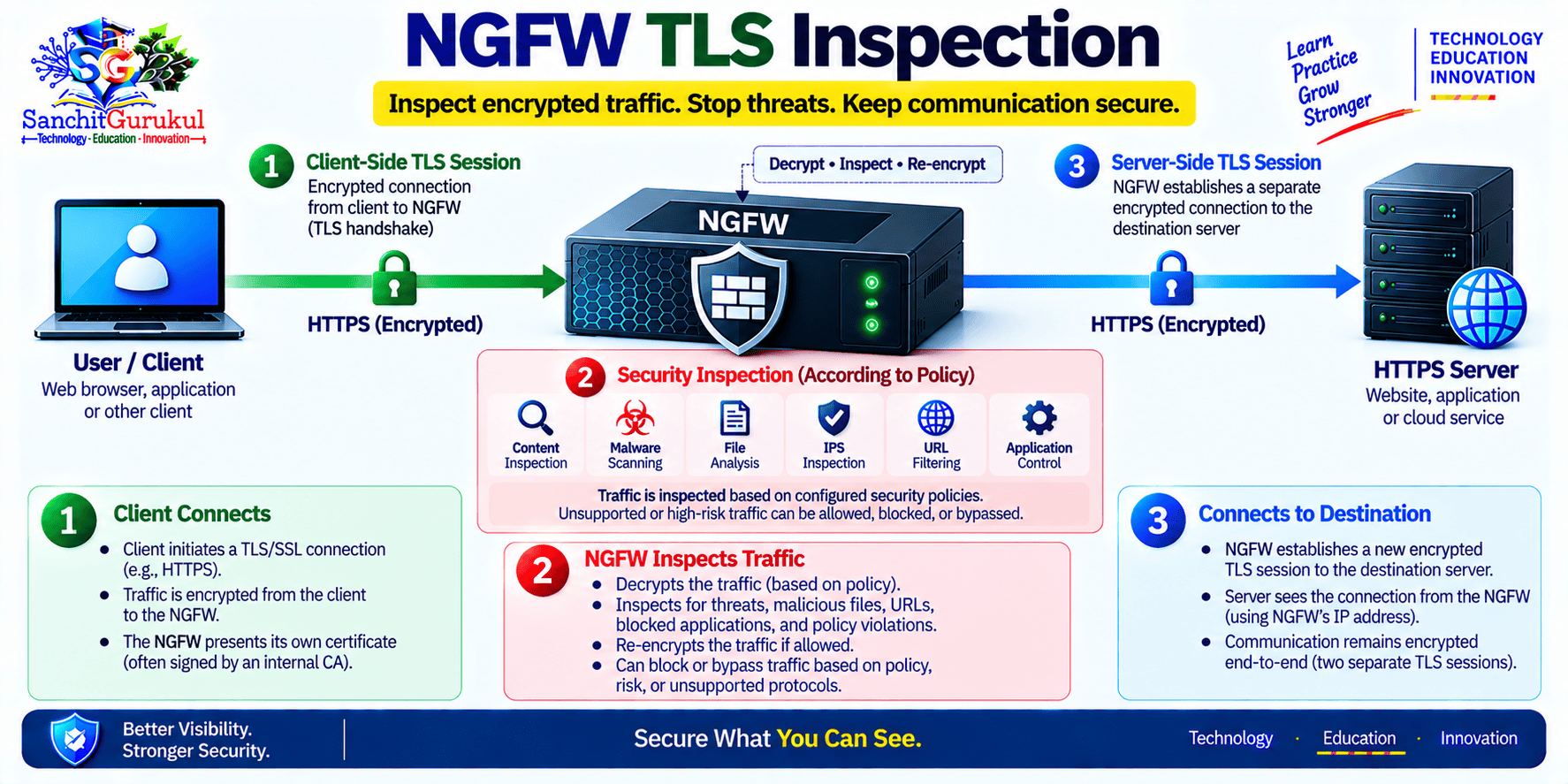
Suppose a user downloads malware through an HTTPS website.
Without decryption, the firewall may see information about the connection but may not be able to inspect all encrypted content.
TLS inspection can allow the firewall to decrypt supported traffic, inspect it, and then re-encrypt it.
TLS Inspection Has Important Considerations
TLS inspection should not simply be enabled everywhere without planning.
Organizations must consider:
- Privacy
- Legal requirements
- Certificate deployment
- Application compatibility
- Performance
- Sensitive categories
- Certificate pinning
- Operational troubleshooting
- Security policy
Some applications may fail when traffic is intercepted.
Some traffic may also be intentionally excluded from decryption according to organizational policy or applicable requirements.
NGFW Policy Design in the Real World
Traditional Policy Example
A simple traditional firewall rule might say:
| Source | Destination | Service | Action |
|---|---|---|---|
| Employees | Internet | TCP 443 | Allow |
This policy is straightforward, but broad.
NGFW Policy Example
An application-aware policy could be more specific:
| Source | User | Application | Security Profile | Action |
|---|---|---|---|---|
| Employee Zone | Employees | Approved Web Apps | Threat Prevention | Allow |
| Employee Zone | Employees | Prohibited Application | — | Deny |
| Finance Zone | Finance Group | Finance SaaS | Threat Prevention | Allow |
The exact implementation depends on the firewall platform.
Security Zones Still Matter
NGFW features do not replace basic network architecture.
Security zones remain important.
A network might include:
- Internet
- Employees
- Servers
- Guest
- Management
- DMZ
Applications, users, and threat inspection provide additional security context on top of these boundaries.

Example: Guest Network
Suppose guest users should only have Internet access.
The firewall can apply:
- Guest security zone
- Internet-only access
- Block access to corporate networks
- URL or threat controls
- Bandwidth policies where supported
- Logging
The organization does not need to treat guest devices as trusted simply because they are physically inside the office.
Example: Server Protection
An application server might only need to communicate with:
- Approved users
- Database server
- DNS
- Update servers
- Monitoring platform
An NGFW can enforce these communication requirements more precisely than simply allowing broad network access.
NGFW Performance and Troubleshooting
More Inspection Requires More Resources
NGFW features consume processing resources.
Examples include:
- IPS
- Malware inspection
- TLS decryption
- Application identification
- URL filtering
- Logging
- Sandboxing
A firewall that can forward a particular amount of simple traffic may process less traffic when several advanced security services are enabled.
Therefore, firewall sizing should consider real inspection requirements, not only interface speed.
What Should Be Considered During Sizing?
Important factors include:
- Throughput
- Connections per second
- Concurrent sessions
- TLS inspection
- IPS
- Application inspection
- Logging
- VPN encryption
- Packet size
- Traffic mix
- Growth
- High availability
Common NGFW Problems
| Problem | Possible Cause | Recommended Check |
|---|---|---|
| Application blocked unexpectedly | Wrong application identification or policy | Review application and policy logs |
| HTTPS website fails | TLS inspection issue | Check certificates and decryption policy |
| Traffic slow | Inspection load or upstream issue | Review firewall resources and path performance |
| User policy not matching | Identity mapping issue | Verify user identification |
| Malware detected | Threat profile action | Review security logs |
| Application shown as unknown | Insufficient traffic or unsupported detection | Inspect session and application details |
| Policy changed but session remains | Existing session state | Review or clear relevant session carefully |
Practical Troubleshooting Workflow
When an NGFW appears to block or mishandle traffic, troubleshoot logically.

Key Takeaways and Summary
Key Takeaways
- An NGFW extends traditional stateful firewalling with deeper application, identity, and threat awareness.
- Port numbers alone do not always identify modern applications accurately.
- Application identification allows security policy to be based on actual application behavior.
- User-aware policies can provide more precise access control than IP addresses alone.
- IPS, URL filtering, malware inspection, DNS security, and threat intelligence can add security layers to permitted traffic.
- TLS inspection can provide visibility into encrypted communication but requires careful design.
- NGFW functionality does not replace good network segmentation or least-privilege policy design.
- Advanced inspection features consume firewall resources and must be considered during sizing.
- NGFW troubleshooting requires checking both traditional firewall functions and advanced security profiles.
- Having NGFW features available does not provide security unless those capabilities are properly configured and maintained.
Summary
A Next-Generation Firewall builds on traditional stateful firewall capabilities by adding deeper understanding of applications, users, content, and threats.
Instead of making every security decision based only on IP addresses and ports, an NGFW can potentially identify the actual application, associate traffic with a user, inspect permitted communication for threats, apply URL policies, and analyze files or encrypted traffic where configured.
These capabilities allow organizations to create more precise security policies, but they also introduce additional complexity. Application identification, identity integration, threat prevention, TLS inspection, performance sizing, licensing, and troubleshooting all require proper planning.
The most effective NGFW deployment combines advanced inspection with fundamental network-security principles such as segmentation, least privilege, secure management, logging, patching, and continuous policy review.
Useful Links and References
SanchitGurukul Static Resources
Official External References
Your feedback matters
Was this post helpful?
Discussion
0 approved comments
No approved comments yet. You can start the discussion below.
Leave a Comment
No login is required. Name and email are used for moderation/security. Your email is never displayed publicly. All comments require administrator approval.
Discover more from SanchitGurukul
Subscribe to get the latest posts sent to your email.

