
A modern enterprise network may connect hundreds of devices, including computers, servers, IP phones, printers, wireless access points and security cameras.
Although these devices may use the same physical switching infrastructure, they do not necessarily need to belong to the same network.
For example:
- Employees need access to business applications.
- IP phones carry voice communication.
- Network administrators require secure access to switches.
- Guest devices should remain separate from corporate systems.
- Some servers need additional isolation from other servers.
Virtual Local Area Networks (VLANs) help organize these connections into separate logical Layer 2 networks.
However, VLANs can be assigned and used in different ways.
You may encounter terms such as:
- Static VLAN
- Dynamic VLAN
- MAC-based VLAN
- Protocol-based VLAN
- Voice VLAN
- Management VLAN
- Native VLAN
- Private VLAN
These terms do not all describe the same type of feature.
Some describe how VLAN membership is assigned, others describe what the VLAN is used for, and others provide special forwarding or isolation behavior.
This article explains these differences, their advantages, limitations and practical use cases.

1. What Is a VLAN and How Are VLAN Types Classified?
A Virtual Local Area Network (VLAN) is a logical Layer 2 broadcast domain.
It allows administrators to separate network devices even when they share physical switches.
For example, consider:
| Department | VLAN | IP Subnet |
|---|---|---|
| Employees | 10 | 192.168.10.0/24 |
| Voice | 20 | 192.168.20.0/24 |
| Management | 50 | 192.168.50.0/24 |
| Guest | 60 | 192.168.60.0/24 |
A computer in VLAN 10 and another computer in VLAN 60 belong to separate Layer 2 broadcast domains.
Communication between their IP networks normally requires routing and appropriate access policies.
Why Use VLANs?
VLANs provide:
- Logical network organization
- Smaller broadcast domains
- Separation of different device groups
- Flexible network design
- Defined boundaries for routing and security policies
VLANs are useful segmentation tools, but they are not substitutes for endpoint authentication, access control lists or firewalls.
Three Ways to Understand VLAN Types
| Classification | Examples | Main Question |
|---|---|---|
| Assignment Method | Static, Dynamic, MAC-based, Protocol-based | How is traffic assigned to a VLAN? |
| Operational Purpose | Data, Voice, Management | What is the VLAN used for? |
| Special Behavior | Native VLAN, Private VLAN | How is traffic tagged, forwarded or isolated? |
These classifications can overlap.
For example, VLAN 20 may be a voice VLAN whose membership is configured statically on an access interface.
Similarly, a management VLAN is typically an ordinary VLAN reserved for management use rather than a separate VLAN protocol.
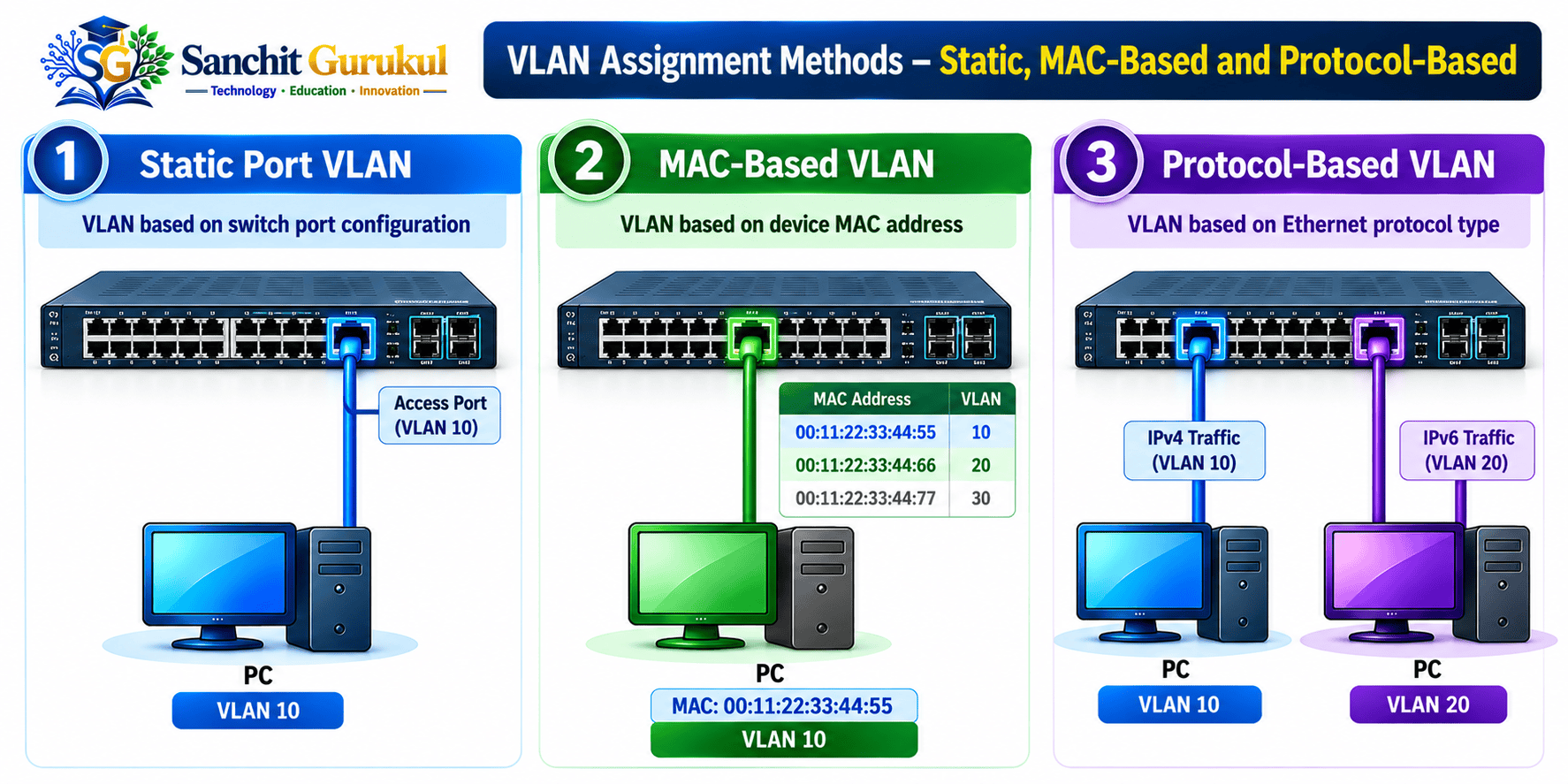
2. VLAN Assignment Methods — Static, MAC-Based and Protocol-Based
A. Port-Based VLAN — Static VLAN
A static VLAN assigns network membership according to the switchport configuration.
This is the most common approach in conventional enterprise access networks.
For example:
- Switchport Fa0/1 belongs to VLAN 10.
- Switchport Fa0/2 belongs to VLAN 20.
A device connected to Fa0/1 normally uses VLAN 10 for its untagged data traffic.
Cisco Configuration
vlan 10
 name EMPLOYEES

interface FastEthernet0/1
 switchport mode access
 switchport access vlan 10
Advantages
- Simple to understand
- Easy to configure
- Predictable VLAN membership
- Widely supported
Limitations
- VLAN assignment is associated with the port.
- Moving a device can require configuration changes.
- Static assignment does not authenticate the device.
@@SGLABEL_Example@@
An office connects all Finance department computers to designated VLAN 10 access ports.
B. MAC-Based VLAN
MAC-based VLAN assignment selects a VLAN using the source MAC address of a device.
Instead of relying only on a fixed port assignment, a supported switch or policy system matches the device’s MAC address against configured rules.
For example:
| Device MAC Address | Assigned VLAN |
|---|---|
| 00:11:22:33:44:55 | 10 |
| 00:11:22:33:44:66 | 20 |
This can be useful when authorized devices move between different switchports.
Advantages
- More flexible endpoint placement
- VLAN selection based on device identity information
- Reduced need for some manual port changes
Limitations
- Requires supported switch features or policy infrastructure
- MAC addresses can be spoofed
- Managing large address databases can become difficult
- Device movement may still require compatible policies and network connectivity
MAC-Based VLAN vs MAB
These terms are related but not identical.
MAC-Based VLAN Classification
A switch uses MAC address information to determine VLAN membership.
MAC Authentication Bypass (MAB)
A switch uses a device’s MAC address as an identifier in a network access authentication process, commonly involving RADIUS.
A RADIUS authorization response may then assign the device to a VLAN.
Neither approach makes a MAC address a cryptographically strong identity.
For stronger endpoint identity verification, use appropriate 802.1X authentication where supported.
C. Protocol-Based VLAN
Protocol-based VLAN classification assigns traffic according to protocol information in Ethernet frames.
For example, some supported switches can distinguish traffic using EtherType values.
| Protocol | EtherType |
|---|---|
| IPv4 | 0x0800 |
| ARP | 0x0806 |
| IPv6 | 0x86DD |
A supported protocol-based VLAN feature may map traffic matching specific protocol rules into a selected VLAN.
Advantages
- Can separate traffic by protocol
- Useful for selected specialized or legacy environments
- Provides additional classification flexibility on compatible switches
Limitations
- Not universally supported
- More complex than ordinary port-based VLANs
- Requires careful handling of related protocols
- Often unnecessary in modern IP-focused networks
3. VLANs by Operational Purpose — Data, Voice and Management
A. Data VLAN
A data VLAN carries ordinary endpoint traffic.
Examples include:
- Employee computers
- Printers
- Business applications
- Departmental workstations
A typical Cisco access port may be configured as:
interface FastEthernet0/1
 switchport mode access
 switchport access vlan 10
VLAN 10 is used as the data VLAN.
B. Voice VLAN
A voice VLAN is commonly used to separate IP phone traffic from ordinary computer traffic.
In many enterprise deployments, a computer connects through the Ethernet port of an IP phone.
The phone and computer may share one physical switchport while using different VLANs.
For example:
| Device | VLAN |
|---|---|
| IP Phone | 20 |
| Computer Connected Through Phone | 10 |
Cisco Configuration
On a compatible Cisco Catalyst switch:
vlan 10
 name DATA

vlan 20
 name VOICE

interface FastEthernet0/3
 switchport mode access
 switchport access vlan 10
 switchport voice vlan 20
 spanning-tree portfast
The IP phone must support the relevant voice VLAN behavior.
Compatible devices may learn the voice VLAN through CDP, LLDP-MED or another supported provisioning method.
Does a Voice VLAN Automatically Prioritize Voice Traffic?
No.
A voice VLAN separates traffic logically.
Actual forwarding priority depends on properly configured QoS classification, markings, trust boundaries and queue scheduling.
For example, a voice application might use:
- CoS 5
- DSCP EF 46
But those markings receive the intended forwarding treatment only when the network is configured to support it.
C. Management VLAN
A management VLAN carries network device management traffic.
Examples include:
- SSH administration
- SNMP monitoring
- Network configuration access
- Operational monitoring
For example:
Management VLAN: 50
Switch IP: 192.168.50.2
Cisco Configuration
vlan 50
 name MANAGEMENT

interface Vlan50
 ip address 192.168.50.2 255.255.255.0
 no shutdown
This creates a management SVI.
The SVI requires appropriate VLAN operational state to become usable.
Does a Management VLAN Provide Security Automatically?
No.
A separate management VLAN organizes management connectivity, but users may still reach it if routing and security policies allow them.
Secure management also requires appropriate:
- ACLs or firewall policies
- SSH and strong authentication
- AAA authorization
- SNMPv3
- Administrative network isolation
- Console or out-of-band recovery
For critical networks, an appropriately isolated out-of-band management network may provide additional protection.
4. Special VLAN Behavior — Native VLAN and Private VLAN
A. Native VLAN
A native VLAN is associated with an IEEE 802.1Q trunk.
On traditional Cisco trunk configurations, traffic in the native VLAN is transmitted without an 802.1Q VLAN tag by default.
Untagged frames received on the trunk are normally classified into its native VLAN.
For example:
Trunk allowed data VLANs: 10,20
Native VLAN: 999
Cisco Configuration
vlan 999
 name UNUSED-NATIVE

interface GigabitEthernet0/1
 switchport mode trunk
 switchport trunk native vlan 999
 switchport trunk allowed vlan 10,20
In this example, VLAN 999 is a dedicated unused native VLAN and is intentionally excluded from the data VLAN allowed list.
Why Is the Native VLAN Important?
It affects how untagged traffic is classified on trunk connections.
Incorrect native VLAN configurations can lead to:
- Unexpected VLAN membership
- Connectivity problems
- Native VLAN mismatch warnings
- Security exposure under particular double-tagging conditions
Native VLAN Security Practices
- Avoid using ordinary employee VLANs as the native VLAN.
- Use a dedicated unused native VLAN where appropriate.
- Configure trunk endpoints consistently.
- Restrict allowed VLANs.
- Disable unnecessary dynamic trunk negotiation.
- Consider native VLAN tagging where supported.
B. Private VLAN — PVLAN
Private VLANs provide additional Layer 2 traffic isolation within a primary VLAN structure.
They can be useful when connected devices should not communicate directly with every other device sharing the same IP subnet.
Typical examples include:
- Shared hosting
- Multi-tenant server environments
- Restricted endpoint networks
- Special isolation requirements
Private VLAN Components
| Component | Function |
|---|---|
| Primary VLAN | Provides the main PVLAN domain |
| Isolated Secondary VLAN | Restricts direct Layer 2 communication between isolated hosts |
| Community Secondary VLAN | Allows hosts within the same community to communicate |
| Promiscuous Port | Can communicate with associated isolated and community ports |
Private VLAN Example
Consider a network with:
- Gateway
- Server-A
- Server-B
Server-A and Server-B belong to an isolated secondary VLAN.
Both can communicate with the shared gateway through an appropriately configured promiscuous interface.
However, they cannot communicate directly with each other at Layer 2.
This is useful when endpoint isolation is required without assigning every endpoint a separate conventional IP subnet.
Do Private VLANs Replace Firewalls?
No.
PVLANs control specific Layer 2 forwarding relationships.
They do not automatically prevent all routed communication.
A gateway or firewall may still route traffic between hosts unless policies restrict it.
Private VLAN Platform Support
PVLAN support varies across Cisco and other enterprise switch families.
Some basic switches and simulator images do not implement all PVLAN features.
Always verify primary, isolated, community and promiscuous port support before deployment.

5. Dynamic VLAN Assignment and Comparison of VLAN Types
Dynamic VLAN assignment selects the endpoint’s VLAN using a policy or authentication result instead of relying entirely on a manually configured access VLAN.
One common enterprise approach is:
IEEE 802.1X with RADIUS Authorization
A device connects to a switchport.
The switch performs network access authentication.
After successful authentication, the RADIUS server may return a VLAN assignment.
For example:
| Endpoint | Authorization Result |
|---|---|
| Finance Employee | VLAN 10 |
| Engineering Employee | VLAN 20 |
| Approved Printer | VLAN 30 |
A supported switch can apply the authorized VLAN according to its access-control configuration.
Why Is Dynamic Assignment Useful?
- Reduces some manual VLAN changes
- Allows policy-based network access
- Supports centrally managed authorization
- Can simplify certain endpoint movement scenarios
Important Dynamic VLAN Limitations
- Requires compatible hardware and software.
- Depends on the authentication and policy design.
- Required VLANs must be available along the network path.
- Authentication failure handling must be configured.
- Different endpoint types may require different access-control methods.
Legacy VMPS vs Modern RADIUS-Based Assignment
Older Cisco platforms documented dynamic-access VLAN assignment using a VLAN Membership Policy Server (VMPS) and VLAN Query Protocol (VQP).
This should not be confused with modern 802.1X-based RADIUS VLAN authorization.
For modern enterprise deployments, evaluate the platform’s supported network access control architecture rather than assuming older VMPS configuration is appropriate.
Complete VLAN Type Comparison
| VLAN Term | Classification | Typical Use |
|---|---|---|
| Static / Port-Based | Assignment method | Fixed endpoint VLAN membership |
| MAC-Based | Assignment method | MAC-dependent VLAN selection |
| Protocol-Based | Assignment method | Supported protocol-specific traffic classification |
| Dynamic | Assignment method | Policy-driven VLAN authorization |
| Data VLAN | Operational purpose | Computers and general applications |
| Voice VLAN | Operational purpose | IP telephony separation |
| Management VLAN | Operational purpose | Device administration and monitoring |
| Native VLAN | Trunk behavior | Handling untagged trunk traffic |
| Private VLAN | Isolation feature | Restricting Layer 2 communication among hosts |
Which VLAN Approach Should You Choose?
| Scenario | Suitable Approach |
|---|---|
| Small office computers | Static data VLANs |
| Enterprise IP phones | Voice VLAN with suitable QoS |
| Switch administration | Restricted management VLAN |
| Enterprise user authentication | 802.1X with authorized VLAN assignment |
| Devices without 802.1X support | Carefully controlled alternative such as MAB |
| Server isolation within a subnet | Private VLAN where supported |
| Trunk configuration | Secure native VLAN configuration |
| Specialized protocol segmentation | Protocol-based VLAN where required and supported |
6. Practical Cisco Lab — Data, Management and Native VLANs
This beginner-friendly lab demonstrates three VLAN concepts using two Cisco Layer 2 switches.
You will configure:
- Two static data VLANs
- One management VLAN
- One unused native VLAN
- An 802.1Q trunk
- Same-VLAN connectivity tests
- VLAN separation verification
Voice VLAN and Private VLAN are explained separately because voice testing requires a suitable IP phone and PVLAN testing requires compatible hardware.
Lab Requirements
- Two Cisco 2960 switches
- Four computers
- Cisco Packet Tracer
- Ethernet cables
Topology
| Connection | Interface |
|---|---|
| PC-A to SW1 | SW1 Fa0/1 |
| PC-C to SW1 | SW1 Fa0/2 |
| PC-B to SW2 | SW2 Fa0/1 |
| PC-D to SW2 | SW2 Fa0/2 |
| SW1 to SW2 | Gi0/1 to Gi0/1 |
VLAN Plan
| VLAN | Name | Purpose |
|---|---|---|
| 10 | EMPLOYEES | Data |
| 20 | SERVERS | Data |
| 50 | MANAGEMENT | Switch management |
| 999 | UNUSED-NATIVE | Trunk native VLAN |
IP Addressing
| Device | VLAN | IP Address |
|---|---|---|
| PC-A | 10 | 192.168.10.10/24 |
| PC-B | 10 | 192.168.10.20/24 |
| PC-C | 20 | 192.168.20.10/24 |
| PC-D | 20 | 192.168.20.20/24 |
| SW1 Management | 50 | 192.168.50.2/24 |
| SW2 Management | 50 | 192.168.50.3/24 |
There is no router or inter-VLAN routing in this lab.

Step 1 — Create VLANs on SW1
enable
configure terminal

hostname SW1

vlan 10
 name EMPLOYEES
exit

vlan 20
 name SERVERS
exit

vlan 50
 name MANAGEMENT
exit

vlan 999
 name UNUSED-NATIVE
exit

end
Step 2 — Configure SW1 Access Ports
configure terminal

interface FastEthernet0/1
 description PC-A-EMPLOYEES
 switchport mode access
 switchport access vlan 10
 no shutdown
exit

interface FastEthernet0/2
 description PC-C-SERVERS
 switchport mode access
 switchport access vlan 20
 no shutdown
exit

end
Step 3 — Configure SW1 Management Interface
configure terminal

interface Vlan50
 description SWITCH-MANAGEMENT
 ip address 192.168.50.2 255.255.255.0
 no shutdown

end
Step 4 — Configure SW1 Trunk
configure terminal

interface GigabitEthernet0/1
 description TRUNK-TO-SW2
 switchport mode trunk
 switchport trunk native vlan 999
 switchport trunk allowed vlan 10,20,50
 switchport nonegotiate
 no shutdown

end
VLAN 999 is the configured native VLAN but is not permitted as an ordinary data VLAN across this trunk.
Step 5 — Create VLANs on SW2
enable
configure terminal

hostname SW2

vlan 10
 name EMPLOYEES
exit

vlan 20
 name SERVERS
exit

vlan 50
 name MANAGEMENT
exit

vlan 999
 name UNUSED-NATIVE
exit

end
Step 6 — Configure SW2 Access Ports
configure terminal

interface FastEthernet0/1
 description PC-B-EMPLOYEES
 switchport mode access
 switchport access vlan 10
 no shutdown
exit

interface FastEthernet0/2
 description PC-D-SERVERS
 switchport mode access
 switchport access vlan 20
 no shutdown
exit

end
Step 7 — Configure SW2 Management Interface
configure terminal

interface Vlan50
 description SWITCH-MANAGEMENT
 ip address 192.168.50.3 255.255.255.0
 no shutdown

end
Step 8 — Configure SW2 Trunk
configure terminal

interface GigabitEthernet0/1
 description TRUNK-TO-SW1
 switchport mode trunk
 switchport trunk native vlan 999
 switchport trunk allowed vlan 10,20,50
 switchport nonegotiate
 no shutdown

end
The trunk configurations are consistent on both ends.
Step 9 — Configure the Computers
Use Packet Tracer:
PC → Desktop → IP Configuration
Apply the IP addresses from the lab table.
Leave the default gateway blank.
No routing is required for communication between devices within the same VLAN and IP subnet.
Step 10 — Verify the VLANs
On both switches:
show vlan briefConfirm:
- VLAN 10 exists.
- VLAN 20 exists.
- VLAN 50 exists.
- VLAN 999 exists.
- Ordinary computer access ports are assigned correctly.
Step 11 — Verify the Trunk
On SW1:
show interfaces trunkExpected relevant information:
Port    Status     Native vlan
Gi0/1   trunking   999

Port    Vlans allowed on trunk
Gi0/1   10,20,50
The full output contains additional information.
Step 12 — Verify the Management VLAN
On SW1:
show ip interface briefConfirm VLAN 50 has address 192.168.50.2.
On SW2, confirm address 192.168.50.3.
From the SW1 CLI:
ping 192.168.50.3Expected:
Successful management VLAN connectivity across the trunk.
Step 13 — Test VLAN 10
From PC-A:
ping 192.168.10.20Expected:
Successful communication with PC-B.
Step 14 — Test VLAN 20
From PC-C:
ping 192.168.20.20Expected:
Successful communication with PC-D.
Step 15 — Verify VLAN Separation
From PC-A:
ping 192.168.20.20Expected:
Failure.
PC-A and PC-D belong to different IP subnets and no inter-VLAN router or gateway is configured.
This demonstrates the absence of inter-VLAN routing in this lab.
It does not independently prove that the network is protected against every possible VLAN security attack.
Step 16 — Verify Switchport Assignment
On SW1:
show interfaces FastEthernet0/1 switchportConfirm that Fa0/1 operates as a static access port in VLAN 10.
Also verify the trunk:
show interfaces GigabitEthernet0/1 switchportCheck the native VLAN and operational trunk mode.
Step 17 — Save the Configurations
On both switches:
copy running-config startup-configExpected Lab Results
| Test | Expected Result |
|---|---|
| PC-A to PC-B | Successful |
| PC-C to PC-D | Successful |
| SW1 to SW2 Management SVI | Successful |
| PC-A to PC-D Without Routing | Unreachable |
| Native VLAN | 999 |
| Allowed Trunk VLANs | 10,20,50 |
| Endpoint Port Assignment | Static |
| Management Interface | VLAN 50 |
7. VLAN Design Best Practices and Key Takeaways
Common VLAN Design Mistakes
| Mistake | Better Approach |
|---|---|
| Using one large VLAN for every device | Segment according to operational requirements |
| Assuming VLANs authenticate users | Use suitable network access authentication |
| Assuming a voice VLAN guarantees priority | Configure and verify QoS |
| Allowing unrestricted management access | Apply appropriate management-plane security |
| Extending VLANs across unnecessary trunks | Limit allowed VLANs |
| Using an employee VLAN as trunk native VLAN | Use a dedicated unused native VLAN where appropriate |
| Assuming all switches support PVLAN | Verify exact model and software support |
| Using MAC addresses as strong identity proof | Prefer appropriate cryptographic authentication |
Core Concepts
- A VLAN is a logical Layer 2 broadcast domain.
- Static VLANs assign membership through switchport configuration.
- MAC-based and protocol-based VLANs use additional classification mechanisms.
- Dynamic VLANs can use authentication or authorization policies.
Operational VLAN Roles
- Data VLANs carry ordinary endpoint traffic.
- Voice VLANs separate supported IP telephony traffic.
- Management VLANs organize device administration connectivity.
- Native VLANs control specific untagged trunk behavior.
Security and Design
- Private VLANs provide additional Layer 2 host isolation.
- VLANs alone are not substitutes for ACLs or firewalls.
- Correct trunk configuration reduces unnecessary VLAN exposure.
- Dynamic authorization requires compatible infrastructure and policies.
- Feature support varies between switch vendors and models.
Conclusion — Understanding Different VLAN Types
VLANs are an essential part of enterprise switching and network design.
They allow administrators to organize endpoints into separate Layer 2 networks and establish boundaries for routing, security and operational management.
However, different VLAN terms describe different capabilities.
Static, MAC-based, protocol-based and dynamic VLAN assignment determine how traffic or devices are associated with VLANs.
Data, voice and management VLANs describe how those VLANs are used.
Native VLANs affect 802.1Q trunk handling, while Private VLANs provide additional Layer 2 isolation.
Understanding these distinctions helps network engineers choose the correct design and avoid configuration mistakes.
For most enterprise networks, begin with a clear VLAN and IP addressing plan, use appropriate access controls, limit unnecessary trunk VLANs and verify each feature against the selected switch platform.
Useful Links and References
SanchitGurukul Static Resources
Official External References
Your feedback matters
Was this post helpful?
Discussion
0 approved comments
No approved comments yet. You can start the discussion below.
Leave a Comment
No login is required. Name and email are used for moderation/security. Your email is never displayed publicly. All comments require administrator approval.
Discover more from SanchitGurukul
Subscribe to get the latest posts sent to your email.

