
A traditional firewall controls network traffic using information such as:
- Source IP address
- Destination IP address
- Port
- Protocol
- Connection state
- Application identification
But a public web application faces another layer of risk.
Attackers may send requests that look like normal HTTP or HTTPS traffic while attempting to exploit weaknesses inside the application.
Examples include:
- SQL injection
- Cross-site scripting
- Malicious file uploads
- Path traversal
- Protocol abuse
- Automated attacks
- Suspicious API requests
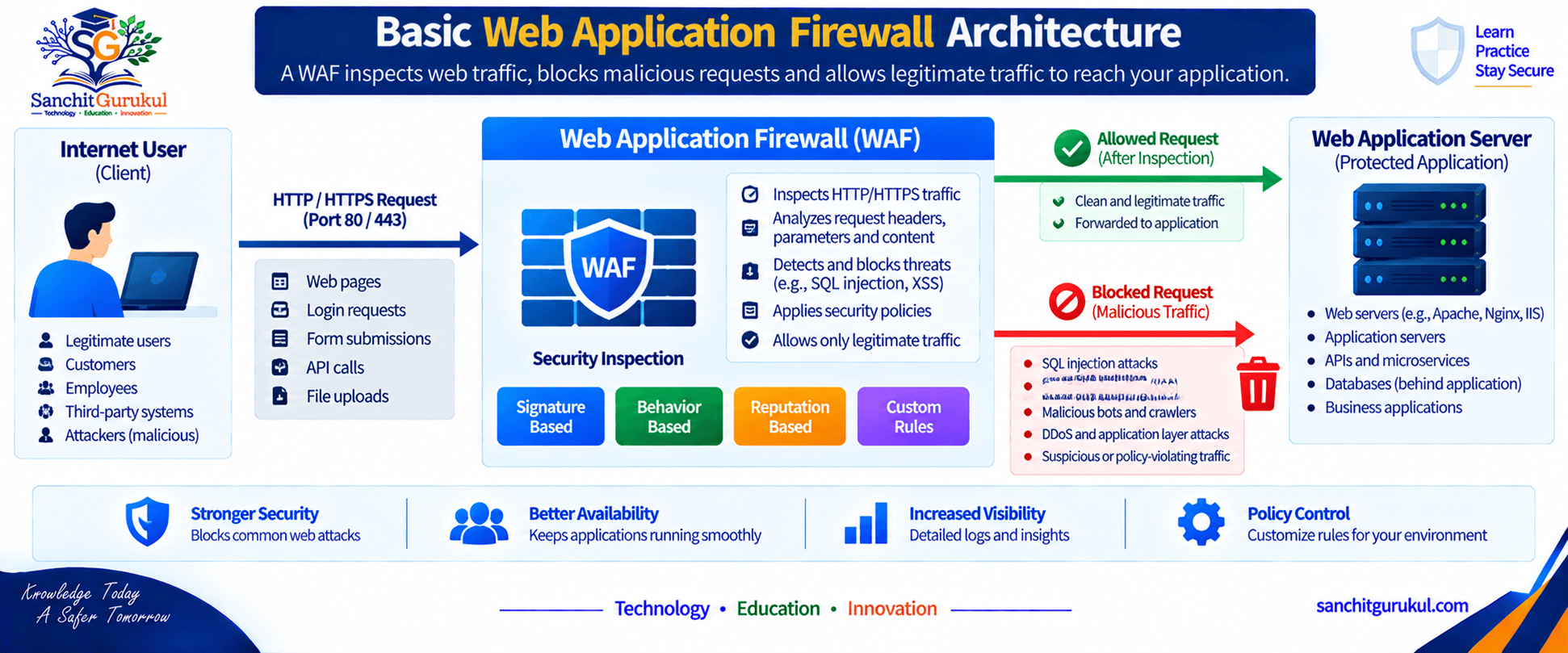
A Web Application Firewall, commonly called a WAF, is designed to inspect and control web application traffic at the HTTP and HTTPS layer.
Understanding What a WAF Does
Why a Normal Firewall Is Not Enough
Suppose a web server allows HTTPS on:
TCP/443
A network firewall can permit HTTPS traffic to the server.
But from the firewall’s basic network perspective, both of these requests may use:
- The same source network
- The same destination IP
- The same TCP port
- The same HTTPS protocol
One request may be legitimate.
Another may contain malicious input intended to exploit the application.
This is where a WAF provides deeper application-layer inspection.
WAF Works at the Web Application Layer
A WAF can inspect information such as:
- HTTP method
- URL
- URI path
- Query parameters
- Headers
- Cookies
- Request body
- Content type
- File uploads
- Response characteristics
- API requests
It can then compare that traffic against configured security policies.
Simple Example
A user submits a normal search request.
The WAF allows it.
An attacker submits unusual input that matches a known SQL injection pattern.
The WAF may:
- Block the request
- Log the event
- Generate an alert
depending on policy configuration.
WAF Is Not a Replacement for Secure Coding
A WAF can reduce risk, but it should not be treated as a substitute for fixing application vulnerabilities.
Applications still need:
- Secure development practices
- Input validation
- Authentication
- Authorization
- Patch management
- Dependency management
- Security testing
How WAF Traffic Inspection Works
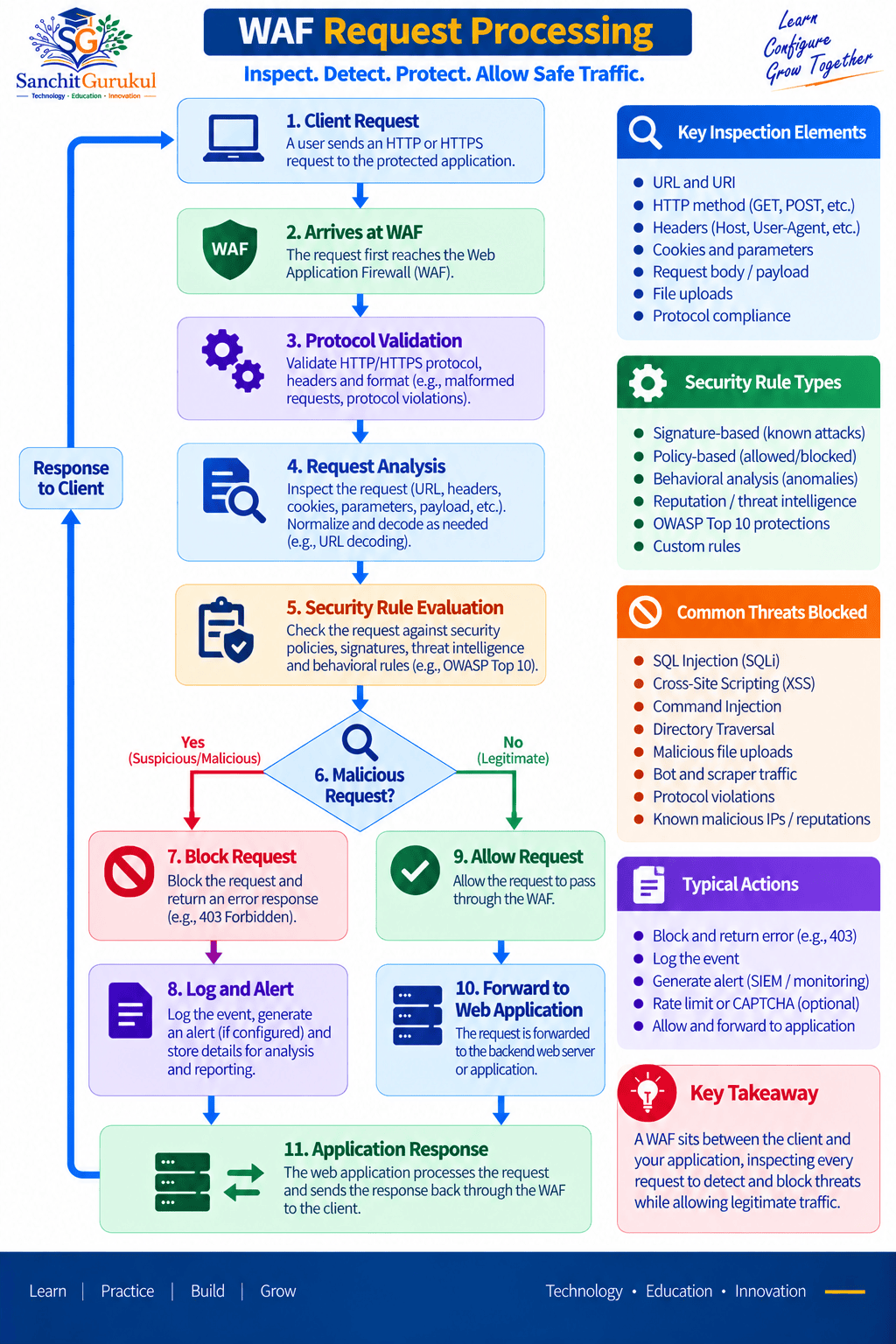
Client Request Arrives
A client connects to the public web application.
The request may contain:
- URL
- Headers
- Cookies
- Parameters
- Request body
The WAF analyzes these elements before allowing the request toward the application.
Security Policy Evaluation
The WAF compares the request against security controls.
These may include:
- Known attack signatures
- Protocol validation
- Input restrictions
- URL policies
- HTTP method policies
- Rate controls
- IP reputation
- Bot-detection logic
- Application-specific rules
Allow, Block or Monitor
Depending on the result, the WAF may:
Allow
Forward the request to the application.
Block
Reject the request.
Monitor
Permit the request but generate an alert or log.
Response Inspection
Some WAF platforms can also inspect responses from the application.
This can help detect:
- Sensitive information exposure
- Application errors
- Suspicious response behavior
Capabilities vary between WAF products.
HTTPS Inspection
Most modern web applications use HTTPS.
The WAF therefore needs visibility into the encrypted application traffic if it is expected to inspect HTTP content.
Depending on architecture, TLS may terminate at:
- The WAF
- A load balancer
- A reverse proxy
- An application gateway
Traffic may then be re-encrypted toward the application server.
Example TLS Architecture
External connection:
Client HTTPS WAF
Internal protected connection:
WAF HTTPS Web Server
This allows the WAF to inspect application traffic while maintaining encryption across network segments.
What Threats Can a WAF Help Detect and Block?
SQL Injection
SQL injection attempts try to manipulate application input so it changes or abuses database queries.
A WAF may detect suspicious input patterns associated with SQL injection and block them before they reach the application.
However, secure database queries and parameterized application code remain essential.
Cross-Site Scripting
Cross-site scripting, or XSS, attempts to inject malicious script content into web applications.
A WAF may detect suspicious script patterns in requests.
Path Traversal
An attacker may attempt to access files outside the intended application directory.
Suspicious requests may contain encoded or abnormal path patterns.
A WAF can identify and restrict such requests.
Malicious File Uploads
Applications that allow file uploads create additional risk.
A WAF may help enforce controls such as:
- Allowed file types
- File-size restrictions
- Content inspection
- Filename validation
More advanced malware inspection may require integration with other security technologies.
HTTP Protocol Abuse
WAFs can also validate normal HTTP behavior.
Examples include:
- Invalid methods
- Malformed headers
- Oversized requests
- Abnormal encoding
- Suspicious content types
API Protection
Modern WAF platforms often protect APIs as well as traditional websites.
API security controls may examine:
- API paths
- HTTP methods
- Headers
- Tokens
- JSON payloads
- Request size
- Rate limits
Some platforms can enforce API schemas.
Automated Attacks and Bots
Not all malicious web traffic comes from a human attacker.
Bots may perform:
- Credential stuffing
- Account enumeration
- Scraping
- Automated login attempts
- Inventory abuse
- Application scanning
Advanced WAF or bot-management systems can help identify unusual automated behavior.

WAF and the OWASP Top 10
WAFs are often used as one layer of defense against several common web-application attack techniques associated with the OWASP Top 10.
However, not every OWASP risk can be solved using a WAF.
For example, problems involving:
- Broken business logic
- Poor authorization
- Insecure design
often require changes inside the application itself.
WAF Deployment Models and Security Policy
Reverse Proxy WAF
A common deployment places the WAF directly in the traffic path.
The client connects to the WAF.
The WAF then establishes communication with the application.
This is known as a reverse proxy architecture.
Benefits can include:
- Full application traffic visibility
- Request modification
- Response inspection
- TLS termination
- Centralized policy enforcement
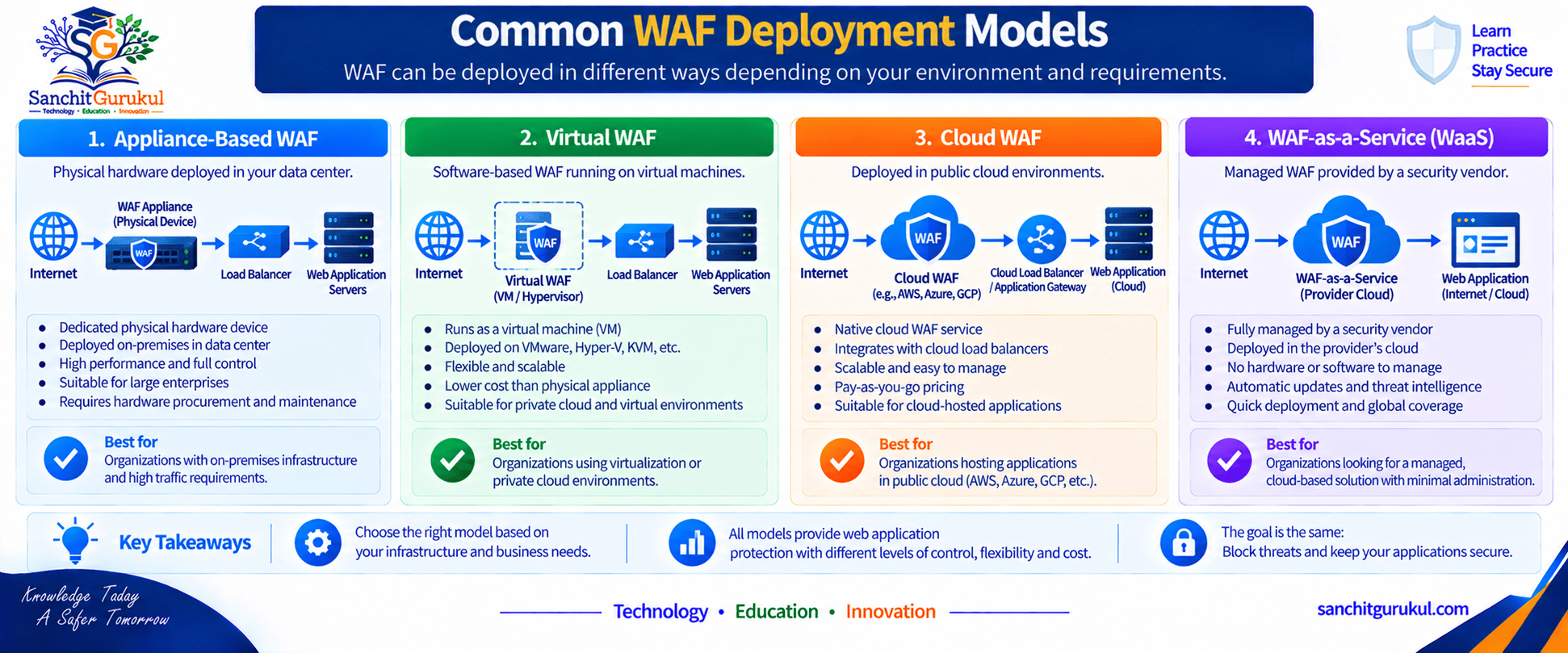
Appliance-Based WAF
A WAF may be deployed as:
- Physical appliance
- Virtual appliance
This is common in data centers and enterprise environments.
Cloud-Based WAF
Cloud services can provide WAF capabilities without requiring a physical appliance.
These are commonly integrated with:
- Cloud load balancers
- Application gateways
- CDNs
- Public cloud services
WAF-as-a-Service
Organizations may also use externally hosted WAF services.
Traffic is directed through the provider’s infrastructure before reaching the application.
This can be useful for Internet-facing applications distributed across multiple locations.
WAF with Load Balancer or ADC
A WAF may be integrated into or deployed alongside:
- Load balancers
- Application Delivery Controllers
- Reverse proxies
The load-balancing function and WAF security function are related but not identical.
Positive and Negative Security Models
WAF policies can broadly use two approaches.
Negative Security Model
The WAF identifies known malicious patterns and blocks them.
Conceptually:
Known bad traffic is blocked.
This is similar to signature-based threat prevention.
Positive Security Model
The WAF defines what valid application behavior should look like.
Anything outside that expected behavior may be rejected.
Conceptually:
Only expected behavior is allowed.
This can provide stronger protection but usually requires more application knowledge and tuning.
Learning Mode
Many WAF platforms provide monitoring or learning functionality.
The WAF observes legitimate application traffic and helps administrators build or refine policy.
This should be reviewed carefully.
Automatically learned behavior should not always be trusted without validation.
False Positives
A false positive occurs when legitimate application traffic is incorrectly identified as malicious.
For example, an application may legitimately accept unusual text containing special characters.
An overly strict rule may block it.
WAF Tuning
Effective WAF deployment requires tuning.
Administrators may need to adjust:
- Signatures
- Allowed URLs
- Request sizes
- File types
- Parameter rules
- Application exceptions
- Rate limits
WAF vs Firewall, IPS and Reverse Proxy
WAF vs Network Firewall
A network firewall primarily controls network communications.
A WAF focuses specifically on web application traffic.
| Feature | Network Firewall | WAF |
|---|---|---|
| Main Focus | Network access control | Web application security |
| Typical Layers | Network / Transport / Application-aware | HTTP / HTTPS application layer |
| IP and Port Control | Yes | Usually not its primary purpose |
| HTTP Parameter Inspection | Limited or product dependent | Core capability |
| SQL Injection Detection | May exist in NGFW | Core WAF use case |
| Web Request Validation | Limited | Yes |
| Application-Specific Policy | Limited compared with WAF | Yes |
WAF vs IPS
An IPS detects or prevents broader network attack patterns.
A WAF specializes in web application requests and understands HTTP semantics in much greater detail.
Both technologies may overlap in some detections, but they serve different security roles.
WAF vs Reverse Proxy
A reverse proxy receives client requests and forwards them to back-end servers.
It may provide:
- TLS termination
- Load distribution
- Caching
- Routing
A WAF may operate as a reverse proxy but adds specialized application-security inspection.
WAF vs Load Balancer
A load balancer distributes traffic across application servers.
A WAF inspects traffic for web application threats.
Some ADC and cloud platforms combine both capabilities.
Use Multiple Layers Together
A secure web architecture may include:
- Network firewall
- WAF
- Load balancer
- Web server
- Application server
- Database firewall policy
- Endpoint/server protection
- Logging and SIEM

WAF Troubleshooting and Best Practices
Application Works Without WAF but Fails Through WAF
This commonly indicates:
- WAF policy block
- TLS configuration problem
- Header modification
- Request-size limitation
- Cookie issue
- Unsupported method
- Backend connectivity problem
Check the WAF logs before changing rules.
Identify the Exact Block Reason
Do not immediately disable the WAF.
Check:
- Matched security rule
- Signature
- Request URL
- HTTP method
- Parameter
- Header
- Request body
- Violation score
- Action taken
Determine Whether It Is a Real Attack
A blocked request could represent:
True Positive
The WAF correctly blocked malicious activity.
or
False Positive
The WAF incorrectly blocked legitimate application behavior.
This distinction must be established before creating an exception.
Avoid Broad Exceptions
Suppose one legitimate application parameter triggers a rule.
Do not solve the issue by disabling the entire SQL-injection policy for the whole application.
Instead, where supported, create the narrowest appropriate exception.
For example, restrict it to:
- Specific application
- Specific URL
- Specific parameter
- Specific signature
Check Backend Health
Sometimes the WAF receives the request correctly but cannot communicate with the application.
Check:
- Server reachability
- Backend port
- Health monitor
- TLS handshake
- DNS
- Routing
- Firewall policy
Check TLS Problems
Common TLS-related issues include:
- Expired certificate
- Hostname mismatch
- Missing certificate chain
- Unsupported protocol version
- Unsupported cipher
- Backend certificate validation failure
Monitor Performance
Because a WAF performs deep application inspection, capacity planning is important.
Monitor:
- Requests per second
- Concurrent connections
- TLS workload
- CPU
- Memory
- Latency
- Policy-processing load

WAF Best Practices
Use the following principles:
- Protect only applications that are properly understood.
- Keep WAF signatures and security intelligence updated.
- Use TLS securely.
- Apply least-privilege application policies.
- Review false positives carefully.
- Avoid unnecessarily broad exclusions.
- Protect administrative URLs more strictly.
- Monitor security events.
- Integrate logs with centralized monitoring.
- Test policy changes before production rollout.
- Patch the actual application vulnerabilities.
Key Takeaways and Summary
Key Takeaways
- A WAF protects web applications by inspecting HTTP and HTTPS traffic.
- WAFs operate at a deeper application layer than traditional network firewalls.
- They can help detect attacks such as SQL injection, XSS, path traversal, and malicious HTTP requests.
- Modern WAF platforms can also provide API and bot protection.
- HTTPS inspection requires an appropriate TLS architecture.
- WAFs can use negative and positive security models.
- WAF policies require careful tuning to reduce false positives.
- A WAF should complement rather than replace network firewalls, IPS, secure coding, and application security testing.
- Broad WAF exceptions can create significant security gaps.
- Troubleshooting should use WAF logs to identify the exact request and security rule responsible for the behavior.
Summary
A Web Application Firewall provides specialized protection for web applications by analyzing HTTP and HTTPS traffic before requests reach the application.
Unlike a traditional network firewall, which primarily controls network connectivity, a WAF understands elements such as URLs, HTTP methods, headers, cookies, parameters, request bodies, and application behavior.
This allows it to identify and block many common web attack techniques while permitting legitimate users to access the application.
WAFs can be deployed as appliances, virtual systems, cloud services, or integrated application-delivery platforms.
However, a WAF is not a complete application-security solution.
Secure applications still require secure development, patching, authentication, authorization, vulnerability management, monitoring, and proper network segmentation.
The best WAF deployments combine strong security policies with careful tuning so malicious traffic is blocked without unnecessarily affecting legitimate application users.
Useful Links and References
SanchitGurukul Static Resources
Official External References
Your feedback matters
Was this post helpful?
Discussion
0 approved comments
No approved comments yet. You can start the discussion below.
Leave a Comment
No login is required. Name and email are used for moderation/security. Your email is never displayed publicly. All comments require administrator approval.
Discover more from SanchitGurukul
Subscribe to get the latest posts sent to your email.


