
Address Resolution Protocol, or ARP, is one of the fundamental protocols used by IPv4 devices on a local network.
Its main purpose is simple:
ARP resolves an IPv4 address to a Layer 2 hardware address, normally an Ethernet MAC address.
For example, a computer may know that it wants to communicate with:
Destination IPv4 Address:
192.168.10.25
but Ethernet communication requires a destination MAC address.
ARP helps the sender discover that MAC address.
Conceptually:
IPv4 Address
192.168.10.25

        ↓ ARP

MAC Address
00:11:22:33:44:55
This mapping allows an IPv4 packet to be carried inside an Ethernet frame across the local network.

What ARP Does
An Ethernet device uses two different types of addressing.
IPv4 Address
The IPv4 address provides logical Layer 3 addressing.
Example:
192.168.10.25IPv4 addresses are used by the IP layer to identify hosts and networks and to route packets between different IP networks.
MAC Address
The MAC address is used for Layer 2 Ethernet delivery on the local network segment.
Example:
00:11:22:33:44:55A normal Ethernet MAC address is 48 bits long.
Why Both Addresses Are Needed
Assume:
Host A:
IP 192.168.10.10
MAC 00:AA:AA:AA:AA:10

Host B:
IP 192.168.10.20
MAC 00:BB:BB:BB:BB:20

Subnet:
192.168.10.0/24
Host A wants to send an IPv4 packet to:
192.168.10.20Because Host B is on the same subnet, Host A needs Host B’s MAC address before it can construct the Ethernet frame.
If the MAC address is unknown, Host A uses ARP.
Where ARP Fits in the Network Stack
ARP is often described as operating between the Network and Data Link layers because it maps IPv4 Layer 3 addresses to Layer 2 addresses.
It is more accurate to think of ARP as a protocol supporting IPv4-to-link-layer address resolution rather than simply labeling it as a normal Network Layer protocol.
IPv4
Identifies the logical destination.
ARP
Discovers the corresponding local Layer 2 address.
Ethernet
Uses the destination MAC address to deliver the frame across the local LAN.
How ARP Works
The normal ARP process contains two main messages:
- ARP Request
- ARP Reply
Consider this network:
Host A:
IP 192.168.10.10
MAC 00:AA:AA:AA:AA:10

Host B:
IP 192.168.10.20
MAC 00:BB:BB:BB:BB:20
Host A wants to communicate with Host B.
Step 1 — Check the ARP Cache
Before sending an ARP request, Host A normally checks its local ARP or neighbor cache.
It asks:
“Do I already know the MAC address for 192.168.10.20?”
If a valid entry already exists:
192.168.10.20
00:BB:BB:BB:BB:20
no new ARP exchange may be necessary.
If the mapping is unknown, ARP resolution begins.
Step 2 — Send ARP Request
Host A sends an:
ARP Request
The request essentially asks:
“Who has 192.168.10.20? Tell 192.168.10.10.”
The Ethernet destination MAC for the request is normally:
FF:FF:FF:FF:FF:FFThis is the Ethernet broadcast address.
All devices in the local broadcast domain can therefore receive the request.
A simplified request contains:
Sender IPv4:
192.168.10.10

Sender MAC:
00:AA:AA:AA:AA:10

Target IPv4:
192.168.10.20

Target MAC:
Unknown

ARP Operation:
Request
Step 3 — Destination Recognizes Its IPv4 Address
Devices receiving the broadcast inspect the target IPv4 address.
Most hosts ignore the request.
Host B recognizes:
Target IPv4:
192.168.10.20
as its own address.
Step 4 — Send ARP Reply
Host B responds with an:
ARP Reply
Conceptually:
“192.168.10.20 is at 00:BB:BB:BB:BB:20.”
The reply can be sent directly toward Host A.
Sender IPv4:
192.168.10.20

Sender MAC:
00:BB:BB:BB:BB:20

Target IPv4:
192.168.10.10

Target MAC:
00:AA:AA:AA:AA:10

ARP Operation:
Reply
Step 5 — Store the Mapping
Host A can now store the learned association in its ARP/neighbor cache.
192.168.10.20
00:BB:BB:BB:BB:20
Step 6 — Send the Ethernet Frame
Host A now constructs an Ethernet frame using:
Destination MAC:
00:BB:BB:BB:BB:20
and carries the IPv4 packet toward Host B.
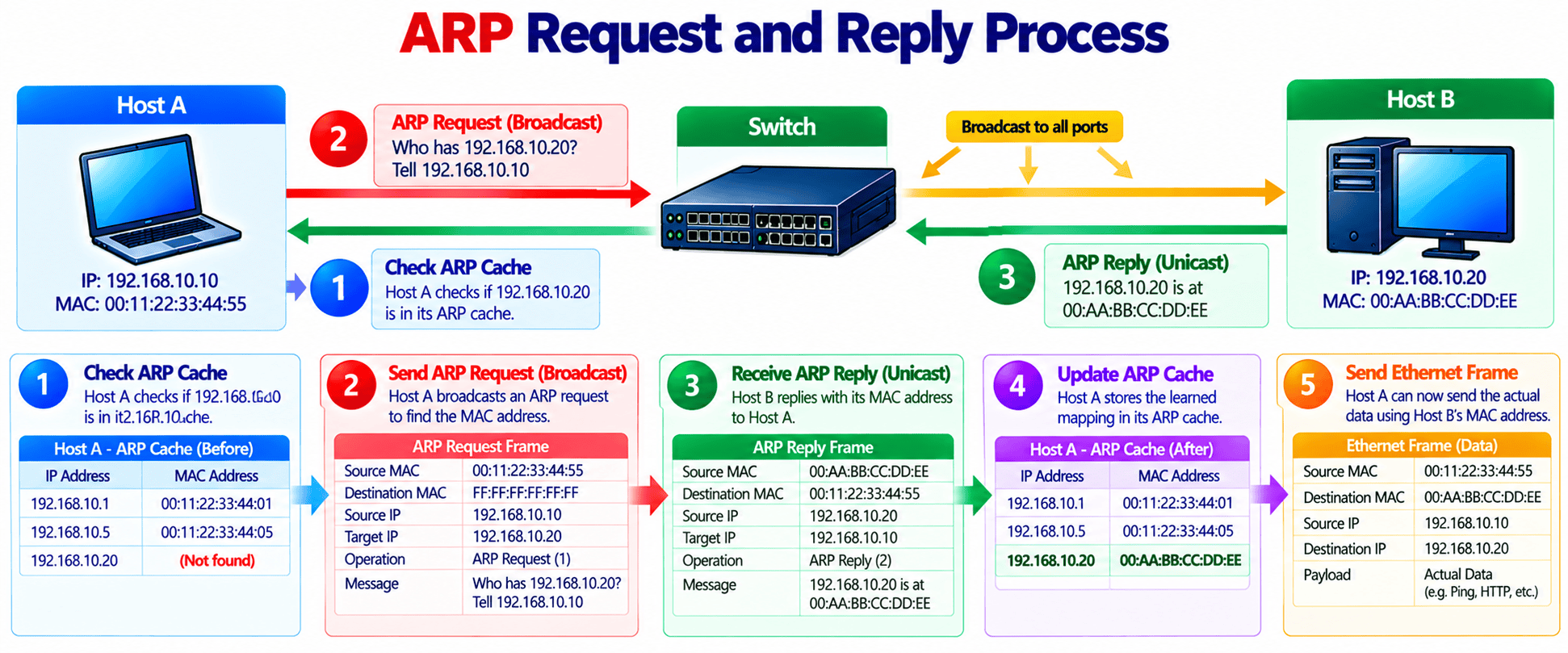
ARP Request vs ARP Reply
| Feature | ARP Request | ARP Reply |
|---|---|---|
| Purpose | Discover MAC address | Return MAC address |
| ARP Opcode | 1 | 2 |
| Typical Ethernet Destination | Broadcast | Requesting host |
| Target MAC Initially Known? | No | Yes |
| Main Question | Who has this IPv4 address? | This IPv4 address is at this MAC |
ARP for Local and Remote Destinations
One common misunderstanding is that a host always ARPs for the final destination’s MAC address.
That is only true when the destination is on the local subnet.
Same Subnet
Assume:
Host A:
192.168.10.10/24

Host B:
192.168.10.20/24
Host A determines that Host B is local.
It performs ARP for:
192.168.10.20and sends the Ethernet frame directly to Host B.
Remote Subnet
Now assume Host A wants to reach:
8.8.8.8with:
Host:
192.168.10.10/24

Default Gateway:
192.168.10.1
Host A determines that 8.8.8.8 is not on its local subnet.
It therefore does not normally ARP for:
8.8.8.8Instead, it ARPs for:
192.168.10.1the default gateway.
The resulting Ethernet frame contains:
Destination MAC:
Default Gateway MAC

IPv4 Destination:
8.8.8.8
ARP Cache and Neighbor Table
Performing a broadcast ARP request before every packet would be inefficient.
Operating systems therefore maintain an ARP or neighbor cache.
Example:
| IPv4 Address | MAC Address | Type |
|---|---|---|
| 192.168.10.1 | 00:10:20:30:40:50 | Dynamic |
| 192.168.10.20 | 00:BB:BB:BB:BB:20 | Dynamic |
| 192.168.10.30 | 00:CC:CC:CC:CC:30 | Static |
Dynamic Entries
Dynamic mappings are learned automatically.
They normally have aging and state-management behavior controlled by the operating system.
Exact lifetimes are implementation dependent.
Static Entries
Administrators can manually configure static IPv4-to-MAC mappings in some operating systems.
Static entries are useful only in specific designs because they require manual management.
ARP Cache Aging Is Not Mainly a Privacy Mechanism
ARP cache entries are aged because network conditions can change.
For example:
- A device can be replaced
- A network interface can change
- A virtual machine can move
- An HA service can move between devices
- A MAC address associated with an IP can legitimately change
Aging allows stale address mappings to be refreshed.
Viewing ARP Information
Windows
Display the traditional ARP cache:
arp -aExample:
Interface: 192.168.10.50

Internet Address      Physical Address
192.168.10.1          00-10-20-30-40-50
192.168.10.20         00-bb-bb-bb-bb-20
Modern Windows systems can also display neighbor information using PowerShell:
Get-NetNeighborFilter for IPv4:
Get-NetNeighbor -AddressFamily IPv4Linux
Use:
ip neighExample:
192.168.10.1 dev eth0 lladdr 00:10:20:30:40:50 REACHABLE
192.168.10.20 dev eth0 lladdr 00:bb:bb:bb:bb:20 STALE
The Linux neighbor table can show states such as:
- REACHABLE
- STALE
- DELAY
- PROBE
- FAILED
depending on the current neighbor-cache condition.
Gratuitous ARP
A Gratuitous ARP, commonly called GARP, is an ARP message sent without first receiving a normal ARP request for that mapping.
A host is essentially announcing:
“This IPv4 address is associated with this MAC address.”
Gratuitous ARP can be useful for:
- Updating neighboring ARP caches
- Announcing an address after failover
- Duplicate-address detection behavior
- High-availability systems
- IP/MAC movement
High Availability Example
Consider two firewalls:
Virtual IPv4:
192.168.10.1

Active Firewall A MAC:
00:AA:AA:AA:AA:01

Firewall B:
Standby
Firewall A fails.
Firewall B becomes active with a different MAC address.
The network needs to learn that:
192.168.10.1is now reachable through the new active device.
A gratuitous ARP can help update neighboring systems.

Proxy ARP, RARP and Inverse ARP
ARP has several related technologies and historical variants.
Proxy ARP
With Proxy ARP, one network device responds to an ARP request on behalf of another IPv4 device.
Consider:
Host A
   |
   | ARP Request
   v
Router
   |
   | Proxy ARP Reply
   v
Host A
The router can reply with its own MAC address for another IPv4 destination when Proxy ARP is enabled and the routing conditions allow it.
Traffic is then sent to the router for forwarding.
Reverse ARP — RARP
RARP — Reverse Address Resolution Protocol was designed for systems that knew their hardware address but needed to discover their IPv4 address.
Conceptually:
Known:
MAC Address

Need:
IPv4 Address
RARP is an old protocol and has been replaced in practical modern networks by technologies such as BOOTP and DHCP.
It should primarily be considered a historical networking concept today.
Inverse ARP — InARP
Inverse ARP should not be treated simply as “normal ARP backwards” for Ethernet hosts.
Historically, Inverse ARP was used in technologies such as Frame Relay and ATM where a device knew a Layer 2 virtual-circuit identifier and needed to learn the corresponding network-layer address.
It is therefore different from normal Ethernet ARP and from RARP.
Quick Comparison
| Technology | Main Purpose |
|---|---|
| ARP | IPv4 address → local Layer 2 address |
| Proxy ARP | Device answers ARP on behalf of another IPv4 destination |
| Gratuitous ARP | Announce/update an IPv4-to-MAC mapping |
| RARP | Hardware address → IPv4 address; legacy/obsolete |
| Inverse ARP | Learn network-layer address across specific Layer 2 virtual-circuit technologies |
ARP Security
ARP was designed for trusted local networks and does not provide strong built-in authentication.
This creates several security risks.
ARP Spoofing
An attacker can send false ARP information.
For example, the attacker may claim:
192.168.10.1
is at
00:66:66:66:66:66
even though the legitimate gateway MAC is:
00:10:20:30:40:50If a client accepts the false mapping, traffic intended for the gateway may be sent toward the attacker.
ARP Poisoning
Repeated forged ARP messages can attempt to alter or “poison” ARP caches.
Possible consequences include:
- Traffic interception
- Man-in-the-middle attacks
- Connectivity disruption
- Traffic redirection
Dynamic ARP Inspection
Managed switches may provide:
Dynamic ARP Inspection — DAI
DAI can validate ARP messages against trusted information.
In DHCP-enabled access networks, this information commonly comes from:
DHCP Snooping bindings
Conceptually:
DHCP Snooping
      |
      v
IP + MAC + VLAN + Port Binding
      |
      v
Dynamic ARP Inspection
      |
      v
Validate ARP Packets
ARP Packet Analysis and Troubleshooting
ARP is one of the first protocols to inspect when a host cannot communicate with another IPv4 device on the same subnet or cannot reach its default gateway.
Wireshark Filter
Use:
arptcpdump
Capture ARP:
sudo tcpdump -nn -i any arpHealthy ARP Exchange
A normal exchange may look like:
ARP Request:
Who has 192.168.10.1?
Tell 192.168.10.50

ARP Reply:
192.168.10.1 is at 00:10:20:30:40:50
Repeated ARP Requests with No Reply
Capture:
Who has 192.168.10.20?
Who has 192.168.10.20?
Who has 192.168.10.20?
but no reply.
Possible causes include:
- Destination offline
- Wrong VLAN
- Incorrect subnet mask
- Layer 2 connectivity failure
- Port/VLAN misconfiguration
- Wireless isolation
- Security policy
- Device using a different IPv4 address
Cannot Reach Default Gateway
Suppose:
Client:
192.168.10.50/24

Gateway:
192.168.10.1
First inspect:
arp -aor:
Get-NetNeighbor -AddressFamily IPv4Then capture:
arpIf you repeatedly see:
Who has 192.168.10.1?with no reply, investigate Layer 2 reachability to the gateway.
Wrong MAC Address Learned
Suppose:
Gateway:
192.168.10.1

Expected Gateway MAC:
00:10:20:30:40:50

Client ARP Entry:
00:66:66:66:66:66
Investigate:
- Duplicate IPv4 address
- ARP spoofing
- HA failover
- Incorrect static ARP entry
- Proxy ARP
- Network device replacement
Incorrect Subnet Mask Can Look Like an ARP Problem
Assume:
Client:
192.168.10.50

Incorrect Mask:
255.255.0.0
The client may incorrectly believe some remote addresses are local.
It may then ARP for an address that should actually be reached through the default gateway.
Duplicate IPv4 Address
You may observe two different MAC addresses claiming the same IPv4 address.
Example:
192.168.10.75 is at 00:AA:AA:AA:AA:75

192.168.10.75 is at 00:BB:BB:BB:BB:75
This strongly suggests:
- Duplicate IPv4 configuration
- HA/address-movement event
- ARP spoofing
- Misconfiguration

ARP and IPv6
ARP is used for:
IPv4
IPv6 does not use ARP.
IPv6 performs equivalent neighbor-resolution functions through:
Neighbor Discovery Protocol — NDP
using:
ICMPv6
Important IPv6 messages include:
- Neighbor Solicitation
- Neighbor Advertisement
- Router Solicitation
- Router Advertisement
Conceptually:
IPv4
ARP Request
ARP Reply
IPv6
Neighbor Solicitation Neighbor Advertisement
Key Takeaways
- ARP resolves IPv4 addresses to local Layer 2 addresses, normally Ethernet MAC addresses.
- ARP supports communication between IPv4 Layer 3 addressing and local Layer 2 Ethernet delivery.
- ARP does not mathematically convert an IP address into a MAC address. It discovers the mapping through network messages.
- A normal ARP exchange consists of:
ARP Request
ARP Reply- ARP Request normally uses Ethernet broadcast:
FF:FF:FF:FF:FF:FF- ARP Request uses opcode:
1and ARP Reply uses opcode:
2- When the destination is local, the sender normally ARPs for the destination host.
- When the destination is remote, the sender normally ARPs for the next-hop router or default gateway.
- ARP caches reduce repeated broadcast requests by temporarily storing learned IPv4-to-MAC mappings.
- ARP cache aging is implementation dependent and primarily helps refresh stale network mappings.
- Gratuitous ARP allows a system to announce or update an IPv4-to-MAC mapping without waiting for a normal request.
- Gratuitous ARP is commonly useful during high-availability and address-movement events.
- Proxy ARP allows a device such as a router to answer ARP on behalf of another IPv4 destination under appropriate conditions.
- RARP is a legacy protocol historically used to discover an IPv4 address from a hardware address.
- Inverse ARP has specific historical uses in technologies such as Frame Relay and should not simply be treated as ordinary Ethernet ARP in reverse.
- ARP does not provide strong authentication and is therefore vulnerable to ARP spoofing and poisoning.
- Dynamic ARP Inspection can help validate ARP messages in managed enterprise access networks.
- DHCP Snooping bindings can provide trusted IP/MAC/port information for Dynamic ARP Inspection.
- Repeated ARP Requests without a reply usually indicate that Layer 2 resolution for the target has failed.
- IPv6 does not use ARP. It uses ICMPv6 Neighbor Discovery.
ARP is simple in concept but extremely important in practical troubleshooting.
When an IPv4 host says:
“I know where the packet needs to go logically, but I do not know which Ethernet address should receive the frame,”
ARP provides the answer.
When troubleshooting local IPv4 connectivity, ask:
What IPv4 address is the host trying to resolve?
Does the operating system believe the destination is local or remote?
Is it ARPing for the destination or the default gateway?
Does an ARP Reply return?
Which MAC address is learned?
Is that MAC address correct?
Are multiple devices claiming the same IPv4 address?
Following those questions makes many VLAN, subnet-mask, gateway, duplicate-address and Layer 2 connectivity problems much easier to isolate.
Useful Links and References
SanchitGurukul Resources
Official Technical References
Your feedback matters
Was this post helpful?
Discussion
0 approved comments
No approved comments yet. You can start the discussion below.
Leave a Comment
No login is required. Name and email are used for moderation/security. Your email is never displayed publicly. All comments require administrator approval.
Discover more from SanchitGurukul
Subscribe to get the latest posts sent to your email.


