
IPsec is one of the most widely used technologies for protecting IP communication across untrusted networks.
It is commonly used for:
- Site-to-site VPNs
- Branch connectivity
- Data center connectivity
- Cloud VPNs
- Remote-access VPNs
- Secure communication between network gateways
IPsec does not refer to a single protocol.
It is a framework of technologies that work together to provide functions such as:
- Encryption
- Integrity
- Authentication
- Anti-replay protection
- Secure key establishment
Two important parts of an IPsec VPN are:
IKE — establishes and manages the security relationship between VPN peers.
ESP — protects the actual network traffic carried through the VPN.
Understanding how these pieces fit together makes IPsec troubleshooting and design much easier.
Understanding the IPsec Architecture
What Does IPsec Actually Protect?
Consider two offices connected across the Internet.
Headquarters:
10.10.0.0/16
Branch:
10.20.0.0/16
Users at headquarters need to communicate with systems at the branch.
The Internet between the sites is not controlled by the organization.
VPN gateways at both locations can use IPsec to protect traffic while it crosses that network.

IPsec Is a Collection of Functions
A typical IPsec VPN needs to solve several problems.
The peers need to:
- Identify each other
- Authenticate each other
- Agree on cryptographic settings
- Establish shared keying material
- Decide which traffic should be protected
- Encrypt or authenticate packets
- Detect replayed traffic
- Refresh security relationships over time
Different IPsec components perform these functions.
Important IPsec Components
The main concepts include:
- IKE
- ESP
- Security Associations
- Encryption algorithms
- Integrity mechanisms
- Diffie-Hellman key exchange
- Traffic selectors
- Tunnel mode
- Transport mode
Not every deployment uses these features in exactly the same way.
IKE and Security Associations
What Is IKE?
IKE, or Internet Key Exchange, is used to establish and manage the cryptographic relationship between IPsec peers.
Before two gateways can securely exchange protected traffic, they need to agree on security parameters.
IKE helps negotiate that relationship.
Conceptually, the peers need to agree on items such as:
- Authentication method
- Cryptographic algorithms
- Key exchange parameters
- Lifetime
- Traffic to protect
Authentication Between VPN Peers
The VPN gateways need to verify each other’s identity.
Common authentication methods include:
- Pre-shared keys
- Digital certificates
Remote-access solutions may also use additional user authentication.
What Is a Security Association?
A Security Association, commonly abbreviated as SA, represents security information used for protected communication.
An SA can contain information such as:
- Encryption algorithm
- Cryptographic keys
- Integrity settings
- Lifetime
- SPI
- Other negotiated parameters
Security Associations are fundamental to IPsec.
Why Are SAs Directional?
IPsec Security Associations are generally unidirectional.
This means communication in each direction has its own SA.
So two-way VPN communication requires security associations for both directions.

What Is an SPI?
An SPI, or Security Parameters Index, helps identify the appropriate Security Association for received IPsec traffic.
It allows the receiving device to determine which security information should be used to process a packet.
You can think of it as an identifier associated with the relevant IPsec SA.
ESP and Packet Protection
What Is ESP?
ESP, or Encapsulating Security Payload, is commonly used to protect the actual data sent through an IPsec VPN.
ESP can provide:
- Confidentiality through encryption
- Integrity protection
- Data-origin authentication
- Anti-replay protection
The exact protections depend on the negotiated configuration.
Original Packet
Suppose a workstation at headquarters sends traffic to a branch server.
Original packet:
Source IP
10.10.10.25
Destination IP
10.20.20.50
The packet reaches the headquarters VPN gateway.
The gateway determines that the traffic should use the IPsec VPN.
The packet is then protected using ESP according to the active Security Association.

Encryption
Encryption helps prevent unauthorized observers from reading protected packet contents.
Common modern deployments may use strong symmetric encryption algorithms such as AES.
The exact algorithms supported depend on the platform.
Integrity
Integrity protection allows the receiver to determine whether protected data has been altered.
Modern deployments should use current supported cryptographic mechanisms rather than obsolete algorithms.
Anti-Replay Protection
An attacker may attempt to capture valid encrypted packets and transmit them again.
This is known as a replay attack.
IPsec can use sequence numbers and a replay window to identify packets that have already been processed or that fall outside an acceptable sequence range.
Tunnel Mode and Transport Mode
IPsec Tunnel Mode
Tunnel mode is widely used for site-to-site VPNs.
The original IP packet is protected and carried inside a new outer IP packet.
The outer packet allows the VPN gateways to communicate across the public network.
For example:
Original traffic:
Source: 10.10.10.25
Destination: 10.20.20.50
Outer communication may use:
Source: Public IP of VPN Gateway A
Destination: Public IP of VPN Gateway B
The original private addresses remain part of the protected inner communication.
Why Tunnel Mode Is Useful
Private addresses such as:
10.10.10.25
cannot normally be routed directly across the public Internet.
Tunnel mode allows the private packet to be carried between public-facing VPN gateways.

IPsec Transport Mode
In transport mode, the original IP header remains part of the packet used for delivery, while the payload receives IPsec protection.
Transport mode may be used when IPsec communication occurs directly between endpoints.
It is less commonly encountered by beginners than tunnel mode in traditional site-to-site VPN designs.
Which Mode Is Used for Site-to-Site VPN?
Traditional gateway-to-gateway site-to-site IPsec VPNs commonly use tunnel mode.
This allows entire networks behind the gateways to communicate through the protected tunnel.
How an IPsec VPN Is Established
Two Main Functions
At a high level, an IPsec VPN performs two major jobs.
Control Plane
The VPN peers establish and maintain the secure relationship.
IKE is responsible for this area.
Data Plane
Actual user or application traffic is protected and transported.
ESP commonly handles this area.
This distinction is extremely useful during troubleshooting.
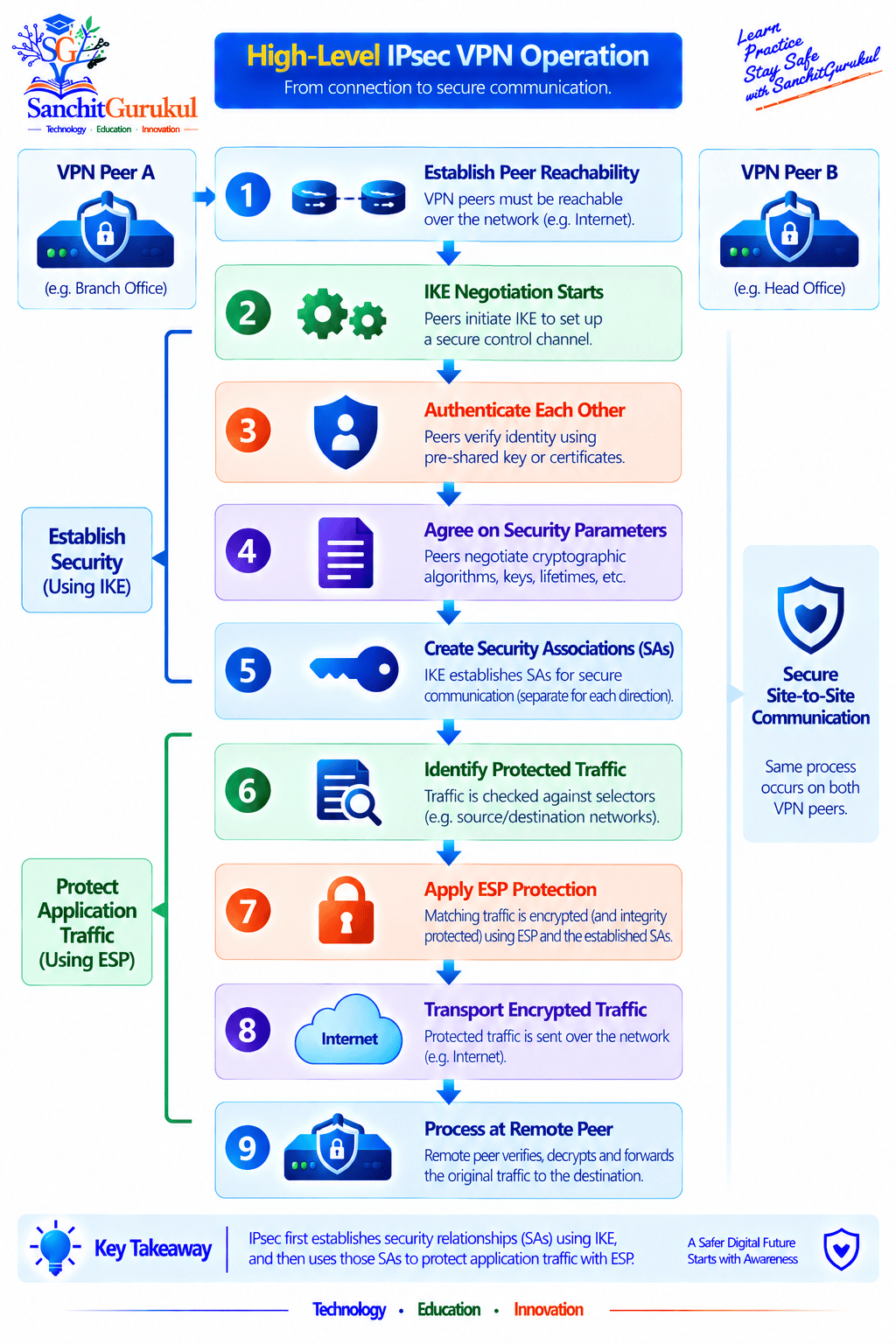
Step 1: VPN Peers Reach Each Other
The public or transport addresses of both VPN endpoints must be reachable.
If the gateways cannot communicate at the underlying IP layer, the VPN cannot establish.
Step 2: IKE Negotiation Begins
The peers exchange information required to establish secure communication.
They negotiate compatible security parameters.
Step 3: Peers Authenticate
Each side verifies that it is communicating with the expected VPN peer.
Step 4: Security Associations Are Established
Security Associations contain the parameters required to protect communication.
Step 5: Traffic Is Identified
The VPN determines which traffic should receive IPsec protection.
For example:
10.10.0.0/16
to:
10.20.0.0/16
Step 6: ESP Protects the Traffic
The gateway applies IPsec protection to matching traffic.
Step 7: The Packet Travels Across the Internet
The protected packet is transported toward the remote VPN gateway.
Step 8: Remote Gateway Processes the Packet
The remote peer:
- Identifies the correct SA
- Verifies the protected packet
- Decrypts it where encryption is used
- Removes the IPsec encapsulation
- Forwards the original packet toward the destination
Important IPsec Design Concepts
Traffic Selectors
A VPN needs to know which traffic should be protected.
Traffic selectors may identify:
- Local network
- Remote network
- Protocol
- Ports
The exact behavior differs depending on the VPN technology and platform.
Route-Based VPN
Many modern firewall platforms support route-based VPNs.
The VPN is represented using a logical tunnel interface or similar mechanism.
Routing determines which traffic is sent toward the tunnel.
This approach can simplify:
- Dynamic routing
- Multiple networks
- Larger VPN designs
- Policy management
Policy-Based VPN
A policy-based VPN identifies protected traffic using policy or traffic-selection criteria.
The exact implementation varies among vendors.
Both route-based and policy-based VPNs remain in use.
NAT and IPsec
NAT can interact with IPsec in several ways.
One common technology is NAT Traversal, or NAT-T.
NAT-T helps IPsec operate when NAT exists between VPN peers.
Detailed NAT-T behavior is better covered together with IPsec negotiation and troubleshooting.
Perfect Forward Secrecy
Perfect Forward Secrecy, commonly called PFS, can require fresh key-exchange material when creating certain IPsec security associations.
The purpose is to reduce the impact if previously used keying information is later compromised.
The exact implementation depends on VPN configuration and protocol version.
IPsec Security and Basic Troubleshooting
Use Strong Cryptography
VPN security depends partly on the algorithms being used.
Organizations should use currently supported cryptographic algorithms that meet their security and regulatory requirements.
Avoid continuing to use obsolete algorithms simply because old equipment still supports them.
Protect Pre-Shared Keys
If pre-shared keys are used, they should be:
- Strong
- Unique
- Securely stored
- Changed when required
- Not reused unnecessarily across many VPNs
Certificates may provide better scalability for some larger environments.
Restrict Traffic Through the VPN
A VPN tunnel being established does not mean all traffic should be permitted.
Firewall rules should still control:
- Source
- Destination
- Applications
- Services
- Users where applicable
Tunnel Establishment vs Data Traffic
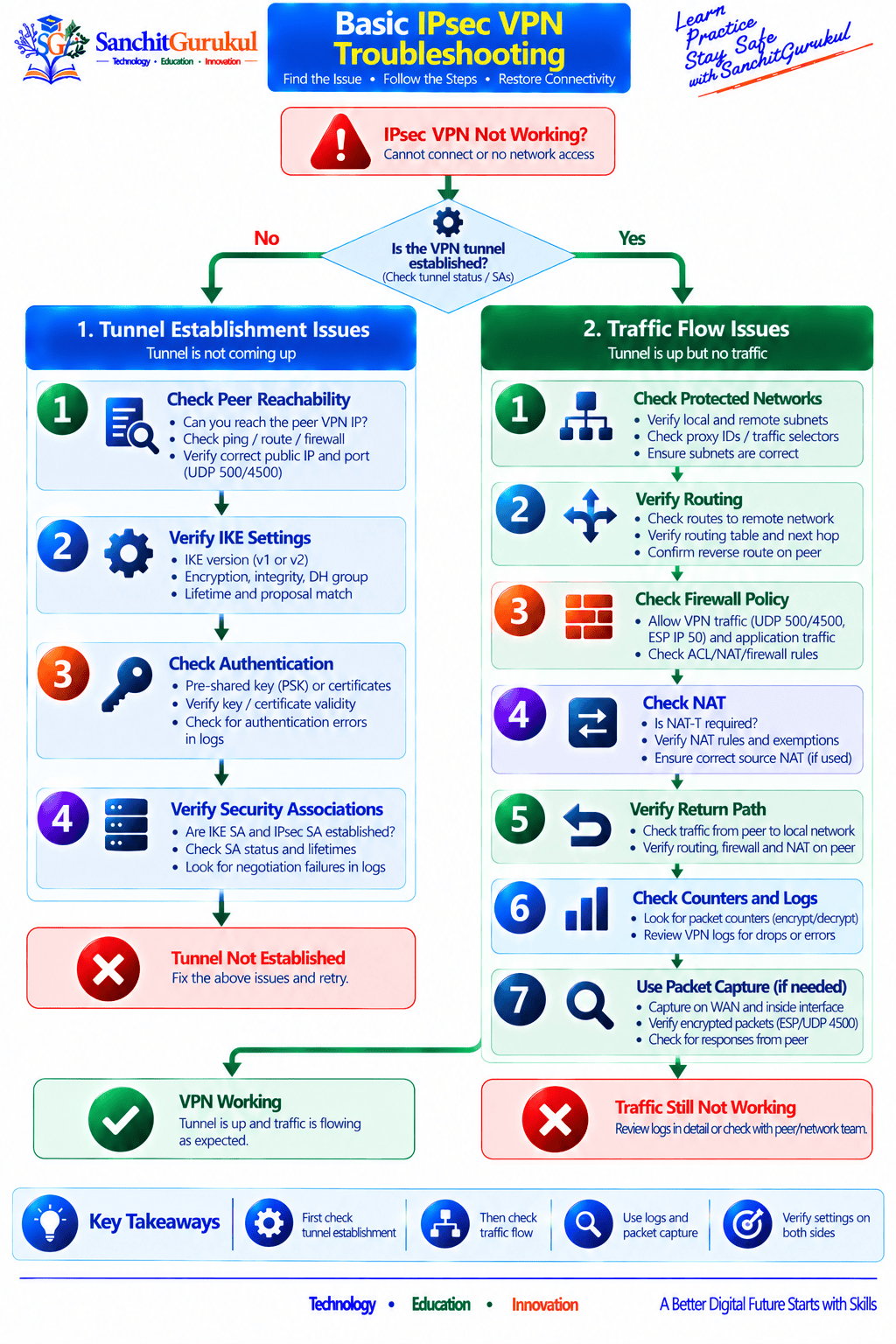
When troubleshooting, first determine:
Is the IPsec VPN established?
Then determine:
Is protected traffic actually passing?
These are different problems.
Basic Troubleshooting Checks
If the VPN does not establish:
- Verify peer reachability.
- Verify peer IP addresses.
- Check IKE configuration.
- Verify authentication.
- Compare cryptographic settings.
- Review VPN logs.
If the VPN establishes but traffic fails:
- Verify protected networks.
- Check routing.
- Check firewall policy.
- Check NAT.
- Verify active IPsec SAs.
- Check packet counters.
- Verify return routing.
- Review logs.
- Use packet captures where necessary.
Common Symptoms
| Symptom | Area to Investigate |
|---|---|
| VPN never establishes | Reachability / IKE / Authentication |
| IKE works but IPsec SA missing | Traffic selectors / IPsec negotiation |
| SA exists but no traffic | Routing / Policy / Traffic generation |
| Encrypt counter increases only | Remote side / Return path |
| Decrypt counter increases but application fails | Internal routing / Firewall / Server |
| Tunnel frequently rebuilds | Lifetime / Connectivity / Negotiation |
| Small packets work but large traffic fails | MTU / MSS / Fragmentation |
These symptoms provide useful direction, but the exact commands and counters differ by vendor.
Key Takeaways and Summary
Key Takeaways
- IPsec is a framework used to protect IP communication.
- IPsec commonly provides confidentiality, integrity, authentication, and anti-replay protection.
- IKE establishes and manages the security relationship between VPN peers.
- ESP commonly protects the actual VPN data traffic.
- Security Associations contain the parameters required to process protected communication.
- IPsec SAs are directional.
- Tunnel mode protects the original IP packet and adds an outer network header.
- Tunnel mode is commonly used for site-to-site VPNs.
- Traffic selectors or routing determine which communication should use the VPN.
- VPN establishment and protected data flow should be troubleshot separately.
Summary
IPsec provides the security framework behind many enterprise VPN connections.
Before application traffic can be protected, VPN peers must authenticate each other and agree on security parameters. IKE performs this negotiation and establishes the security relationships required for communication.
Security Associations store the information needed to process protected traffic, while ESP commonly provides the actual encryption, integrity, authentication, and anti-replay protection used for VPN packets.
In a site-to-site VPN, tunnel mode allows private network packets to be carried securely between VPN gateways across the Internet.
Understanding the separation between IKE negotiation, Security Associations, and ESP-protected application traffic is one of the most important foundations for learning advanced IPsec configuration and troubleshooting.
Useful Links and References
SanchitGurukul Static Resources
Official External References
Your feedback matters
Was this post helpful?
Discussion
0 approved comments
No approved comments yet. You can start the discussion below.
Leave a Comment
No login is required. Name and email are used for moderation/security. Your email is never displayed publicly. All comments require administrator approval.
Discover more from SanchitGurukul
Subscribe to get the latest posts sent to your email.

