
Patch management is the process of identifying, testing, prioritizing, deploying, and verifying software updates that fix security vulnerabilities, bugs, or other problems in operating systems, applications, network devices, and other technology.
In simple terms:
Patch management means keeping systems securely updated.
A patch may fix:
- Security vulnerabilities
- Software bugs
- Stability problems
- Compatibility issues
- Performance problems
- Vendor-reported defects
From a cybersecurity perspective, security patches are especially important because attackers may exploit known vulnerabilities in outdated software.
A simple patch-management lifecycle is:
Discover → Assess → Prioritize → Test → Deploy → Verify → Monitor
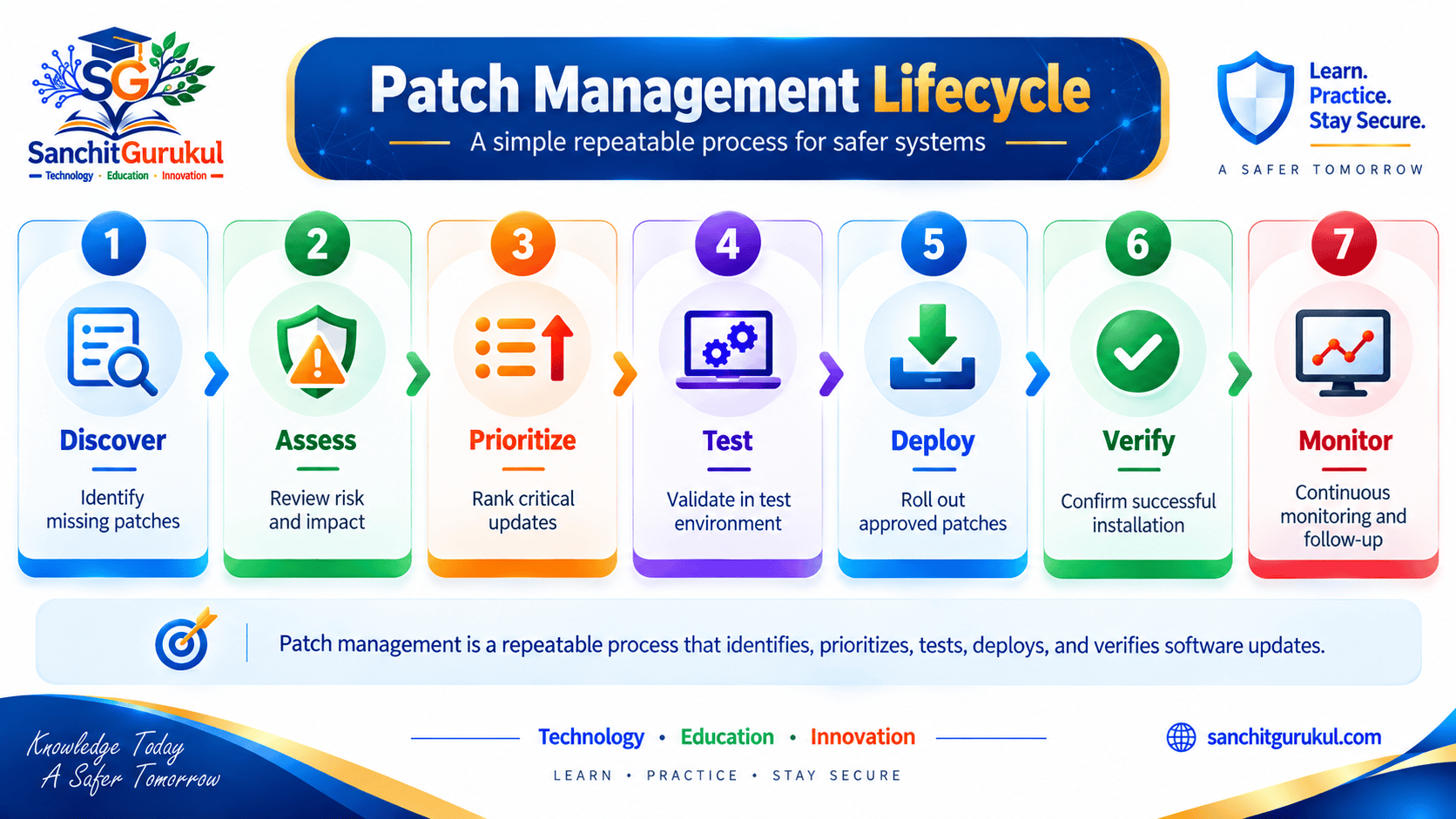
Understanding Patch Management
What Is a Patch?
A patch is a software update provided to correct or improve an existing product.
Depending on the vendor and platform, updates may be called:
- Security updates
- Hotfixes
- Cumulative updates
- Firmware updates
- Service packs
- Maintenance releases
- Bug fixes
Not every patch is security-related.
However, security patches are designed to address vulnerabilities that could potentially be exploited.
Why Is Patch Management Important?
Suppose a vendor discovers a serious vulnerability in a server application.
The vendor releases a security patch.
If an organization continues running the vulnerable version without appropriate mitigation, attackers may be able to exploit the known weakness.
This creates a common security sequence:
Vulnerability Discovered
↓
Vendor Releases Patch
↓
Attackers Learn About Vulnerability
↓
Unpatched Systems Remain Exposed
The longer an important vulnerable system remains unpatched, the longer the organization may remain exposed.
Patch Management vs Software Updates
Not every software update should automatically be installed without review.
Some updates may:
- Add features
- Change functionality
- Modify configuration
- Affect compatibility
- Require a restart
- Introduce operational risk
Patch management therefore combines security urgency with operational control.
How Patch Management Works
A structured process helps organizations patch important systems without creating unnecessary outages.
Step 1 — Maintain an Asset Inventory
Before patching, organizations need to know what they operate.
Inventory may include:
- Servers
- Laptops
- Desktops
- Network devices
- Firewalls
- VPN gateways
- Applications
- Databases
- Cloud workloads
- Virtual machines
Important information may include:
- Device name
- Operating system
- Software version
- Business owner
- Location
- Criticality
- Support status
You cannot reliably patch a system you do not know exists.
Step 2 — Identify Available Patches
Organizations should monitor trusted sources such as:
- Vendor security advisories
- Operating-system update services
- Vulnerability-management platforms
- CERT advisories
- Security bulletins
The goal is to determine:
Which patches apply to which systems?
Step 3 — Assess the Risk
Not every patch has the same urgency.
Consider:
- Vulnerability severity
- Known exploitation
- Internet exposure
- Asset importance
- Authentication requirements
- Existing security controls
- Potential business impact
For example:
Critical vulnerability + Internet-facing VPN + active exploitation
normally deserves much higher priority than:
Moderate vulnerability + isolated laboratory system
Step 4 — Prioritize
A practical priority model might look like:
Emergency
Act immediately or as quickly as operationally possible.
High
Schedule rapid remediation.
Medium
Address through the normal patch cycle.
Low
Handle according to routine maintenance priorities.
Actual timelines should be defined by organizational policy and risk.
Step 5 — Test
Where practical, patches should be tested before widespread production deployment.
Testing may identify:
- Application compatibility issues
- Service failures
- Performance problems
- Restart requirements
- Configuration changes
Step 6 — Deploy
Deployment may occur through:
- Centralized patch systems
- Endpoint-management platforms
- Operating-system tools
- Cloud-management platforms
- Vendor management systems
- Controlled manual updates
Deployment should follow appropriate change-management procedures.
Step 7 — Verify
Do not assume deployment succeeded.
Verify:
- Correct version installed
- Patch status
- Required reboot completed
- Service operational
- Vulnerability no longer detected
- No unexpected configuration changes
Step 8 — Monitor
After deployment, monitor for:
- Application failures
- Performance issues
- Security alerts
- Patch failures
- Devices that missed the update

Patch Prioritization and Risk
One of the biggest patch-management mistakes is treating every available update as equally urgent.
Severity Is Important
Security teams often consider technical severity information such as:
- Vendor severity
- CVSS score
- Vulnerability description
- Required privileges
- Attack complexity
But severity alone does not determine organizational risk.
Exploitation Matters
A vulnerability being actively exploited can significantly increase urgency.
For example:
Vulnerability A
CVSS: Very High
Internal test server
No known exploitation
Vulnerability B
Lower technical severity
Internet-facing service
Known active exploitation
Depending on the environment, Vulnerability B may require faster action.
Exposure Matters
An internet-facing system can often be reached by more potential attackers than an isolated internal system.
High-risk assets may include:
- VPN gateways
- Firewalls
- Public web applications
- Email gateways
- Identity systems
- Remote-access services
Asset Criticality Matters
Consider two servers with the same vulnerability.
Server A
Temporary development environment
Server B
Critical payment-processing server
The business impact of compromise may be significantly different.
Existing Controls Matter
Controls can sometimes reduce exposure while patching is prepared.
Examples include:
- Firewall restrictions
- WAF rules
- IPS signatures
- Feature disablement
- Access restrictions
- Network segmentation
These do not always replace the patch.
They may provide temporary mitigation.
Known Exploited Vulnerabilities
Organizations may also use sources such as the CISA Known Exploited Vulnerabilities (KEV) Catalog to identify vulnerabilities known to be exploited in real-world attacks.
This information can help prioritize remediation.
Patch Management Across Different Systems
Patch management is not limited to Windows computers.
Operating Systems
Examples include:
- Windows
- Linux
- macOS
- Mobile operating systems
Organizations should track supported versions and security-update status.
Applications
Applications may require separate updates even when the operating system is fully patched.
Examples include:
- Browsers
- Database software
- Web servers
- Office applications
- Business applications
- Security products
A fully patched operating system can still host a vulnerable application.
Network Devices
Network infrastructure often has its own firmware and software lifecycle.
Examples include:
- Firewalls
- Routers
- Switches
- VPN appliances
- Wireless controllers
- Load balancers
Updates may require careful planning because network-device reboots can affect connectivity.
Security Appliances
Security products themselves can contain vulnerabilities.
Examples include:
- Firewalls
- WAFs
- IDS/IPS
- VPN gateways
- Email-security gateways
A device designed to protect the network still requires patch management.
Cloud Environments
Patch responsibility in cloud environments depends on the service model.
For example:
Virtual Machine
The customer may be responsible for operating-system and application patching.
Managed Service
The cloud provider may manage more of the underlying platform.
However, customers still need to understand their responsibilities.
Containers and Images
Containerized environments require attention to:
- Base images
- Software packages
- Application dependencies
- Runtime vulnerabilities
Simply restarting an old vulnerable container does not patch the underlying image.
A new secure image may need to be built and redeployed.

Emergency Patching and Zero-Day Vulnerabilities
Routine patch cycles work well for normal updates.
Some vulnerabilities require faster action.
What Is Emergency Patching?
Emergency patching is an accelerated process used when the risk of waiting is too high.
Typical triggers might include:
- Active exploitation
- Critical internet-facing vulnerability
- Major ransomware campaign
- Privilege escalation affecting important systems
- Vendor emergency advisory
The exact decision should depend on organizational risk.
What Happens During a Zero-Day?
A zero-day vulnerability may become known before a patch is available.
In that situation, patch management alone cannot immediately solve the problem.
The organization may need temporary controls such as:
- Disable vulnerable functionality
- Restrict access
- Block specific traffic
- Apply vendor workaround
- Increase monitoring
- Isolate affected systems
Then:
Vendor Releases Patch
↓
Test
↓
Deploy
↓
Verify
Emergency Does Not Mean Reckless
Urgent patches can still create operational problems.
Organizations may need to balance:
Security Risk
against:
Operational Risk
For highly exposed and actively exploited systems, delaying a patch for extensive testing may itself create greater risk.
Common Patch Management Problems
Unknown Assets
Forgotten systems may never receive updates.
Examples include:
- Old virtual machines
- Forgotten cloud servers
- Legacy appliances
- Development systems
Asset inventory is therefore essential.
Unsupported Systems
Software that has reached end of support may no longer receive security updates.
This creates increasing risk over time.
Possible responses include:
- Upgrade
- Replace
- Isolate
- Restrict
- Retire
Delayed Reboots
Some patches are installed but do not become fully effective until the system is restarted.
A dashboard may show:
Patch Installed
while:
Reboot Pending
means the update may not yet be fully active.
Failed Deployments
Some systems may miss updates because they are:
- Offline
- Remote
- Misconfigured
- Low on storage
- Experiencing management-agent problems
Verification is therefore important.
Legacy Applications
Organizations sometimes delay operating-system patches because an old application may stop working.
Possible responses include:
- Test compatibility
- Upgrade the application
- Replace unsupported software
- Apply temporary compensating controls
- Isolate the system
Leaving a vulnerable system indefinitely should not become the default solution.
Patch Fatigue
Large organizations can receive thousands of vulnerability findings and patches.
Attempting to treat everything as equally urgent can overwhelm teams.
Risk-based prioritization helps focus effort on the most important exposures.
Patch Management and Related Security Concepts
Patch management works closely with several areas of cybersecurity.
Patch Management vs Vulnerability Management
Vulnerability Management
Identifies, assesses, prioritizes, remediates, and verifies security weaknesses.
Patch Management
Focuses specifically on managing software and firmware updates.
Therefore:
Patch Management is an important part of Vulnerability Management.
But not every vulnerability can be fixed with a patch.
For example:
Weak password
requires a configuration or identity-control change.
Patch Management vs Security Hardening
Patching
Fixes known software weaknesses.
Hardening
Reduces unnecessary exposure and insecure configuration.
For example:
Updating SSH software is patching.
Disabling unnecessary Telnet is hardening.
Organizations generally need both.
Patch Management and Risk Assessment
Risk assessment helps determine:
Which patches should be applied first?
Factors include:
- Exposure
- Exploitation
- Business impact
- Asset value
- Existing controls
Patch Management and Attack Surface
An unnecessary vulnerable service creates avoidable exposure.
Security teams may choose:
Patch the service
or, if it is not needed:
Remove the service entirely
Removing unnecessary functionality can reduce the attack surface more effectively than continuously maintaining something the organization does not need.
Patch Management and Defense in Depth
Patching is a preventive security control.
But Defense in Depth assumes that preventive controls may fail.
Even well-patched environments still require:
- MFA
- EDR
- Network segmentation
- Least privilege
- Monitoring
- Backups
- Incident response
Building an Effective Patch Management Program
A practical patch-management program should define clear responsibilities and processes.
Maintain Accurate Inventory
Know:
- What systems exist
- Who owns them
- Which software versions they run
- Whether they are supported
- How important they are
Define Patch Priorities
Create rules for handling:
- Emergency patches
- Critical patches
- Standard updates
- Low-risk updates
Define Testing Procedures
Use appropriate:
- Development
- Test
- Pilot
- Production
stages where practical.
Define Deployment Windows
Routine maintenance windows can help reduce operational disruption.
However, critical actively exploited vulnerabilities may require action outside normal maintenance periods.
Track Exceptions
Sometimes a patch cannot immediately be installed.
Document:
- Why
- Which risk remains
- Temporary mitigation
- Owner
- Review date
- Planned remediation
Verify Compliance
Track:
- Patched systems
- Missing patches
- Failed installations
- Reboot status
- Unsupported systems
- Approved exceptions
Review and Improve
Patch-management metrics may help identify recurring problems.
Examples include:
- Percentage of critical systems patched
- Time to remediate critical vulnerabilities
- Failed patch rate
- Number of unsupported systems
- Number of overdue exceptions
The objective should be to improve security outcomes rather than simply produce a large number of reports.
Key Takeaways
- Patch management is the process of identifying, prioritizing, testing, deploying, and verifying software and firmware updates.
- Security patches fix known vulnerabilities, but patches may also address bugs and stability problems.
- Patch management applies to operating systems, applications, network devices, security appliances, cloud workloads, and other technology.
- An accurate asset inventory is essential.
- Not every patch has the same urgency.
- Risk-based prioritization should consider severity, exposure, known exploitation, asset importance, and existing controls.
- Internet-facing and actively exploited vulnerabilities often require faster attention.
- CISA’s Known Exploited Vulnerabilities catalog can provide useful exploitation context.
- Patches should be tested where practical before broad production deployment.
- Deployment must be followed by verification.
- Some updates require a reboot before they become fully effective.
- Unsupported systems create increasing patch-management risk.
- Zero-day vulnerabilities may require temporary mitigation until a patch is released.
- Installing a patch does not prove that earlier exploitation did not occur.
- Patch management is part of vulnerability management, but not every vulnerability is solved by patching.
- Patching and security hardening should work together.
- Effective patch management is a continuous risk-management process, not simply a monthly update activity.
Useful Links and References
SanchitGurukul Static Resources
Official External References
Your feedback matters
Was this post helpful?
Discussion
0 approved comments
No approved comments yet. You can start the discussion below.
Leave a Comment
No login is required. Name and email are used for moderation/security. Your email is never displayed publicly. All comments require administrator approval.
Discover more from SanchitGurukul
Subscribe to get the latest posts sent to your email.
