
Prerequisites: Basic Understanding of Computer Networks, IP Addresses and Network Ports
Imagine downloading an important document from a website.
The document travels across several networks before reaching your computer.
During this journey, some network packets may be lost, delayed or received out of order.
How does your computer recover missing information?
How does it arrange the received information correctly?
And how does it prevent the sender from transmitting more data than the receiver can handle?
One of the protocols designed to address these problems is Transmission Control Protocol (TCP).
TCP is a fundamental protocol of modern computer networking.
It provides reliable, ordered, connection-oriented communication between applications over IP networks.
In this article, you will learn:
- What TCP is and why it is used
- The important features of TCP
- How TCP connections work
- How TCP detects loss and retransmits data
- The difference between flow control and congestion control
- The TCP header and its fields
- Common TCP flags and options
- Advantages, limitations and common applications
- Basic TCP troubleshooting concepts
What Is Transmission Control Protocol (TCP)?
TCP stands for Transmission Control Protocol.
It is a connection-oriented transport-layer protocol used for communication between applications over IP networks.
TCP is specified in IETF RFC 9293 — Transmission Control Protocol (TCP).
It operates at:
OSI Layer 4 — Transport Layer
TCP provides applications with a continuous stream of bytes.
This means applications do not need to manage the delivery order of individual network packets.
Why Is TCP Called Connection-Oriented?
Before normal application data is exchanged, TCP establishes connection state between two endpoints.
This is commonly performed using the TCP Three-Way Handshake.
The three messages are:
- SYN: The client requests a connection.
- SYN-ACK: The server acknowledges the request and sends its own synchronization information.
- ACK: The client acknowledges the server’s response.
After the handshake completes, the endpoints can exchange application data.
TCP connections are full-duplex, meaning both endpoints can send and receive data.
When communication ends, the connection can be closed gracefully using FIN and ACK exchanges.
Where Is TCP Commonly Used?
| Application | Protocol | Common TCP Port |
|---|---|---|
| Web browsing | HTTP | 80 |
| Secure web browsing | HTTPS over TCP | 443 |
| Secure remote access | SSH | 22 |
| Email transfer | SMTP | 25 |
| File transfer control | FTP | 21 |
| DNS zone transfers and other TCP-based DNS operations | DNS over TCP | 53 |
These are common service ports, not mandatory ports for every deployment.
Modern HTTP/3 uses QUIC over UDP rather than TCP.
Key Features of TCP and How It Works
TCP includes several mechanisms designed to support reliable network communication.
1. Reliable and Ordered Data Delivery
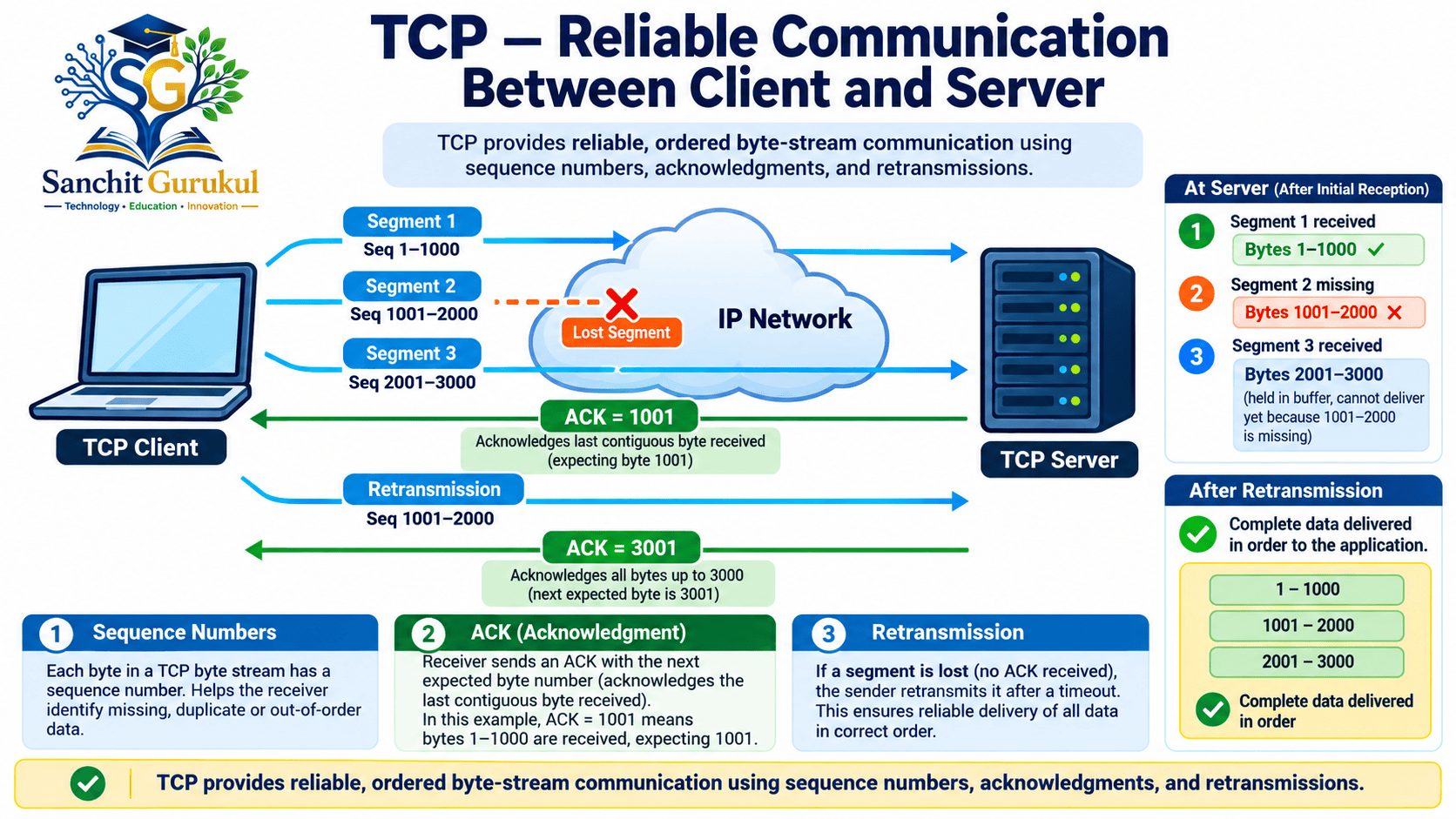
TCP uses sequence numbers to track the positions of bytes within a connection.
The receiver uses these numbers to identify missing or out-of-order data.
TCP normally delivers received data to the application in the correct byte order.
2. Acknowledgments and Retransmission
TCP receivers acknowledge successfully received data.
An acknowledgment number normally identifies the next byte expected in sequence.
Consider this simplified example:
| Step | TCP Communication |
|---|---|
| 1 | Sender transmits 500 bytes starting at Seq = 1001 |
| 2 | Receiver accepts all 500 bytes |
| 3 | Receiver sends ACK = 1501 |
| 4 | Sender knows the bytes through sequence number 1500 were acknowledged |
If the sender does not receive the expected acknowledgment, or other loss signals are detected, TCP can retransmit missing data.
Retransmission can occur after a timeout or through supported fast-recovery mechanisms.
Important: TCP is designed for reliable delivery, but it cannot guarantee successful completion when a connection fails permanently.
3. Flow Control
Flow control prevents a sender from overwhelming the receiving endpoint.
TCP uses an advertised receive window (rwnd).
The receiver tells the sender how much additional data it is currently prepared to accept.
If the receiver’s available buffer space decreases, it can advertise a smaller window.
If necessary, the window can become zero until the receiver can accept additional data.
4. Congestion Control
Congestion control helps prevent excessive traffic from overwhelming the network path.
Unlike flow control, which protects the receiver, congestion control manages the sender’s use of network capacity.
TCP implementations use congestion-control algorithms to adjust transmission behavior.
Examples of congestion-control concepts include:
- Slow start
- Congestion avoidance
- Fast retransmit
- Fast recovery
The exact algorithm depends on the operating system and TCP implementation.
Flow Control vs Congestion Control
| Feature | Flow Control | Congestion Control |
|---|---|---|
| Main Purpose | Protect the receiver | Protect the network path |
| Main Concern | Receiver buffer capacity | Available network capacity and congestion |
| Important Variable | Receive Window (rwnd) | Congestion Window (cwnd) |
| Controlled By | Receiver advertisements and sender behavior | Sender’s congestion-control algorithm |

5. Error Detection
TCP includes a mandatory 16-bit checksum.
The checksum is calculated over the TCP header and data, together with information from an IP pseudo-header.
The receiver checks the checksum to detect certain forms of corruption.
If a TCP segment fails validation, the receiver does not accept it as valid data.
TCP does not repair corrupted bytes directly. Missing data may instead be recovered through retransmission.
The checksum is not a cryptographic integrity mechanism.
6. Multiplexing Through Port Numbers
TCP uses source and destination port numbers to identify communication endpoints.
For example:
Client: 192.0.2.10:52000
Server: 198.51.100.20:443
The TCP connection is identified using the source and destination IP addresses and port numbers.
This allows a device to support multiple simultaneous TCP connections.
TCP Header Explained — Fields, Flags and Options
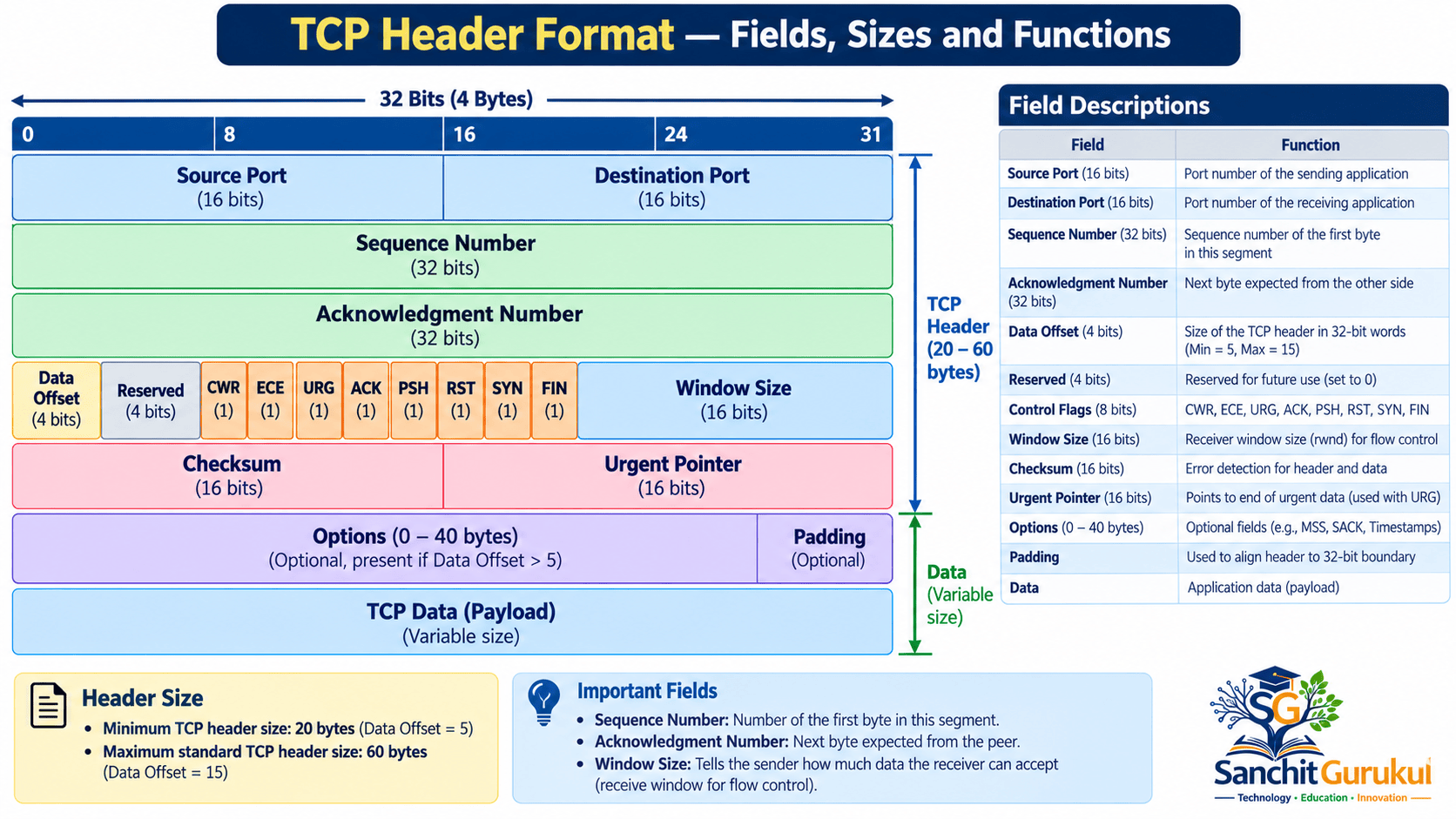
Every TCP segment contains a TCP header.
The header carries information needed to identify the connection, manage sequencing, acknowledge received data and control communication.
The minimum TCP header size is 20 bytes.
With standard TCP options, the header can grow to a maximum of 60 bytes.
TCP Header Fields
| Field | Size | Purpose |
|---|---|---|
| Source Port | 16 bits | Identifies the sending port |
| Destination Port | 16 bits | Identifies the receiving port |
| Sequence Number | 32 bits | Identifies the sequence position of transmitted data |
| Acknowledgment Number | 32 bits | Identifies the next expected sequence number when ACK is set |
| Data Offset | 4 bits | Specifies TCP header length in 32-bit words |
| Reserved | 4 bits | Reserved for future use |
| Control Flags | 8 bits | Manage connection and control behavior |
| Window | 16 bits | Advertises receive-window capacity |
| Checksum | 16 bits | Detects corruption in TCP segments |
| Urgent Pointer | 16 bits | Identifies urgent-data boundaries when URG is set |
| Options and Padding | Variable | Carries supported TCP extensions |
These field sizes follow the RFC 9293 TCP header definition.
Important TCP Flags
| Flag | Meaning | Purpose |
|---|---|---|
| SYN | Synchronize | Establishes a connection and synchronizes sequence numbers |
| ACK | Acknowledgment | Indicates that the acknowledgment field is valid |
| FIN | Finish | Indicates no more data will be sent in that direction |
| RST | Reset | Resets or aborts a connection |
| PSH | Push | Requests prompt delivery of buffered data to the receiving application |
| URG | Urgent | Indicates that the urgent pointer is significant |
| ECE | ECN-Echo | Supports Explicit Congestion Notification |
| CWR | Congestion Window Reduced | Supports congestion notification handling |
A TCP segment can have multiple flags enabled.
For example, the server’s second handshake segment normally contains both SYN and ACK.
Common TCP Options
TCP options extend its basic functionality.
| Option | Purpose |
|---|---|
| MSS — Maximum Segment Size | Announces the maximum TCP data segment size the endpoint is prepared to receive |
| Window Scale | Supports receive windows larger than the basic 16-bit window field |
| SACK — Selective Acknowledgment | Helps identify received blocks when some data is missing |
| Timestamps | Supports round-trip-time measurement and protection against wrapped sequence numbers |
Some options are negotiated during the three-way handshake.
For example, the Window Scale option is negotiated using SYN segments.
Not every TCP connection uses every available option.
Advantages, Limitations and Common TCP Applications
Advantages of TCP
Reliable communication: TCP uses acknowledgments and retransmissions to recover from many transmission losses.
Ordered delivery: Applications receive the accepted byte stream in sequence.
Flow control: The advertised receive window helps prevent receiver-buffer overflow.
Congestion control: TCP adjusts its sending behavior according to congestion-control rules.
Interoperability: TCP is standardized and widely supported across operating systems and networking equipment.
Limitations of TCP
Connection setup: A normal TCP connection requires a handshake before ordinary application data transfer.
Protocol overhead: TCP requires connection state, headers, acknowledgments and recovery mechanisms.
Performance impact of loss: Retransmissions and ordered delivery can introduce delays when packets are lost.
Resource consumption: TCP endpoints maintain state and buffering for active connections.
No built-in encryption: TCP does not independently provide confidentiality or cryptographic authentication.
Applications commonly use TLS over TCP when encrypted communication is required.
TCP vs UDP — Quick Comparison
| Feature | TCP | UDP |
|---|---|---|
| Communication Type | Connection-oriented | Connectionless |
| Reliability | Reliable ordered byte stream while connection operates correctly | No built-in delivery guarantee |
| Connection Handshake | Normally required | Not required |
| Data Ordering | Provided | Not provided |
| Flow Control | Provided | Not provided by UDP |
| Retransmission | Provided by TCP | Not provided by UDP |
| Common Applications | HTTP/1.1, HTTP/2, SSH, SMTP | DNS queries, VoIP, QUIC/HTTP/3 |
UDP-based applications can implement their own reliability and congestion-control mechanisms.
Therefore, UDP does not automatically mean unreliable application communication, and TCP does not automatically mean better performance.
Basic TCP Troubleshooting
Network engineers frequently use TCP packet captures to diagnose connectivity and performance issues.
Common TCP Problems
| Observation | Possible Explanation |
|---|---|
| Repeated SYN packets | Server response missing, filtered or lost |
| TCP RST | Connection rejected or reset |
| TCP retransmissions | Suspected data loss or missing acknowledgments |
| Duplicate ACKs | Possible missing or out-of-order data |
| Zero Window | Receiver currently cannot accept more data |
| Low throughput | Congestion, receiver limitations, loss or other bottlenecks |
These symptoms require interpretation in context. A packet capture alone does not always identify the root cause.
Useful Wireshark Filters
Show TCP traffic:
tcp
Show initial SYN packets:
tcp.flags.syn == 1 && tcp.flags.ack == 0
Show TCP retransmission candidates:
tcp.analysis.retransmission
Show duplicate ACK analysis:
tcp.analysis.duplicate_ack
Show TCP reset packets:
tcp.flags.reset == 1
Show zero-window conditions:
tcp.analysis.zero_window
Wireshark analysis fields are diagnostic interpretations based on the captured packets.
For example, a retransmission indication does not by itself prove where or why packet loss occurred.
Key Takeaways
TCP Fundamentals
- TCP stands for Transmission Control Protocol.
- It operates at the Transport Layer.
- TCP is connection-oriented and full-duplex.
- It provides reliable, ordered byte-stream communication.
- TCP uses port numbers to identify application endpoints.
Reliability and Performance
- Sequence numbers track data positions.
- Acknowledgments identify successfully received data.
- Retransmissions help recover missing data.
- Flow control protects the receiver.
- Congestion control limits sending according to network conditions.
- TCP checksums detect certain forms of data corruption.
TCP Header and Security
- The minimum TCP header is 20 bytes.
- The maximum standard TCP header is 60 bytes.
- TCP supports flags such as SYN, ACK, FIN and RST.
- Common options include MSS, Window Scale, SACK and Timestamps.
- TCP does not provide built-in encryption.
Transmission Control Protocol is one of the most important foundations of modern computer networking.
It enables applications to exchange ordered data over IP networks while recovering from many common transmission problems.
Its sequence numbers, acknowledgments and retransmission mechanisms support reliable delivery.
Flow control and congestion control help TCP adapt to receiver capacity and network conditions.
Although TCP introduces additional processing and communication overhead, its functionality makes it suitable for many applications where ordered and reliable data transfer is important.
Understanding TCP is essential for network administrators, security engineers and anyone learning how computer networks operate.
Useful Links and References
SanchitGurukul Resources
Official External References
Your feedback matters
Was this post helpful?
Discussion
0 approved comments
No approved comments yet. You can start the discussion below.
Leave a Comment
No login is required. Name and email are used for moderation/security. Your email is never displayed publicly. All comments require administrator approval.
Discover more from SanchitGurukul
Subscribe to get the latest posts sent to your email.