
Imagine opening a website in your web browser.
You enter an address such as:
https://sanchitgurukul.com/learn/
Your browser uses this address to identify the website resource you want to access.
But how do applications identify web pages, files, email addresses and other resources?
One important technology used for this purpose is the Uniform Resource Identifier (URI).
A URI provides a standardized way to identify a resource.
In this article, you will learn:
- What a URI is
- How URI components work
- How to read a URI step by step
- Differences between URI, URL and URN
- Where URIs are used in everyday technology

What Is a Uniform Resource Identifier (URI)?
URI stands for Uniform Resource Identifier.
A URI is a standardized sequence of characters used to identify a resource.
A resource can be:
- A web page
- An image or document
- A web application endpoint
- An email address
- A digital resource identified by a unique name
A URI is not limited to websites or resources available on the public internet.
Examples of URIs
| URI Example | Purpose |
|---|---|
https://example.com |
Identifies a website resource |
https://example.com/images/logo.png |
Identifies an image resource |
mailto:help@example.com |
Identifies an email recipient |
urn:isbn:9780131103627 |
Identifies a book using an ISBN-based URN |
These examples show that not every URI looks like a website address.
A URI may identify a resource by its location, name or another supported identification method.
Understanding the Components of a URI
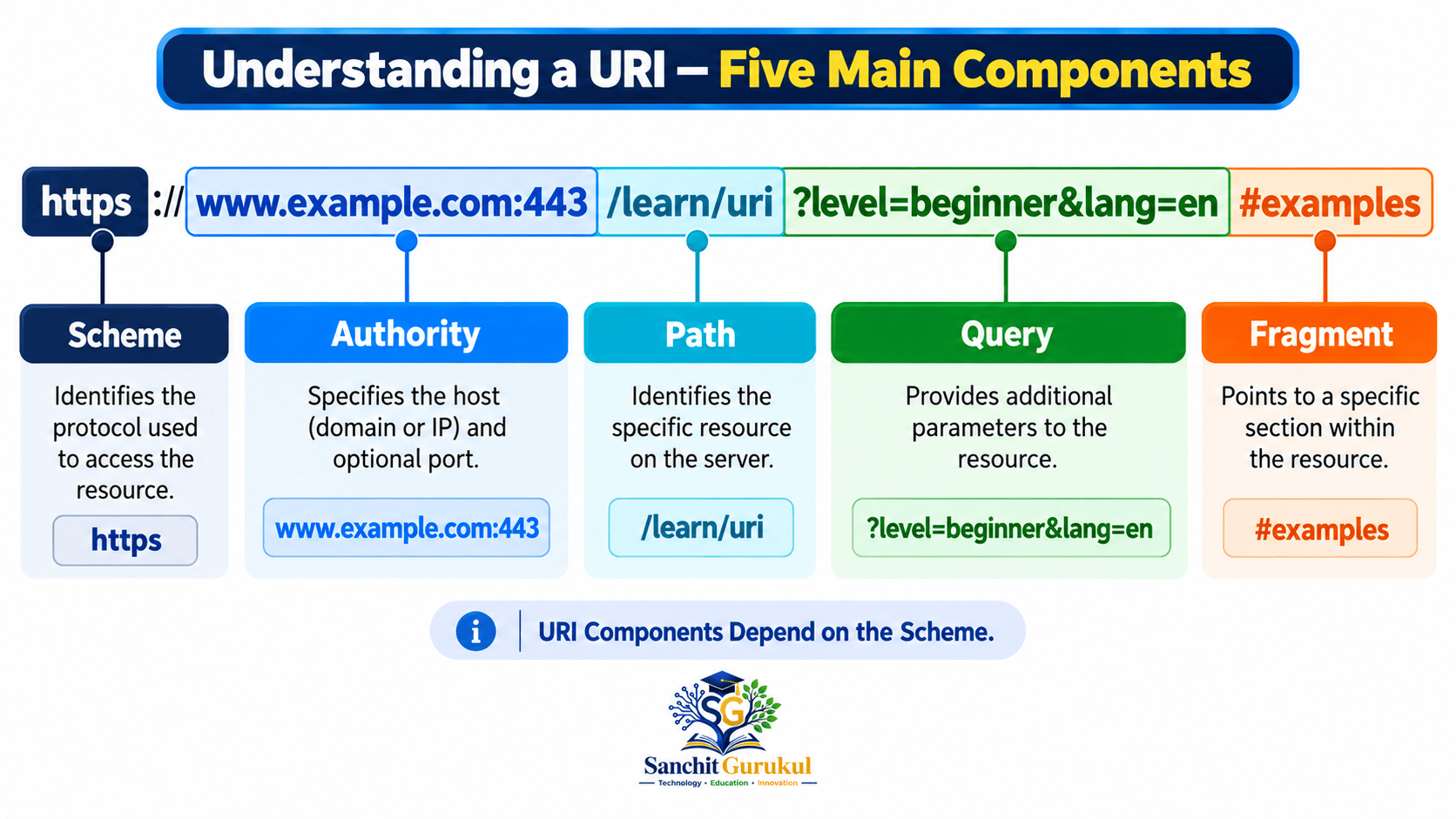
Many web URIs contain five important components.
Let’s examine this example:
https://www.example.com:443/learn/uri?level=beginner&lang=en#examples
This is an illustrative address and does not represent a guaranteed live webpage.
1. Scheme
The scheme appears at the beginning of the URI.
Example: https
It tells an application how to interpret the identifier.
Common schemes include:
https— Secure web communicationhttp— Web communication without HTTPS protectionmailto— Email address handlingfile— File resource identificationurn— Resource identification using a registered naming scheme
A scheme does not always represent a network communication protocol.
For example, mailto and urn have different purposes from https.
2. Authority
The authority is introduced by // when present.
Example: www.example.com:443
In this example:
www.example.comis the hostname.443is the port number.
Port 443 is the standard default port for HTTPS.
Therefore, it normally does not need to be written explicitly in an HTTPS URL.
An authority can also contain optional user information in schemes that support it.
Important: Not every URI has an authority component.
For example, mailto:help@example.com does not use the same authority structure as a normal HTTPS URL.
3. Path
The path identifies a resource within the structure defined by the URI scheme.
Example: /learn/uri
For a website, the path may identify:
- A page
- An application route
- A document
- Another web resource
A web path does not necessarily represent an actual folder or file stored on the server.
4. Query
The query begins with a question mark (?).
Example: ?level=beginner&lang=en
Web applications commonly use queries to provide information such as search terms, filters and selected options.
In this example:
level=beginnerselects a learning level.lang=enidentifies an English-language preference.
The ampersand (&) separates the example parameters.
Although web applications commonly use key=value pairs, this format is not required for every URI query.
5. Fragment
The fragment begins with a hash symbol (#).
Example: #examples
It can identify a particular section or part of a resource.
For example, clicking a link containing #examples may take the browser directly to the Examples section of a webpage.
For normal HTTP and HTTPS requests, the fragment is not sent to the web server.
The browser or another client application interprets it.
URI Components Summary
| Component | Example | Meaning |
|---|---|---|
| Scheme | https |
How the identifier is interpreted |
| Authority | www.example.com:443 |
Host and optional port |
| Path | /learn/uri |
Identifies a resource within the site |
| Query | ?level=beginner&lang=en |
Additional identifying or request information |
| Fragment | #examples |
Specific part of a resource |
URI vs URL vs URN
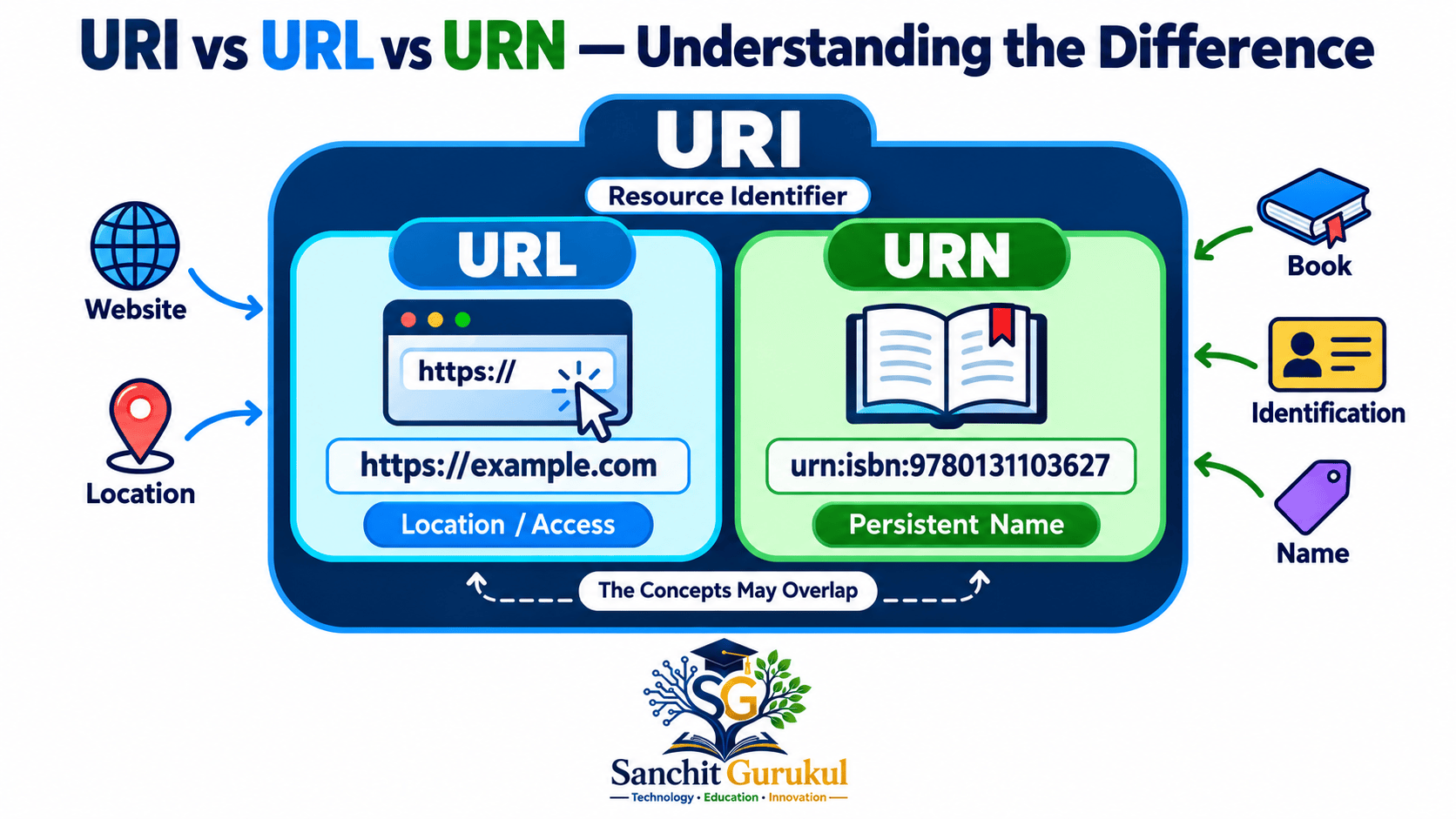
URI, URL and URN are related terms, but they emphasize different concepts.
URI — Uniform Resource Identifier
A URI identifies a resource.
It is the broader concept.
URL — Uniform Resource Locator
A URL identifies a resource by providing information about its location or how it can be accessed.
Example:
https://www.example.com/learn/
This address identifies a resource that can be accessed using HTTPS.
URN — Uniform Resource Name
A URN identifies a resource using a naming scheme intended to remain independent of its current location.
Example:
urn:isbn:9780131103627
This identifies a publication using an ISBN-based name.
The URN itself does not directly specify a website where the book can be downloaded or purchased.
URI, URL and URN Comparison
| Feature | URI | URL | URN |
|---|---|---|---|
| Full Form | Uniform Resource Identifier | Uniform Resource Locator | Uniform Resource Name |
| Main Purpose | Identify a resource | Identify a resource using location/access information | Identify a resource using a persistent name |
| Example | mailto:help@example.com |
https://example.com |
urn:isbn:9780131103627 |
| Direct Resource Location Required | No | Provides location/access information | No |
Important: URL and URN are concepts within the broader URI system. The naming and locating roles are not always completely separate.
Where Are URIs Used?
1. Web Browsing
Web browsers use URLs to identify web resources.
For example:
https://sanchitgurukul.com/tool/
This URL identifies the SanchitGurukul tools page.
2. Hyperlinks
Websites use URI references to connect pages and resources.
For example, clicking a hyperlink can open another webpage or jump to a section on the same page.
3. Web APIs
An API allows software applications to communicate.
A web API can use URLs to identify resources.
For example:
https://api.example.com/students/25
This illustrative URL identifies a student resource in an example API.
4. Email Links
An email link can use the mailto scheme.
For example:
mailto:help@example.com
An email application may use it to prepare a message addressed to the specified recipient.
Practical Example — Read a URI
Key Takeaways
URI Fundamentals
- URI stands for Uniform Resource Identifier.
- A URI identifies a resource.
- A URI does not always specify a physical location.
- URIs are used by websites, applications and other systems.
URI Components
- Scheme: Identifies how the URI should be interpreted.
- Authority: Commonly identifies a host and optional port.
- Path: Identifies a resource within the relevant structure.
- Query: Contains additional identifying or request information.
- Fragment: Identifies a particular part of a resource.
URI, URL and URN
- URI is the broader identification concept.
- URL emphasizes location or access information.
- URN emphasizes persistent resource naming.
- Not every URI is a website URL.
A Uniform Resource Identifier is an important part of internet and application technologies.
It provides a standardized method for identifying web pages, documents, services and many other resources.
Understanding URI components makes it easier to read website addresses, work with APIs and understand how applications identify resources.
Next Article: URL Explained — Structure, Encoding, Query Parameters and Practical Examples.
Useful Links and References
SanchitGurukul Resources
Official External References
Your feedback matters
Was this post helpful?
Discussion
0 approved comments
No approved comments yet. You can start the discussion below.
Leave a Comment
No login is required. Name and email are used for moderation/security. Your email is never displayed publicly. All comments require administrator approval.
Discover more from SanchitGurukul
Subscribe to get the latest posts sent to your email.