
Introduction
In Part 1, we explored how Transport Layer Security (TLS) protects communication through encryption, authentication, data integrity, a cryptographic handshake and forward secrecy.
We also examined protocol versions and TLS cipher suites.
These mechanisms establish the foundation of secure communication.
However, production TLS deployments require additional capabilities.
Modern applications must resume connections efficiently, validate certificates through trusted Certificate Authorities, negotiate application protocols and remain compatible with different operating systems and browsers.
Administrators also need to identify TLS configuration problems, investigate certificate errors and monitor live HTTPS services.
Part 2 focuses on these practical and operational aspects of TLS.
What You Will Learn
- How TLS session resumption works
- What session tickets and Pre-Shared Keys are
- How Certificate Authorities establish trust
- How browsers validate certificate chains
- TLS compatibility and interoperability
- Server Name Indication (SNI)
- Application-Layer Protocol Negotiation (ALPN)
- Encrypted ClientHello (ECH)
- TLS 1.3 0-RTT early data
- How to test a live TLS connection using OpenSSL
- How to inspect a Server Certificate
- Common TLS errors and troubleshooting
- Best practices for secure TLS deployment
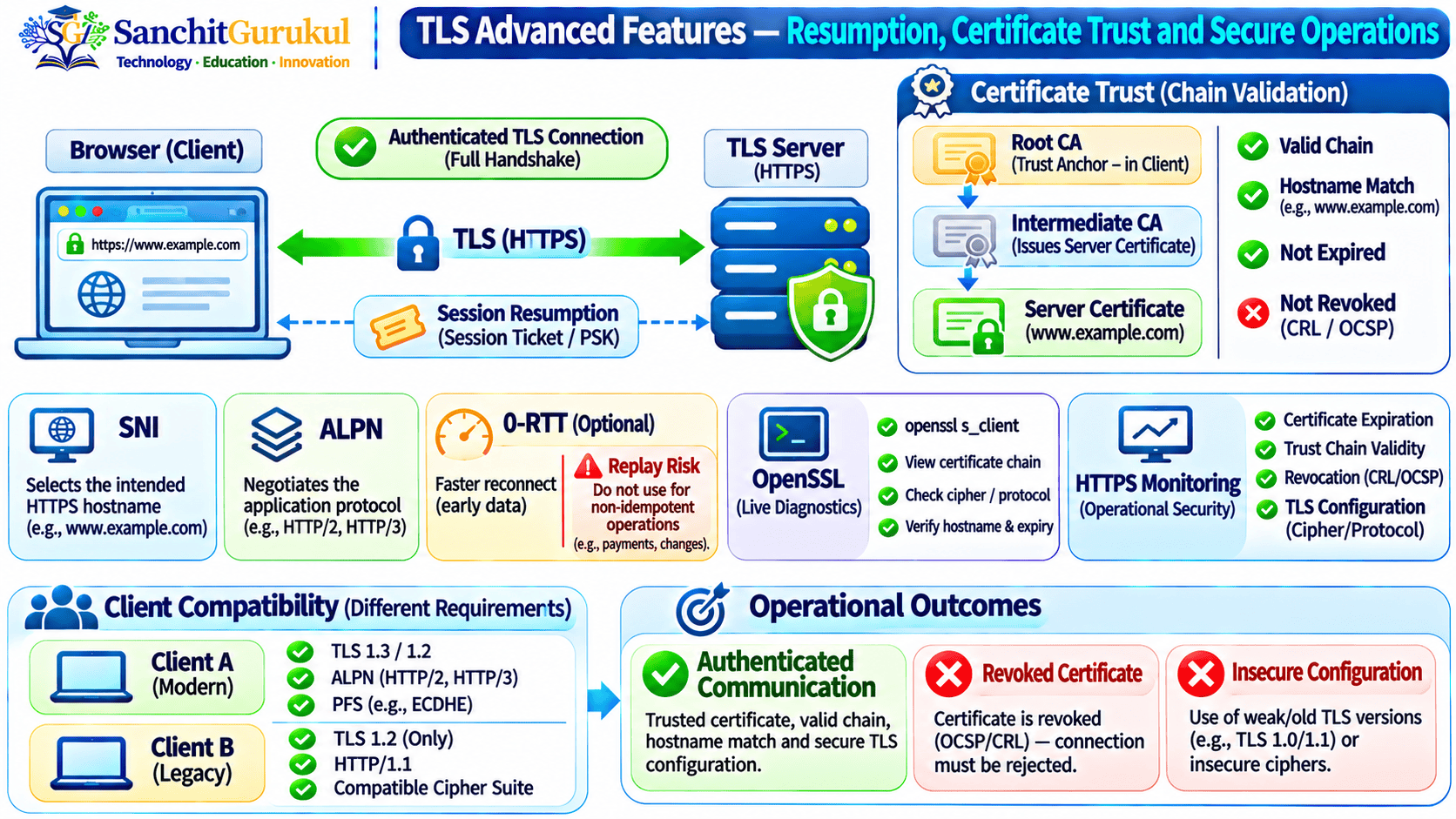
Prerequisites: Key Aspects of TLS — Part 1, HTTPS, TLS Handshake and Certificate Fundamentals
Series: Key Aspects of TLS — Part 2 of 2
1. Key Aspect 8 — Session Resumption and Session Tickets
TLS Session Resumption allows two endpoints to establish another protected connection using suitable cryptographic context from a previous connection.
Why Is Resumption Useful?
A full TLS handshake involves protocol negotiation, key establishment and authentication.
Resumption can reduce repeated processing and connection-establishment overhead.
TLS 1.3 Resumption
TLS 1.3 supports resumption using Pre-Shared Keys (PSKs).
After an authenticated connection, a server may issue a NewSessionTicket.
The client can retain the appropriate resumption information for subsequent connections.
Simplified Workflow
- The client completes an authenticated TLS connection.
- The server issues suitable resumption information.
- The client stores the relevant state.
- The client starts a later connection.
- The client offers a resumption PSK identity.
- The server decides whether to accept resumption.
- Both parties establish traffic keys for the new connection.
Does a Session Ticket Contain the Plaintext Session Key?
Not necessarily.
Ticket contents and server-side storage depend on the implementation.
A stateless design may use encrypted and authenticated tickets protected by server-held ticket keys. Other deployments may use stateful resumption storage.
Security Considerations
- Protect resumption PSKs.
- Protect ticket-encryption keys.
- Restrict ticket lifetimes.
- Rotate secrets according to policy.
- Review ticket-key sharing across server clusters.
- Prefer resumption modes with appropriate forward-secrecy properties.
2. Key Aspect 9 — Certificate Authorities and TLS Trust
A Certificate Authority (CA) issues and signs certificates under an established policy.
For typical public HTTPS, certificate authentication involves a chain of trust.
Certificate Hierarchy
TLS Certificate Hierarchy — Three Levels
Level 1 — Trusted Root CA
Provides an accepted trust anchor under the client's certificate trust policy.
Level 2 — Intermediate Issuing CA
Certifies the relevant Server Certificate under the issuing hierarchy's authority and constraints.
Level 3 — TLS Server Certificate
Associates a public key with the server identity, such as www.example.com.
Validation Result: The client constructs and validates an appropriate certification path to an accepted trust anchor.
Root CA
Provides an accepted trust anchor under the client’s certificate policy.
Intermediate CA
A subordinate CA certified by another authority.
Server Certificate
Contains the certified public key and the relevant server identity.
How Does a Browser Validate the Certificate?
Typical checks include:
- Build a suitable certification path.
- Verify certificate signatures.
- Check acceptance of the Root CA trust anchor.
- Check certificate validity dates.
- Match the requested DNS hostname against SAN.
- Evaluate Key Usage and Extended Key Usage.
- Apply relevant cryptographic and trust policies.
- Perform applicable certificate-status checks.
Does Every TLS Connection Need a Public CA?
No.
TLS can use publicly trusted certificates, private enterprise PKI, application-specific trust anchors or supported PSK authentication.
Certificate Revocation
Certificate status mechanisms may include:
- Certificate Revocation Lists (CRLs)
- Online Certificate Status Protocol (OCSP)
- Other platform-specific status information
Actual revocation checking differs between clients and security policies.
Important Limitation
A valid certificate helps authenticate the intended domain identity.
It does not guarantee that the website’s content or operator is honest.
3. Key Aspect 10 — Compatibility and Interoperability
TLS is widely used across many platforms and services.
Common Applications
- HTTPS websites
- APIs
- Email protocols using TLS
- Directory services
- Database connections
- Enterprise applications
- Microservices
- Secure remote-access systems where applicable
What Affects Compatibility?
| Component | Compatibility Requirement |
|---|---|
| TLS Version | Client and server support a suitable common version |
| Cipher Suite | Supported algorithms are compatible |
| Key Agreement | Compatible cryptographic groups |
| Signature Algorithm | Compatible authentication signatures |
| Certificate Type | Client understands the certified key algorithm |
| Root Store | Relevant trust anchor is accepted |
| Certificate Path | Suitable issuer certificates are available |
| Application Policy | The connection is permitted by security configuration |
Example
A modern browser supports TLS 1.3.
An older enterprise application supports securely configured TLS 1.2.
A server may support both, without enabling SSL 3.0 or deprecated TLS versions.
What If a Client Supports Only TLS 1.0?
The recommended approach is to upgrade, replace or appropriately isolate the legacy client.
Weakening a public TLS service for every user should not be the default solution.
4. Server Name Indication (SNI)
Server Name Indication (SNI) is a TLS extension that allows clients to indicate the intended server hostname during negotiation.
Example
A reverse proxy hosts three applications:
shop.example.com
api.example.com
portal.example.com
All three share a public IP address.
The client sends the intended hostname through SNI.
The server uses that information to select an appropriate TLS configuration and certificate.
What Happens if SNI Is Wrong?
The server may present the certificate associated with another website.
The browser may then report a hostname mismatch.
Important Security Point
Traditional SNI may reveal the requested hostname to network observers.
It is not, by itself, a privacy mechanism.
5. Application-Layer Protocol Negotiation (ALPN)
Application-Layer Protocol Negotiation (ALPN) is a TLS extension used to negotiate which application protocol will operate over the connection.
Example
A client and web server may use ALPN to agree on:
- HTTP/1.1
- HTTP/2
SNI vs ALPN
| Extension | Purpose |
|---|---|
| SNI | Indicates the intended server hostname |
| ALPN | Negotiates the application protocol |
Why Is ALPN Useful?
One secure endpoint can support multiple application protocols while allowing the client and server to select a mutually supported option.
Important Distinction
SNI and ALPN are different TLS extensions.
A correct SNI hostname does not guarantee that the intended application protocol will be negotiated.
6. What Is Encrypted ClientHello (ECH)?
Encrypted ClientHello (ECH) is designed to protect selected sensitive information in a TLS ClientHello.
This can include the inner server hostname when ECH is supported and correctly deployed.
Why Is It Useful?
Traditional SNI can expose the requested hostname to network observers.
ECH aims to reduce this exposure.
What Does ECH Not Hide?
ECH does not automatically conceal:
- Destination IP addresses
- All traffic timing
- All packet sizes
- Every DNS observation
- All other network metadata
Important Principle
TLS protects application communication, but it does not inherently provide complete anonymity or prevent every form of traffic analysis.
7. TLS 1.3 0-RTT Early Data
TLS 1.3 supports optional 0-RTT Early Data.
A client with suitable resumption information may send application data before completing the ordinary handshake.
Why Use 0-RTT?
It can reduce latency for selected repeat connections.
Simplified Process
- The client previously completed an authenticated connection.
- It retains suitable resumption PSK information.
- It starts another connection.
- It offers early application data.
- The server decides whether to accept that data.
- The handshake continues.
What Is the Security Risk?
0-RTT has weaker security properties than ordinary post-handshake application data.
Specifically:
- Early data is not forward secret.
- It does not provide full protection against replay across connections.
- Certain application operations may be unsafe if repeated.
Example
A carefully designed read-only request may be more suitable for 0-RTT than operations that:
- Transfer money
- Create purchases
- Change permissions
- Delete records
- Perform irreversible actions
Even read-only endpoints require suitable review.
Best Practice
Enable 0-RTT only when the relevant application protocol and server design provide appropriate replay-risk controls.

8. Practical Lab 1 — Inspect a Live TLS 1.3 Connection
This read-only lab demonstrates TLS negotiation and certificate verification.
Requirements
- OpenSSL installed
- Network access to an authorized HTTPS endpoint
- Suitable trusted CA configuration
Step 1 — Check OpenSSL
openssl versionStep 2 — Test TLS 1.3
openssl s_client
    -connect example.com:443
    -servername example.com
    -tls1_3
    -verify_hostname example.com
    -verify_return_error
    -brief < /dev/null
Command Explanation
| Option | Purpose |
|---|---|
-connect |
Selects the target server and port |
-servername |
Sends SNI |
-tls1_3 |
Restricts negotiation to TLS 1.3 |
-verify_hostname |
Checks the server’s expected DNS identity |
-verify_return_error |
Fails on certificate-verification errors |
-brief |
Displays abbreviated connection information |
Illustrative Output
Protocol version: TLSv1.3
Ciphersuite: TLS_AES_256_GCM_SHA384
Peer certificate: ...
Verification: OK
Actual output depends on the server and client.
Step 3 — Inspect the Presented Certificate Chain
openssl s_client
    -connect example.com:443
    -servername example.com
    -verify_hostname example.com
    -verify_return_error
    -showcerts < /dev/null
Step 4 — Test with curl
curl -Iv https://example.com/What Should You Check?
- Negotiated TLS version
- Cipher suite
- Certificate identity
- Certificate verification result
- Intermediate CA Certificates
- Handshake errors
Important Limitation
-showcerts displays the certificates transmitted by the server.
It does not guarantee that every client will construct exactly that same certification path.
9. Practical Lab 2 — Inspect and Verify an X.509 Certificate
A TLS connection can fail because of certificate errors even when the negotiated TLS version and cipher suite are secure.
Assume an authorized PEM certificate is available as:
server.pem
Step 1 — Inspect Identity and Issuer
openssl x509
    -in server.pem
    -noout -subject -issuer -serial
Step 2 — Inspect Validity
openssl x509
    -in server.pem
    -noout -dates
Step 3 — Inspect Subject Alternative Name
openssl x509
    -in server.pem
    -noout -ext subjectAltName
Step 4 — Inspect Extended Key Usage
openssl x509
    -in server.pem
    -noout -ext extendedKeyUsage
Step 5 — Calculate the Public-Key Fingerprint
openssl x509
    -in server.pem
    -pubkey -noout |
    openssl pkey -pubin -outform DER |
    openssl dgst -sha256
Step 6 — Verify an Authorized Private PKI Chain
openssl verify
    -CAfile root-ca.pem
    -untrusted intermediate.pem
    -purpose sslserver
    -verify_hostname portal.corp.example
    -show_chain
    server.pem
Illustrative Success
server.pem: OKWhat Does This Result Mean?
The certificate validates under the explicitly supplied trust configuration and selected checks.
It does not independently prove that:
- Every browser trusts the Root CA.
- The private key is uncompromised.
- The live application presents this certificate.
- Revocation status was checked.
- The application itself is secure.
10. Common TLS Errors and Troubleshooting
| Problem | Possible Cause | Recommended Check |
|---|---|---|
| TLS handshake failure | Incompatible parameters | Compare client and server configuration |
| Protocol version alert | Unsupported TLS version | Verify secure TLS 1.2/1.3 support |
| No shared cipher | Cipher suite mismatch | Inspect supported algorithms |
| Certificate verification failed | Trust-chain problem | Inspect issuers and trusted roots |
| Hostname mismatch | Incorrect SAN or SNI | Check hostname and certificate |
| Certificate expired | Validity ended | Renew or replace |
| Certificate revoked | Certificate-status policy rejects it | Replace and investigate |
| Works on one client only | Different TLS libraries or trust stores | Compare client environments |
| Client certificate required | Server expects mTLS | Review client authentication |
| Wrong certificate presented | Binding, SNI or load-balancer issue | Inspect actual TLS termination |
| Resumption fails | Ticket or PSK state unavailable | Review resumption configuration |
| 0-RTT rejected | Early data not accepted | Use an ordinary handshake |
Recommended Troubleshooting Workflow
- Identify the affected client and server.
- Record the exact error.
- Check supported TLS versions.
- Check cipher suite and key agreement compatibility.
- Inspect the presented certificate.
- Verify SAN, validity and trust chain.
- Check applicable revocation policy.
- Determine whether mTLS is required.
- Identify proxies and TLS termination devices.
- Test with OpenSSL or another suitable diagnostic utility.
- Correct the underlying problem.
- Verify from the affected client’s environment.
Example — TLS 1.3 Fails but TLS 1.2 Works
Possible causes include an unsupported version, incompatible parameters or TLS library configuration.
Correct Response: Investigate negotiation rather than assuming the certificate itself is invalid.
Example — Certificate Verification Fails
The negotiated TLS version may be acceptable while the client cannot build a trusted certificate path.
Correct Response: Troubleshoot certificate trust separately from protocol negotiation.
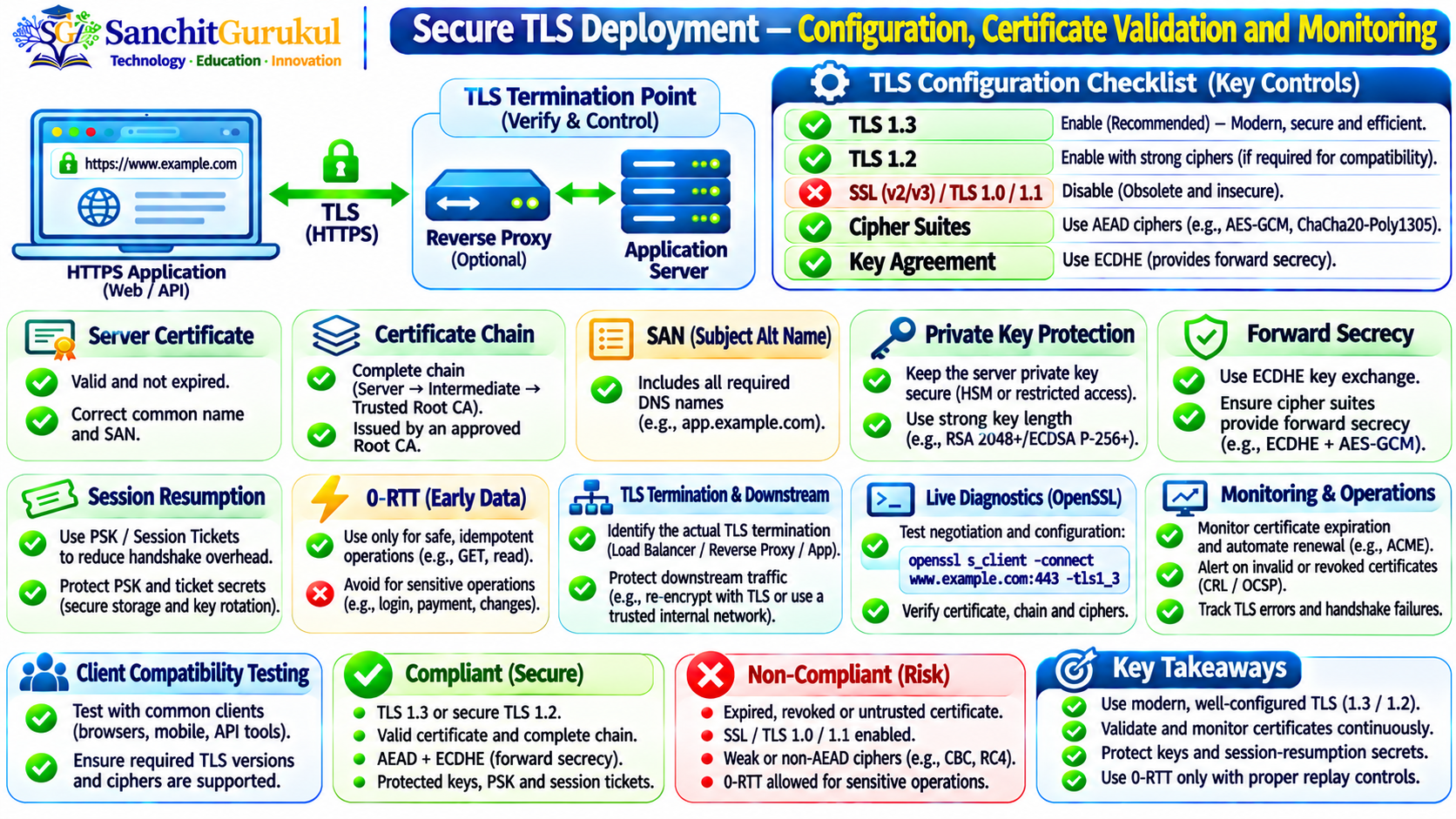
11. TLS Security Best Practices
Prefer TLS 1.3
Use TLS 1.3 where supported, with secure TLS 1.2 where needed.
Disable Deprecated Protocols
Avoid SSL 2.0, SSL 3.0, TLS 1.0 and TLS 1.1.
Use Secure Cryptography
Prefer authenticated encryption and appropriate key agreement.
Validate Certificates
Check SAN, issuer chain, trust anchor, validity and applicable policies.
Protect Private Keys
Restrict key access and maintain secure rotation procedures.
Preserve Appropriate Forward Secrecy
Use suitable ephemeral key agreement and resumption configurations.
Protect Session Tickets and PSKs
Apply reasonable lifetimes, secret rotation and access control.
Control 0-RTT
Enable early data only where the application safely handles replay risks.
Identify TLS Termination Points
Review load balancers, reverse proxies and gateways that decrypt traffic.
Monitor Live Certificates
Track expiration and the exact certificate served by production endpoints.
Test Client Compatibility
Include supported browsers, operating systems, TLS libraries and applications.
Maintain Current Software
Apply relevant security updates to TLS libraries and web servers.
Monitor Errors
Investigate handshake failures, certificate errors and unexpected negotiation.
Secure Applications
Remember that TLS does not replace access control, secure coding or endpoint protection.
12. Frequently Asked Questions
Q1. What are the three main security properties of TLS?
Confidentiality, authentication and integrity.
Their precise guarantees depend on correct protocol negotiation, authentication and implementation.
Q2. Does TLS encrypt all internet traffic?
No. TLS protects connections that use the protocol or a suitable TLS-based design.
Q3. Does TLS always need an SSL Certificate?
No. TLS supports certificate authentication and suitable PSK authentication mechanisms.
Q4. What is the difference between TLS 1.2 and TLS 1.3?
TLS 1.3 modernizes key establishment, encryption and negotiation while removing many obsolete cryptographic options.
Q5. Does TLS 1.3 always provide forward secrecy?
No. Ordinary full certificate-authenticated ephemeral handshakes provide forward-secret properties, but PSK-only and 0-RTT modes have important limitations.
Q6. Is AES-256 always more secure than AES-128?
The full cryptographic configuration matters. Both AES-128-GCM and AES-256-GCM can provide strong protection when correctly used.
Q7. What is the difference between a cipher suite and a certificate?
A cipher suite specifies negotiated cryptographic algorithms. A certificate binds a public key to an identity.
Q8. Why are TLS session tickets used?
They help clients establish resumed TLS connections with less repeated handshake overhead.
Q9. Does a valid HTTPS certificate prove a website is trustworthy?
No. It supports endpoint authentication, not the honesty of the website operator.
Q10. Does TLS protect stored passwords and database records?
Not by itself. TLS protects supported data in transit; stored data requires separate security controls.
13. Key Takeaways
TLS Operations
- Session resumption can reduce repeated handshake overhead.
- TLS 1.3 uses PSKs for supported resumption.
- Session tickets and PSKs require secure key management.
- Certificate Authorities support certificate-based authentication.
- Public and private PKI use different trust-distribution models.
- Compatibility depends on cryptographic capabilities and trust configuration.
- SNI helps identify the intended hostname.
- ALPN negotiates the application protocol.
- ECH aims to protect selected ClientHello information.
- 0-RTT can reduce latency but introduces replay concerns.
- OpenSSL supports practical TLS and certificate inspection.
Security Considerations
- Resumption credentials can become sensitive security assets.
- Certificate trust does not establish the honesty of a website.
- A valid signature alone does not establish correct hostname identity.
- TLS does not conceal all network metadata.
- 0-RTT early data is not forward secret.
- Clients can differ in certificate-chain construction and trust.
- A strong TLS version does not compensate for insecure applications.
- Production endpoints require monitoring and regular verification.
SG Quick Revision — TLS Part 2
TLS Session Resumption: Establishes a new connection using suitable prior cryptographic context.
PSK: Pre-Shared Key.
Session Ticket: Information supporting a resumed connection.
Root CA: Accepted certificate trust anchor.
Intermediate CA: Subordinate CA in a certification hierarchy.
SAN: Subject Alternative Name.
mTLS: Mutual TLS authentication.
SNI: Server Name Indication.
ALPN: Application-Layer Protocol Negotiation.
ECH: Encrypted ClientHello.
0-RTT: Optional early application data with replay and forward-secrecy limitations.
CRL: Certificate Revocation List.
OCSP: Online Certificate Status Protocol.
OpenSSL s_client: Tests a live TLS connection.
OpenSSL x509: Inspects X.509 certificates.
OpenSSL verify: Verifies certification paths.
-servername: Supplies the SNI hostname.
-verify_hostname: Checks the expected server hostname.
-verify_return_error: Fails on certificate verification errors.
Main Concept: Trusted Identity + Secure TLS Negotiation + Protected Session Resumption + Correct Application Behavior + Continuous Monitoring = Reliable TLS Operations.
Conclusion
TLS security extends beyond the initial encryption handshake.
Session resumption helps reduce connection overhead, while Certificate Authorities and trust anchors support common certificate-based authentication models.
Compatibility mechanisms allow different systems to negotiate mutually supported secure communication.
SNI helps select the correct HTTPS hostname, and ALPN supports application protocol negotiation.
ECH is designed to protect selected handshake information, while optional 0-RTT early data introduces additional replay-related security considerations.
Administrators must understand these features alongside certificate-chain validation, private-key protection and protocol configuration.
Practical verification using OpenSSL helps identify unsupported versions, cipher suite problems, certificate errors and incorrect TLS termination.
Combined with Part 1, this article provides a structured understanding of TLS cryptography, authentication, protocol operation and secure deployment.
Series Complete: Key Aspects of TLS — Parts 1 and 2.
Recommended Further Reading
- SSL/TLS Certificates Explained
- Certificate Chain Validation
- SSL/TLS Certificate Troubleshooting
- Certificate Revocation Explained
- Certificate Lifecycle Management
- ACME and Let’s Encrypt
- Private PKI Architecture and Labs
Useful Links and References
SanchitGurukul Resources
Official Standards and Documentation
Your feedback matters
Was this post helpful?
Discussion
0 approved comments
No approved comments yet. You can start the discussion below.
Leave a Comment
No login is required. Name and email are used for moderation/security. Your email is never displayed publicly. All comments require administrator approval.
Discover more from SanchitGurukul
Subscribe to get the latest posts sent to your email.

