
Imagine two employees, Alice and Bob, working in different offices.
Alice wants to call Bob using an office IP phone.
She enters Bob’s extension number and presses the call button.
Within seconds, Bob’s phone starts ringing.
When Bob answers, both employees can speak to each other over the company’s IP network.
But how does Alice’s phone find Bob’s phone?
How does Bob’s phone know someone is calling?
What happens when Bob answers or Alice ends the call?
One important protocol responsible for managing these operations is Session Initiation Protocol (SIP).
SIP is widely used in Voice over IP (VoIP) telephone systems, IP PBX platforms, SIP trunks and other real-time communication services.
It helps devices establish, modify and terminate communication sessions over IP networks.
However, SIP normally does not carry the actual voice or video data.
Other protocols, such as the Real-time Transport Protocol (RTP), are commonly used to transport media.
In this article, you will learn:
- What SIP is and why it is used
- How SIP works in VoIP communication
- Important SIP network components
- How SIP registration works
- Common SIP request and response messages
- How a SIP phone call is established and terminated
- Differences between SIP, SDP, RTP and SRTP
- SIP ports and transport protocols
- Common SIP security risks and protections
- Basic SIP troubleshooting concepts

What Is SIP and How Does It Work?
SIP stands for Session Initiation Protocol.
It is an application-layer signaling protocol used to establish, modify and terminate communication sessions between devices over IP networks.
SIP is defined primarily in IETF RFC 3261, together with later updates and extensions.
A communication session may involve:
- Voice calls
- Video calls
- Multimedia conferences
- Real-time communication applications
- Other supported communication services
A session is simply a period during which two or more devices communicate using agreed parameters.
Why Is SIP Needed?
Before two IP phones can communicate, several things may need to happen.
For example:
- The caller must identify the intended recipient.
- The network must determine where the recipient can be reached.
- The recipient must be notified about the incoming call.
- The endpoints need compatible media settings.
- The call must be accepted or rejected.
- Both sides need a way to end or modify the session.
SIP provides standardized signaling messages to support these operations.
SIP Works Using Requests and Responses
SIP uses a request-response communication model.
This is conceptually similar to HTTP.
A device sends a SIP request.
Another device or server sends a response.
For example, Alice’s phone may send an INVITE request to initiate a call.
Bob’s phone may respond with 180 Ringing while the phone alerts Bob.
When Bob answers, the phone may respond with 200 OK.
Alice’s phone then sends an ACK.
These messages allow the endpoints to establish the call.
SIP Is Not the Same as VoIP
VoIP stands for Voice over Internet Protocol.
VoIP describes technologies that carry voice communication over IP networks.
SIP is one signaling protocol commonly used in VoIP systems.
| Term | Meaning | Purpose |
|---|---|---|
| VoIP | Voice over Internet Protocol | Voice communication over IP networks |
| SIP | Session Initiation Protocol | Call signaling and session management |
| SDP | Session Description Protocol | Describes media settings |
| RTP | Real-time Transport Protocol | Transports voice or video media |
| SRTP | Secure Real-time Transport Protocol | Provides security for RTP media |
| IP PBX | IP Private Branch Exchange | Manages organizational telephone services |
Not all VoIP systems use SIP.
Similarly, SIP is not limited to voice communication.
SIP Architecture — IP Phones, Proxy, Registrar, PBX and Gateway
A SIP environment may contain multiple devices and servers.
For beginners, it is easiest to understand these components by looking at a typical office telephone system.
1. SIP User Agent
A User Agent (UA) is a SIP-capable device or application.
Examples include:
- IP desk phone
- Computer softphone
- Smartphone SIP application
- Conference phone
- SIP-enabled communication system
A User Agent can send and receive SIP messages.
It can perform two logical roles.
User Agent Client (UAC)
The role that creates a SIP request.
User Agent Server (UAS)
The role that receives a SIP request and generates a response.
A single SIP phone can perform both roles during different transactions.
For example, Alice’s phone acts as a UAC when sending an INVITE.
Bob’s phone acts as a UAS when responding to that INVITE.
2. SIP Proxy Server
A SIP proxy server receives and forwards SIP requests toward the intended destination.
For example, Alice’s phone may send a call request to its configured SIP proxy.
The proxy helps route the request toward Bob’s phone.
A proxy can also participate in routing policies, authentication-related functions and other supported signaling operations.
It does not necessarily carry the voice media.
3. SIP Registrar Server
A registrar receives SIP REGISTER requests.
It processes registration information so the SIP service can maintain reachable contact information for users.
For example, a user may have the SIP address:
sip:alice@example.com
The registrar can associate that address with the user’s registered contact information.
The actual contact information can include more than a simple IP address.
4. SIP Location Service
A location service stores or provides information used to locate reachable SIP contacts.
A proxy may consult this information to determine where to forward a call.
Registration information often contributes to the location service.
The registrar and proxy functions may exist on the same physical or virtual server.
5. SIP Redirect Server
A redirect server responds to a request with information about another destination.
Instead of forwarding the call itself, it tells the requester where another attempt may be made.
6. IP PBX
An IP PBX is a telephone system that manages organizational calling features over IP networks.
Common features may include:
- Extension numbers
- Internal calling
- Call forwarding
- Call transfer
- Voicemail
- Call queues
- Auto-attendant menus
An IP PBX may contain SIP proxy, registration and call-control functionality.
7. SIP Gateway
A SIP gateway connects SIP-based communication with another telephone or communication system.
For example, a gateway may connect an IP PBX to a traditional telephone network.
A gateway can perform signaling conversion and media conversion when required.
8. Session Border Controller (SBC)
A Session Border Controller is commonly deployed at the boundary between different VoIP networks.
Depending on its configuration, an SBC may help with:
- SIP signaling control
- Network Address Translation (NAT)
- Security policy enforcement
- Interoperability between providers
- Media anchoring or relaying
- Call routing
An SBC is especially useful in enterprise SIP trunking and provider interconnection environments.
SIP Components Comparison
| Component | Main Function |
|---|---|
| User Agent | Sends or receives SIP messages |
| SIP Proxy | Routes SIP requests |
| Registrar | Processes SIP registrations |
| Location Service | Helps locate registered contacts |
| Redirect Server | Provides alternative destination information |
| IP PBX | Manages telephone system functions |
| SIP Gateway | Connects different telephone networks |
| SBC | Controls signaling and sometimes media at network boundaries |

SIP Messages and Call Flow — INVITE, Ringing, OK, ACK and BYE
SIP uses standardized request methods and response status codes.
These messages control the establishment and management of communication sessions.
Important SIP Request Methods
| SIP Method | Purpose |
|---|---|
| INVITE | Initiates a session or modifies one through a new INVITE |
| ACK | Acknowledges a final response to INVITE |
| BYE | Terminates an established session |
| CANCEL | Attempts to cancel a pending request |
| REGISTER | Registers contact information |
| OPTIONS | Queries supported capabilities |
| UPDATE | Updates session parameters under supported conditions |
| REFER | Requests that another party initiate a SIP request, often used for transfers |
The first six methods are particularly important for beginners.
Important SIP Response Codes
SIP responses use three-digit status codes.
| Response | Meaning |
|---|---|
| 100 Trying | Request received and being processed |
| 180 Ringing | Called endpoint is alerting the user |
| 183 Session Progress | Additional session progress information |
| 200 OK | Request succeeded |
| 401 Unauthorized | Authentication challenge in an applicable flow |
| 403 Forbidden | Request refused |
| 404 Not Found | Requested user or resource not found |
| 407 Proxy Authentication Required | Proxy authentication challenge |
| 408 Request Timeout | Request did not complete within the expected period |
| 480 Temporarily Unavailable | Called party temporarily unavailable |
| 486 Busy Here | Called endpoint reports busy |
| 487 Request Terminated | Request terminated, often after cancellation |
| 488 Not Acceptable Here | Requested session parameters not acceptable |
| 503 Service Unavailable | Server temporarily unable to handle request |
A 401 Unauthorized response is not always a permanent login failure.
In SIP authentication, a server may use it to challenge the client, which then retries with appropriate credentials.
How a SIP Voice Call Works
Consider a call between Alice and Bob.
Alice’s SIP address is:
sip:alice@example.com
Bob’s SIP address is:
sip:bob@example.com
For simplicity, assume both endpoints can be reached through a SIP service and that the required media negotiation succeeds.
Step 1 — Alice Starts the Call
Alice dials Bob’s number.
Her phone sends a SIP INVITE request.
The request identifies the intended recipient and commonly includes information describing the proposed media session.
Step 2 — The Network Processes the Request
The SIP proxy receives the INVITE.
It forwards the request toward Bob’s device.
The network may return:
100 Trying
This indicates that the request is being processed.
It does not mean Bob has answered.
Step 3 — Bob’s Phone Rings
Bob’s device receives the INVITE.
If it begins alerting Bob, it may return:
180 Ringing
Alice’s phone can use this information to provide an appropriate ringing indication.
Step 4 — Bob Answers
Bob accepts the call.
His phone returns:
200 OK
For a typical SDP offer in the INVITE, the successful response includes the corresponding media answer.
Step 5 — Alice Sends ACK
Alice’s phone sends:
ACK
This acknowledges the successful final response to the INVITE.
At this point, the signaling exchange has established the session and media can proceed according to the negotiated information.
Step 6 — Voice Communication Begins
Voice is commonly transported using RTP or SRTP.
The media packets may travel directly between the phones.
Alternatively, the network may use a media relay, gateway or SBC.
Step 7 — The Call Ends
When Alice hangs up, her phone sends:
BYE
Bob’s phone responds:
200 OK
The established SIP session is terminated.
Simplified SIP Call Flow

What Happens When a Call Is Cancelled?
Suppose Alice calls Bob but hangs up before Bob answers.
Alice’s phone can send a CANCEL request while the INVITE is still pending.
A typical successful cancellation may involve:
- CANCEL request
- 200 OK response to CANCEL
- 487 Request Terminated response to the original INVITE
- ACK acknowledging the final INVITE response
CANCEL is different from BYE.
CANCEL attempts to stop a pending request.
BYE terminates an established SIP session.
If an INVITE has already received a successful final response, CANCEL does not terminate the resulting established session.
SIP Registration, SDP, RTP and Network Ports Explained
SIP works with other protocols and supporting services.
Understanding their different responsibilities helps avoid confusion.
How SIP Registration Works
Registration allows a SIP service to learn how to reach a user.
For example, Alice may use a softphone on her laptop.
Her SIP address could be:
sip:alice@example.com
The softphone can send a REGISTER request containing its current contact information.
The registrar processes the request and maintains the registration according to the applicable policy and expiration time.
A simplified successful registration may involve:
- The softphone sends REGISTER.
- The registrar may challenge the request for authentication.
- The softphone retries with suitable authentication information.
- The registrar accepts the registration.
- The registrar returns 200 OK.
The registration can later expire or be refreshed.
Important: SIP registration is not mandatory for every SIP call.
Some devices use direct addressing, static routing or other arrangements without registration.
What Is SDP?
SDP stands for Session Description Protocol.
SDP is a format used to describe multimedia sessions.
It is defined in RFC 8866.
SDP can describe information such as:
- Media type
- Media address
- Media port
- Transport protocol
- Supported media formats
SIP commonly carries SDP in its message body.
SDP itself does not transport audio or video.
What Is RTP?
RTP stands for Real-time Transport Protocol.
It is commonly used to carry voice and video packets in real-time communication systems.
For example, after Alice and Bob establish a SIP voice call, RTP may transport the encoded audio between their devices.
RTP provides media transport information such as sequence numbers and timestamps.
It does not by itself guarantee reliable delivery or encryption.
What Is SRTP?
Secure Real-time Transport Protocol (SRTP) provides security services for RTP media.
Depending on the negotiated security configuration, these services include confidentiality and integrity protection.
SRTP requires appropriate key management and endpoint configuration.
Enabling SIP over TLS does not automatically enable SRTP.
SIP vs SDP vs RTP vs SRTP
| Protocol | Main Responsibility |
|---|---|
| SIP | Establishes, controls and terminates sessions |
| SDP | Describes proposed or agreed media settings |
| RTP | Transports real-time media |
| SRTP | Protects real-time media using cryptographic security |
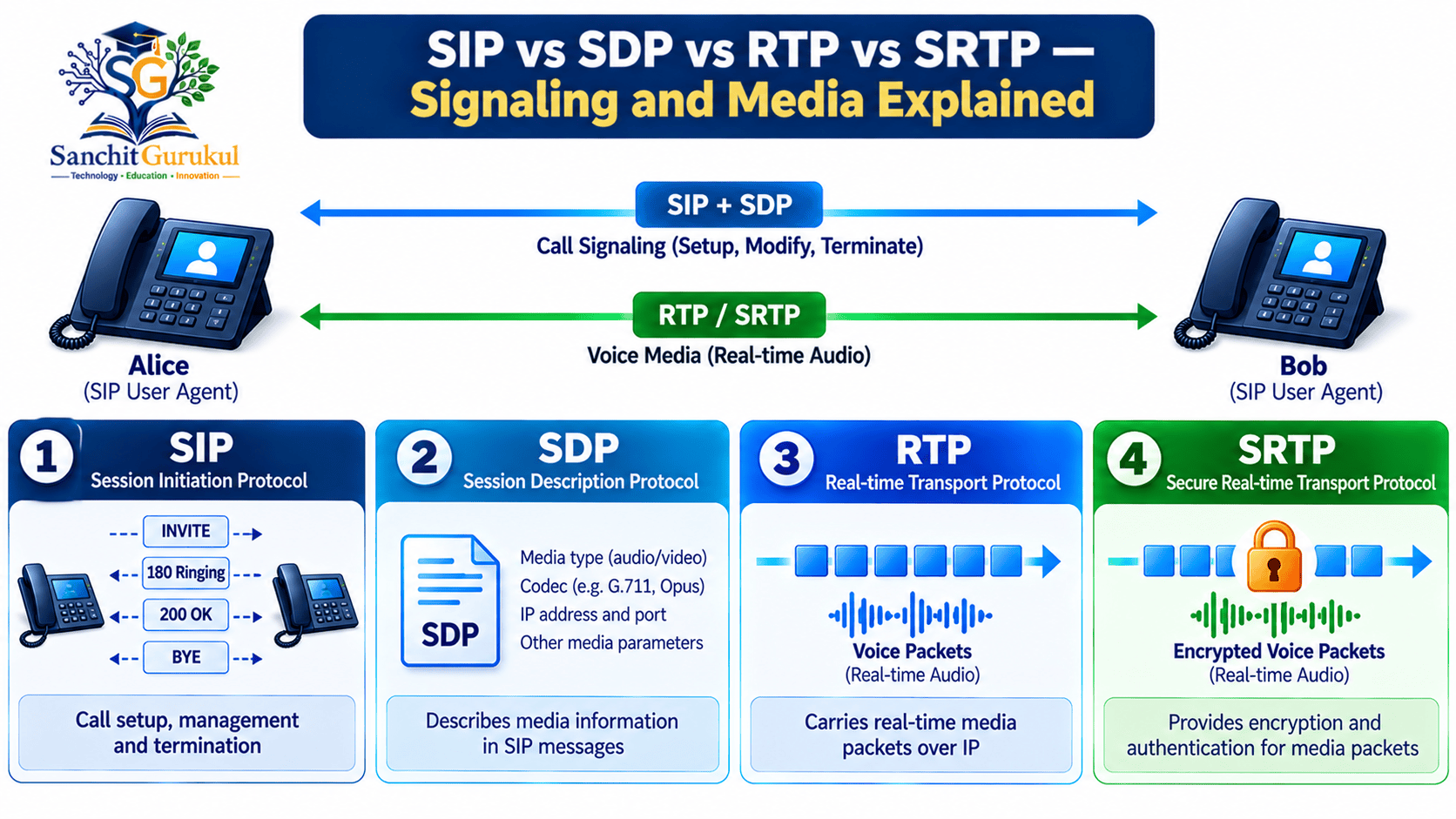
SIP Ports and Transport Protocols
SIP can operate over different supported transport mechanisms.
Common SIP deployments use the following ports:
| Port | Transport | Common Use |
|---|---|---|
| 5060 | UDP | Conventional SIP signaling |
| 5060 | TCP | Conventional SIP signaling |
| 5061 | TCP with TLS | SIP signaling protected using TLS |
| Configurable | WebSocket / Secure WebSocket | SIP transport for supported web-based clients |
| Configurable | UDP | RTP or SRTP media |
These are common conventions and assignments, not universal requirements for every deployment.
SIP signaling can use other configured ports.
RTP and SRTP normally use media ports negotiated or configured for the deployment.
It is incorrect to assume that RTP always uses one fixed port.
SIP over WebSocket is defined in RFC 7118.
Does SIP Use TCP or UDP?
SIP supports multiple transport protocols.
UDP
Common in traditional SIP deployments.
It is connectionless and has no built-in reliable delivery mechanism.
SIP includes signaling mechanisms for handling retransmissions where appropriate.
TCP
Provides a reliable, connection-oriented transport.
TLS
Can protect SIP signaling over supported connections.
WebSocket
Allows supported SIP communications over WebSocket connections, including use cases involving browser-based SIP clients.
The transport method depends on the endpoint, server and network design.
SIP Security, Common Problems and Troubleshooting
SIP-based communication systems require appropriate security and network configuration.
SIP provides signaling functions, but secure communication also depends on endpoint configuration, authentication, transport security and the media path.
1. SIP Authentication and Unauthorized Registration
A SIP service may require devices to authenticate before registration or other operations.
Weak credentials and exposed administrative services can create security risks.
Recommended protections include:
- Strong, unique account credentials
- Access restrictions
- Supported authentication methods
- Monitoring repeated authentication failures
- Disabling unnecessary services
- Timely security updates
2. SIP Signaling Encryption
SIP over TLS can protect signaling on the connections where TLS is used.
However, TLS commonly protects individual transport connections.
If SIP messages pass through multiple servers, signaling protection depends on the security of each relevant hop and the trustworthiness of the intermediaries.
3. Media Encryption
SRTP can protect voice and video media.
However, media encryption must be properly negotiated and configured.
SIP over TLS does not automatically mean voice traffic is encrypted.
Likewise, an SRTP-enabled media path does not automatically establish that all signaling is secure.
4. NAT and Firewall Problems
Network Address Translation changes IP addressing information as traffic crosses network boundaries.
In VoIP deployments, SIP signaling and media information may contain addresses and ports used for session establishment.
Incorrect NAT handling can create problems such as:
- One-way audio
- No audio
- Failed incoming calls
- Calls disconnecting unexpectedly
- Incorrect media destinations
Modern VoIP designs may use SBCs, media relays and other suitable NAT traversal mechanisms.
5. Latency, Jitter and Packet Loss
Real-time voice is sensitive to network performance.
Latency
The delay experienced by network communication.
Jitter
Variation in packet arrival timing.
Packet Loss
Packets that fail to reach the destination.
Excessive delay, variation or loss can reduce voice quality.
Quality of Service (QoS) policies can help prioritize real-time traffic within networks that support and enforce those policies.
However, QoS cannot guarantee quality across every external network.
6. Common SIP Troubleshooting Scenarios
| Problem | Possible Area to Investigate |
|---|---|
| Phone cannot register | Credentials, registrar, DNS, connectivity |
| Call fails immediately | SIP response, routing, authentication |
| Phone does not ring | Registration, contact routing, endpoint status |
| Call connects but no audio | RTP routing, NAT, firewall, media negotiation |
| One-way audio | Media address, firewall, NAT, routing |
| Poor voice quality | Packet loss, delay, jitter, congestion |
| Calls disconnect | Session timers, network state, endpoint behavior |
| 488 Not Acceptable Here | Unsupported or unacceptable session parameters |
These are possible causes, not definitive diagnoses.
Simple Troubleshooting Example — Call Connects but No Audio

Key Takeaways
Core SIP Concepts
- SIP stands for Session Initiation Protocol.
- It is an application-layer signaling protocol.
- SIP helps establish, modify and terminate communication sessions.
- SIP is widely used in VoIP and IP telephone systems.
- SIP does not normally transport the actual voice packets.
How SIP Works
- User Agents send and respond to SIP requests.
- Proxy servers help route SIP messages.
- Registrars process device registrations.
- Registration is not mandatory for every SIP call.
- INVITE initiates a session.
- ACK acknowledges a final INVITE response.
- BYE terminates an established session.
Signaling and Media
- SDP describes session media information.
- RTP commonly transports voice and video.
- SRTP protects media using supported security mechanisms.
- SIP signaling and media may use different network paths.
- SIP can use UDP, TCP, TLS and other supported transports.
Security and Troubleshooting
- Use strong authentication and restricted service access.
- TLS can protect supported SIP signaling connections.
- SRTP protects media when correctly configured.
- NAT and firewall issues can cause one-way audio.
- Packet loss, latency and jitter affect call quality.
- Successful call setup does not guarantee successful media communication.
Session Initiation Protocol is an important technology in modern IP-based communication systems.
It enables devices and services to establish, control and terminate voice and multimedia sessions.
SIP is widely used in enterprise IP PBX systems, SIP trunking, contact centers and other communication platforms.
Its main responsibility is signaling, while SDP and RTP-related technologies support media negotiation and transport.
Understanding SIP requests, responses, registration and basic call flows provides a strong foundation for learning VoIP networks.
For network administrators, the ability to distinguish SIP signaling problems from media-path problems is especially valuable.
With proper authentication, encryption, network configuration and monitoring, SIP-based communication can support secure and reliable business communication.
Next in This Series: SIP Call Flow Explained — REGISTER, INVITE, 100 Trying, 180 Ringing, 200 OK, ACK, BYE and Wireshark Analysis.
Useful Links and References
SanchitGurukul Static Resources
Official External References
Your feedback matters
Was this post helpful?
Discussion
0 approved comments
No approved comments yet. You can start the discussion below.
Leave a Comment
No login is required. Name and email are used for moderation/security. Your email is never displayed publicly. All comments require administrator approval.
Discover more from SanchitGurukul
Subscribe to get the latest posts sent to your email.


