
VoIP — Voice over Internet Protocol is a technology that carries voice communication across IP networks instead of relying only on traditional circuit-switched telephone networks.
In a VoIP system, a user’s voice is:
Captured
Converted into digital information
Encoded
Placed into packets
and:
Transmitted through an IP network
At the receiving side, the process is reversed so the other person can hear the conversation.
VoIP is widely used in:
- Business telephone systems
- Cloud calling
- Contact centers
- Remote work
- Unified Communications
- Mobile calling applications
- Video conferencing platforms
Modern VoIP systems can provide far more than basic voice calls.
They may also support:
- Video
- Voicemail
- Call forwarding
- Conference calling
- Call recording
- Presence
- Messaging
- Auto attendants
- Contact-center features
- CRM integration
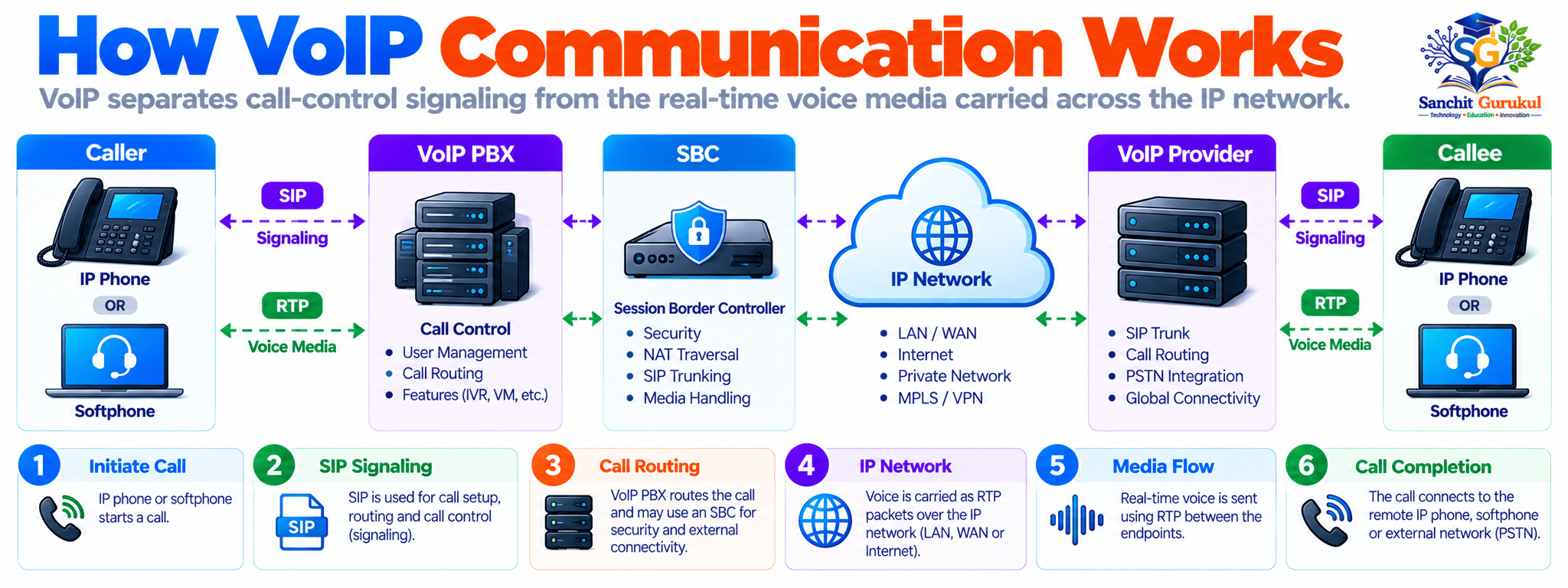
How VoIP Works
A VoIP call involves several different processes.
The most important concept is that:
Call signaling
and:
Voice media
are normally separate functions.
1. Voice Is Captured
When a person speaks into:
- An IP phone
- A computer microphone
- A mobile device
- A headset
the microphone converts sound into an electrical signal.
The system then converts that information into digital audio.
2. A Codec Processes the Audio
A:
Codec
encodes the audio into a digital format suitable for transmission.
Codec stands for:
Coder / Decoder
Different codecs have different characteristics.
They may differ in:
- Audio quality
- Bandwidth requirements
- Processing requirements
- Compression
- Delay
Common VoIP codecs include:
- G.711
- G.729
- Opus
For example, G.711 provides high-quality voice but requires more bandwidth than heavily compressed codecs.
3. Voice Is Packetized
The encoded audio is divided into smaller blocks.
These blocks are placed into network packets.
A typical real-time voice packet can include:
Ethernet Header
↓
IP Header
↓
UDP Header
↓
RTP Header
↓
Encoded Voice Payload
The voice stream normally consists of many small packets sent continuously while the person is speaking.
4. Signaling Establishes the Call
Before users can communicate, the endpoints need to establish a session.
Modern VoIP environments commonly use:
SIP — Session Initiation Protocol
SIP handles functions such as:
- Starting a call
- Locating users
- Negotiating sessions
- Modifying sessions
- Ending calls
SIP is primarily:
Signaling
It does not normally carry the actual voice audio itself.
5. Media Parameters Are Negotiated
The endpoints need to agree on things such as:
- Codec
- Media IP address
- Media port
- Audio capability
This information is commonly described using:
SDP — Session Description Protocol
For example, two phones may determine that both support:
Codec:
G.711

Media Transport:
RTP

Destination Media Port:
Example Dynamic UDP Port
6. Voice Media Uses RTP
After the call is established, voice is commonly transported using:
RTP — Real-time Transport Protocol
RTP provides information useful for real-time media delivery, including:
- Sequence numbers
- Timestamps
- Payload type
These fields help the receiving endpoint handle a continuous media stream.
7. The Receiver Reconstructs the Audio
The receiving device collects incoming RTP packets.
It uses information such as:
- Sequence numbers
- Timestamps
- Codec type
to process the audio stream.
The codec then decodes the information so it can be played through:
- A phone speaker
- Headset
- Computer speakers
8. The Call Is Terminated
When one user hangs up, the signaling system terminates the session.
With SIP, a normal call termination commonly involves:
BYE
↓
200 OK
The media stream then stops.
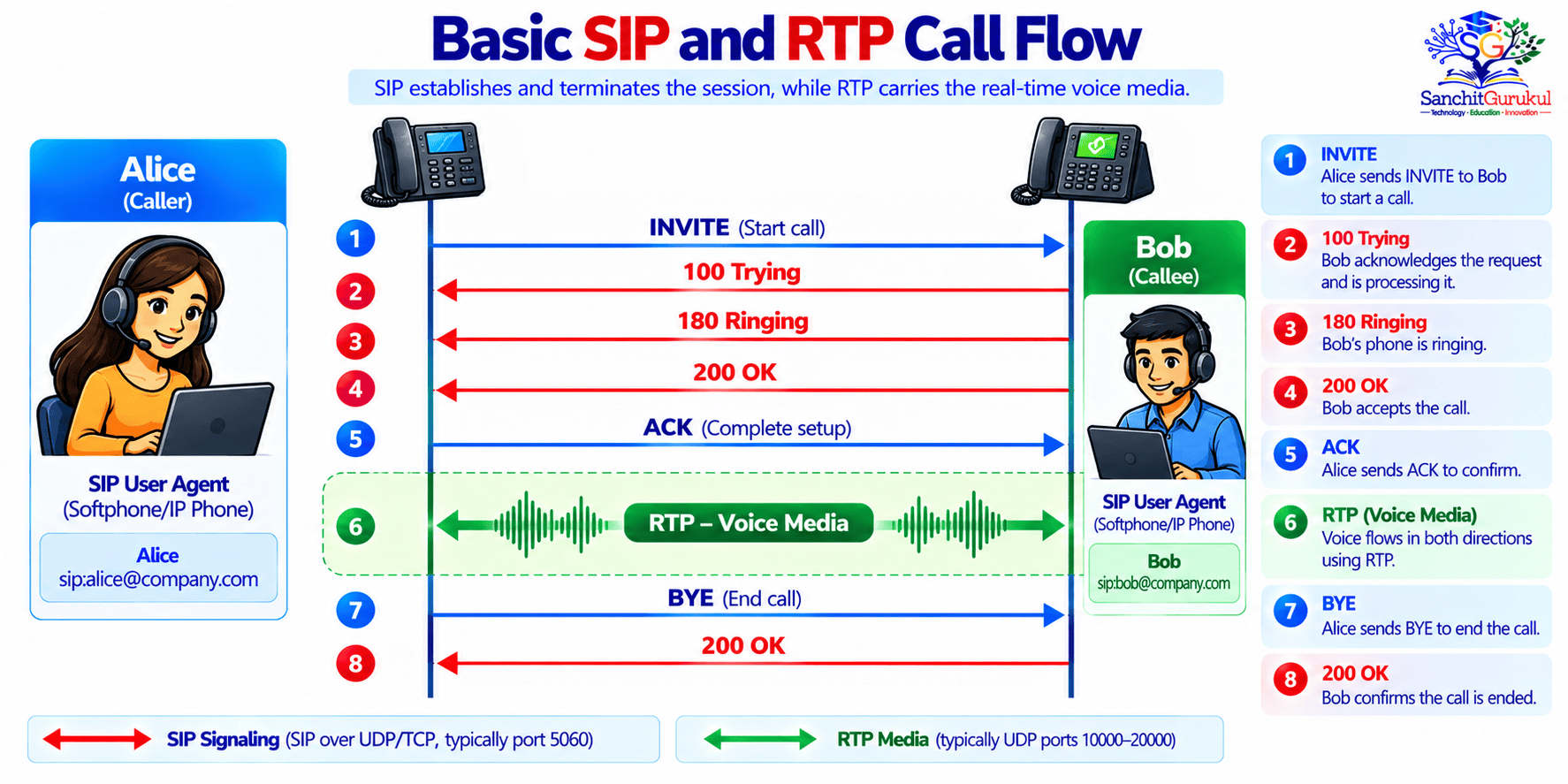
Important VoIP Protocols and Components
VoIP is not a single protocol.
A complete solution normally uses multiple protocols and infrastructure components.
SIP — Session Initiation Protocol
SIP is widely used to establish, manage and terminate multimedia sessions.
Common SIP messages include:
| SIP Message | Purpose |
|---|---|
| INVITE | Request to establish a session |
| REGISTER | Register an endpoint or user |
| ACK | Confirm successful call setup |
| BYE | Terminate an established session |
| CANCEL | Cancel a pending request |
| OPTIONS | Query capabilities or availability |
Common SIP responses include:
100 Trying

180 Ringing

200 OK

401 Unauthorized

403 Forbidden

404 Not Found

486 Busy Here

503 Service Unavailable
Understanding these messages can make VoIP troubleshooting much easier.
RTP — Real-time Transport Protocol
RTP is commonly used to transport:
- Voice
- Video
- Other real-time media
RTP normally uses UDP because real-time voice is sensitive to delay.
For a live conversation, receiving an old retransmitted audio packet several seconds later would usually be less useful than simply continuing with newer audio.
RTCP — RTP Control Protocol
RTCP works alongside RTP.
It can provide information about media quality such as:
- Packet loss
- Jitter
- Timing
- Sender information
- Receiver information
SIP Server or IP PBX
An IP PBX or communication platform can provide functions such as:
- User registration
- Call routing
- Extensions
- Voicemail
- Call forwarding
- Hunt groups
- Auto attendants
- External calling
SBC — Session Border Controller
An:
SBC — Session Border Controller
is commonly deployed at boundaries between VoIP networks.
An SBC may provide functions such as:
- SIP security
- Policy enforcement
- NAT traversal
- Media anchoring
- Protocol normalization
- Interoperability
- Call admission control
- Topology hiding
Why an SBC Matters
A firewall understands IP sessions.
A VoIP-aware SBC understands much more about:
SIP dialogs
Call signaling
Media negotiation
Codec handling
VoIP policy
and:
Session security.
In enterprise environments, SBCs are often important at the boundary between an internal voice system and an external SIP provider.
SIP Trunk
A SIP trunk provides IP-based connectivity between a business communication system and a service provider.
It can replace or supplement traditional telephone circuits.
Conceptually:
Enterprise IP Phones
↓
IP PBX / UC Platform
↓
SBC
↓
SIP Trunk
↓
Telephony Provider
↓
External Phone Network
VoIP Gateway
A gateway can connect VoIP environments with traditional telephone interfaces.
For example:
IP Network
↕
VoIP Gateway
↕
Traditional Telephony
Gateways may be required when organizations still use:
- Legacy phones
- Fax systems
- Analog lines
- Traditional PBX interfaces
Real-World VoIP Call Examples
Understanding real call scenarios helps connect the protocols.
Example 1 — Internal Office Call
Assume:
Alice Extension:
1001

Bob Extension:
1002

Voice System:
Corporate IP PBX
Alice calls:
1002The basic process can look like:
Alice Phone
↓
SIP INVITE
↓
IP PBX
↓
SIP INVITE
↓
Bob Phone
Bob answers.
The devices negotiate media.
Then:
Alice
← RTP Voice →
Bob
Depending on the architecture, the RTP stream may flow directly between endpoints or through another media-processing device.
Example 2 — Business Call to an External Number
Assume an employee calls an outside customer.
The flow may look like:
IP Phone
↓
Corporate VoIP Platform
↓
SBC
↓
SIP Trunk Provider
↓
Telephone Network
↓
Customer Phone
The employee may simply dial a telephone number.
Behind the scenes, multiple signaling and media systems are involved.
Example 3 — Remote Worker
A remote employee uses a softphone on a laptop.
The user may connect through:
- The Internet
- VPN
- Cloud calling platform
- Secure SBC or access service
The employee can retain the same:
- Business extension
- Caller ID
- Voicemail
- Corporate calling features
regardless of physical location.
Example 4 — Call Center
Contact centers often use VoIP because calls can be integrated with:
- Queues
- CRM applications
- Call recording
- Agent status
- Reporting
- Analytics
For example:
Customer Calls
↓
Contact Center Platform
↓
Call Queue
↓
Available Agent Selected
↓
Call Delivered
↓
CRM Record Displayed
VoIP Quality — Latency, Jitter and Packet Loss
Voice traffic behaves differently from many ordinary data applications.
A delayed file transfer may still complete successfully.
A delayed conversation can become difficult to understand.
Three of the most important VoIP quality factors are:
Latency
Jitter
Packet Loss

Latency
Latency is the time required for information to travel from one point to another.
Excessive latency can cause people to:
- Talk over each other
- Experience awkward pauses
- Perceive delayed responses
Latency can be introduced by:
- Long network paths
- Congestion
- Slow links
- Encryption
- Media processing
- Queuing
- Satellite connections
Jitter
Jitter is variation in packet arrival time.
Suppose RTP packets are generated evenly:
Packet 1
20 ms

Packet 2
20 ms

Packet 3
20 ms

Packet 4
20 ms
Ideally, the receiving system sees a relatively predictable stream.
But a congested network may cause packets to arrive irregularly:
Packet 1
↓
Packet 2
↓↓↓↓
Packet 3
↓
Packet 4
The endpoint commonly uses a:
Jitter Buffer
to absorb some arrival-time variation.
However, a very large jitter buffer can itself increase delay.
Packet Loss
Packet loss means some packets never reach the destination.
For voice, packet loss can produce:
- Missing syllables
- Robotic sound
- Choppy audio
- Short silence
- Distortion
Because RTP commonly uses UDP, missing packets are generally not retransmitted like ordinary reliable TCP data.
Out-of-Order Packets
Packets may occasionally arrive in a different order than they were transmitted.
RTP sequence numbers help the receiving system identify the proper media sequence.
Bandwidth
Every active call consumes network bandwidth.
Bandwidth depends on:
- Codec
- Packetization interval
- IP version
- Layer 2 overhead
- Encryption
- Tunneling
- Other encapsulation
QoS for VoIP
Because voice is sensitive to delay, networks often use:
QoS — Quality of Service
to give real-time traffic appropriate treatment.
QoS can include:
- Classification
- Marking
- Queuing
- Scheduling
- Policing
- Shaping
Voice packets may be identified using:
DSCP
A commonly used DSCP value for real-time voice bearer traffic is:
DSCP:
EF

Decimal:
46
Network devices can then place that traffic into an appropriate low-latency queue.
Example of Congestion
Assume a branch office has:
WAN Bandwidth:
20 Mbps

Traffic:
Voice Calls
Video Meetings
File Transfers
Software Updates
Web Browsing
Without proper QoS, a large file transfer may compete with small voice packets.
During congestion:
Voice Packet
Waits Behind
Large Data Packets
↓
Delay Increases
↓
Jitter Increases
↓
Call Quality Drops
With proper classification and queuing, the router can give delay-sensitive voice traffic appropriate priority.

Benefits and Common Use Cases
VoIP has become popular because voice communication can share modern IP infrastructure.
Lower Infrastructure Complexity
Organizations can carry:
- Voice
- Data
- Video
- Collaboration
over IP-based infrastructure.
This can reduce dependence on separate traditional telephone networks.
Mobility
Users can often access business calling services from:
- Office IP phones
- Laptops
- Mobile phones
- Remote locations
This is particularly useful for:
- Remote workers
- Hybrid employees
- Travelling staff
- Multi-site organizations
Scalability
Adding a new user can often involve:
Create User
↓
Assign Extension
↓
Apply Calling Policy
↓
Register Phone or Application
This can be simpler than installing new physical telephone lines for every employee.
Unified Communications
VoIP is often part of:
Unified Communications — UC
UC platforms can combine:
- Voice
- Video
- Messaging
- Meetings
- Presence
- File collaboration
into one communication environment.
Call Centers
Contact centers benefit from features such as:
- Call queues
- Agent groups
- Recording
- Monitoring
- Analytics
- CRM integration
- Call routing
Education
Schools and universities may use VoIP and collaboration systems for:
- Administrative calling
- Distance learning
- Virtual classes
- Internal communication
Residential and Personal Use
Consumer applications also use IP-based voice communication.
Voice may be integrated with:
- Messaging
- Video
- Mobile applications
- Internet calling services
VoIP Security and Common Challenges
Moving voice onto an IP network provides flexibility but also introduces IP-based security considerations.
Eavesdropping
If media is transmitted without appropriate protection, someone with unauthorized network access may attempt to intercept voice traffic.
A secure deployment may use:
SRTP — Secure Real-time Transport Protocol
to protect media.
Signaling Protection
SIP signaling can also require protection.
Depending on the implementation, SIP may be protected using:
TLS
This can help protect signaling between trusted systems.
Unauthorized Registration
Attackers may attempt to register as another VoIP user if:
- Credentials are weak
- Authentication is misconfigured
- Systems are exposed unnecessarily
Strong authentication and access control are therefore important.
Toll Fraud
A compromised voice system may be abused to place unauthorized calls.
Controls can include:
- Strong authentication
- Calling restrictions
- International dial policies
- Fraud monitoring
- Rate controls
- Alerting
Denial of Service
Attackers may attempt to overwhelm:
- SIP servers
- SBCs
- PBXs
- Network links
Availability is especially important because voice services may support critical business operations.
NAT and Firewall Problems
VoIP protocols can be challenging through NAT and firewalls because:
Signaling
and:
Media
may use different ports and addresses.
A firewall may allow SIP signaling while RTP media still fails.
The symptom may be:
Call Rings
↓
Call Connects
↓
No Audio
or:
One-Way AudioThis is a classic VoIP troubleshooting clue.
One-Way Audio Example
Assume:
Alice:
10.10.10.25

Bob:
Remote Network

SIP Signaling:
Working

Alice Can Hear Bob:
Yes

Bob Can Hear Alice:
No
The problem may involve:
- Incorrect media IP information
- NAT
- Firewall policy
- RTP routing
- SBC configuration
- Asymmetric routing
Internet and Power Dependency
VoIP systems depend on:
- Network connectivity
- Network devices
- Power
- Communication servers or cloud services
If switches, routers or phones lose power, calls can be affected unless backup systems exist.
Organizations may therefore use:
- UPS
- Redundant network devices
- Multiple WAN circuits
- High-availability call systems
- Backup calling methods
Emergency Calling
Emergency-calling behavior varies by:
- Country
- Service provider
- Calling platform
- Device location
- Enterprise configuration
Organizations using VoIP should verify that emergency calling and location information are correctly configured for their environment.
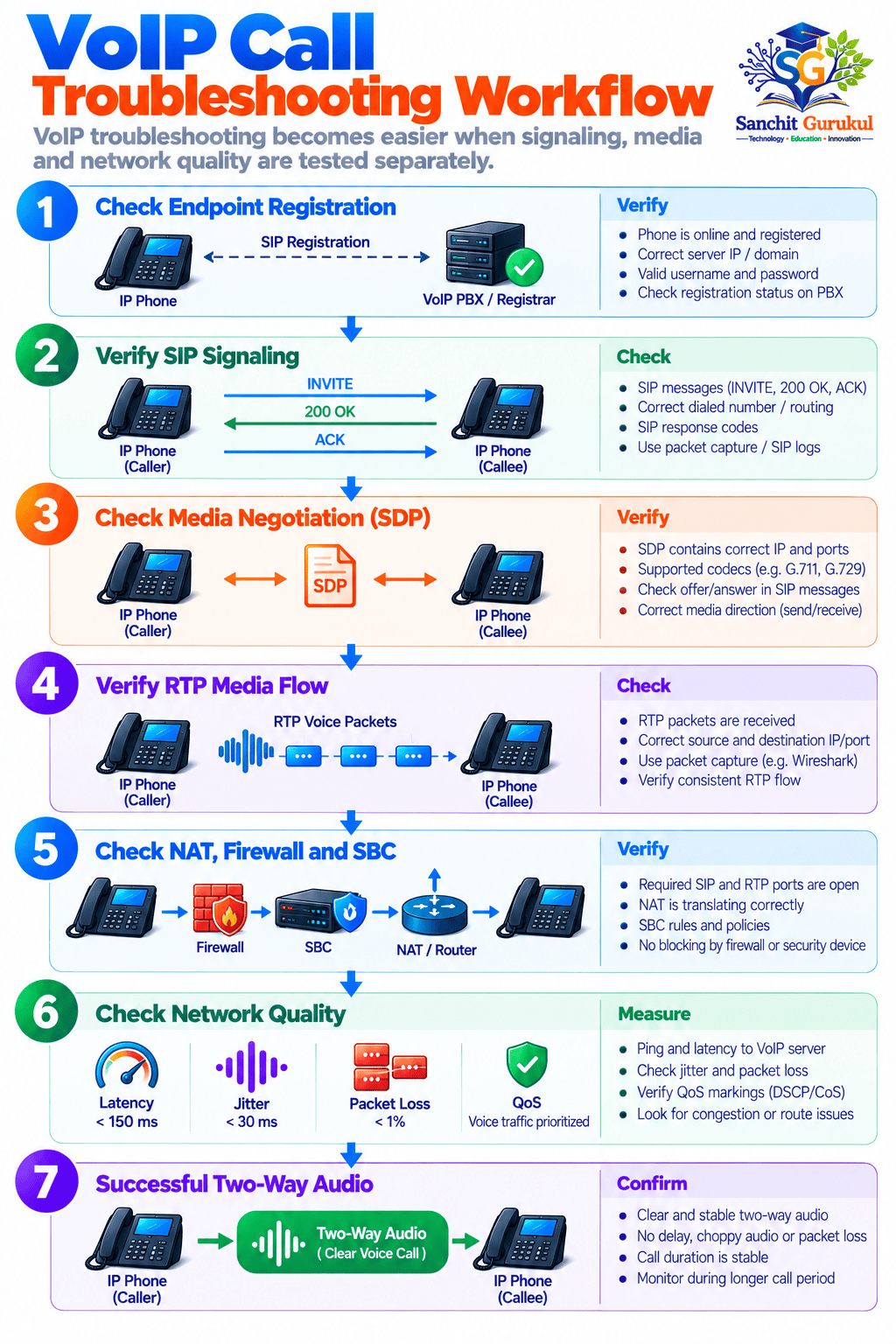
Key Takeaways
- VoIP stands for Voice over Internet Protocol.
- VoIP carries voice across IP networks.
- A basic voice process is:
Voice
↓
Digital Conversion
↓
Codec
↓
Packetization
↓
IP Network
↓
Remote Device
↓
Decoded Audio- SIP is commonly used for:
Call signaling
- SDP describes:
Media session parameters
- RTP commonly carries:
Real-time voice media
- RTCP can provide:
Media statistics and control information
- Codecs determine how voice is encoded.
- Common codecs include:
- G.711
- G.729
- Opus
- SIP signaling and RTP media are separate traffic flows.
- A successful SIP call setup does not automatically prove that RTP media is working.
- One-way or no-audio problems often involve:
- NAT
- Firewalls
- SBCs
- Incorrect media addressing
- Routing
- Important VoIP quality factors include:
- Latency
- Jitter
- Packet loss
- Bandwidth
- Congestion
- A jitter buffer helps compensate for variations in RTP packet arrival time.
- QoS can protect delay-sensitive voice traffic during congestion.
- A common voice QoS marking is:
DSCP EF
Decimal 46- QoS prioritizes existing bandwidth.
It does not create additional bandwidth.
- SBCs are commonly used at VoIP network boundaries.
- SIP trunks provide IP-based connectivity to telephony service providers.
- VoIP security should protect:
- Signaling
- Media
- User credentials
- Call infrastructure
- SIP signaling may be protected with:
TLS
- Media may be protected using:
SRTP
- VoIP can be affected by network and power failures.
- Emergency calling must be designed and verified for each deployment.
VoIP combines traditional voice communication with modern IP networking.
A phone call that appears simple to the user can involve:
- SIP signaling
- DNS
- Authentication
- Codec negotiation
- SDP
- RTP
- UDP
- IP routing
- NAT
- Firewall policies
- QoS
- SBC processing
- Service-provider infrastructure
Understanding these components is especially valuable for network and security engineers because VoIP problems often cross multiple technology layers.
A useful troubleshooting mindset is:
Can the endpoint register?
↓
Can signaling establish the call?
↓
Are media parameters correct?
↓
Can RTP flow in both directions?
↓
Is the network introducing loss, jitter or delay?
↓
Is QoS working during congestion?
Once signaling and media are understood separately, VoIP becomes much easier to design, secure and troubleshoot.
Useful Links and References
SanchitGurukul Resources
Official Technical References
Your feedback matters
Was this post helpful?
Discussion
0 approved comments
No approved comments yet. You can start the discussion below.
Leave a Comment
No login is required. Name and email are used for moderation/security. Your email is never displayed publicly. All comments require administrator approval.
Discover more from SanchitGurukul
Subscribe to get the latest posts sent to your email.


