
The Internet Protocol, commonly called IP, is one of the most important protocols used in computer networking.
IP provides the addressing and packet-delivery mechanism that allows devices to communicate:
- Inside the same network
- Between different networks
- Across enterprise environments
- Across service-provider networks
- Across the Internet
Every IP packet contains information that helps networking devices determine:
Where did the packet come from?
and:
Where should the packet go?
The two IP versions used in modern networks are:
- IPv4 — Internet Protocol Version 4
- IPv6 — Internet Protocol Version 6
How Internet Protocol Works
IP operates at the Network Layer — Layer 3 of the OSI model.
Its main responsibilities include:
- Logical addressing
- Packet delivery
- Packet forwarding
- Routing between networks
- Supporting communication between different Layer 3 networks
- Preventing packets from circulating forever using TTL or Hop Limit
IP is a:
Connectionless protocol
This means IP itself does not establish an end-to-end session before packets are transmitted.
Each packet can be processed independently.
IP is also commonly described as:
Best effort
IP does not guarantee that:
- A packet will arrive
- Packets will arrive in order
- A packet will arrive only once
- Lost data will be retransmitted
- Application data will be delivered reliably
Protocols such as TCP can provide reliability above IP when applications require it.
Basic Packet Delivery Example
Assume a client has:
Client IP:
192.168.10.50

Subnet:
192.168.10.0/24

Default Gateway:
192.168.10.1

Destination:
8.8.8.8
The client determines that:
192.168.10.50
and
8.8.8.8

are not on the same local IPv4 subnet.
The packet is therefore sent toward the client’s:
Default gateway
The router examines the destination IP address:
8.8.8.8It performs a routing-table lookup and forwards the packet toward the appropriate next hop.
Other routers may repeat this process until the packet reaches the destination network.
IPv4 and IPv6
IPv4 and IPv6 perform the same fundamental job:
Provide logical addressing and packet delivery.
However, their addressing systems and packet formats are different.
IPv4
IPv4 — Internet Protocol Version 4 is the traditional version of IP and remains widely deployed.
IPv4 was specified in RFC 791 in 1981, and the ARPANET transition to TCP/IP occurred in 1983.
An IPv4 address contains:
32 bits
Example:
192.168.10.25A 32-bit address space provides:
2^32

=

4,294,967,296 possible values
Not all of these values are available as ordinary public host addresses.
Parts of the IPv4 address space are reserved for purposes such as:
- Private addressing
- Loopback
- Multicast
- Link-local addressing
- Documentation
- Special-use networks
IPv4 addresses are normally written using four decimal numbers separated by dots.
Example:
192.168.10.25Each decimal section represents:
8 bits
Therefore:
8 bits + 8 bits + 8 bits + 8 bits

=

32 bits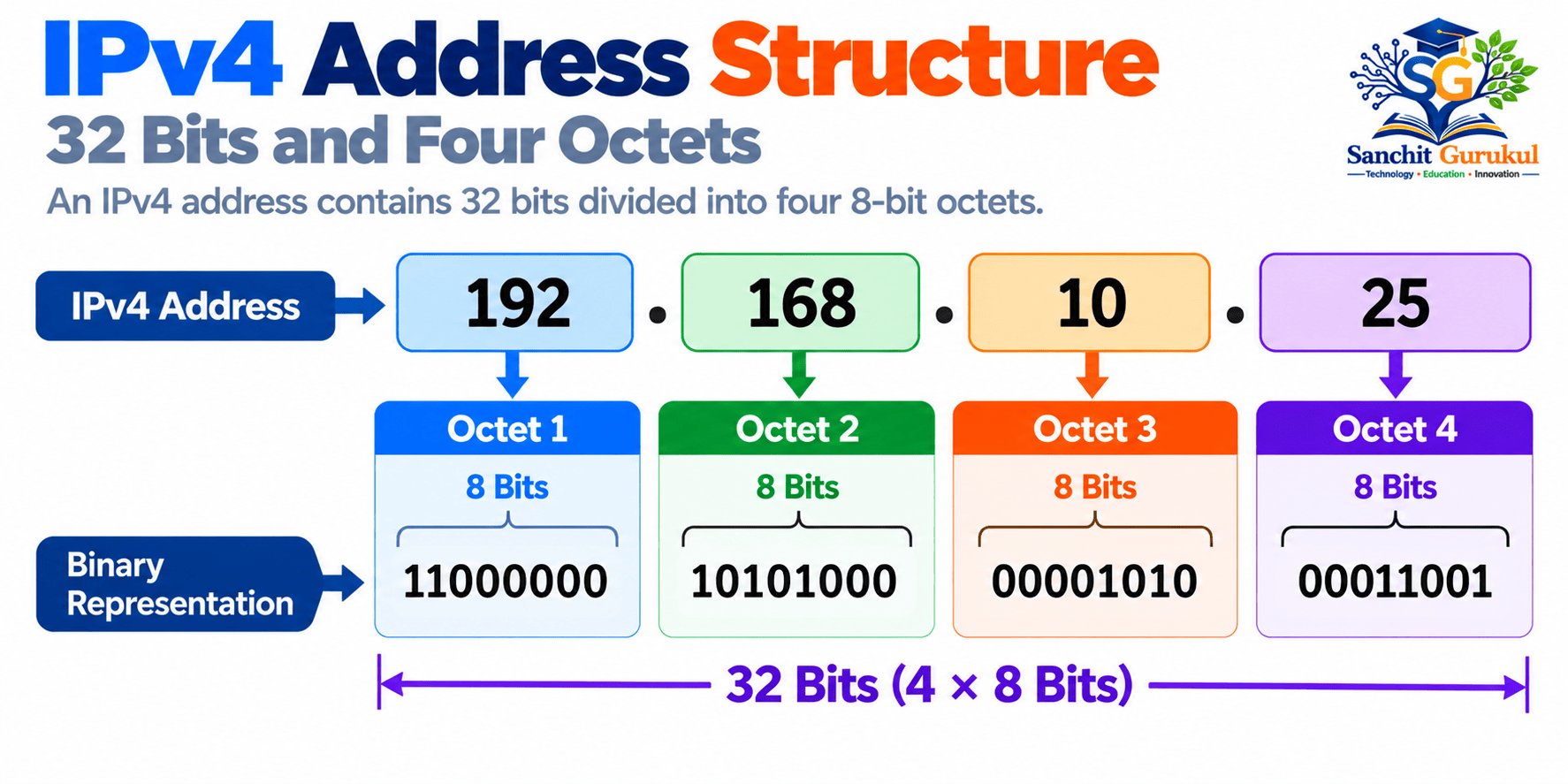
IPv6
IPv6 — Internet Protocol Version 6 was developed to provide a much larger addressing system and improve several aspects of IP operation.
The IETF developed IPv6 during the 1990s.
The original IPv6 specification was published as RFC 2460 in 1998.
The current base IPv6 specification is defined by RFC 8200.
IPv6 uses:
128-bit addresses
Example:
2001:db8:10:20::25The theoretical IPv6 address space contains:
2^128

≈

3.4 × 10^38 addresses
That is approximately:
340 undecillion addresses
The much larger address space helps overcome the address-exhaustion limitations associated with IPv4.
IPv4 vs IPv6
| Feature | IPv4 | IPv6 |
|---|---|---|
| Address Length | 32 bits | 128 bits |
| Example | 192.168.10.25 | 2001:db8::25 |
| Base Header | Variable, minimum 20 bytes | Fixed 40 bytes |
| Broadcast | Supported | Not used |
| Multicast | Supported | Supported |
| Header Checksum | Yes | No |
| Router Fragmentation | Possible | Routers do not fragment |
| Lifetime Field | TTL | Hop Limit |
| Address Resolution | ARP | Neighbor Discovery |
| Address Space | ~4.29 billion values | ~3.4 × 10^38 values |
Public, Private, Static and Dynamic IP Addresses
One common source of confusion is treating:
- Public
- Private
- Static
- Dynamic
as four equivalent address types.
They actually describe different characteristics.
Public vs Private describes address scope and routability.
Static vs Dynamic describes how an address is assigned or maintained.
An address can therefore be:
- Public and static
- Public and dynamic
- Private and static
- Private and dynamic
Public IP Addresses
A public IP address is normally an address that can be globally routed through the Internet.
Internet service providers and organizations obtain address space through the Internet addressing hierarchy.
A home Internet connection, for example, may have a public IPv4 address on the ISP-facing side of the router.
Inside the home network, devices usually use private IPv4 addresses.
The router may then use:
NAT — Network Address Translation
to allow multiple private devices to communicate through public IPv4 connectivity.
Private IPv4 Addresses
Private IPv4 addressing is defined by RFC 1918.
Three IPv4 ranges are reserved for private networks:
10.0.0.0/8

172.16.0.0/12

192.168.0.0/16
Examples include:
10.10.20.5

172.16.50.10

192.168.1.100
These addresses are widely used inside:
- Home networks
- Enterprise networks
- Data centers
- Labs
- Private cloud networks
RFC 1918 addresses are not intended to be routed across the public Internet.

Static IP Address
A static IP address is intended to remain consistent rather than being automatically replaced through normal dynamic assignment.
Static addressing is commonly used for infrastructure such as:
- Routers
- Firewalls
- Servers
- Network appliances
- Management interfaces
- DNS services
Example:
Server IP:
192.168.10.10/24

Default Gateway:
192.168.10.1

DNS:
192.168.10.20
A static address does not mean that the address can never be changed.
An administrator can change it when required.
“Static” simply means that its normal assignment is intended to remain stable.
Dynamic IP Address
A dynamic IP address is assigned automatically.
For IPv4 networks, this is commonly performed by:
DHCP — Dynamic Host Configuration Protocol
A DHCP server can provide configuration such as:
- IP address
- Subnet mask
- Default gateway
- DNS server
- Lease duration
Example:
DHCP Pool:

192.168.10.100
to
192.168.10.200
A client may receive:
192.168.10.125for a particular lease period.
The client may later renew the same address or receive another address depending on DHCP configuration and network conditions.
Important IPv6 Address Types
IPv6 uses its own addressing architecture.
Common examples include:
Global Unicast
Usually globally routable IPv6 addresses.
The current global unicast allocation is primarily within:
2000::/3Unique Local Address — ULA
Used for local IPv6 communication.
fc00::/7Locally generated ULAs commonly begin with:
fdLink-Local
Used for communication on the local link.
fe80::/10Loopback
::1Multicast
ff00::/8IPv4 Classes and CIDR
Older IPv4 networks used a classful addressing system.
The traditional address classes were:
- Class A
- Class B
- Class C
- Class D
- Class E
Historical IPv4 Classes
| Class | First Octet | Historical Purpose | Default Prefix |
|---|---|---|---|
| A | 1–126 | Large unicast networks | /8 |
| B | 128–191 | Medium unicast networks | /16 |
| C | 192–223 | Smaller unicast networks | /24 |
| D | 224–239 | Multicast | Not applicable |
| E | 240–255 | Reserved / special purposes | Not applicable |
Special-use ranges exist inside the overall IPv4 address space.
The table should therefore be understood as the historical classful model, not as a modern address-allocation guide.
For example:
127.0.0.0/8is reserved for loopback purposes.

Why Classes Are No Longer Used for Modern Routing
Modern IP networks use:
CIDR — Classless Inter-Domain Routing
CIDR represents networks using prefix lengths.
Examples:
10.10.0.0/16

10.10.10.0/24

10.10.10.128/25

192.168.1.0/27
The /16, /24, /25, and /27 values tell us how many leading bits belong to the network prefix.
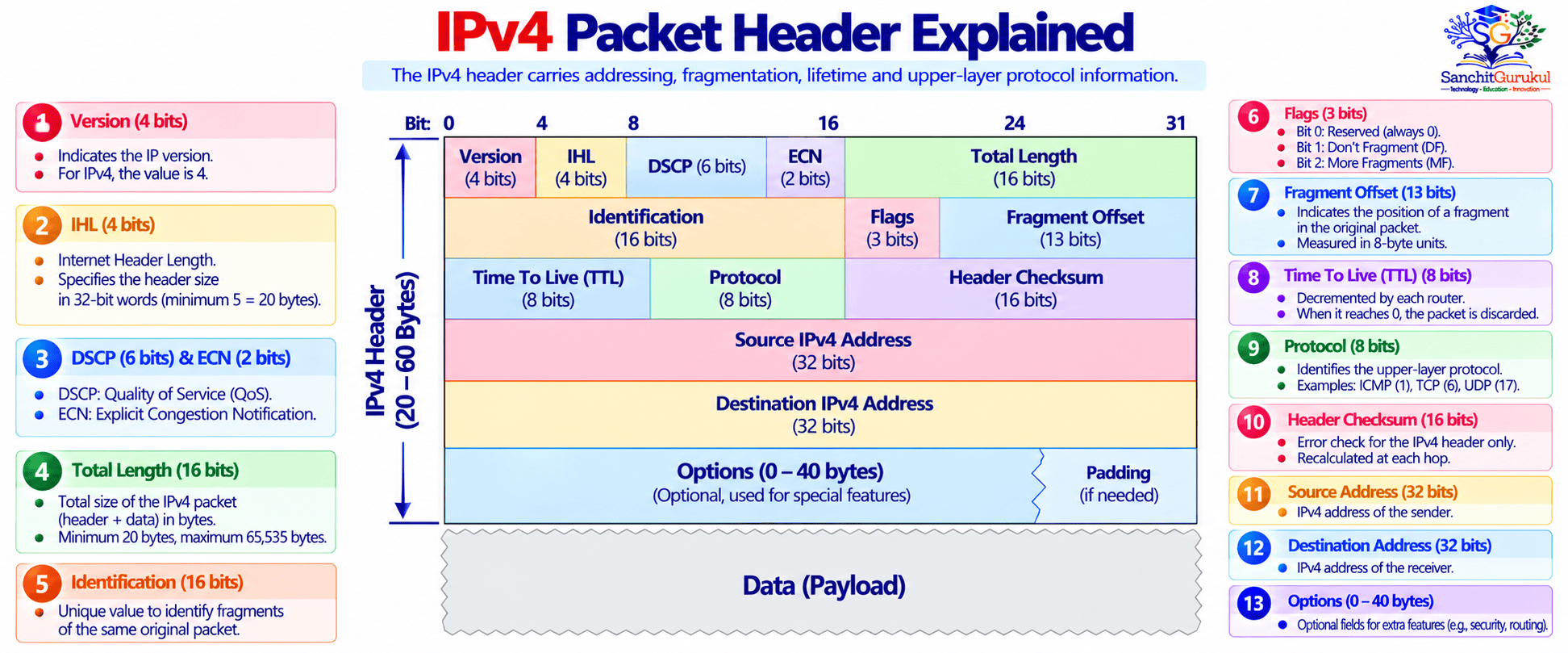
IPv4 Packet Header
Every IPv4 packet contains:
IPv4 Header
+
Payload
The normal minimum IPv4 header size is:
20 bytes
When IPv4 options are present, the header can grow to a maximum of:
60 bytes
Its size is determined by the:
IHL — Internet Header Length
field.
Version
Size:
4 bits
Identifies the IP version represented by the header.
For IPv4:
Version = 4IPv6 uses a different header structure.
Internet Header Length — IHL
Size:
4 bits
Specifies the IPv4 header length in units of:
32-bit words
The minimum normal value is:
IHL = 5

5 × 4 bytes

=

20-byte IPv4 header
The maximum IHL value is:
15

15 × 4 bytes

=

60-byte IPv4 header
DSCP and ECN
The original IPv4 specification called this area:
Type of Service — ToS
Modern use defines this byte using:
- DSCP — Differentiated Services Code Point
- ECN — Explicit Congestion Notification
DSCP can be used as part of Quality of Service policies to classify or mark traffic.
Total Length
Size:
16 bits
Specifies the total size of the IPv4 packet:
IPv4 Header
+
Payload
The maximum value represented by this field is:
65,535 bytesIdentification
Size:
16 bits
Used with IPv4 fragmentation.
Fragments belonging to the same original IPv4 datagram carry information that helps the receiving host perform reassembly.
Flags
Size:
3 bits
The IPv4 flags include:
Reserved
Normally set to zero.
DF — Don’t Fragment
Indicates that the packet should not be fragmented.
MF — More Fragments
Indicates that additional fragments follow.
The final fragment has:
MF = 0Fragment Offset
Size:
13 bits
Indicates where a fragment belongs within the original IPv4 datagram.
Time To Live — TTL
Size:
8 bits
TTL prevents packets from circulating indefinitely because of routing loops.
Each router forwarding the IPv4 packet reduces the TTL.
Example:
Original TTL:
64

Router 1:
63

Router 2:
62

Router 3:
61
When the TTL reaches zero, the router discards the packet.
It will normally generate an:
ICMP Time Exceeded
message.
This behavior is also fundamental to utilities such as:
- traceroute
- tracert
Protocol
Size:
8 bits
Identifies the protocol carried in the IPv4 payload.
Examples:
| Protocol | Number |
|---|---|
| ICMP | 1 |
| TCP | 6 |
| UDP | 17 |
For example:
IPv4 Protocol = 6

Payload Protocol = TCP
Header Checksum
Size:
16 bits
Provides error checking for the IPv4 header.
Because routers modify fields such as TTL, the IPv4 header checksum must be updated during forwarding.
IPv6 removed the IP-layer header checksum.
Source Address
Size:
32 bits
Contains the source IPv4 address.
Example:
192.168.10.50Destination Address
Size:
32 bits
Contains the destination IPv4 address.
Example:
203.0.113.10Routers primarily use this destination information to determine where the packet should be forwarded.
Options and Padding
IPv4 can include optional header information.
Options are rarely used in normal modern application traffic because they can:
- Increase header size
- Increase processing requirements
- Create compatibility concerns
- Create security concerns
Padding may be added so that the header ends on the required 32-bit boundary.
When options are present, the IHL value becomes greater than:
5How Routers Deliver an IP Packet
Consider this simple network:
Client:
192.168.10.50/24

Default Gateway:
192.168.10.1

Destination Server:
203.0.113.50
The delivery process is approximately:
1. Client Examines the Destination
The client compares:
Destination IP

with

Local network prefix
It determines that:
203.0.113.50is outside its local subnet.
2. Client Uses the Default Gateway
The client sends the Layer 2 frame toward:
192.168.10.1which is its default gateway.
For IPv4 Ethernet networks, ARP can be used to discover the gateway’s MAC address.
3. Router Receives the Packet
The router removes the incoming Layer 2 frame information and examines the IPv4 packet.
The destination remains:
203.0.113.504. Router Performs a Routing Lookup
The router checks its routing table.
It attempts to find the most specific route matching:
203.0.113.50This is called:
Longest Prefix Match
5. Router Decrements TTL
Before forwarding the IPv4 packet, the router reduces the TTL.
For example:
TTL 64
↓
TTL 63
6. Packet Is Forwarded
The router creates the appropriate outgoing Layer 2 frame and forwards the packet toward the next hop.
The process can repeat across multiple routers.
7. Destination Receives the Packet
Eventually, a router connected to the destination network forwards the packet toward the destination system.
The destination host examines the IP protocol information and passes the payload to the appropriate higher-layer protocol.
Key Takeaways
- IP stands for Internet Protocol.
- IP operates primarily at Layer 3 — the Network Layer.
- IP provides logical addressing and packet delivery between networks.
- The two IP versions used in modern networks are:
IPv4

IPv6- IPv4 addresses contain:
32 bits- IPv6 addresses contain:
128 bits- IPv4 provides approximately:
2^32
=
4.29 billion address values- IPv6 provides approximately:
2^128
=
3.4 × 10^38 address values- Public/private and static/dynamic are different classifications.
- RFC 1918 private IPv4 ranges are:
10.0.0.0/8

172.16.0.0/12

192.168.0.0/16- Class A, B and C addressing is mainly a historical concept.
- Modern networks use:
CIDR and prefix lengths
such as:
10.10.10.0/24- The normal IPv4 header is at least:
20 bytesand can grow to:
60 byteswhen options are present.
- IPv4 uses TTL to help prevent routing loops.
- IPv6 uses:
Hop Limit
for the equivalent function.
- IPv4 routers may perform fragmentation when permitted.
- IPv6 routers do not fragment packets in transit.
- Routers forward packets primarily by examining the:
Destination IP address
and performing a routing-table lookup.
- IP itself does not guarantee reliable delivery.
- Protocols such as TCP can provide reliability above IP.
The Internet Protocol is one of the foundations of modern networking.
Whether communication is occurring between two computers in the same organization, between different data centers, through a cloud network, or across the global Internet, IP provides the logical addressing system that allows packets to move toward their destinations.
Understanding:
- IPv4
- IPv6
- Public and private addresses
- Static and dynamic addressing
- CIDR
- Routing
- TTL
- Fragmentation
- IPv4 packet headers
creates the foundation required for studying more advanced topics such as:
- Subnetting
- Routing protocols
- NAT
- ARP
- IPv6 Neighbor Discovery
- Firewalls
- Load balancers
- VPNs
- Packet analysis
- Network troubleshooting
Useful Links and References
SanchitGurukul Resources
Official Technical References
Your feedback matters
Was this post helpful?
Discussion
0 approved comments
No approved comments yet. You can start the discussion below.
Leave a Comment
No login is required. Name and email are used for moderation/security. Your email is never displayed publicly. All comments require administrator approval.
Discover more from SanchitGurukul
Subscribe to get the latest posts sent to your email.


